
2 layers10.6 × 21.8 mm

 idt12312/B-ART11
UARTをBLEで飛ばすモジュール
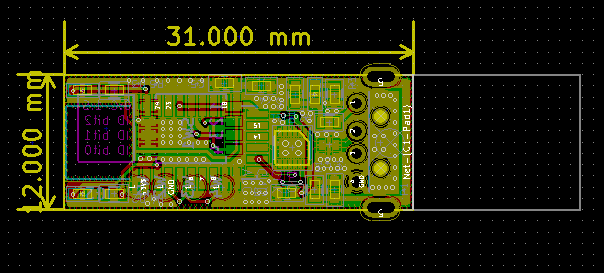
B ART typeU is an open-source printed circuit board by idt12312, from the idt12312/B-ART repository on GitHub, published under the MIT licence. It is a 2-layer board of 12 × 31 mm with 22 parts on 23 nets, routed with 263 tracks and 118 vias.
It is built around the FT234XD-R and BLM18P. Its parts include 5 capacitors, 5 resistors, 3 ICs, 3 diodes and 1 connector. It belongs with the interfaces and adapters boards of this library.
B-ARTはXbee ZigBeeモジュールみたいにUARTを無線で飛ばすモジュールです。 マイコンのプログラムを追加で書くことなく、UARTのTXとRXだけをつなげるだけでUARTを無線化できます。 無線部分はBLE(Bluetooth Low Energy)で実装をしています。
非常に小さいことが特徴で、開発中の基板に挿して簡単に使える無線モジュールをコンセプトに開発をしています。 (現状、秋月で買えるどの無線モジュールよりも小さいはず)
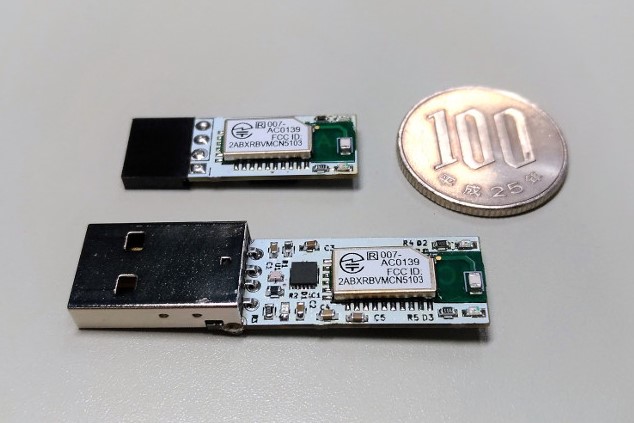
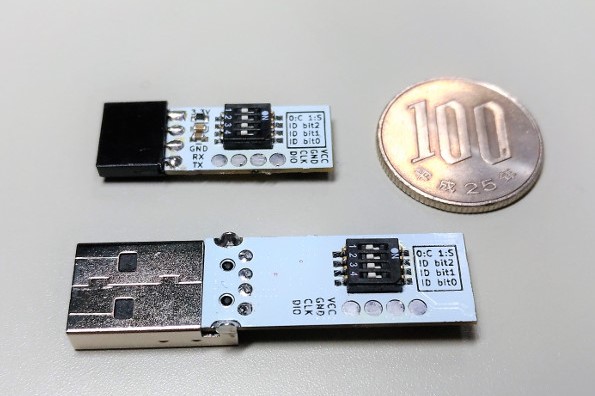
B-ARTにはType-PとType-Uの2種類があり、Type-Pはピンヘッダ、Type-UはUSBコネクタがついています。 Type-Pには4pinのピンヘッダが付いていて、3.3V-GND-TX-RX の4本を接続するだけで使うことができます。 Type-UにはPCに直接挿せるUSBコネクタと、FTDIのUSB-UART変換IC(FT234XD)が載っています。 FT234XDのおかげでPCにさすとシリアルポートとして認識されるので、 普段シリアルポートを使うときと全く変わることなく使うことができます。
B-ARTの裏面にはType-P、Type-UともにDIPスイッチがあり、そこからIDを設定できます。 IDが同じ相手を選択して通信をするので、同じ環境にB-ARTが何組もあってもIDさえ違えば混線が起きないようになっています。
例えば小さい走行ロボットを無線を使ってデバッグする時にB-ARTは役立つでしょう。 走行をさせるときに有線だと線が邪魔になり、Xbeeなどはモジュールが大きすぎて載せられないという状況です。
下の写真は現在制作中のマイクロマウスの機体MIZUHOv2に B-ART TypePを挿しているところです。
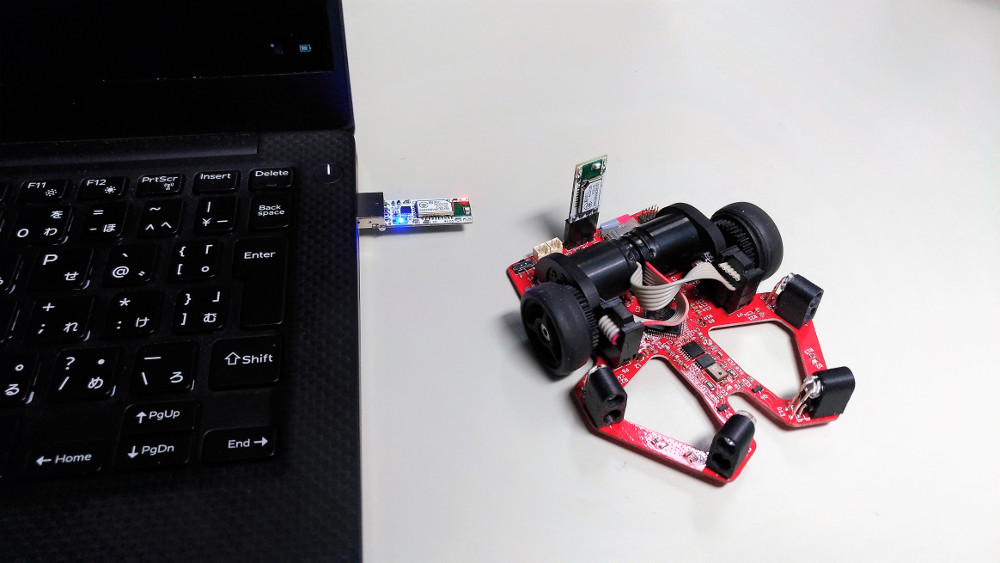
B-ARTは非常に小さく軽いので、マイクロマウスの機体に乗せても走行時にそれほど問題にはなりません。 基板に4pinのコネクタさえつけておけばほしい時にだけB-ARTを挿して使うことができます。
B-ARTのType-PとType-Uの基板の裏にはDIPスイッチが4bit分あり、 1bitはクライアント動作をするかサーバー動作をするか、3bitはIDを意味していています。
| DIPスイッチ | 意味 |
|---|---|
| 1 | 0:client動作 1:server動作 |
| 2 | ID bit2 |
| 3 | ID bit1 |
| 4 | ID bit0 |
B-ARTは通信においてはType-PであるかType-Uであるかは関係なく、 同じIDを持つサーバーとクライアントが1対1で通信できるという仕組みになっています。 なので、同じIDを持っていさえすれば、
の全ての組み合わせで通信が可能です。
4pinのピンヘッダ(というよりスルーホール)があり、それぞれのpinは次のような意味を持っています。
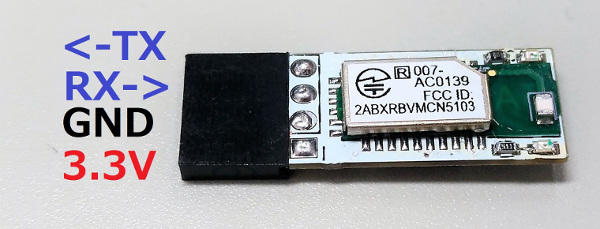
B-ARTは最大30mAくらいの電流を必要とするので、それに耐えられるような電源につないでください。
電源・IOの電圧は3.3Vであることに注意してください
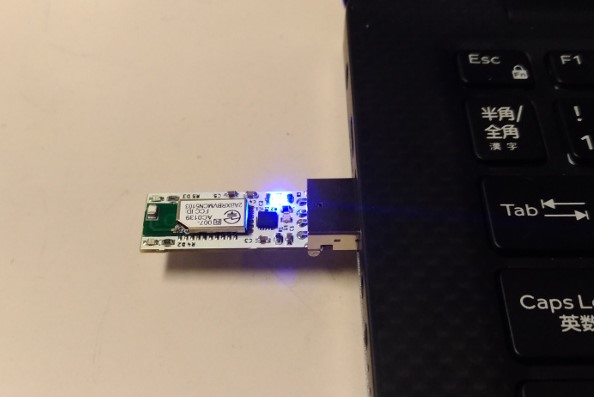
パソコンのUSBに挿すだけです。
電源を入れると クライアント動作に設定されているB-ARTは赤色LEDが、 サーバー動作に設定されているB-ARTは緑色のLEDが光ります。
サーバー側とクライアント側に同じIDを持たせた状態で電源を入れると自動的に接続されます。 接続された瞬間にB-ARTに乗っている緑と赤の両方のLEDが一瞬点滅します。
一旦切断されても、接続可能な状態になると自動で接続されます。
UARTにデータを流すとサーバー側、クライアント側どちらからでももう片方に送信されます。 その際にLEDが点滅するので、LEDを見ることで正常に動作しているかが分かります。
以下の設定でのみ動作します。
| パラメータ | 値 |
|---|---|
| Baudrate | 115200bps |
| Data size | 8bit |
| Start bit | 1bit |
| Stop bit | 1bit |
| Parity | なし |
| Flow control | なし |
| 信号レベル | 3.3V |
※UART側からデータを連続して送り続けると、データが欠損する可能性があります。 確実に連続して送信できるのは70byteくらいです。 それ以上のデータが連続する場合は、70byteくらいごとに間隔をあけてください。
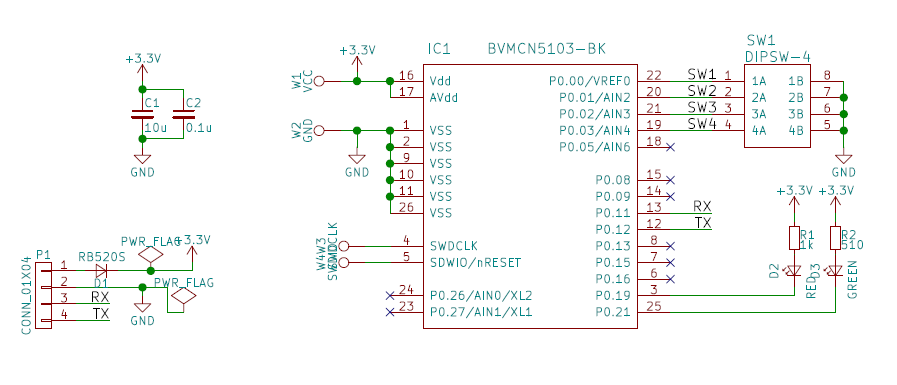
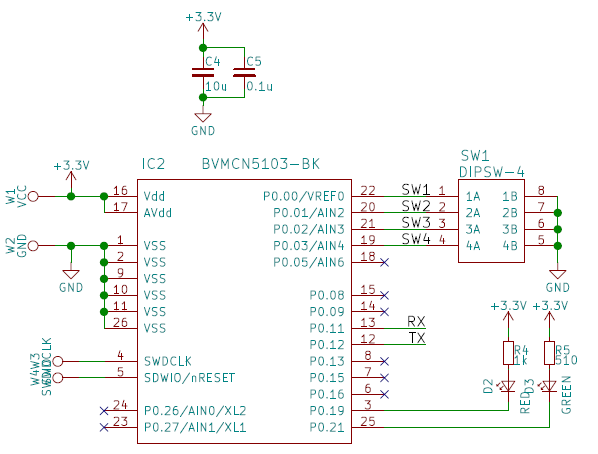
回路図
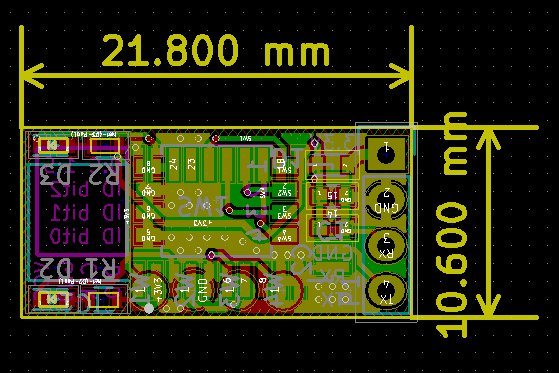
アートワーク
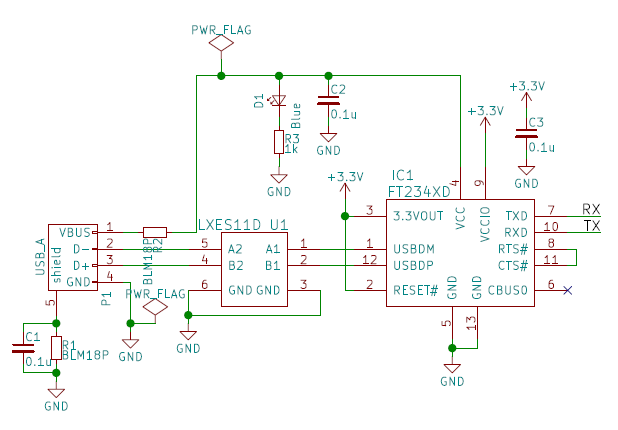
USB周りの回路図
マイコン周りの回路図
アートワーク
最新のビルドされたバイナリはbinディレクトリに入っています。
Eclipseのプロジェクトごとリポジトリにあげてあるので、 きっとEclipseにimportするだけで動かすことができます。
起動時にDIPスイッチの状態を読み取って(main.c)、サーバー動作(main_server.c)をするか、 クライアント動作(main_client.c)をするかを決定しています。
BLEの操作はNordicのサンプルにある、NUSを参考にしています。 SDKにあるble_nusとble_nus_cをもとにble_bartsとble_barts_cを書いています。(名前を変えただけ)
GATTサーバーとして、次のようなサービスを立てます。
| AttributeType | Name | Permissions | UUID |
|---|---|---|---|
| Service | BART Service | Read | 20yy0001-DA04-4C71-ADBE-6CA269E7E983 |
| Characteristic | TX | Write | 20yy0002-DA04-4C71-ADBE-6CA269E7E983 |
| Characteristic | RX | Notify | 20yy0003-DA04-4C71-ADBE-6CA269E7E983 |
TXにwriteするとUARTからデータが出力され、 UARTにデータが入るとRXをsubscribeしているデバイスにNotifyします。
UUIDのyyはID(3bit)を16進数に変換したものが入ります。
自分と同じIDをもつサーバーを探します。 このとき、サーバーのもつServiceのUUID(上の表のyy)をもとに同じIDのものを検索します。
同じIDのサーバーが見つかったらConnectし、RXのCharactericics(notify)をsubscribeします。
後はUARTからデータが来たらサーバーのRXにwriteをし、サーバーからnotifyが来たらUARTにデータを流します。
| Qty | Value | Footprint | References |
|---|---|---|---|
| 4 | 0.1u | Capacitors_SMD:C_0603 | C1, C2, C3, C5 |
| 2 | 1k | Resistors_SMD:R_0603 | R3, R4 |
| 2 | BLM18P | Resistors_SMD:R_0603 | R1, R2 |
| 1 | 10u | Capacitors_SMD:C_0603 | C4 |
| 1 | 510 | Resistors_SMD:R_0603 | R5 |
| 1 | BVMCN5103-BK | B-ART:BVMCN5103-BK | IC2 |
| 1 | Blue | LEDs:LED_0603 | D1 |
| 1 | DIPSW-4 | B-ART:DIPSW-4P | SW1 |
| 1 | FT234XD | Housings_DFN_QFN:DFN-12-1EP_3x3mm_Pitch0.45mm | IC1 |
| 1 | GND | B-ART:test_th_pad | W2 |
| 1 | GREEN | LEDs:LED_0603 | D3 |
| 1 | LXES11D | B-ART:LXES11D | U1 |
| 1 | RED | LEDs:LED_0603 | D2 |
| 1 | SWDCLK | B-ART:test_th_pad | W3 |
| 1 | SWDIO | B-ART:test_th_pad | W4 |
| 1 | USB_A | B-ART:USB_A_plug | P1 |
| 1 | VCC | B-ART:test_th_pad | W1 |


antmicro/scalenode-cm4-baseboard
Baseboard for Raspberry Pi 4 Compute Module optimized for clustering


znuh/usb2serial-autovtg
USB to serial converter with automatic target voltage detection, buffered IOs, 1.8V to 5V support and backflow current protection

alvarop/ostur
This is a work in progress for a cheese cave controller system. The goal is to be able to control a mini fridge to get the right conditions for cheesemaking.
It measures 12 × 31 mm and has 2 copper layers, 1.6 mm thick.
22 parts, built around the FT234XD-R and BLM18P. The full list of its parts is on this page, with links to each part's symbol and footprint where PCBKit's library has them.
From the idt12312/B-ART repository on GitHub, at the commit this page was made from: the board is pcb/typeU/B-ART_typeU.kicad_pcb. PCBKit opens the board in the browser, with nothing to install.
Its repository publishes it under the MIT licence: you may reuse it on that licence's terms (keep the author's notice, and for a copyleft licence share your changes alike).