2 layers140.5 × 30 mm
Type e
google/mozc-devices
Circuit diagrams and firmware source code for Gboard DIY keyboards
16 parts3kApache-2.0

 hsgw/san17
3keys macropad
3keys is an open-source printed circuit board by hsgw, from the hsgw/san repository on GitHub, published under the MIT licence. It is a 2-layer board of 63.8 × 18.5 mm with 16 parts on 11 nets, routed with 105 tracks and 24 vias.
Its parts include 3 capacitors, 2 resistors, 2 ICs, 2 switches and 1 connector. It belongs with the keyboards and input boards and the STM32 boards of this library.
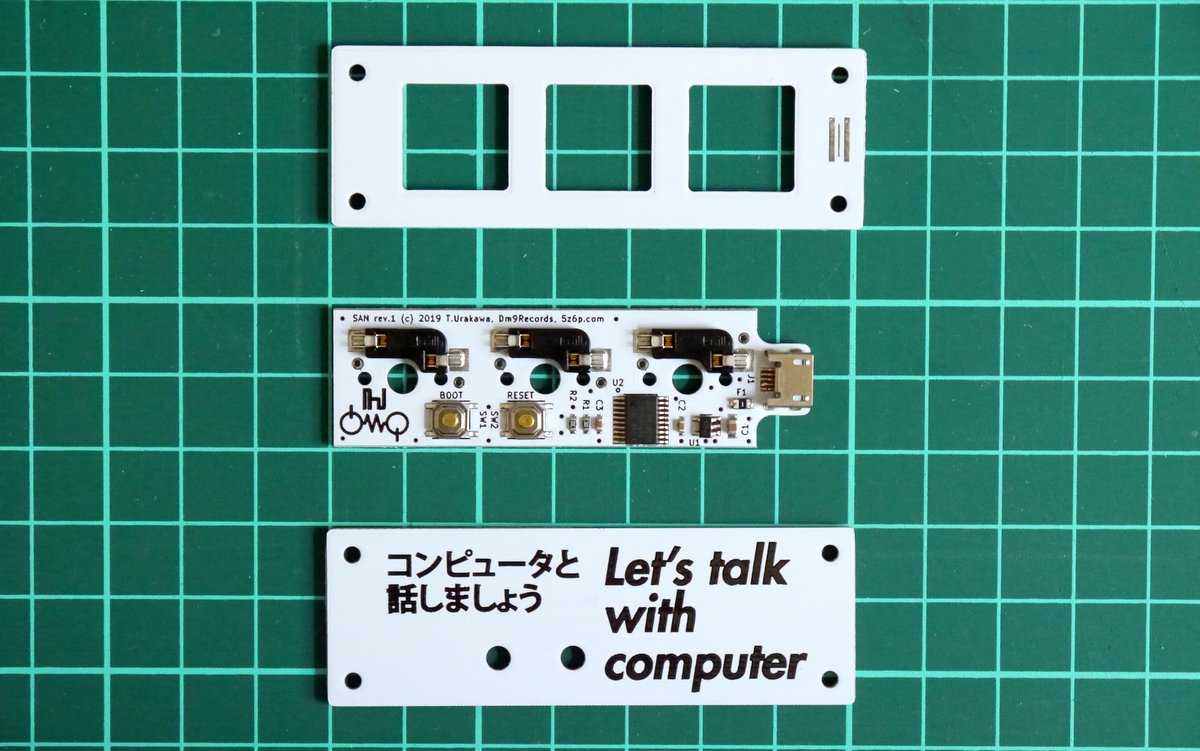
3keys macro pad.
BOOTとRESETのシルクが逆になっている
(正しくはSW1 RESET, SW2 BOOT)Zadigを使用してOS標準で入るドライバをWinUSBのものに入れ替える必要があります。
STM Device in DFU Modeとして認識されているはず)Options → List All devicesにチェックSTM Device in DFU ModeもしくはSTM32 BOOTLOADERを選択して、WinUSBをインストールするReplace Driverを押して下さい。問い合わせ先 Twitter(https://twitter.com/hsgw)もしくはurkwtky[at]gmail.comまで
| Qty | Value | Footprint | References |
|---|---|---|---|
| 3 | SW_Push | SMKJP:SW_kailh_MX_socket_repairable_small | SW_MX1, SW_MX2, SW_MX3 |
| 2 | 0.1u | dm9_rc:C1608_Hand | C2, C3 |
| 2 | 10k | dm9_rc:R1608_Hand | R1, R2 |
| 2 | SW_Push | dm9_switches:TACT_5.1x5.1 | SW1, SW2 |
| 1 | 100mA | dm9_rc:C2012_hand | F1 |
| 1 | 10u | dm9_rc:C2012_hand | C1 |
| 1 | LOGO | dm9_silks:logo_hsgw_3mm | G*** |
| 1 | LOGO | dm9_silks:logo_dm9_5mm | G*** |
| 1 | STM32F042F6Px | Housings_SSOP:TSSOP-20_4.4x6.5mm_Pitch0.65mm | U2 |
| 1 | TLV70012_SOT23-5 | dm9_smd_ic:SOT-23-5 | U1 |
| 1 | USB_OTG | dm9_conn:USB-microB-LCSC-U-F-M5DD-W-2 | J1 |
It measures 63.8 × 18.5 mm and has 2 copper layers, 1.6 mm thick.
16 parts. The full list of its parts is on this page, with links to each part's symbol and footprint where PCBKit's library has them.
From the hsgw/san repository on GitHub, at the commit this page was made from: the board is pcb/3keys.kicad_pcb. PCBKit opens the board in the browser, with nothing to install.
Its repository publishes it under the MIT licence: you may reuse it on that licence's terms (keep the author's notice, and for a copyleft licence share your changes alike).
google/mozc-devices
Circuit diagrams and firmware source code for Gboard DIY keyboards

conorpp/u2f-zero
U2F USB token optimized for physical security, affordability, and style

rusefi/rusefi
rusefi - GPL internal combustion engine control unit

VoronDesign/Voron-Hardware
Cool Hardware designed by the Voron Design group

hoglet67/RGBtoHDMI
Bare-metal Raspberry Pi project that provides pixel-perfect sampling of Retro Computer RGB/YUV video and conversion to HDMI

hackclub/OnBoard
💡 Join 1,000 teenagers and make your first PCB with a $100 grant!

