2 layers95.9 × 95 mm
Hnr26-badge
nushackers/hnr26-badge-quacknroll
Hack&Roll 2026 "Quack & Roll" badge source files, for both hardware and firmware
77 parts8

 hiralsinghal/USB-Hub
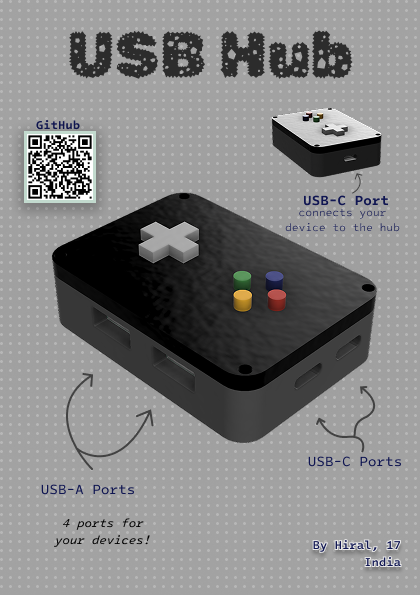
This is a USB hub. It has a USB-C port to connect to the device. It has two USB-A ports and two USB-C ports, which can be used for connecting more devices as it allows you to increase the number of ports available.
USB Hub is an open-source printed circuit board by hiralsinghal, from the hiralsinghal/USB-Hub repository on GitHub. It is a 2-layer board of 60 × 38 mm with 29 parts on 29 nets, routed with 296 tracks and 13 vias.
It is built around the SL2.1S and USBLC6-2SC6-ES. Its parts include 11 capacitors, 6 resistors and 4 ICs. It belongs with the interfaces and adapters boards of this library.


This is a USB hub. It has a USB-C port to connect to the device. It has two USB-A ports and two USB-C ports, which can be used for connecting more devices as it allows you to increase the number of ports available.
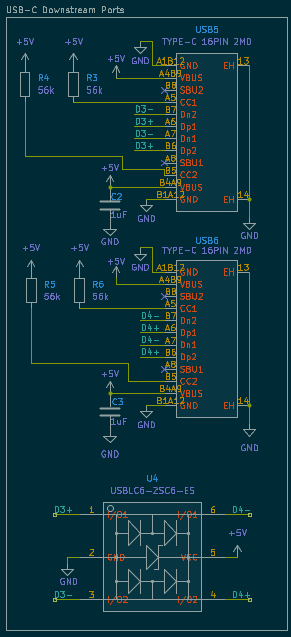
This is the schematic for the USB hub. It has an IC, which makes the hub work.
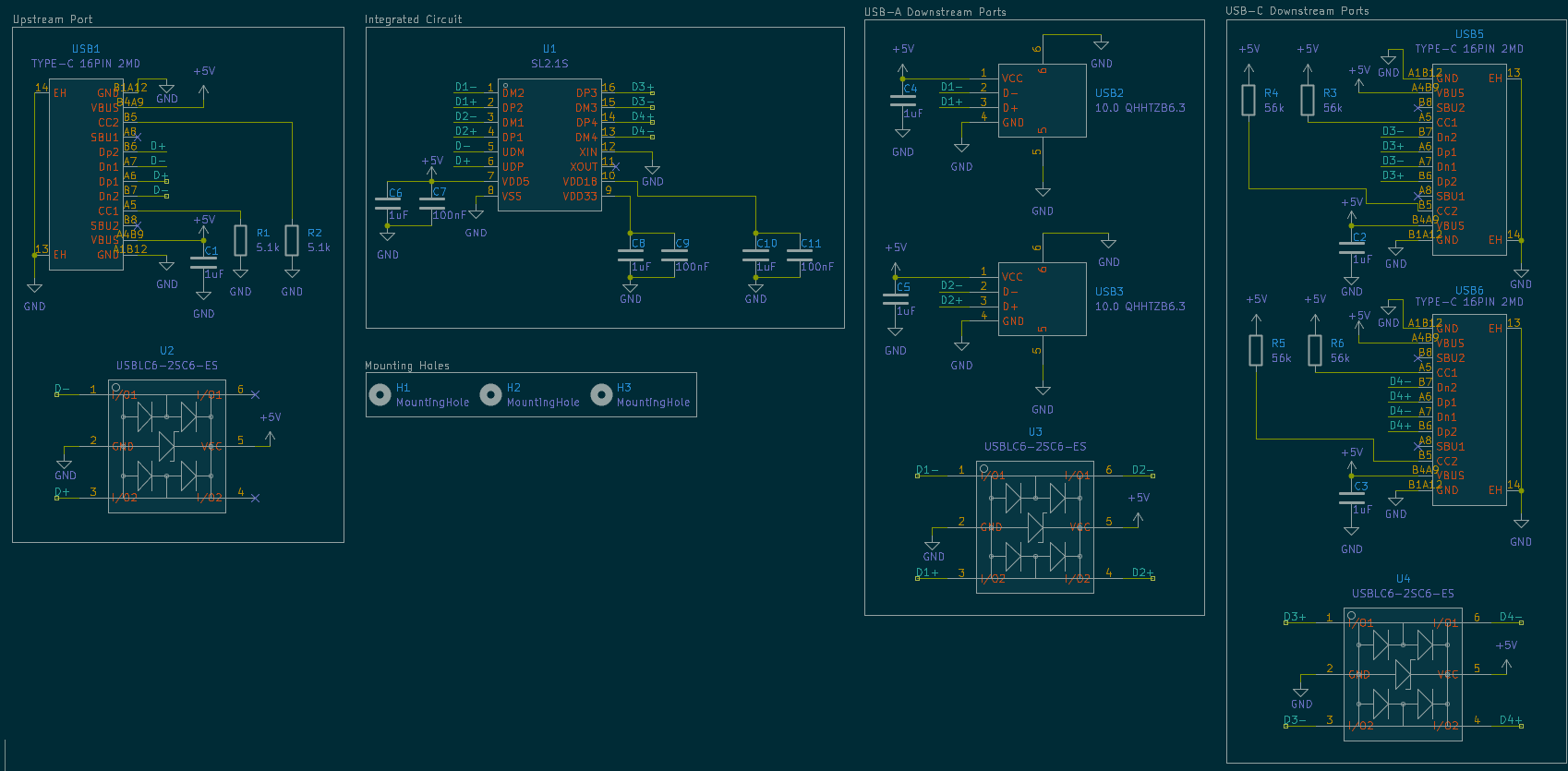
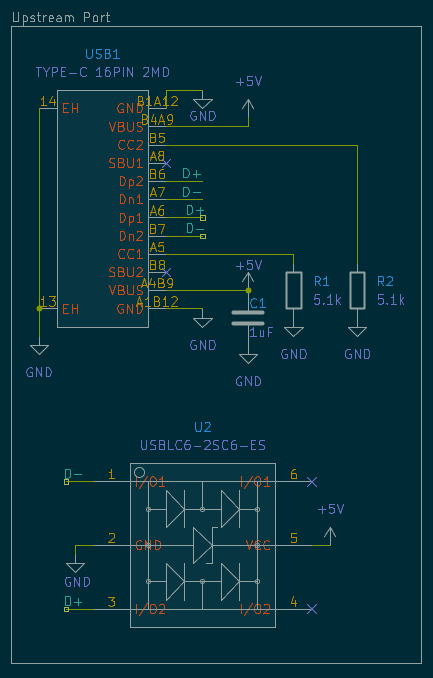
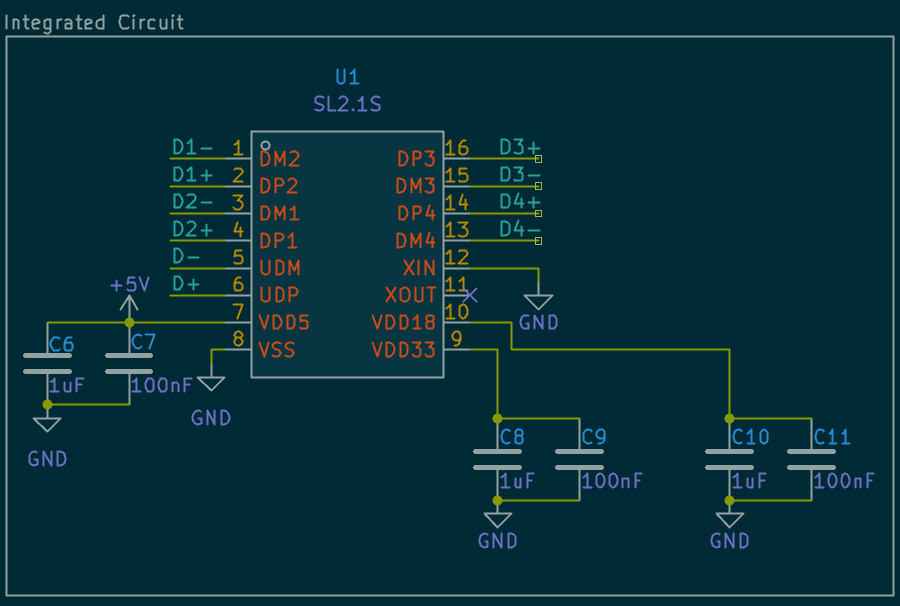
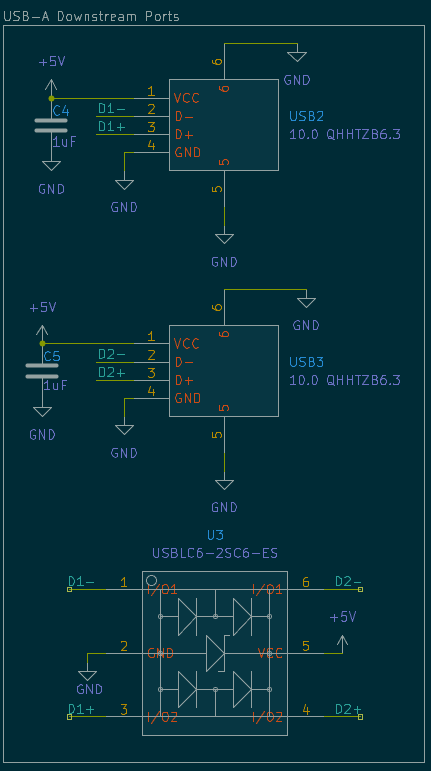
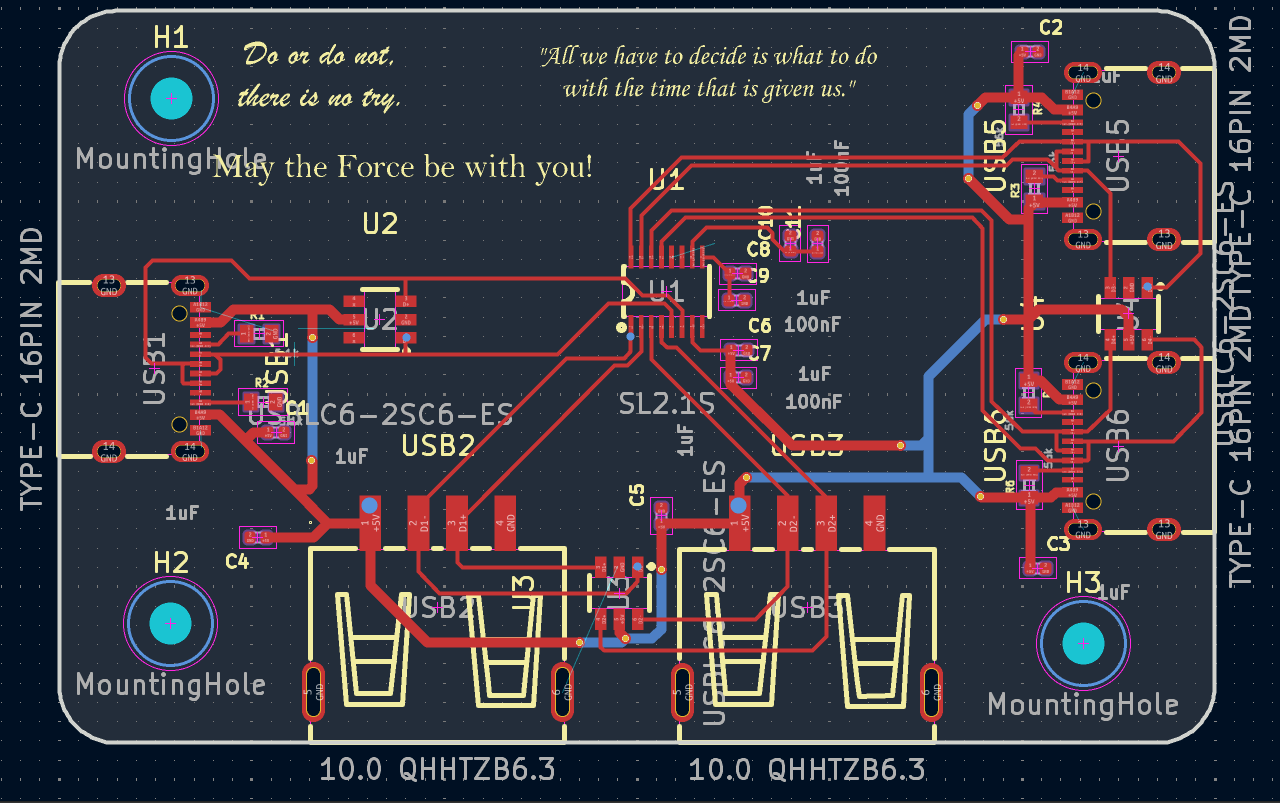
Its just a rounded rectangle shaped PCB and has three mounting holes, so it can be screwed into the case. I added some quotes as silkscreen art.
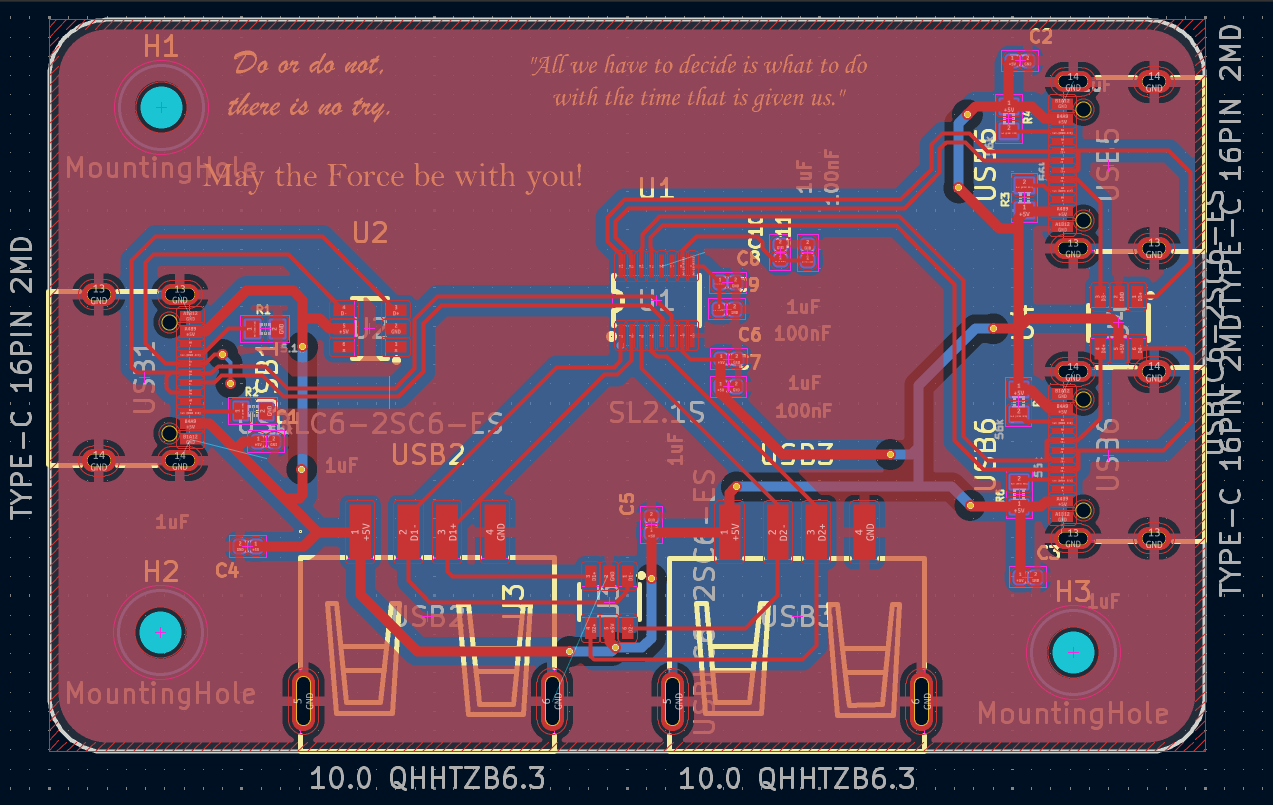
No zones
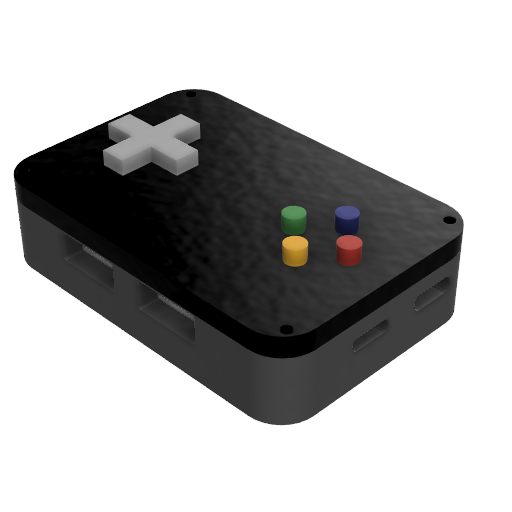
I designed this in Fusion, using my PCB as a guide. It has holes for M3 screws so the bottom and top parts hold together. You can find the files in the CAD folder.
For a more detailed BOM, take a look at BOM. It has links to the items and notes.
| Item | Description | Quantity | Unit Price ($) | Total Price ($) |
|---|---|---|---|---|
| JLCPCB PCB | PCB | 5 | 0.8 | 4 |
| CoreChips SL2.1s | USB 2.0 HUB Controller Integrated Circuit | 5 | 0.2534 | 1.27 |
| SHOU HAN 10.0 QHHTZB6.3 | CONN RCPT USB 2.0 Type-A 4POS SMD R/A | 10 | 0.0636 | 0.64 |
| SHOU HAN TYPE-C 16PIN 2MD(073) | CONN RCPT Type-C 16POS SMD R/A | 20 | 0.0707 | 1.41 |
| ElecSuper USBLC6-2SC6-ES | ESD DIODE 5VWM 15VC SOT-23-6L | 20 | 0.0278 | 0.56 |
| 10k Resistor SMD:R 0402 | Resistor | 6 | 0.0083 | 0.0498 |
| 0.1uf Capacitor SMD:C 0402 | Capacitor | 11 | 0.011 | 0.121 |
| Total | 8.0508 |
This was designed in Figma. It wasn't easy to make. I had no ideas. I was stuck. Its not my best work.
I have been trying to get more into hardware, making guided projets before jumping in to make something my own. I want to have knowledge on how to do this stuff, so I know how to make my own project. My routing skills were improved. I made them neatly.
This project was submitted to Fallout.
| Qty | Value | Footprint | References |
|---|---|---|---|
| 8 | 1uF | Capacitors:CAPC1005X55N | C1, C2, C3, C4, C5, C6, C8, C10 |
| 4 | 56k | Resistors:CAPC1005X60 | R3, R4, R5, R6 |
| 3 | 100nF | Capacitors:CAPC1005X55N | C7, C9, C11 |
| 3 | MountingHole | MountingHole:MountingHole_2.2mm_M2 | H1, H2, H3 |
| 3 | TYPE-C 16PIN 2MD | USB:USB-C-SMD_TYPE-C-16PIN-2MD-073 | USB1, USB5, USB6 |
| 3 | USBLC6-2SC6-ES | USB:SOT-23-6_L2.9-W1.6-P0.95-LS2.8-BR | U2, U3, U4 |
| 2 | 10.0 QHHTZB6.3 | USB:USB-A-TH_10.0QHHTZB6.3 | USB2, USB3 |
| 2 | 5.1k | Resistors:CAPC1005X60 | R1, R2 |
| 1 | SL2.1S | USB:SSOP-16_L4.6-W2.6-P0.53-LS4.0-BL | U1 |
nushackers/hnr26-badge-quacknroll
Hack&Roll 2026 "Quack & Roll" badge source files, for both hardware and firmware

blazjerman/ESP32-Based-Sensor-PCB
For updates or additional library formats, visit SnapEDA.

PTR-projects/PTR_mini_hardware
Welcome to the KPPTR-hardware repository! This repository contains the design files for the hardware components used in the KPPTR project.

PTR-projects/PTR_micro_hardware
Welcome to the KPPTR-hardware repository! This repository contains the design files for the hardware components used in the KPPTR project.


Lumethra/Auth75
This is a 75% keyboard with a fingerprint sensor. What? A fingerprint sensor in a keyboard? Yes, you've heard it right! This keyboard includes a working fingerprint sensor.

Lumethra/CADPad
SHHH, this is a gift, dont spoiler it, SHHHH. But what exactly is this?? Good question. Its a keyboard. Again. Wait, what does again mean, well its my second one. My Auth75 was my first one. Back to what this is.
It measures 60 × 38 mm and has 2 copper layers, 1.6 mm thick.
29 parts, built around the SL2.1S and USBLC6-2SC6-ES. The full list of its parts is on this page, with links to each part's symbol and footprint where PCBKit's library has them.
From the hiralsinghal/USB-Hub repository on GitHub, at the commit this page was made from: the board is PCB/USB-Hub.kicad_pcb and its schematic PCB/USB-Hub.kicad_sch. PCBKit opens the board in the browser, with nothing to install.
Its repository states no licence, so its author keeps all rights: ask hiralsinghal before reusing the design.