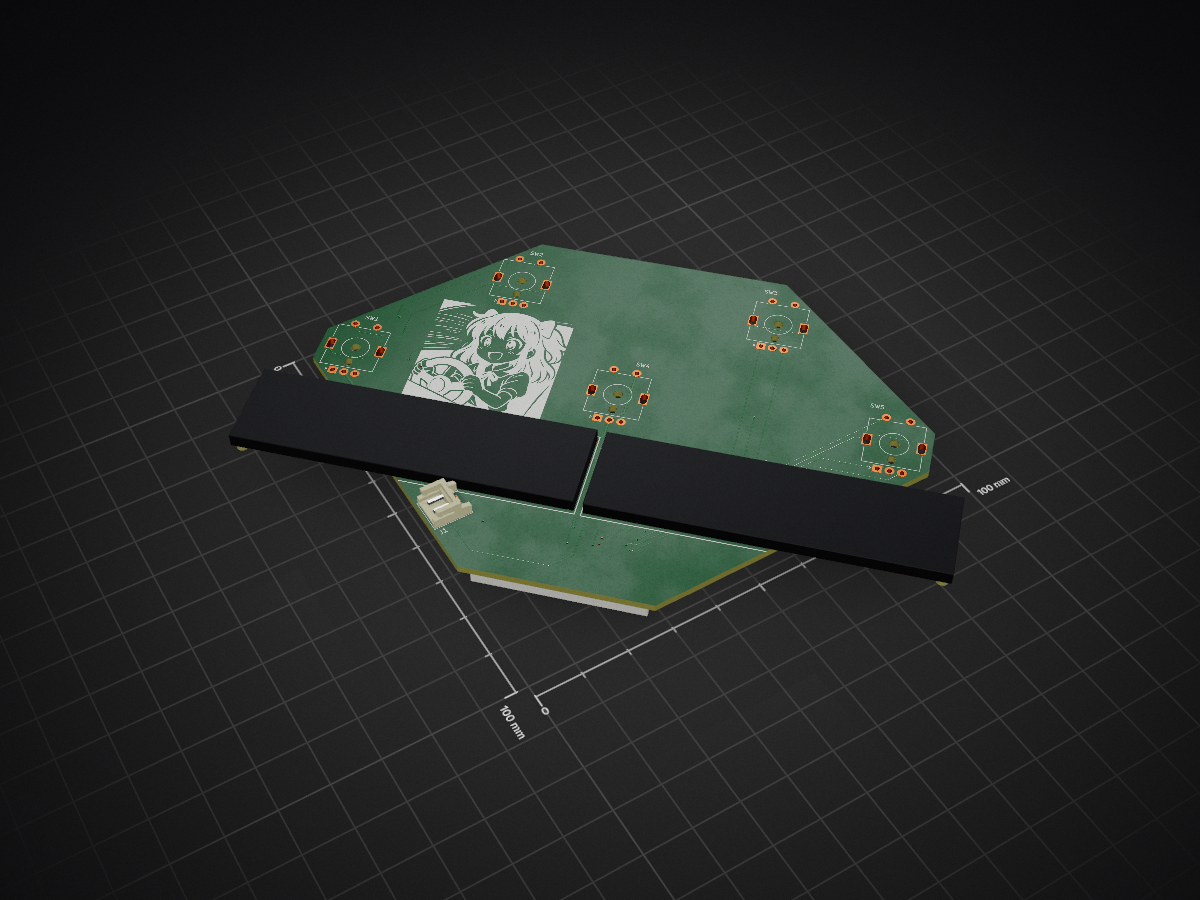
Firmware and PCB files for an ESP32-S3 sim-racing button box with five rotary encoders, capacitive touch on encoder/buttons, two ST7789 displays, MCP23017 button/LED expansion, MPR121 touch sensing, WS2812 status LEDs…
ButtonBox is an open-source printed circuit board by Hartmannlight, from the Hartmannlight/Buttonbox repository on GitHub. It is a 2-layer board of 100 × 100 mm with 10 parts on 34 nets, routed with 253 tracks and 19 vias.
Its parts include 5 switches and 2 connectors.
README
README.md
KLX ButtonBox
Firmware and PCB files for an ESP32-S3 sim-racing button box with five rotary encoders, capacitive touch on encoder/buttons, two ST7789 displays, MCP23017 button/LED expansion, MPR121 touch sensing, WS2812 status LEDs, DS18B20 temperature input, and a disabled buzzer diagnostic stub.
Repository layout
text
src/
  app/        Firmware application helpers and diagnostics
  config/     Hardware pinout and device addresses
  domain/     Hardware-independent events and device state
  hal/        Arduino/driver-facing hardware adapters
pcb/
  ButtonBox/  Encoder/display board KiCad project
  Controller/ Controller board KiCad project
scratch/      One-off hardware analysis scripts
Firmware status
The firmware is currently a hardware diagnostic build, not a finished sim-racing HID profile. It boots the ESP32-S3, scans I2C, initializes both displays, reads encoders/buttons/touch, drives diagnostic LEDs, and renders current state on the displays.
Known hardware items still need bench verification:
FFC orientation and all 30 continuity mappings.
MPR121 address and touch thresholds for the real metal controls.
MCP23017 button/LED mapping against the assembled PCB.
GPIO0 boot behavior with DS2 backlight.
Buzzer circuit. Firmware intentionally keeps it muted until the hardware is verified.
Build
Install PlatformIO, then run:
powershell
platformio run
Upload to the connected ESP32-S3:
powershell
platformio run --target upload
Open the serial monitor:
powershell
platformio device monitor
Serial speed is 115200.
Hardware notes
The authoritative pin constants live in src/config/HardwareConfig.hpp. The longer hardware handover is in KLX_ButtonBox_Firmware_Handover.md; treat it as a verification log and update it when a measurement on the real device contradicts an assumption.
It measures 100 × 100 mm and has 2 copper layers, 1.6 mm thick.
What parts does the ButtonBox use?
10 parts. The full list of its parts is on this page, with links to each part's symbol and footprint where PCBKit's library has them.
Where can I download the ButtonBox KiCad files?
From the Hartmannlight/Buttonbox repository on GitHub, at the commit this page was made from: the board is pcb/ButtonBox/ButtonBox.kicad_pcb and its schematic pcb/ButtonBox/ButtonBox.kicad_sch. PCBKit opens the board in the browser, with nothing to install.
Can I use the ButtonBox design in my own project?
Its repository states no licence, so its author keeps all rights: ask Hartmannlight before reusing the design.
Firmware and PCB files for an ESP32-S3 sim-racing button box with five rotary encoders, capacitive touch on encoder/buttons, two ST7789 displays, MCP23017 button/LED expansion, MPR121 touch sensing, WS2812 status LEDs…