Iyada
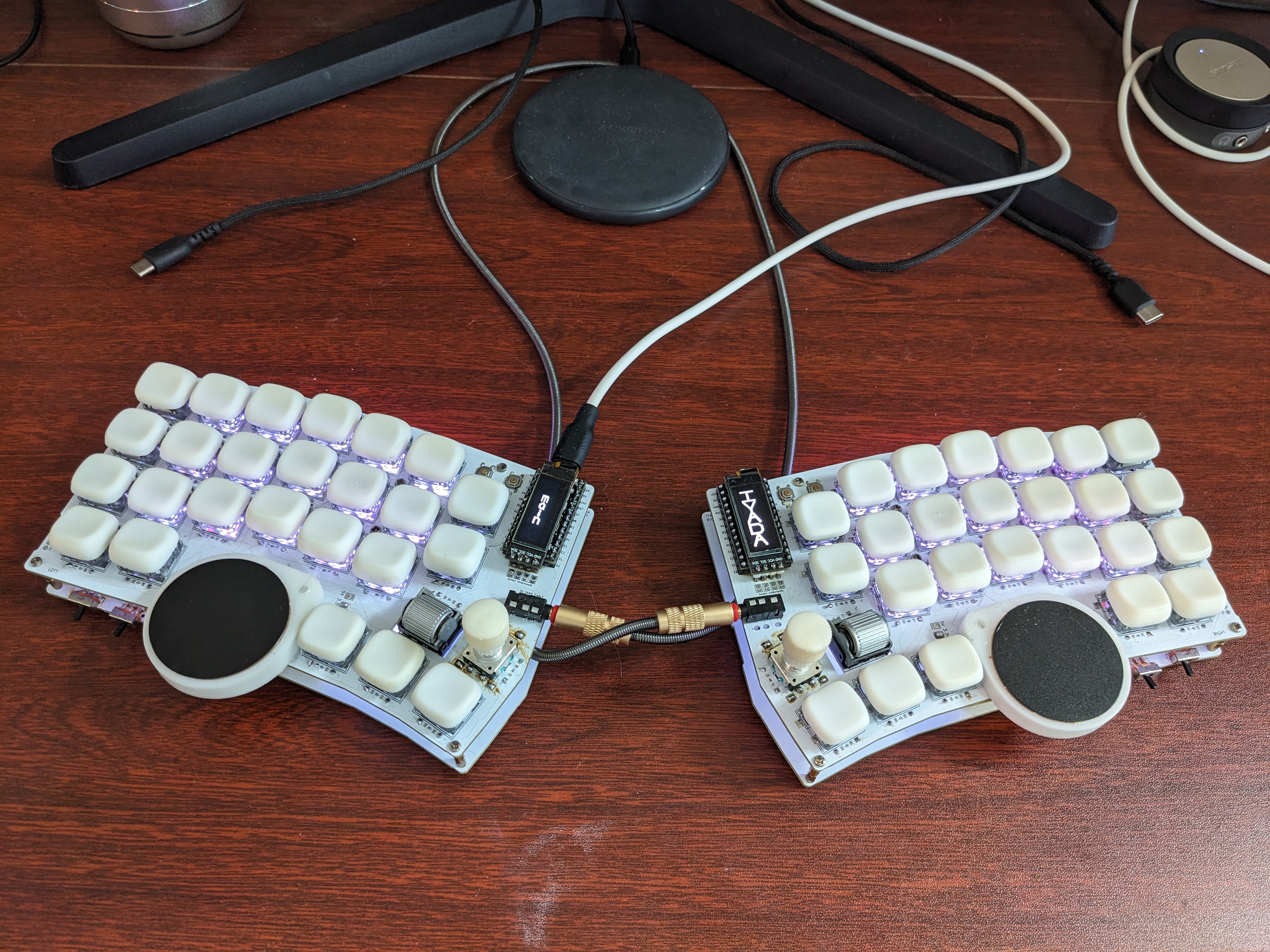
The Iyada is a keyboard, mouse, space mouse, and a gamepad in one unit
- Keyboard Maintainer: Gareth Gummow
- Demonstration: Iyada Dual Analogue Gameplay
- Recommended Keycaps: KLP Lamé
This device is powered by QMK Firmware running on two RP2040 Microcontrollers.
To flash the firmware for it, simply copy the kiraibuilds/iyada directory to the ~/qmk_firmware/keyboards locally on your machine before following one of the make examples included in the appropriate Readme file.
To learn how to set up QMK locally on your machine, see the build environment setup and the make instructions.
Brand new to QMK? Start with the Complete Newbs Guide
Features
- Simultaneous Choc/MX Hotswap Compatibility: The Iyada is simultaneously MX and Choc hotswap compatible. This means one can use any combination of Choc and MX switches or switch between them without having to reflash the firmware!
- OLED Screens: The Iyada is equipped with a 32x128 OLED screenn on each side. The lefthand OLED tells the user which layer is currently active, and the righthand OLED displays a fun, unobtrusive animation!
- Four Encoders: The Iyada is equipped with a rotary encoder and a scroll encoder on each side of the keyboard! By default, these are used for the purposes of web navigation and media playback.
- Dual Pointers: The Iyada is equipped with a Cirque Pinnacle trackpad on each side! By default, these can be used for mouse cursor movement. However, they are also configured to function as dual analogue sticks in video games!
- RGB Lighting: The baseplate of the Iyada comes equipped with LEDs, allowing for RGB animations and simple backlighting should the user so desire!
- Haptic Feedback: The Iyada is equipped with a DRV2605L on each half, allowing for haptic feedback that informs the user that a layer shift key has been pressed!
- Audio Feedback: The Iyada is equipeed with a small piezoelectric speaker on each side that relies on hardware-driven PWM to produce sound! By default, this allows the user to make the Iyada produce an audible sound whenever a key is pressed.
- Power Boosting: The Iyada is equipped with a TP4056 and a lithium polymer battery on each side! This allows one to provide extra power, thereby ensuring features like RGB and Haptics are always working as expected, no matter the configuration!
- Advanced Autocorrect: QMK includes the ability to define custom dictionaries for use with the Autocorrect feature. As part of the Iyada project, the largest ever such dictionary has been created, compiled, and added for use with this, or any other piece of hardware that utilises QMK firmware!
- Dual Analogue Support: The Iyada natively supports virtual dual analogue sticks. This means, using software such as a video game emulator, one is able to map each Cirque Pinnacle trackpad to its own
separate analogue stick. The first version of full Cirque joystick emulation has already been implemented and is ready for use. Fully polished digital joystick emulation is still production!
Additional Information
- Cirque Sizing: Although 40mm Cirque trackpads are recommended, one may use any size that one so desires. 40mm Cirque trackpads are used only because they are popularly considered to be the most comfortable variety. The only issue associated with using a smaller Cirque is that it may not be possible to attach these Cirques to the Iyada Cirque holders perfectly centred.
- Cirque Holder: UV resin is used to attach a Cirque to the Iyada Cirque holder. All 40mm Cirques have been confirmed to be able to attach to the standard Cirque holder regardless of the type of overlay it comes with. To attach a Cirque to the Iyada Cirque holder, it is recommended that one first attaches the Cirque holder to the Iyada top PCB using a heat-set insert and M2.2 screw, then connects the Cirque to the Iyada top PCB, before using something like hot glue or tape to test what position and orientation is most comfortable for use. After one is happy with the position and orientation, and after one is sure the Cirque has been connected to the Iyada top PCB properly, a very small amount of UV resin can then be used to permanently secure the trackpad to its holder. After this, the hot glue or tape may be removed.
- Curved Overlay: All features including secondary click functions and scrolling functions work with the curved overlay, however the attenuation in config.h must be set to its maximum value of 1 for this to work consistently. It does still technically work if the attenuation is set to a value of 2, but in testing was reported as being frustrating to use.
- Cirque Attenuation: If one is not using the curved overlay, setting the attenuation in config.h to 3 or 4 generally works best. If one does have curved overlays on one's Cirque trackpads, then setting the attenuation to 1 or 2 generally works best.
- Cirque Positioning: It is recommended to mount each Cirque trackpad to the keyboard such that it is angled away from the MCU by an angle of between 20 degrees and 40 degrees. Mounting the Cirques perfectly straight tends to make it more difficult for one to use one's thumbs to control mouse pointing.
- Cirque Conflicts: It is worth noting that using the Steno and/or Joystick functionality may cause the Cirques to become less accurate, more prone to drifting, and overall more painful to use.
- Cirque Problems: If a Cirque trackpad is only partially connected, then the mouse pointer should jitter erratically when one attempts to use it. If SDA or SCL are not connected properly at all, then the Cirque trackpad will only be able to move in the X direction or in the Y direction but not both. If there is jittering in the X direction but not the Y direction, or vice versa, then either SDA or SCL is partially connected while the other is fully connected. If the Cirque drops user input periodically when the attenuation is set to 1, almost like stuttering or lagging, then 5V or GND are not properly connected. If the Cirque does not respond at all despite the correct solder jumpers being closed, then either that half is not receiving sufficient power, or the Cirque is not properly connected. To resolve every single one of these problems, use 3.3V Cirques, reconnect/resolder the Cirques, add the battery/charging accessories, and use either WS2812B-2020 LEDs or no LEDs at all before testing again. In case one simply removes a pad or trace by accident while adding a Cirque trackpad, each half of the keyboard has 3 places where it is possible to solder a Cirque alongside 2 places where an FPC connecter for a Cirque can be added. If none of this works, disconnect any LEDs and try using the Cirque. If it suddenly works fine, the problem was insufficient power. If nothing changes, the problem is the connection between the Cirque and the PCB.
- Haptic Compatibility: The Iyada is designed to support all haptic feedback drivers that are compatible with QMK. By default, it is configured to use the DRV2605L, however the Iyada is also natively compatible with solenoid drivers if one would prefer to use that instead.
- Audio: The Iyada natively supports the use of piezo speakers for the purposes of audio feedback. Simply hand-wire one's speaker to the appropriately on each half of the Iyada in order to utilise this feature.
- SPI Peripherals: The Iyada supports direct control of SPI-based peripherals, including Cirque trackpads that have been configured to communicate via SPI. If one wants to use any such peripheral, simply hand-wire the appropriate connections the corresponding 4 pins located on the bottom of the MCU.
- Power Draw: If one uses two 5V Cirque trackpads in tandem with WS2812B-5050 LEDs, the battery and charging accessories are required to provide all components with sufficient power simultaneously. Neglecting to do so when using this configuration will result in the 5V Cirque present on the secondary half of the keyboard to become non-responsive. Even with the additional battery and charging accessories, it is possible that there will still be insufficient power if one is using an Iyada with two 5V Cirque trackpads, WS2812B-5050 LEDs, and additional non-standard peripherals connected via an SPI to I2C bus-bridge such as the SC18IS604.
- Battery Connections: The Iyada natively supports the use of a lipo battery on each half to help power more energy-intensive configurations. Simply solder the battery wires to the TP4056 units on each half, and position the battery so as to not block any of the Iyada's LEDs.


 gargum/Iyada74


