2 layers81.3 × 106.7 mm
 felixUOB/Two_Defuse_Or_Not_Two_Defuse
The Barbies team project
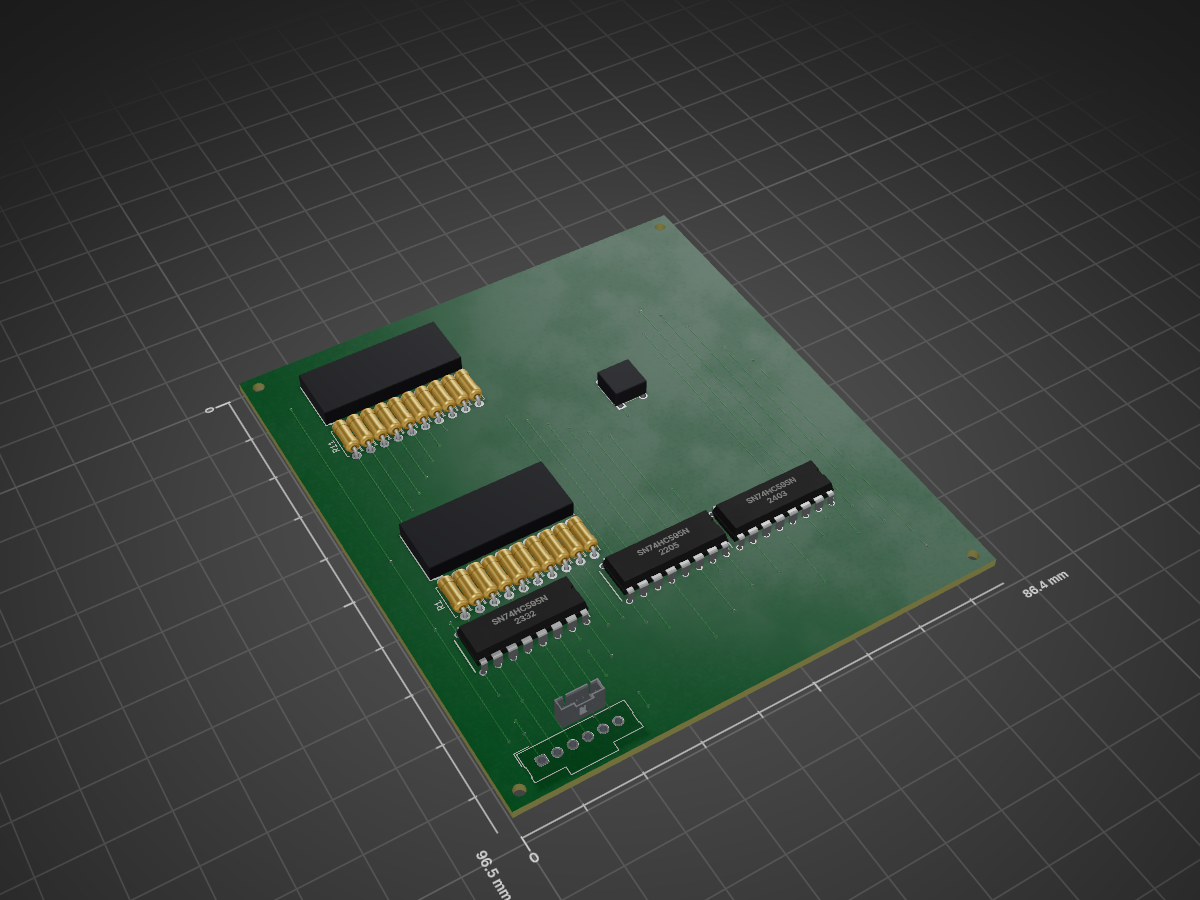
Fishing Game Circuit is an open-source printed circuit board by felixUOB, from the felixUOB/Two_Defuse_Or_Not_Two_Defuse repository on GitHub. It is a 2-layer board of 86.4 × 96.5 mm with 27 parts on 55 nets, routed with 177 tracks and 88 vias.
It is built around the SN74HC595N and DTS-62N-V. Its parts include 20 resistors, 3 ICs, 1 connector and 1 switch.


Created by The Barbies | COMS30043 2025 Team Project
This project aims to create an innovative and tense cooperative experience for players by utilising custom hardware.
The application runs on an asymmetric two-input system: one player operates within the Unity game world created for the project, while the other operates a custom physical hardware controller to communicate and defuse the bomb.
Technical report on the project can be found here (May require downloading due to file size).
Watch the technical video and trailer here.
To fully experience this project, a physical 'hardware bomb' controller is required.
Hardware/ControllerV0.1 folder in Visual Studio Code.Team_Project folder in the Unity Editor and import any required packages.Note: If you do not have the required custom hardware, the level will still open and assign a Mock API. However, the game will not be playable, as the physical interactions required to navigate and access the game states will be absent.
├── Games Project Pitch Design Documents.pdf
├── Hardware
│   ├── Circuit_Designs
│   ├── ControllerV0.1
│   ├── Example Code
│   └── Manufacturing Drawings
├── Hardware-Software_Interaction.md
├── README.md
├── Team_Project  (Unity Project Root)
│   ├── Assets
│   ├── Packages
│   ├── ProjectSettings
│   └── ... (Builds and project files)
└── The Barbies - Team Project Pitches.pdf| Qty | Value | Footprint | References |
|---|---|---|---|
| 20 | R_Small | Resistor_THT:R_Axial_DIN0207_L6.3mm_D2.5mm_P7.62mm_Horizontal | R1, R2, R3, R4, R5, R10, R11, R12, R13, R14, R15, R16, R17, R18, R19, R20 +4 |
| 3 | SN74HC595N | SamacSys_Parts:DIP794W53P254L1930H508Q16N | IC1, IC2, IC3 |
| 2 | OSX10201-GYR1 | SamacSys_Parts:DIPS760W45P254L2550H815Q20N | DS1, DS2 |
| 1 | Conn_01x06_Socket | Connector_Molex:Molex_SL_171971-0006_1x06_P2.54mm_Vertical | J3 |
| 1 | DTS-62N-V | SamacSys_Parts:DTS62NV | S1 |


bmpc/amstrad_cpc6128_romboard
A ROM Board for the Amstrad CPC 6128 capable of loading two expansion ROMs simultaneously from an SD card.

Eric2363/CECS-490A-Self-Playing-orchestra
The self-playing orchestra is a collection of three or more instruments that work together to play a song automatically.

gustavo-sen/project-kratos-iot
A project to introduce IoT development in the new workspace


Gecesars/ant_control
Acoplador automático de antena HF, aberto e reparável, para estações de até 100 W PEP. O projeto usa uma rede L comutada por relés, medição direcional forward/reflected baseada em ponte tandem-match e controladora…

mk4-dd/Controller-Electrical-Schematics
This repo is a part of the Hitchco MK4 project. You can read more about the project here.


It measures 86.4 × 96.5 mm and has 2 copper layers, 1.6 mm thick.
27 parts, built around the SN74HC595N and DTS-62N-V. The full list of its parts is on this page, with links to each part's symbol and footprint where PCBKit's library has them.
From the felixUOB/Two_Defuse_Or_Not_Two_Defuse repository on GitHub, at the commit this page was made from: the board is Hardware/Circuit_Designs/Fishing-Game-Circuit/Fishing-Game-Circuit.kicad_pcb and its schematic Hardware/Circuit_Designs/Buttons-Circuit/Buttons-Circuit.kicad_sch. PCBKit opens the board in the browser, with nothing to install.
Its repository states no licence, so its author keeps all rights: ask felixUOB before reusing the design.