Skip to the content
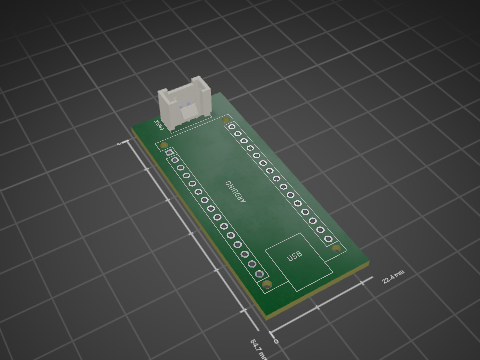
2 layers29.2 × 32.5 mmXiao, the printed circuit board in 3D

An intelligent beehive monitoring solution combining embedded AI, LoRaWAN communication, and solar power to help beekeepers protect their colonies and optimize hive management.

Size
29.2 × 32.5 mm
Copper layers
2
Thickness
1.6 mm
Parts
3
Nets
16
Pads
34
Tracks, vias
15, 0
Pours
1
Routed
Yes
KiCad
KiCad 9.0 (file 20241229)
Created
2 Feb 2026
Updated
1 May 2026

Overview

Xiao is an open-source printed circuit board by fcl2002, from the fcl2002/Open-Ruche-Monitoring repository on GitHub, published under the MIT licence. It is a 2-layer board of 29.2 × 32.5 mm with 3 parts on 16 nets, routed with 15 tracks and 0 vias.

Its parts include 1 diode and 1 connector. It belongs with the ESP32 boards of this library.

README

README.md

Open Ruche 🐝 — BEE SMART

Système de Monitorage Autonome de Ruches en Temps-réel
Protéger les abeilles, préserver demain.

An intelligent beehive monitoring solution combining embedded AI, LoRaWAN communication, and solar power to help beekeepers protect their colonies and optimize hive management.


Context & Motivation

Bee colonies face an accelerating global decline driven by the Varroa destructor mite, the Asian hornet (Vespa velutina), pesticides, and climate change. Continuous 24/7 manual monitoring is impossible for beekeepers — Open Ruche fills that gap with autonomous, real-time surveillance and automatic threat detection.


Team

RoleName
Project Manager, System Integration & Firmware LeadFernando COSTA LASMAR
AI/ML Engineer & Model DevelopmentFlávio ROSIM DE SOUSA
Hardware Design & PCB EngineerMatheus SISTON GALDINO
Power Management & Solar SystemsKarim SAWAYA
HMI & DocumentationYan DING

Academic context: Polytech Sorbonne — EI4 FISE | Projet Systèmes Embarqués IoT 2025-2026 | Groupe 4 – Ruche 9


Solution Overview

Open Ruche is built around four integrated layers:

Power Layer

  • Solar panel + battery with charge management module
  • Switchable voltage regulator for load optimization
  • Deep Sleep mode bringing average draw down to ~0.822 mA

Sensor Layer (custom PCB)

  • Temperature: 2× DS18B20 probes (internal) + 1× DHT22 (external T°/humidity)
  • Weight: HX711 load cell amplifier
  • Light: LUX sensor
  • Motion/safety: MMA8452 accelerometer, GPS module, buzzer alarm
  • Air quality: gas/particle sensor (SEN0190)

AI Processing Layer

  • Dual-core setup: Arduino Nano 3.3 (audio) + XIAO ESP32S3 (vision)
  • TensorFlow Lite models running fully on-device
  • Audio classification model — 86.45% accuracy on test data
    • Class 1: Normal activity
    • Class 2: Swarming
    • Class 3: Queenless colony
  • Hornet detection model (computer vision) — 79.7% accuracy, F1-score 90%
    • Code 0: No hornet detected
    • Code 1: Hornet detected

Communication & Cloud Layer

  • LoRaWAN module → The Things Network (TTN)
  • Configurable uplink frequency via TTN downlink
  • Cloud dashboards: BEEP Monitor + Datacake
  • Real-time alerts and remote parameter configuration

Software Architecture

The firmware implements a 4-state machine to minimise power consumption:

text
BOOT → INIT → LECTURE (sensors + AI) → DEEP SLEEP
              ↑___________________________________|
              Wake after configurable interval
  • INIT → LECTURE triggered when LUX > 100 AND internal temp > 20 °C
  • LECTURE → DEEP SLEEP when LUX < 100 OR internal temp < 15 °C
  • LoRa downlink allows remote configuration of the sleep interval
  • Logging system for debugging and field maintenance

Power Consumption

PhaseAverage Current
Active period (AI + sensors + LoRa)~85.8 mA
Deep Sleep~0.822 mA

Charge breakdown per cycle (54 s total):

  • AI (10 s): 0.414 mAh — 38%
  • Sensors (15 s): 0.283 mAh — 26%
  • LoRa (9 s): 0.117 mAh — 11%
  • Deep Sleep (20 min): 0.274 mAh — 25%

Estimated autonomy (1000 mAh battery): ~13 days without solar charging.


Project Status

ObjectiveStatus
Sensor accuracy & LoRa transmission✅ Done
Real-time image & audio AI detection✅ Done
Alarm creation & notifications✅ Done
Remote parameter & alarm configuration✅ Done
System energy autonomy✅ Done
PCB schematic & assembly✅ Done
Enclosure fabrication & prototype wiring✅ Done
Data display on cloud platforms✅ Done
Accelerometer for fall/theft detection❌ Not implemented

Getting Started

Prerequisites

  • Arduino IDE or PlatformIO
  • KiCad (for hardware design)
  • The Things Network account + LoRaWAN gateway access

Quick Start

bash
# Clone the repository
git clone https://github.com/[your-username]/OpenRuche.git
cd OpenRuche

# Project structure
# hardware/   — KiCad schematics & PCB files
# software/   — Firmware (Arduino / PlatformIO)
# ai/         — TensorFlow Lite model training scripts
# docs/       — Documentation & guides

For detailed development guidelines, see CONTRIBUTING.md.


License

This project is open-source. See LICENSE for details.

Parts

3
QtyValueFootprintReferences
11N5817Diode_THT:D_DO-41_SOD81_P10.16mm_HorizontalD1
1GROVEGrove:SEEED_110990030J1
1XIAO-ESP32-S3-DIPXiao:XIAO-ESP32-S3-DIPXIAO

More from fcl2002/Open-Ruche-Monitoring

3
  • 2 layers86.4 × 81.9 mmOpen ruche monitoring, the printed circuit board in 3D

    Open ruche monitoring

    fcl2002/Open-Ruche-Monitoring

    An intelligent beehive monitoring solution combining embedded AI, LoRaWAN communication, and solar power to help beekeepers protect their colonies and optimize hive management.

    28 parts1MIT
  • 2 layers33 × 33 mmDFR0264, the printed circuit board in 3D

    DFR0264

    fcl2002/Open-Ruche-Monitoring

    An intelligent beehive monitoring solution combining embedded AI, LoRaWAN communication, and solar power to help beekeepers protect their colonies and optimize hive management.

    15 parts1MIT
  • 2 layers22.4 × 54.7 mmArduino, the printed circuit board in 3D

    Arduino

    fcl2002/Open-Ruche-Monitoring

    An intelligent beehive monitoring solution combining embedded AI, LoRaWAN communication, and solar power to help beekeepers protect their colonies and optimize hive management.

    2 parts1MIT

Similar boards

  • 2 layers40 × 30 mmBlinky, the printed circuit board in 3D

    Blinky

    earthtojake/text-to-cad

    Design physical products with AI

    3 parts26kMIT
  • 2 layers51.9 × 16 mmPassive2-rpi non standard adapter, the printed circuit board in 3D

    Passive2-rpi non standard adapter

    hzeller/rpi-rgb-led-matrix

    Controlling up to three chains of 64x64, 32x32, 16x32 or similar RGB LED displays using Raspberry Pi GPIO

    3 parts4.4kGPL-2.0
  • 2 layers16.3 × 16.3 mmSensor, the printed circuit board in 3D

    Sensor

    scottbez1/splitflap

    DIY split-flap display

    3 parts4.2k
  • 2 layersSub, the printed circuit board in 3D

    Sub

    atopile/atopile

    Design circuit boards with code! ✨ Get software-like design reuse 🚀, validation, version control and collaboration in hardware; starting with electronics ⚡️

    3 parts4kMIT
  • 2 layers85 × 30 mmDual stomp, the printed circuit board in 3D

    Dual stomp

    torvalds/GuitarPedal

    Linus learns analog circuits

    3 parts2.5kGPL-2.0
  • 2 layers124.5 × 33.7 mm172319-1 connector, the printed circuit board in 3D

    172319-1 connector

    rusefi/rusefi

    rusefi - GPL internal combustion engine control unit

    3 parts1.2k
  • 2 layers10.5 × 83 mmProgrammingAdapter, the printed circuit board in 3D

    ProgrammingAdapter

    stuartpittaway/diyBMSv4

    Version 4 of the diyBMS

    3 parts1.1k
  • 2 layers21.2 × 51.3 mmPico reset, the printed circuit board in 3D

    Pico reset

    hackclub/sprig

    🍃 Learn to code by making games in a JavaScript web-based game editor.

    3 parts1.1kMIT

Questions

How big is the Xiao PCB?

It measures 29.2 × 32.5 mm and has 2 copper layers, 1.6 mm thick.

What parts does the Xiao use?

3 parts. The full list of its parts is on this page, with links to each part's symbol and footprint where PCBKit's library has them.

Where can I download the Xiao KiCad files?

From the fcl2002/Open-Ruche-Monitoring repository on GitHub, at the commit this page was made from: the board is hardware/XIAO/Xiao.kicad_pcb and its schematic hardware/Arduino/Arduino.kicad_sch. PCBKit opens the board in the browser, with nothing to install.

Can I use the Xiao design in my own project?

Its repository publishes it under the MIT licence: you may reuse it on that licence's terms (keep the author's notice, and for a copyleft licence share your changes alike).