
2 layers42 × 67 mm

Using the Michi you can make anything into a key just by connecting a few alligator clips
Michi is an open-source printed circuit board by ElectronicCats, from the ElectronicCats/michi repository on GitHub. It is a 2-layer board of 80 × 102.8 mm with 98 parts on 55 nets, routed with 642 tracks and 37 vias.
It is built around the RP2040 and W25Q128JVSIQ. Its parts include 18 connectors, 17 resistors, 14 capacitors, 3 ICs and 1 diode. It belongs with the RP2040 boards of this library.



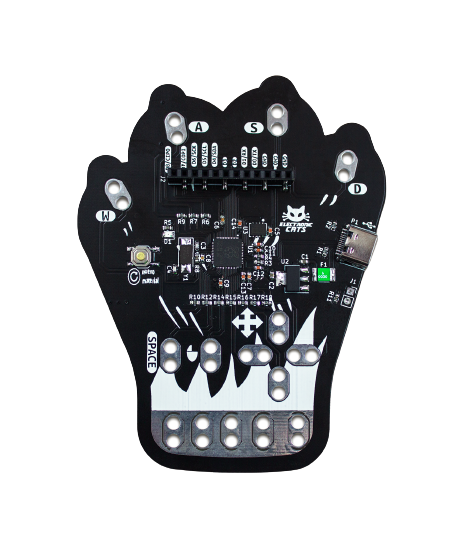
Michi is an electronic board designed by Electronic Cats that simulates configurable keyboard and mouse keys. It has the feature of being able to connect to any conductive material, turning these objects into touch panels.
It is an experiment kit for beginners and experts looking to interact between the real world and technology. The Michi can cover the areas of plastic arts, visual arts, music, sports, engineering and even physical rehabilitation.
People 6 years and older, educators, artists, engineers, designers, inventors and creators.
The Michi uses high resistance switching to detect when it has made a connection even with materials that are not very conductive (such as leaves, pasta or people). This technique attracts, Michi can also act as a keyboard or mouse. There are 10 inputs on the front of the board, which can be linked via alligator wires or any other method you can think of. There are another 5 inputs on the back, 3 for keyboard keys and 2 for mouse movement, which can be accessed with jumpers.
For example, when you connect and touch an apple, you make a connection, and Michi sends the computer a keyboard message. The computer sees Michi as an ordinary keyboard (or mouse). Therefore, it works with all programs, operating systems and web pages, since all programs and web pages receive information from the keyboard and mouse.
Any material that can conduct a little electricity will work. Here are some materials that people have used in our workshops: Ketchup or tomato sauce, Pencil Graphite, Finger Paint, Lemons, etc.
Other materials that work very well: plants, coins, silverware, anything wet, most foods, aluminum foil, water, and hundreds of things we haven't tried.
That's up to you! First, load a computer program or any web page. Let's say you load a piano. Then, instead of using the buttons on the computer keyboard to play the piano, you can connect Michi to something fun, like bananas, and the bananas become your piano keys.
Or let's say you search for a Pacman game online and draw a joystick with a pencil. Then you can play Pacman by touching the drawing. The kit includes everything you need: Michi Board, alligator cable, USB cable.
Visit our Wiki where you can find the manual 📖: Wiki


Contributions are welcome!
Please read the document Contribution Manual which will show you how to contribute your changes to the project.
✨ Thanks to all our contributors! ✨
See Electronic Cats CLA for more information.
See the community code of conduct for a vision of the community we want to build and what we expect from it.
Electronic Cats invests time and resources in providing this open-source design design, please support Electronic Cats and open-source hardware by purchasing products from Electronic Cats!

Firmware released under an GNU AGPL v3.0 license. See the LICENSE file for more information.
Hardware released under an CERN Open Hardware Licence v1.2. See the LICENSE_HARDWARE file for more information.
Electronic Cats is a registered trademark, please do not use if you sell these PCBs.
Electronic Cats invests time and resources providing this open source design, please support Electronic Cats and open-source hardware by purchasing products from Electronic Cats!
Designed by Electronic Cats.
30 Jul 2022
| Qty | Value | Footprint | References |
|---|---|---|---|
| 15 | D | SEWALLI_renew | P6, P6, P6, P6, P6, P6, P6, P6, P6, P6, P6, P6, P6, P6, P6 |
| 11 | LOGO | LOGO | G***, G***, G***, G***, G***, G***, G***, G***, G***, G***, G*** |
| 10 | 22M | Resistor_SMD:R_0603_1608Metric | R6, R7, R9, R10, R12, R14, R15, R16, R17, R18 |
| 8 | .1uf | Capacitor_SMD:C_0603_1608Metric | C5, C7, C9, C10, C11, C12, C13, C14 |
| 3 | 1k | Resistor_SMD:R_0603_1608Metric | R5, R8, R11 |
| 2 | 10uf | Capacitor_SMD:C_0603_1608Metric | C1, C2 |
| 2 | 1uf | Capacitor_SMD:C_0603_1608Metric | C6, C8 |
| 2 | 27.4 | Resistor_SMD:R_0603_1608Metric | R3, R4 |
| 2 | 27pf | Capacitor_SMD:C_0603_1608Metric | C3, C4 |
| 2 | 5.1K | Resistor_SMD:R_0603_1608Metric | R1, R2 |
| 2 | G*** | kibuzzard-63055E6D | kibuzzard-63055E6D, kibuzzard-63055E6D |
| 2 | G*** | kibuzzard-630562A3 | kibuzzard-630562A3, kibuzzard-630562A3 |
| 2 | G*** | Aesthetics:usb_graphic | svg2mod, svg2mod |
| 2 | G*** | kibuzzard-63055EA5 | kibuzzard-63055EA5, kibuzzard-63055EA5 |
| 2 | G*** | kibuzzard-63055FE6 | kibuzzard-63055FE6, kibuzzard-63055FE6 |
| 2 | G*** | kibuzzard-63055E62 | kibuzzard-63055E62, kibuzzard-63055E62 |
| 2 | G*** | kibuzzard-63055E8E | kibuzzard-63055E8E, kibuzzard-63055E8E |
| 2 | LOGO | Aesthetics:electronic_cats_logo_8x6 | G***, G*** |
| 1 | 0.5A | Fuse:Fuse_1812_4532Metric_Pad1.30x3.40mm_HandSolder | F1 |
| 1 | Conn_01x02 | Connector_PinSocket_2.54mm:PinSocket_1x02_P2.54mm_Vertical | J1 |
| 1 | Conn_Right | Connector_PinSocket_2.54mm:PinSocket_1x12_P2.54mm_Vertical_SMD_Pin1Right | J2 |
| 1 | Crystal | Crystal:Crystal_SMD_5032-2Pin_5.0x3.2mm_HandSoldering | Y1 |
| 1 | G*** | kibuzzard-63056260 | kibuzzard-63056260 |
| 1 | G*** | kibuzzard-63055F28 | kibuzzard-63055F28 |
| 1 | G*** | kibuzzard-630562BF | kibuzzard-630562BF |
| 1 | G*** | kibuzzard-639765C9 | kibuzzard-639765C9 |
| 1 | G*** | kibuzzard-630561F0 | kibuzzard-630561F0 |
| 1 | G*** | kibuzzard-639765AD | kibuzzard-639765AD |
| 1 | G*** | kibuzzard-6305624B | kibuzzard-6305624B |
| 1 | G*** | kibuzzard-63056210 | kibuzzard-63056210 |
| 1 | G*** | kibuzzard-63056270 | kibuzzard-63056270 |
| 1 | G*** | kibuzzard-63056299 | kibuzzard-63056299 |
| 1 | G*** | kibuzzard-63056280 | kibuzzard-63056280 |
| 1 | G*** | kibuzzard-6305640E | kibuzzard-6305640E |
| 1 | G*** | kibuzzard-6305622D | kibuzzard-6305622D |
| 1 | G*** | kibuzzard-6449595B | kibuzzard-6449595B |
| 1 | LED | Diode_SMD:D_0805_2012Metric | D1 |
| 1 | NCP1117ST33T3G | Package_TO_SOT_SMD:SOT-223-3_TabPin2 | U2 |
| 1 | RP2040 | Library:QFN40P700X700X90-57N | U1 |
| 1 | SW_Push | Button_Switch_SMD:SW_SPST_TL3342 | SW1 |
| 1 | USB_C_Plug_USB2.0 | Library:C393939 | P1 |
| 1 | Val** | PCB_Michi_Act | Ref** |
| 1 | W25Q128JVS | Library:W25Q16JVUUIQ | U3 |
It measures 80 × 102.8 mm and has 2 copper layers, 1.6 mm thick.
98 parts, built around the RP2040 and W25Q128JVSIQ. The full list of its parts is on this page, with links to each part's symbol and footprint where PCBKit's library has them.
From the ElectronicCats/michi repository on GitHub, at the commit this page was made from: the board is Hw/michi.kicad_pcb and its schematic Hw/michi.kicad_sch. PCBKit opens the board in the browser, with nothing to install.
Its repository states no licence, so its author keeps all rights: ask ElectronicCats before reusing the design.

shanteacontrols/OpenDeck
A platform for building interactive control and sensing devices using MIDI and OSC built with Zephyr RTOS.


polpo/picogus
Emulation of ISA sound cards and CD-ROM on Raspberry Pi Pico (GUS, SB/Adlib, MPU-401, Tandy, CMS, Panasonic CD-ROM) with USB mouse/joystick support

Bastardkb/Dilemma
The Dilemma is a vertical stagger low-profile keyboard with mods.

Staacks/gbinterceptor
Capture or stream Game Boy gameplay footage via USB without modifying the Game Boy.

