2 layers36 × 50 mm
Tune button c3-jst
EdgeCoil/tune-button
BLE remote (ESP32-C3) that likes or playlists the current Spotify song through a companion Android app. Firmware, app, protocol and three PCBs: XIAO, four-key and JST-button.
42 parts
 EdgeCoil/tune-button
BLE remote (ESP32-C3) that likes or playlists the current Spotify song through a companion Android app. Firmware, app, protocol and three PCBs: XIAO, four-key and JST-button.
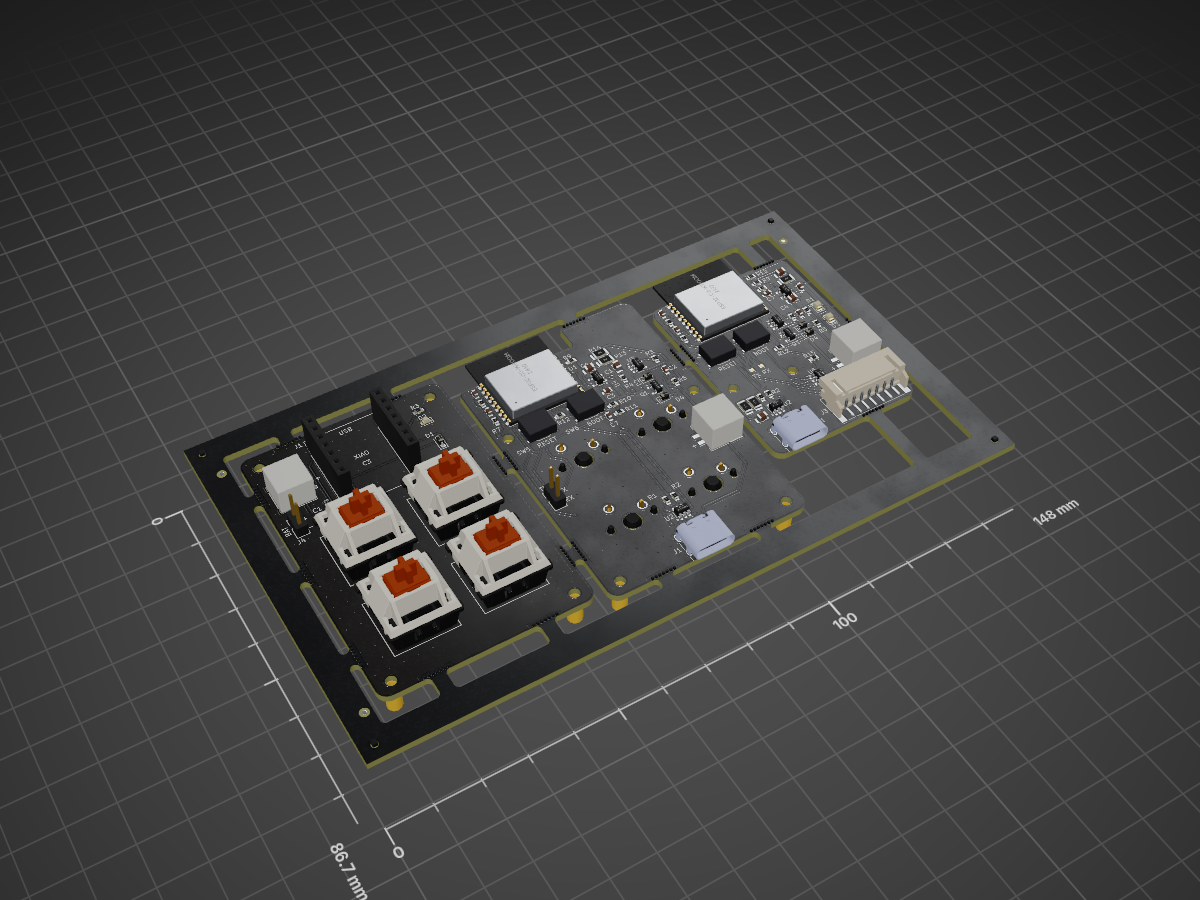
Tune button panel is an open-source printed circuit board by EdgeCoil, from the EdgeCoil/tune-button repository on GitHub. It is a 2-layer board of 148 × 86.7 mm with 246 parts on 80 nets, routed with 829 tracks and 482 vias.
It is built around the ESP32-C3-WROOM-02-N4, SRV05-4-P-T7 and RT9080-33GJ5, with the TP4054-42-SOT25R, 1N5819WS and AO3401A among its other parts. Its parts include 31 resistors, 16 capacitors, 12 switches, 10 diodes and 9 ICs. It belongs with the ESP32 and RISC-V boards of this library.


A pocket remote for Spotify on Android. Out of the box its four keys like the song that's playing, add it to a playlist, skip, and play or pause. Each key can also do something else when held or double-pressed. It runs for months on a small battery and charges over USB-C.
It is not a Bluetooth keyboard, so nothing on the phone gets remapped. Each press sends a small, signed Bluetooth broadcast. A companion app hears it in the background, even with the phone locked, and does what you set that key to do.
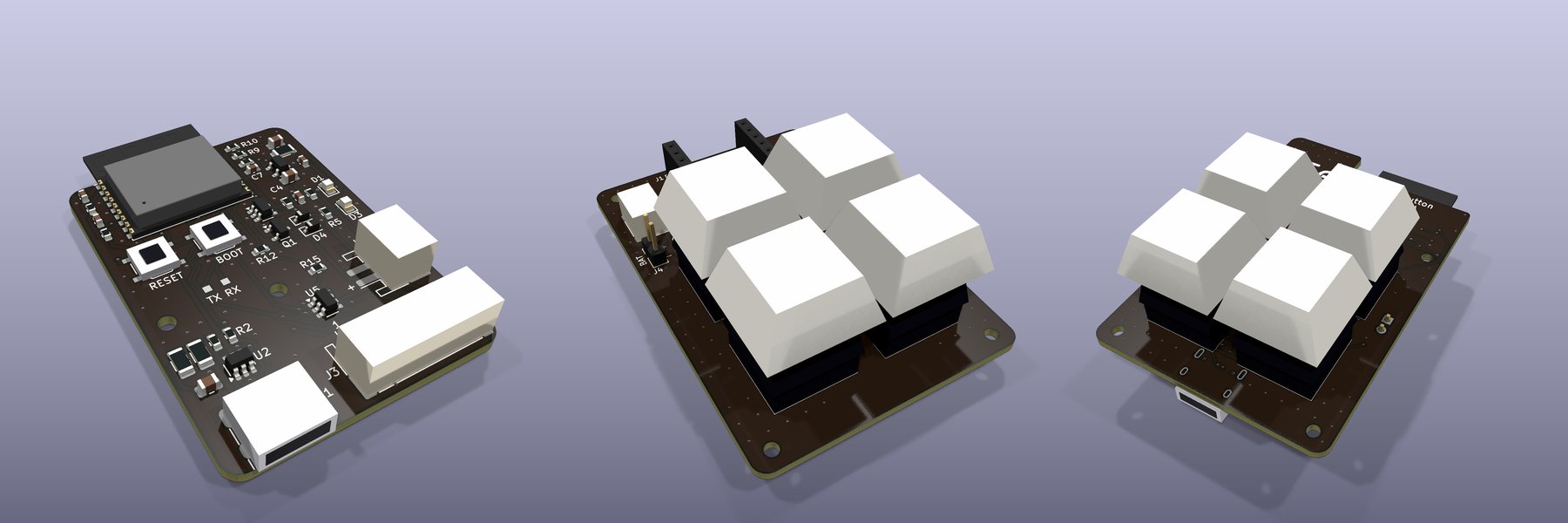 The three four-key boards (renders; rev A is being made):
c3-jst with buttons on a cable, the XIAO board, and the C3 board's key side.
 button ──wake──► ESP32-C3 ──signed BLE broadcast──► Android app ──HTTPS──► Spotify
                 (deep sleep)                      (listens in the         like, add, skip,
                                                    background)            play/pause, …
Status: works end to end. A one-button unit on a XIAO ESP32-C3 liked the playing song from a locked Samsung phone; the app heard the press in 0.8 s. The four-key firmware and app (holds, double presses, playback control) are written and unit-tested but not yet tried on hardware; the four-key boards (rev A) are ordered. Still to do: a longer latency run on each scan mode and a battery-life measurement. See
docs/design.md.
hardware/wiring.md). There are 3D-printable cases, and layered acrylic
cases for the four-key boards (hardware/case).tunebutton://callback.Pick the build for your button:
| Button | Build (-e) | sh scripts/merge.sh <build> makes |
|---|---|---|
| Hand-wired XIAO, two buttons | xiao_esp32c3 (the default) | tune-button-c3.bin |
| Hand-wired XIAO, one button | xiao_esp32c3_1btn | tune-button-c3-1btn.bin |
| XIAO four-key board | xiao_board | tune-button-xiao-board.bin |
c3 or c3-jst board | c3_board | tune-button-c3-board.bin |
With PlatformIO:
cd firmware
pio test -e native            # host tests: packet encoder, signatures and key gestures
pio run -e c3_board -t upload # build and flash over USB-C
Or make one image (table above) and flash it at offset 0x0, either in Chrome with
esptool-js or with
esptool.py --chip esp32c3 write_flash 0 tune-button-c3.bin.
Only have one button? Wire it to D1. A press acts when you let go; holding it for 5 seconds pairs.
Things worth knowing:
0x0 erases the pairing, so pair again afterwards.
pio run -t upload keeps it.platformio.ini: TB_BURST_MS (how long each press is broadcast) and TB_LED_PIN.pio run -t upload), and the
app still understands a button that hasn't been updated.cd android
./gradlew test assembleDebug # needs JDK 17+ and Android SDK 35Install app/build/outputs/apk/debug/app-debug.apk on the phone, open it and work down the screen:
Press a key. Within a moment the phone buzzes once and shows a notification, for example "♥ Liked — Title · Artist" or "⏭ Next track". If something goes wrong it buzzes twice and says why: nothing playing, signed out, a local file, and so on. Podcast episodes work too.
What a key can do, on press, hold (0.6 s) or double press:
| The song | like it, remove it from Liked Songs, add it to a playlist, remove it from a playlist |
| Playback | play / pause, next, previous, volume up or down 10 %, shuffle on / off, repeat (off → all → one), play a playlist |
| Anything else | call a webhook, such as a Home Assistant automation. It gets the key, the gesture and the song |
Each slot has its own playlist, so key 2 could add to one playlist and key 2 held to another.
Holds and double presses cost a little speed, on that key only. A key with nothing on hold or double press sends the moment it goes down. One with a hold action waits for you to let go (or for the hold); one with a double press waits 0.3 s for a second press. The button has to know which keys wait, so after changing those, the app asks you to hold keys 1 and 2 for 3 seconds and tap Send key settings. That doesn't re-pair anything.
Quick presses all count: three fast presses of skip are three skips.
The app's Recent presses list shows, for each press, how long the phone took to hear it, how long Spotify took, the button's battery level and the result.
| Option | What it is | State |
|---|---|---|
| Hand-wired XIAO | A XIAO ESP32-C3 with one or two switches and a LiPo: hardware/wiring.md | One-button unit built and working |
| 3D-printed case | Parametric OpenSCAD, with ready STLs: hardware/case/ | Ready to print |
| Four-key PCBs | Three boards: one carrying a XIAO, one with the ESP32-C3 module on board, and a small one that takes buttons on a cable. hardware/pcb/ | Rev A ordered |
The firmware supports all four boards, but it hasn't been run on them yet (they're being made).
| Path | What it is |
|---|---|
firmware/ | PlatformIO / Arduino firmware for the ESP32-C3 (NimBLE) |
android/ | The companion app (Kotlin, Android 8+) |
protocol/ | The broadcast format, and gen_vectors.py, which makes the test vectors both sides check against |
hardware/ | Wiring, parts, the case and the PCBs |
docs/design.md | How it works, security, power budget, latency and bench tests |
Each press is signed with a key shared at pairing and carries a counter, so the app ignores copies
and anything not from your button. docs/design.md has the details.
| What | Licence |
|---|---|
The case and PCBs: hardware/case/, hardware/pcb/ (OpenSCAD and KiCad sources, STLs) | CERN-OHL-S-2.0 |
| Firmware, app, protocol tools | MIT |
The Gradle wrapper (android/gradlew*, android/gradle/wrapper/), as shipped by Gradle | Apache-2.0 |
Documentation (README.md, docs/ including the renders, hardware/wiring.md, protocol/spec.md) | CC BY 4.0 |
The EdgeCoil mark (hardware/pcb/edgecoil-mark.svg and the silkscreen drawn from it), name and URL | All rights reserved |
Each source file carries an SPDX header, and REUSE.toml covers the rest by path.
The board licence does not cover the EdgeCoil mark, name or URL on the silkscreen. If you make or sell boards from these designs, take them off.
Spotify is a trademark of Spotify AB. This project is not affiliated with or endorsed by Spotify.
edgecoil · edgecoil.dev
| Qty | Value | Footprint | References |
|---|---|---|---|
| 138 | NPTH | NPTH | KiKit_MB_10_1, KiKit_MB_10_2, KiKit_MB_10_3, KiKit_MB_10_4, KiKit_MB_10_5, KiKit_MB_10_6, KiKit_MB_10_7, KiKit_MB_11_1, KiKit_MB_11_2, KiKit_MB_11_3, KiKit_MB_11_4, KiKit_MB_11_5, KiKit_MB_11_6, KiKit_MB_11_7, KiKit_MB_12_1, KiKit_MB_12_2 +122 |
| 10 | M2 | MountingHole:MountingHole_2.2mm_M2 | H1, H1, H1, H2, H2, H2, H3, H3, H4, H4 |
| 8 | MX switch | Button_Switch_Keyboard:SW_Cherry_MX_1.00u_PCB | SW1, SW1, SW2, SW2, SW3, SW3, SW4, SW4 |
| 6 | 10k | Resistor_SMD:R_0603_1608Metric | R6, R6, R7, R7, R9, R9 |
| 6 | 220k | Resistor_SMD:R_0603_1608Metric | R1, R2, R10, R10, R11, R11 |
| 6 | Fiducial | Fiducial | KiKit_FID_B_1, KiKit_FID_B_2, KiKit_FID_B_3, KiKit_FID_T_1, KiKit_FID_T_2, KiKit_FID_T_3 |
| 5 | 1 | Resistor_SMD:R_1206_3216Metric | R13, R13, R14, R14, R16 |
| 5 | 100n | Capacitor_SMD:C_0603_1608Metric | C1, C5, C5, C7, C7 |
| 5 | 1k | Resistor_SMD:R_0603_1608Metric | R3, R4, R4, R12, R12 |
| 4 | 1N5819WS | Diode_SMD:D_SOD-323 | D2, D2, D4, D4 |
| 4 | 1u | Capacitor_SMD:C_0603_1608Metric | C3, C3, C6, C6 |
| 4 | 5.1k | Resistor_SMD:R_0603_1608Metric | R1, R1, R2, R2 |
| 3 | 10u | Capacitor_SMD:C_0805_2012Metric | C1, C1, C8 |
| 3 | LiPo | Connector_JST:JST_PH_S2B-PH-SM4-TB_1x02-1MP_P2.00mm_Horizontal | J2, J2, J3 |
| 3 | SRV05-4 | Package_TO_SOT_SMD:SOT-23-6 | U2, U2, U5 |
| 2 | 22u | Capacitor_SMD:C_0805_2012Metric | C4, C4 |
| 2 | 3.3k | Resistor_SMD:R_0603_1608Metric | R5, R5 |
| 2 | 4.7k | Resistor_SMD:R_0603_1608Metric | R3, R3 |
| 2 | 4.7u | Capacitor_SMD:C_0603_1608Metric | C2, C2 |
| 2 | AO3401A | Package_TO_SOT_SMD:SOT-23 | Q1, Q1 |
| 2 | BOOT | Button_Switch_SMD:SW_Push_1P1T_XKB_TS-1187A | SW6, SW6 |
| 2 | CHG red | LED_SMD:LED_0805_2012Metric | D1, D1 |
| 2 | ESP32-C3-WROOM-02-N4 | RF_Module:ESP32-C3-WROOM-02 | U1, U1 |
| 2 | LED | LED_SMD:LED_0805_2012Metric | D3, D3 |
| 2 | RESET | Button_Switch_SMD:SW_Push_1P1T_XKB_TS-1187A | SW5, SW5 |
| 2 | RT9080-3.3 | Package_TO_SOT_SMD:SOT-23-5 | U4, U4 |
| 2 | TP4054 | Package_TO_SOT_SMD:SOT-23-5 | U3, U3 |
| 2 | USB-C | Connector_USB:USB_C_Receptacle_HRO_TYPE-C-31-M-12 | J1, J1 |
| 1 | 1N4148WS | Diode_SMD:D_SOD-323_HandSoldering | D1 |
| 1 | 330 | Resistor_SMD:R_0603_1608Metric | R15 |
| 1 | Buttons | Connector_JST:JST_PH_S7B-PH-SM4-TB_1x07-1MP_P2.00mm_Horizontal | J3 |
| 1 | LED | LED_SMD:LED_0603_1608Metric | D2 |
| 1 | RXD | TestPoint:TestPoint_Pad_1.0x1.0mm | TP2 |
| 1 | TXD | TestPoint:TestPoint_Pad_1.0x1.0mm | TP1 |
| 1 | UART | Connector_PinHeader_2.54mm:PinHeader_1x02_P2.54mm_Vertical | TP1 |
| 1 | XIAO left | Connector_PinSocket_2.54mm:PinSocket_1x07_P2.54mm_Vertical | J1 |
| 1 | XIAO right | Connector_PinSocket_2.54mm:PinSocket_1x07_P2.54mm_Vertical | J2 |
| 1 | to XIAO BAT | Connector_PinHeader_2.54mm:PinHeader_1x02_P2.54mm_Vertical | J4 |
EdgeCoil/tune-button
BLE remote (ESP32-C3) that likes or playlists the current Spotify song through a companion Android app. Firmware, app, protocol and three PCBs: XIAO, four-key and JST-button.

EdgeCoil/tune-button
BLE remote (ESP32-C3) that likes or playlists the current Spotify song through a companion Android app. Firmware, app, protocol and three PCBs: XIAO, four-key and JST-button.

EdgeCoil/tune-button
BLE remote (ESP32-C3) that likes or playlists the current Spotify song through a companion Android app. Firmware, app, protocol and three PCBs: XIAO, four-key and JST-button.

cristianchelu/oddware
Personal collection of projects that don't deserve their own repositories.

OpenLogicEFI/Hardware
Hardware is based off an open source project called Speeduino by Josh Stewart.


jlcjak/neurband
Open, minimal sEMG wristband like the Meta Neural Band: 8-ch ADS1298 + nRF52832 BLE, dry gold electrodes on a flex, 3D-printed band. KiCad, FreeCAD, Zephyr, Python, simulations.

zeugmaster/nucula-board
Nucula Board: an ESP32-C3 hardware prototype with USB-C, PN7160 NFC, OLED and detachable keyboard. KiCad sources and manufacturing files.
It measures 148 × 86.7 mm and has 2 copper layers, 1.6 mm thick.
246 parts, built around the ESP32-C3-WROOM-02-N4, SRV05-4-P-T7, RT9080-33GJ5 and TP4054-42-SOT25R. The full list of its parts is on this page, with links to each part's symbol and footprint where PCBKit's library has them.
From the EdgeCoil/tune-button repository on GitHub, at the commit this page was made from: the board is hardware/pcb/panel/tune-button-panel.kicad_pcb and its schematic hardware/pcb/c3-jst/tune-button-c3-jst.kicad_sch. PCBKit opens the board in the browser, with nothing to install.
Its repository states no licence, so its author keeps all rights: ask EdgeCoil before reusing the design.