Skip to the content
2 layers137.2 × 82.6 mmMakropad, the printed circuit board in 3D

A macropad featuring a 4x4 grid of keys, two rotary encoders and a 128x32 OLED display

Size
137.2 × 82.6 mm
Copper layers
2
Thickness
1.6 mm
Parts
57
Nets
55
Pads
288
Tracks, vias
594, 190
Pours
1
Routed
Yes
KiCad
KiCad 9.0 (file 20241229)
Created
22 Feb 2026
Updated
8 May 2026

Overview

Makropad is an open-source printed circuit board by doenertrinker909, from the doenertrinker909/Makropad repository on GitHub. It is a 2-layer board of 137.2 × 82.6 mm with 57 parts on 55 nets, routed with 594 tracks and 190 vias.

It is built around the WS2812B-V5/W. Its parts include 32 diodes, 18 switches, 1 resistor, 1 IC and 1 connector. It belongs with the lEDs and displays and keyboards and input boards and the AVR (ATmega, ATtiny) boards of this library.

Main components

1

README

README.md

Makropad

A minimalistic makropad featuring a 4x4 grid of keys, two rotary encoders and a 128x32 OLED display.
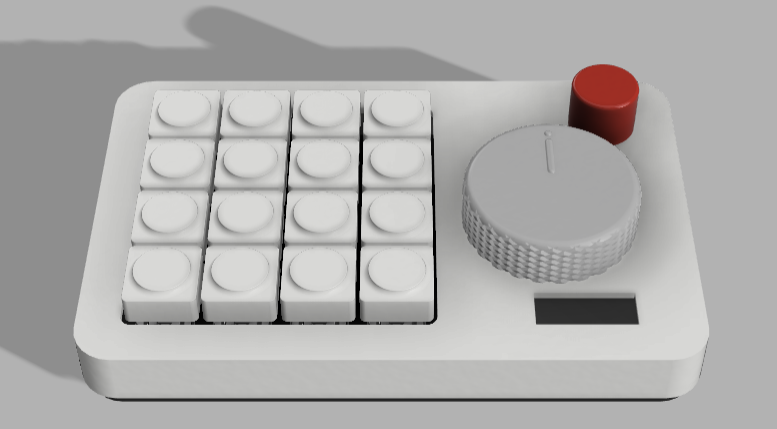
render of the makropad

You can put most makropad-like keyboards in two categories:

Way too expensive and overbloated with useless features

or

An ok price but an ugly design (in my opinion)

That's what motivated me to make my own makropad. It's designed to be easily built, having just the right amount of features all while having a sleek minimalistic design.

Features

  • Arduino Pro Micro MCU (ATmega32u4)
  • Two customizable rotary encoders
  • A 128x32 OLED that displays helpful information
  • Custom shortcuts for any program (with QMK)
  • Power via USB-C
  • Sleek minimalistic case optimised for CNC milling and 3D printing
  • Hot swap switches

PCB

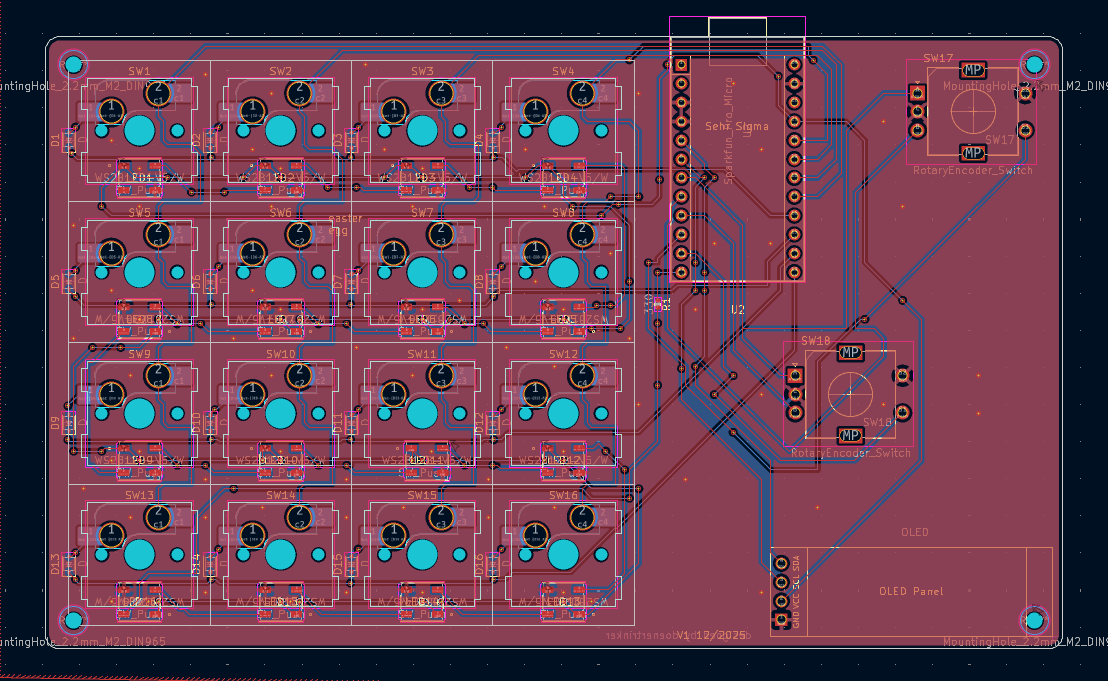
The pcb layout

screenshot of the pcb layout

The schematics

The MCU with the encoders and OLED

image of mcu + encoders

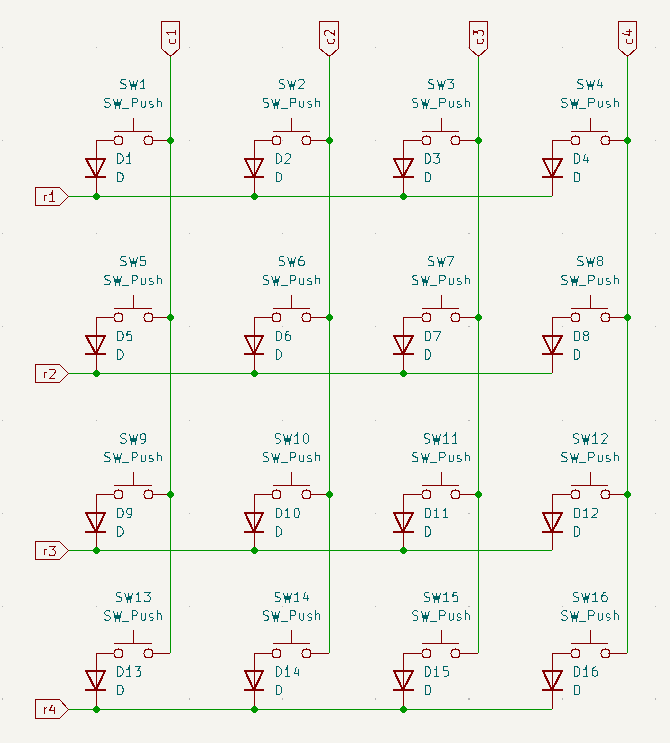
The switch matrix

image of the switch matrix

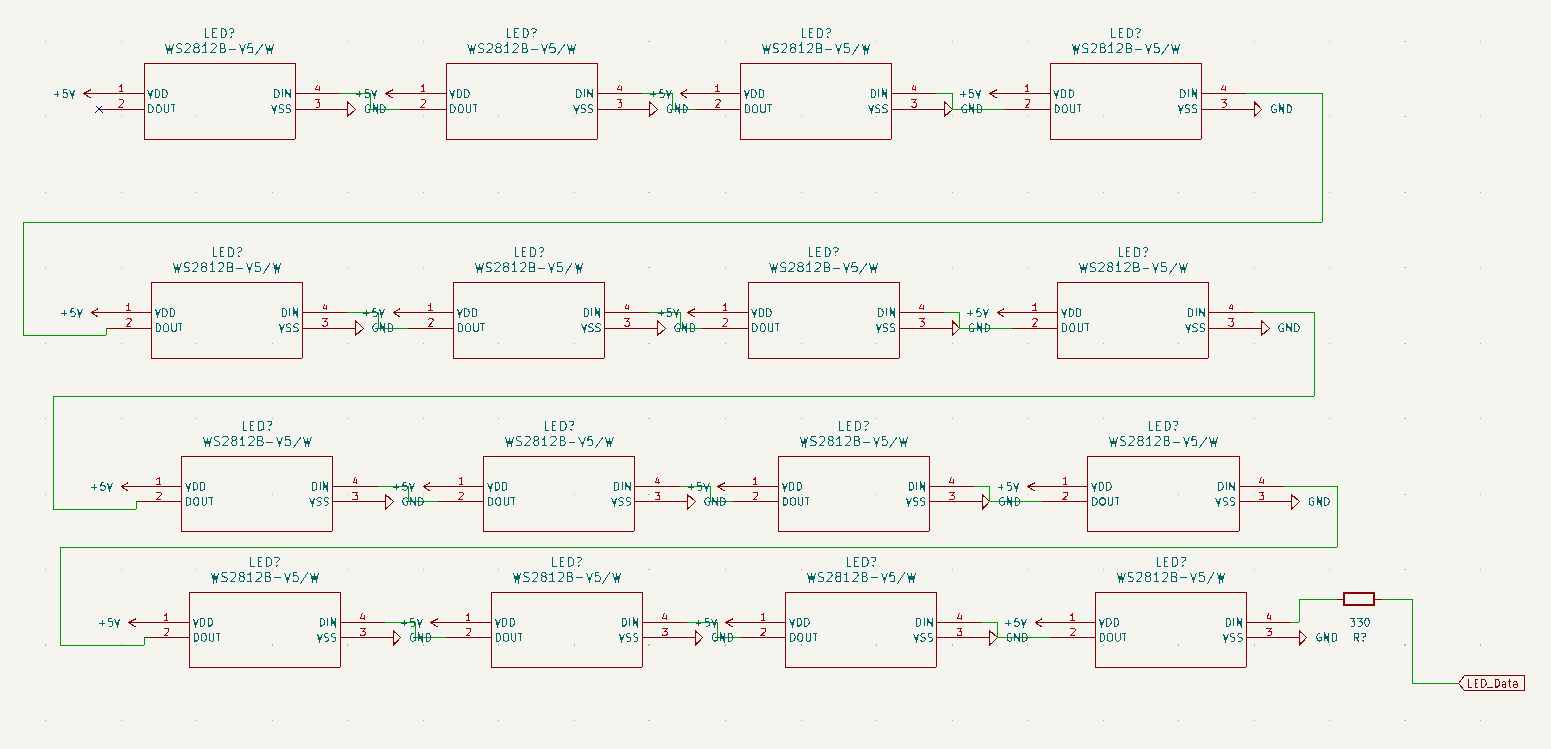
The LED matrix

image of the led matrix

First start

  • By default the makropad will work like a standard numpad in the following format:

7 8 9 +

4 5 6 -

1 2 3 *

0 . / ↵

  • You can either just compile and flash the firmware with QMK toolbox or choose to customize the code further to your needs
  • By customizing the QMK files you can make it your own

BOM

This is an estimated cost:

Product NameProduct DescriptionProduct LinkProduct Unit Cost in EURProduct AmountTotal in EUR
1N4148WSDiode SOD-323https://jlcpcb.com/partdetail/2485-1N4148WS/C21280.007916.00.13
-128x32 OLEDhttps://www.amazon.de/-/en/gp/product/B07BDFXFRK4.51.04.5
WS2812B-V5/WLED 5050https://jlcpcb.com/partdetail/Worldsemi-WS2812B_V5W/C28748850.0916.01.34
RCA02330RJLF330 Ohm resistor 0402https://jlcpcb.com/partdetail/23789673-RCA02330RJLF/C223562290.00031.00
CHERRY MX2A-71NNCherry style keyboardswitchhttps://www.reichelt.de/de/de/shop/produkt/cherry_mx_silent_red_-_tastenmodul_-_schnappbefestigung-3615310.7516.012
-EC11 Rotary encoderhttps://www.amazon.de/-/en/gp/product/B08728PS6N2.02.04
ARD PRO-MICRO-CArduino Pro Micro (ATmega32u4)https://www.reichelt.de/de/de/shop/produkt/arduino_-_mikrocontroller_atmega32u4_usb-c-4216077.991.07.99
YMDK Kailh CPG151101S11Kailh Hotswap Socketshttps://www.amazon.de/-/en/YMDK-CPG151101S11-Swappable-Mechanical-Keyboards/dp/B07K8CCMQZ0.1616.02.56
32.52

Parts

57
QtyValueFootprintReferences
16DDiode_SMD:D_SOD-323D1, D2, D3, D4, D5, D6, D7, D8, D9, D10, D11, D12, D13, D14, D15, D16
16SW_PushPCM_Switch_Keyboard_Hotswap_Kailh:SW_Hotswap_Kailh_MX_Plated_1.00uSW1, SW2, SW3, SW4, SW5, SW6, SW7, SW8, SW9, SW10, SW11, SW12, SW13, SW14, SW15, SW16
16WS2812B-V5/WWS2812B-V5/W:SMD4_LED_SMD5050_WS2812B_WDSLED1, LED2, LED3, LED4, LED5, LED6, LED7, LED8, LED9, LED10, LED11, LED12, LED13, LED14, LED15, LED16
2RotaryEncoder_SwitchRotary_Encoder:RotaryEncoder_Alps_EC11E-Switch_Vertical_H20mmSW17, SW18
1330Resistor_SMD:R_0402_1005MetricR1
1OLEDOLED:SSD1306-0.91-OLED-4pin-128x32J1
1Sparkfun_Pro_MicroArduinoPro:Sparkfun_Pro_MicroU2

The 53 most common of 57 parts.

Similar boards

  • 2 layers47.5 × 47.5 mmDisco on a Skirt RC1, the printed circuit board in 3D

    Disco on a Skirt RC1

    Dfdye/Voron_Mods

    The parts in this repository have been designed for my own use, and not specifically for public release. As such, they probably contain multiple errors, and are subject to change without notice.

    26 parts31GPL-3.0
  • 4 layers198.4 × 104.3 mmDC33, the printed circuit board in 3D

    DC33

    Maritime-Hacking-Village/Badge-2025

    Public repository for the official MHV 2025 badge.

    200 parts15CERN-OHL-W-2.0
  • 2 layers101 × 56 mmBenchtop V1, the printed circuit board in 3D

    Benchtop V1

    hkienle/osh-vacuum

    This PCB is designed to control a high RPM impeller for vacuum machines. It provides comprehensive control and monitoring capabilities with modern connectivity options.

    82 parts8
  • 2 layers40 × 24 mmVeittur p1-ble, the printed circuit board in 3D

    Veittur p1-ble

    karlp/veittur-p1-ble

    euro P1 meter HAN port to BLE...

    30 partsBSD-2-Clause
  • 2 layers127 × 82 mmLightbox, the printed circuit board in 3D

    Lightbox

    roy-rishi/lithophane-lightbox

    60 parts
  • 4 layers33.3 × 20 mmRegulator30Leds17V5V, the printed circuit board in 3D

    Regulator30Leds17V5V

    Jochen0x90h/LedStrip

    Receiver and voltage regulator for LED strips based on WS2812 or equivalent

    17 partsMIT
  • 2 layers59.2 × 52.9 mmMagic epaper, the printed circuit board in 3D

    Magic epaper

    fossasia/magic-epaper-hardware

    Magic ePaper Hardware

    57 parts1kApache-2.0
  • 2 layers100 × 70.3 mmModulAdapter universal, the printed circuit board in 3D

    ModulAdapter universal

    GaudiLabs/OpenDrop

    Open Source Digital Microfluidics Bio Lab

    57 parts492GPL-3.0

Questions

How big is the Makropad PCB?

It measures 137.2 × 82.6 mm and has 2 copper layers, 1.6 mm thick.

What parts does the Makropad use?

57 parts, built around the WS2812B-V5/W. The full list of its parts is on this page, with links to each part's symbol and footprint where PCBKit's library has them.

Where can I download the Makropad KiCad files?

From the doenertrinker909/Makropad repository on GitHub, at the commit this page was made from: the board is Hardware/KiCAD/Makropad.kicad_pcb and its schematic Hardware/KiCAD/LedMatrix.kicad_sch. PCBKit opens the board in the browser, with nothing to install.

Can I use the Makropad design in my own project?

Its repository states no licence, so its author keeps all rights: ask doenertrinker909 before reusing the design.