2 layers63.5 × 36.8 mm
CYMOCAN G0
CYMOTIVE/CYMOCAN
Low cost USB to CAN-FD (Controller Area Network - Flexible Data rate) interface.
39 parts20

 CYMOTIVE/CYMOCAN20
Low cost USB to CAN-FD (Controller Area Network - Flexible Data rate) interface.
DEBUGEDGE BREAKOUT is an open-source printed circuit board by CYMOTIVE, from the CYMOTIVE/CYMOCAN repository on GitHub. It is a 2-layer board of 17.8 × 27.9 mm with 4 parts on 11 nets, routed with 105 tracks and 3 vias.
It belongs with the interfaces and adapters boards of this library.
CYMOCAN is a low cost USB to CAN-FD (Controller Area Network - Flexible Data rate) interface.
Using the CandleLight firmware CYMOCAN can work with Windows(WCID USB) and Linux(SocketCAN over gs_usb).
CYMOCAN_G0 has:
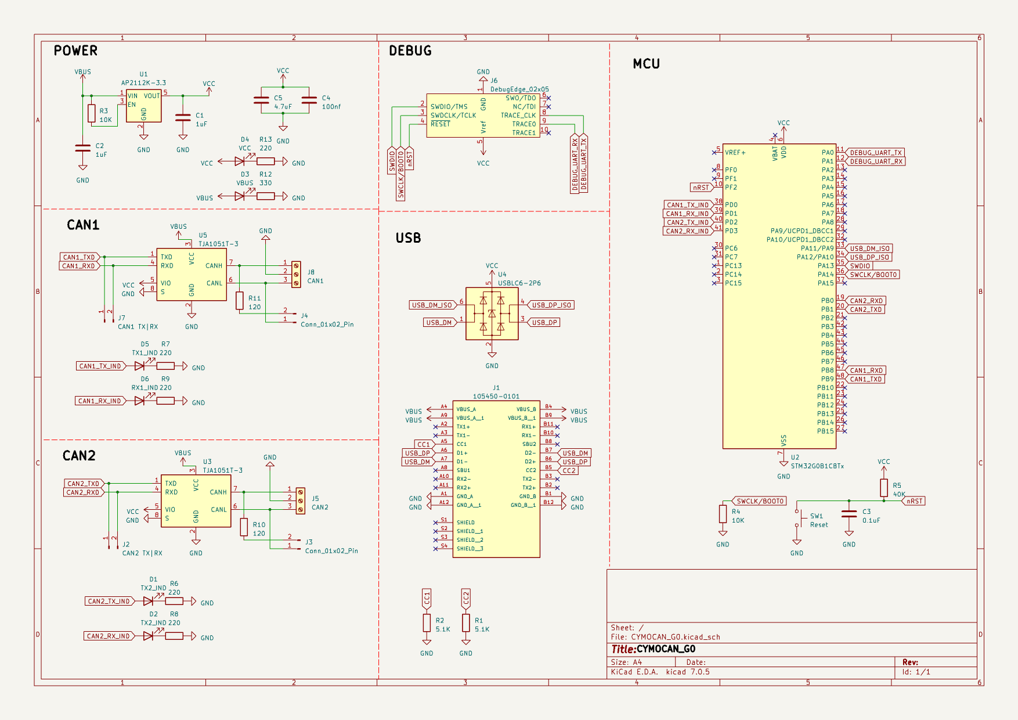
CYMOCAN_G0 BOM
| Reference | Description | Quantity |
|---|---|---|
| C1, C2 | 0603 1uF Capacitor | 2 |
| C3 | 0603 0.1uF Capacitor | 1 |
| C4 | 0603 100nf Capacitor | 1 |
| C5 | 0603 4.7uF Capacitor | 1 |
| D1, D2, D3, D4, D5, D6 | 0603 LED | 6 |
| J1 | Molex 105450-0101 USB-C socket | 1 |
| J2, J3, J4, J7 | 01x02 Pin Header | 4 |
| J5, J8 | 3 Pin TerminalBlock Bornier 5.08mm | 2 |
| R1, R2 | 0603 5.1K Resistor | 2 |
| R3, R4 | 0603 10K Resistor | 2 |
| R5 | 0603 40K Resistor | 1 |
| R6, R7, R8, R9, R13 | 0603 220 Resistor | 5 |
| R10, R11 | 0603 120 Resistor | 2 |
| R12 | 0603 330 Resistor | 1 |
| SW1 | Push switch 6mm THT | 1 |
| U1 | AP2112K-3.3 LDO regulator | 1 |
| U2 | STM32G0B1CBT6 Microcontroller | 1 |
| U3, U5 | TJA1051T-3 CAN transceiver | 2 |
| U4 | USBLC6-2P6 USB ESD protection diodes | 1 |
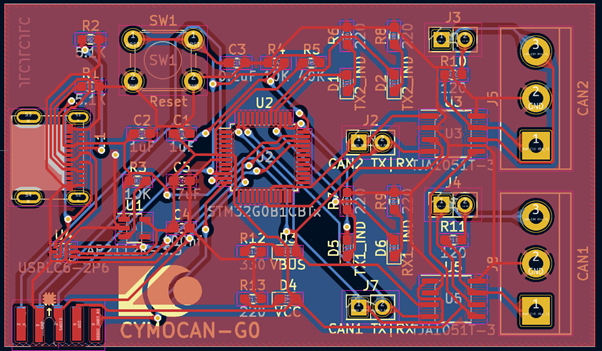
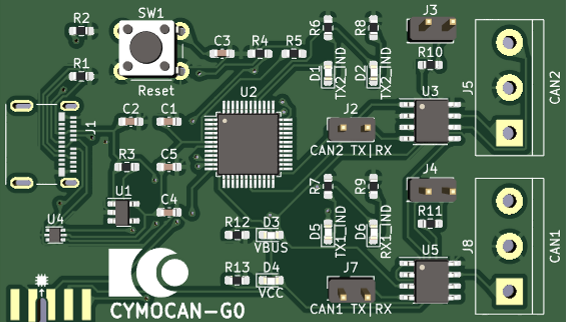
You Do not need this in order to flash and use the CYMOCAN board. This breakout is only necessary if you wish to debug the board during development.
After assembling the device follow the flashing instructions in the CandleLight firmware Repo.
For now use the PR https://github.com/candle-usb/candleLight_fw/pull/139 and the nucleo_g0b1re target.
You will need to compile a kernel version 5.18 or above for GS_USB CAN-FD support. The flags you must enable are:
After compiling and installing the Kernel the CYMOCAN will appear as a standard SocketCAN device.
To setup the device for classic CAN use the following commands
sudo ip link set can0 qlen 1000
sudo ip link set can0 up type can bitrate 500000
Subsitute can0 for the channel you are using. Now you can use the device with any SocketCAN compatible software.
TODO
| Qty | Value | Footprint | References |
|---|---|---|---|
| 1 | Conn_01x10_Pin | Connector_PinHeader_2.54mm:PinHeader_1x10_P2.54mm_Vertical | J3 |
| 1 | Conn_ARM_JTAG_SWD_10 | Connector_PinHeader_1.27mm:PinHeader_2x05_P1.27mm_Vertical_SMD | J2 |
| 1 | DebugEdge_02x05 | DebugEdge:DebugEdge_2x05_Host | J1 |
| 1 | LOGO | LOGO | G*** |
CYMOTIVE/CYMOCAN
Low cost USB to CAN-FD (Controller Area Network - Flexible Data rate) interface.

joypad-ai/joypad-os
Universal controller firmware for building adapters, dongles, and custom controllers.


hackclub/OnBoard
💡 Join 1,000 teenagers and make your first PCB with a $100 grant!

tardate/LittleArduinoProjects
a collection of "Little Electronic & Arduino Projects", most involving electronics or an Arduino in one way or another!

drandyhaas/KiCadRoutingTools
A set of Python/Rust tools to aid routing in KiCad

osy/XG_Mobile_Station
Open source eGPU dock for ROG Ally and ROG Flow

Luos-io/luos_engine
Open-source and real-time orchestrator for cyber-physical-systems, to easily design, test and deploy embedded applications and digital twins.

NVNTLabs/switch2-SDEX2M2
Micro SD Express to M.2 NVME Adapter for Nintendo Switch 2
It measures 17.8 × 27.9 mm and has 2 copper layers, 1.6 mm thick.
4 parts. The full list of its parts is on this page, with links to each part's symbol and footprint where PCBKit's library has them.
From the CYMOTIVE/CYMOCAN repository on GitHub, at the commit this page was made from: the board is hardware/DEBUGEDGE_BREAKOUT/DEBUGEDGE_BREAKOUT.kicad_pcb and its schematic hardware/CYMOCAN_G0/CYMOCAN_G0.kicad_sch. PCBKit opens the board in the browser, with nothing to install.
Its repository states no licence, so its author keeps all rights: ask CYMOTIVE before reusing the design.