2 layers

 cwahlmann/vz2003
Nachbau eines VZ200-Color-Computers (1983)
Vz200-keyboard layout is an open-source printed circuit board by cwahlmann, from the cwahlmann/vz200 repository on GitHub, published under the GPL-3.0 licence. It is a 2-layer board of 174.5 × 71.6 mm with 50 parts on 23 nets, routed with 1,046 tracks and 2 vias.
Its parts include 45 switches, 2 connectors, 1 resistor, 1 IC and 1 diode. It belongs with the keyboards and input boards of this library.
Mit einem funktionstüchtigen Nachbau des "VZ200 Color Computer" von 1983 lassen wir die Welt der 8-Bit Computer wieder auferstehen.
Autoren: Jürgen Wahlmann & Christian Wahlmann

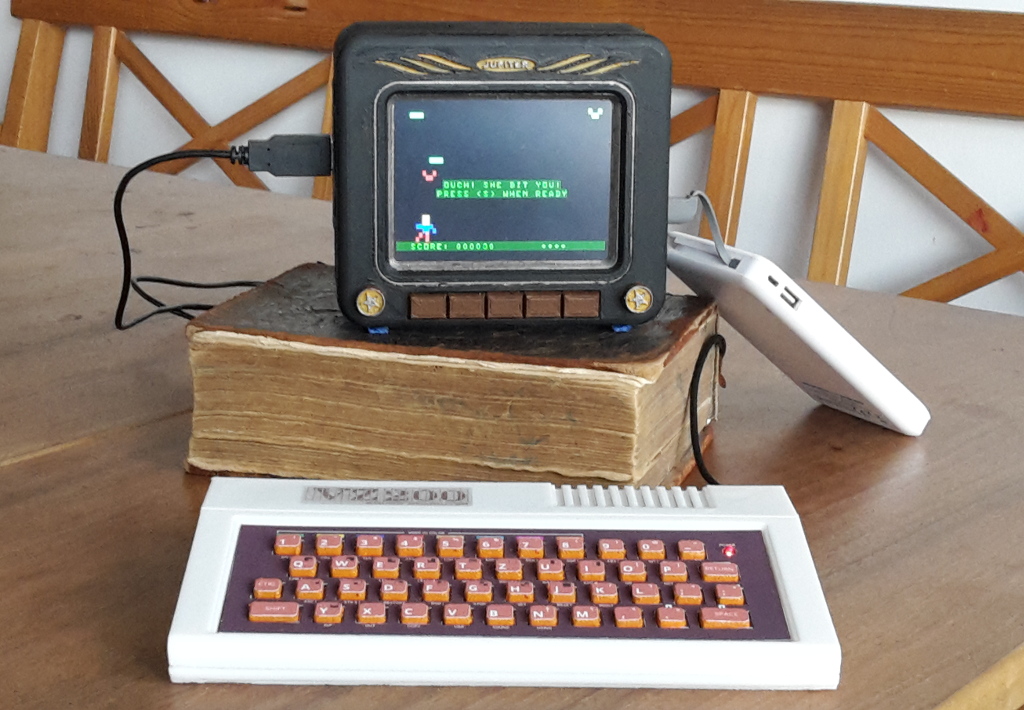
Dieses Repository dient der Verwaltung aller Sourcen, insbesondere
Dokumentation und Releases sind gehostet unter https://cwahlmann.github.io/vz200-remake
| Qty | Value | Footprint | References |
|---|---|---|---|
| 1 | 110 | Resistors_ThroughHole:R_Axial_DIN0204_L3.6mm_D1.6mm_P7.62mm_Horizontal | R1 |
| 1 | KeyWarrier24-8Mod | Socket_Strips:Socket_Strip_Straight_1x22_Pitch2.54mm | U1 |
| 1 | Led_Small | LEDs:LED_D1.8mm_W3.3mm_H2.4mm | D1 |
| 1 | PWR-LED | Pin_Headers:Pin_Header_Straight_1x02_Pitch2.54mm | P1 |
| 1 | Reset-Button | Pin_Headers:Pin_Header_Straight_1x02_Pitch2.54mm | P2 |
| 1 | key-/ß | Buttons_Switches_ThroughHole:SW_PUSH_6mm | SW4 |
| 1 | key-apostroph/Ä | Buttons_Switches_ThroughHole:SW_PUSH_6mm | SW32 |
| 1 | key-comma | Buttons_Switches_ThroughHole:SW_PUSH_6mm | SW5 |
| 1 | key-ctrl-left | Buttons_Switches_ThroughHole:SW_PUSH_6mm | SW38 |
| 1 | key-dot | Buttons_Switches_ThroughHole:SW_PUSH_6mm | SW10 |
| 1 | key-enter | Buttons_Switches_ThroughHole:SW_PUSH_6mm | SW45 |
| 1 | key-left-shift | Buttons_Switches_ThroughHole:SW_PUSH_6mm | SW39 |
| 1 | key-semicolon/Ö | Buttons_Switches_ThroughHole:SW_PUSH_6mm | SW26 |
| 1 | key-space | Buttons_Switches_ThroughHole:SW_PUSH_6mm | SW25 |
| 1 | key0 | Buttons_Switches_ThroughHole:SW_PUSH_6mm | SW9 |
| 1 | key1 | Buttons_Switches_ThroughHole:SW_PUSH_6mm | SW3 |
| 1 | key2 | Buttons_Switches_ThroughHole:SW_PUSH_6mm | SW8 |
| 1 | key3 | Buttons_Switches_ThroughHole:SW_PUSH_6mm | SW13 |
| 1 | key4 | Buttons_Switches_ThroughHole:SW_PUSH_6mm | SW2 |
| 1 | key5 | Buttons_Switches_ThroughHole:SW_PUSH_6mm | SW7 |
| 1 | key6 | Buttons_Switches_ThroughHole:SW_PUSH_6mm | SW12 |
| 1 | key7 | Buttons_Switches_ThroughHole:SW_PUSH_6mm | SW1 |
| 1 | key8 | Buttons_Switches_ThroughHole:SW_PUSH_6mm | SW6 |
| 1 | key9 | Buttons_Switches_ThroughHole:SW_PUSH_6mm | SW11 |
| 1 | keyA | Buttons_Switches_ThroughHole:SW_PUSH_6mm | SW14 |
| 1 | keyB | Buttons_Switches_ThroughHole:SW_PUSH_6mm | SW20 |
| 1 | keyC | Buttons_Switches_ThroughHole:SW_PUSH_6mm | SW27 |
| 1 | keyD | Buttons_Switches_ThroughHole:SW_PUSH_6mm | SW33 |
| 1 | keyE | Buttons_Switches_ThroughHole:SW_PUSH_6mm | SW40 |
| 1 | keyF | Buttons_Switches_ThroughHole:SW_PUSH_6mm | SW15 |
| 1 | keyG | Buttons_Switches_ThroughHole:SW_PUSH_6mm | SW21 |
| 1 | keyH | Buttons_Switches_ThroughHole:SW_PUSH_6mm | SW28 |
| 1 | keyI | Buttons_Switches_ThroughHole:SW_PUSH_6mm | SW34 |
| 1 | keyJ | Buttons_Switches_ThroughHole:SW_PUSH_6mm | SW41 |
| 1 | keyK | Buttons_Switches_ThroughHole:SW_PUSH_6mm | SW16 |
| 1 | keyL | Buttons_Switches_ThroughHole:SW_PUSH_6mm | SW22 |
| 1 | keyM | Buttons_Switches_ThroughHole:SW_PUSH_6mm | SW29 |
| 1 | keyN | Buttons_Switches_ThroughHole:SW_PUSH_6mm | SW35 |
| 1 | keyO | Buttons_Switches_ThroughHole:SW_PUSH_6mm | SW42 |
| 1 | keyP | Buttons_Switches_ThroughHole:SW_PUSH_6mm | SW17 |
| 1 | keyQ | Buttons_Switches_ThroughHole:SW_PUSH_6mm | SW23 |
| 1 | keyR | Buttons_Switches_ThroughHole:SW_PUSH_6mm | SW30 |
| 1 | keyS | Buttons_Switches_ThroughHole:SW_PUSH_6mm | SW36 |
| 1 | keyT | Buttons_Switches_ThroughHole:SW_PUSH_6mm | SW43 |
| 1 | keyU | Buttons_Switches_ThroughHole:SW_PUSH_6mm | SW18 |
| 1 | keyV | Buttons_Switches_ThroughHole:SW_PUSH_6mm | SW24 |
| 1 | keyW | Buttons_Switches_ThroughHole:SW_PUSH_6mm | SW31 |
| 1 | keyX | Buttons_Switches_ThroughHole:SW_PUSH_6mm | SW37 |
| 1 | keyY/Z | Buttons_Switches_ThroughHole:SW_PUSH_6mm | SW44 |
| 1 | keyZ/Y | Buttons_Switches_ThroughHole:SW_PUSH_6mm | SW19 |


hackclub/OnBoard
💡 Join 1,000 teenagers and make your first PCB with a $100 grant!

dmcke5/NucDeck
The Open Source DIY Handheld Gaming PC!


roarfred/AmsToMqttBridge
Minimalistic system to read AMS/HAN data from electrical meter
It measures 174.5 × 71.6 mm and has 2 copper layers, 1.6 mm thick.
50 parts. The full list of its parts is on this page, with links to each part's symbol and footprint where PCBKit's library has them.
From the cwahlmann/vz200 repository on GitHub, at the commit this page was made from: the board is tastatur/keyboard-layout/vz200-keyboard-layout.kicad_pcb. PCBKit opens the board in the browser, with nothing to install.
Its repository publishes it under the GPL-3.0 licence: you may reuse it on that licence's terms (keep the author's notice, and for a copyleft licence share your changes alike).