2 layers139.5 × 94.6 mm

 crolbar/yuki9
my keyboard
Yuki pcb V01 is an open-source printed circuit board by crolbar, from the crolbar/yuki repository on GitHub, published under the GPL-3.0 licence. It is a 2-layer board of 141.6 × 97.9 mm with 31 parts on 38 nets, routed with 321 tracks and 0 vias.
Its parts include 22 switches, 1 IC and 1 connector. It belongs with the keyboards and input boards and the STM32 boards of this library.
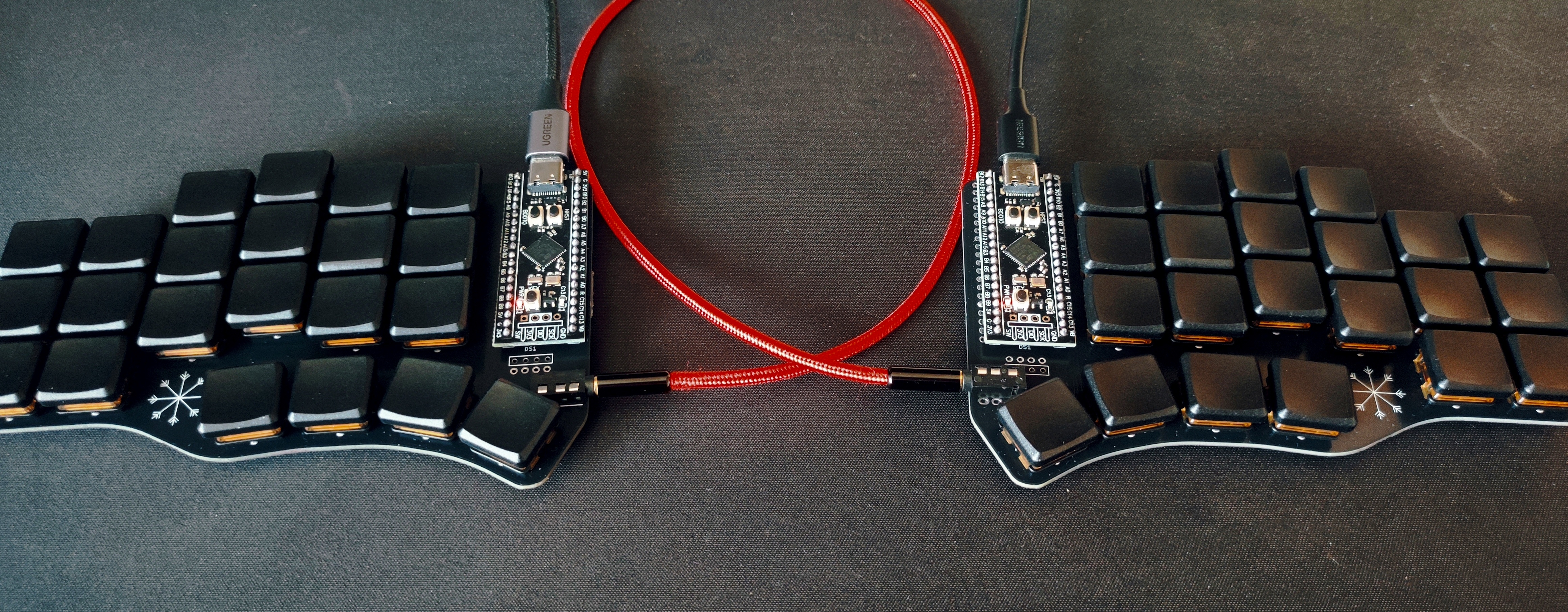 Made with Keyberon
| Layer | Description |
|---|---|
| Layer 0 | Firmware Dvorak |
| Layer 1 | Numbers & Symbols |
| Layer 2 | Less used keys & Macros |
| Layer 3 | Mouse movement & buttons |
| Layer 4 | Qwerty |
| Product | Qty | Note |
|---|---|---|
| YUKI PCB | 2 | KiCad project files can be found in yuki_pcb directory. I ordered them from JLCPCB. They are reversible so you will use the same pcb for both left and right. |
| STM32F401CCU6 | 2 | Can be found on aliexpress. I have ordered mine from a local vendor. |
| TRRS jacks | 2 | PJ-320A |
| TRRS cable | 1 | 3.5mm jack cable, with 3 stripes. |
| Switches | 44 | Cherry MX for v0.1 and Kailh Choc V1 for v0.2. Ordered from splitkb |
| Keycaps | 44 | 1U keycaps. Ordered from splitkb. |
You will need rust installed so:
curl --proto '=https' --tlsv1.2 -sSf https://sh.rustup.rs | shcargo-binutils for stripping unused data from the rust binary and other optimizations:
rustup component add llvm-tools
cargo install cargo-binutils
dfu-util for flashing:
sudo pacman -S dfu-utiladd the rust target for the MCU:
rustup target add thumbv7em-none-eabihfthen to compile the firmware:
cargo objcopy --bin yuki --release -- -O binary yuki.binfor the right board add --features right
to flash enter dfu by holding BOOT clicking RESET and releasing BOOT and enter (can be tricky):
dfu-util -d 0483:df11 -a 0 --dfuse-address 0x08000000:leave -D yuki.bin"After that to enter dfu just hold button 05 and 33 click reset and release the buttons.
if you are on NixOS you could use the devShell:
enter the dev shell:
nix developand use the flash script that can be found in flash.nix
flash right| Qty | Value | Footprint | References |
|---|---|---|---|
| 22 | KEYSW | YUKI:CherryMX_rev | K00, K01, K02, K03, K04, K05, K10, K11, K12, K13, K14, K15, K20, K21, K22, K23 +6 |
| 3 | LOGO | YUKI:RUST_GEAR | G***, G***, G*** |
| 1 | OLED | YUKI:OLED | DS1 |
| 1 | TRRS | YUKI:MJ-4PP-9_Cantor_MX_TX-RX_Crossover | J1 |
| 1 | YAAJ_WeAct_BlackPill_Part_Like | YUKI:YUKI_YAAJ_WeAct_BlackPill_2 | U1 |
The 28 most common of 31 parts.

joeycastillo/Sensor-Watch
A board replacement for the classic Casio F-91W wristwatch

hoglet67/RGBtoHDMI
Bare-metal Raspberry Pi project that provides pixel-perfect sampling of Retro Computer RGB/YUV video and conversion to HDMI

hackclub/OnBoard
💡 Join 1,000 teenagers and make your first PCB with a $100 grant!

openwch/ch32v003
CH32V003 is an ultra-cheap RISC-V MCU with 2KB SRAM, 16KB flash, and up to 18 GPIOs that sells for under $0.10

Luos-io/luos_engine
Open-source and real-time orchestrator for cyber-physical-systems, to easily design, test and deploy embedded applications and digital twins.

BlueAndi/Pixelix
Full RGB LED matrix, based on an ESP32 and WS2812B LEDs or emulated LEDs on TFT.


It measures 141.6 × 97.9 mm and has 2 copper layers, 1.6 mm thick.
31 parts. The full list of its parts is on this page, with links to each part's symbol and footprint where PCBKit's library has them.
From the crolbar/yuki repository on GitHub, at the commit this page was made from: the board is yuki_pcb/yuki_pcb_V01.kicad_pcb and its schematic yuki_pcb/yuki_pcb.kicad_sch. PCBKit opens the board in the browser, with nothing to install.
Its repository publishes it under the GPL-3.0 licence: you may reuse it on that licence's terms (keep the author's notice, and for a copyleft licence share your changes alike).