2 layers100 × 100 mm
Zxevo1010 main
UzixLS/zxevo1010-board
10x10cm PCB variant of ZX-Evolution project for G738/G706 enclosure
252 parts26

 conejoninja/arcade7
Gopher Arcade
Gopher arcade is an open-source printed circuit board by conejoninja, from the conejoninja/arcade repository on GitHub, published under the Apache-2.0 licence. It is a 2-layer board of 99.9 × 43.2 mm with 14 parts on 12 nets, routed with 116 tracks and 4 vias.
It is built around the ATTINY85-20PU, SN74LVC2G04DBVR and CPT-1203-78-SMT-TR, with the EG1213 among its other parts. Its parts include 3 switches, 2 resistors, 2 ICs and 1 connector. It belongs with the retro computing and games boards and the AVR (ATmega, ATtiny) boards of this library.


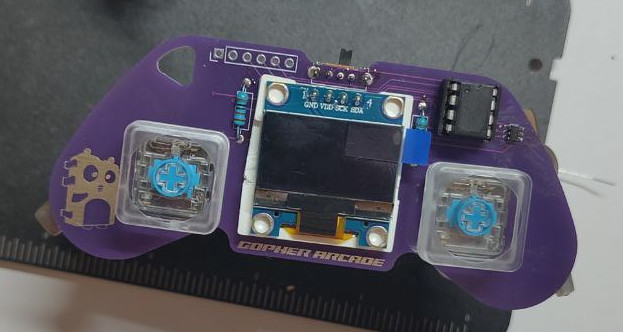
Gopher ARCADE is a simple ATTiny85 game console based on Armour Grade. I wanted to make some modifications and also improve my PCB making skills, so I recreated it from scratch since there were no source files, only gerbers.
There's a good collection of games written in Arduino/C: https://github.com/andyhighnumber/Attiny-Arduino-Games
My idea is to write some games in Go with TinyGo
While is pretty straight forward to mount all the components, check out the build guide for the easiest order to do so.
In the hardware/kicad folder you could find the KiCAD project with the used mods as well as the gerbers files in case you want to just order some PCBs without modifying them.
| No | Item name | Quantity | Notes |
|---|---|---|---|
| 1 | PCB | 1 | |
| 2 | ATTiny85 20PU | 1 | |
| 3 | DIP8P socket | 1 | |
| 4 | SSD1306 I²C 128x64 display | 1 | |
| 5 | 10k ohm resistors (through hole) | 2 | |
| 6 | SN74LVC2G04DBVR | 1 | |
| 7 | CPT-1203-78-SMT-TR (buzzer) | 1 | |
| 8 | EG1213 switch | 1 | |
| 9 | CR2032 battery holder (smd) | 1 | |
| 10 | Kailh choc v2 low profile | 2 | footprint accepts both kailh choc v1 & v2 |
| 11 | Kailh choc v2 low profile keycap | 2 | |
| 12 | Display spacer (3d printed) | 1 | optional, but helps aligning the display |
The github.com/conejoninja/arcade/tinyssd1306 package has a simple driver for the display as the once in the drivers repository has a buffer and doesn't fit in the ATTiny85.
Board's pins are defined as follows:
const (
	P5 Pin = PB0
	P6 Pin = PB1
	P7 Pin = PB2
	P2 Pin = PB3
	P3 Pin = PB4
	P1 Pin = PB5

	LED          = P1
	BUTTON_LEFT  = P7
	BUTTON_RIGHT = P5
	SPEAKER      = P6
)You need TinyGo and avrdude. Depending on your OS, you can check the installation instructions.
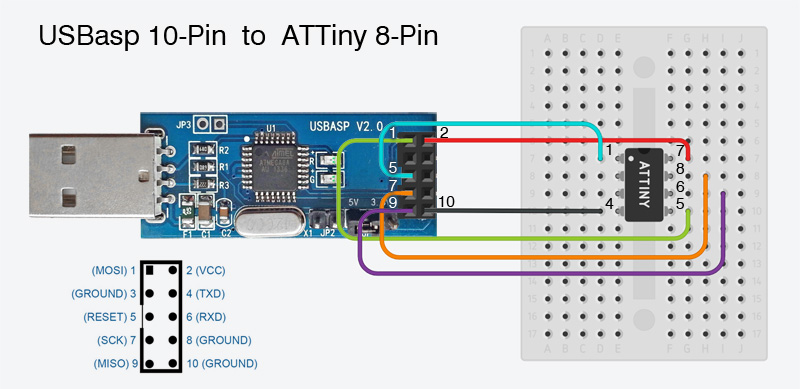
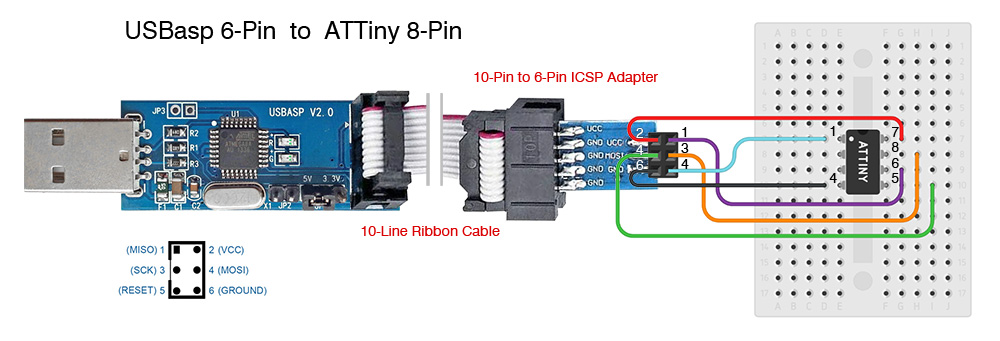
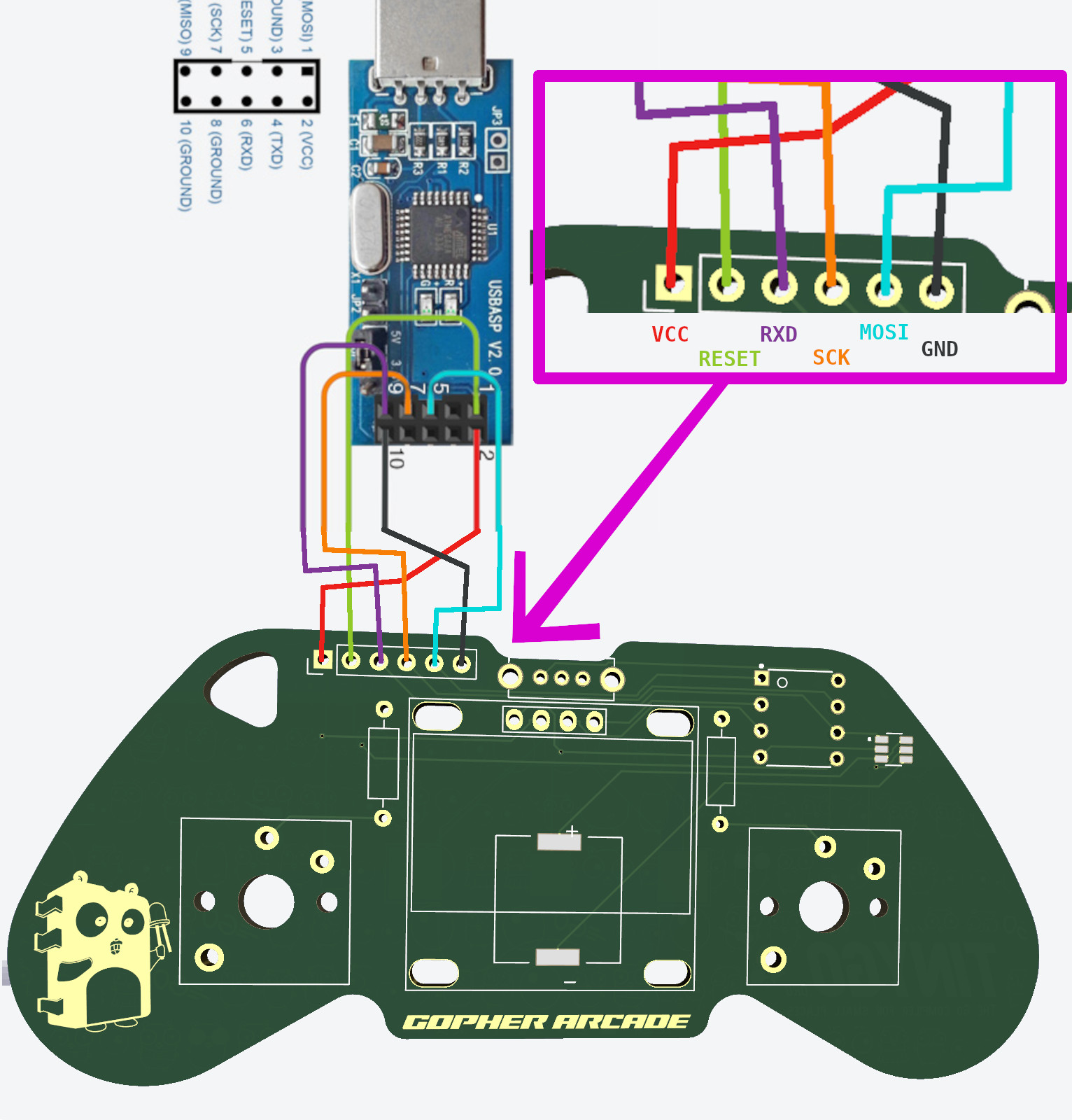
Here you could find how to connect it to your USBasp probe.
You could use the 10-Pin connector to the ATTiny85:
You could use the 6-Pin connector to the ATTiny85:
Or if you don't want to take out/in the chip each time (you could damage the pins of the ATTiny), you could connect to the board directly as follows:
By default the ATTiny85 runs at 1MHz, you can make it runs at 8MHz with the following command (this is only required once).
avrdude -p attiny85 -c usbasp -B 32 -U lfuse:w:0xE2:mYou could use TinyGo with USBASP and the target gopher-arcade to flash it as follows:
tinygo flash -size=short -target gopher-arcade .There's a good collection of games written in Arduino/C: https://github.com/andyhighnumber/Attiny-Arduino-Games
Note: some of then need a different board with analog input or more buttons.
Unfortunately I can not provide support on how to flash them (use the Arduino IDE *wink *wink) as it defeats the purpose of programming them with TinyGo!
| Qty | Value | Footprint | References |
|---|---|---|---|
| 2 | R | Resistor_THT:R_Axial_DIN0207_L6.3mm_D2.5mm_P10.16mm_Horizontal | R1, R2 |
| 2 | SW_Push | PCM_Switch_Keyboard_Kailh:SW_Kailh_Choc_V1V2 | SW1, SW2 |
| 1 | ATTINY85-20PU | mods:DIP762W46P254L927H533Q8B | U1 |
| 1 | Battery_Cell | Battery:BatteryHolder_Multicomp_BC-2001_1x2032 | BT1 |
| 1 | CPT-1203-78-SMT-TR | mods:XDCR_CPT-1203-78-SMT-TR | LS1 |
| 1 | Conn_01x06_Socket | Connector_PinHeader_2.54mm:PinHeader_1x06_P2.54mm_Vertical | J1 |
| 1 | EG1213 | mods:SW_EG1213 | S1 |
| 1 | LOGO | mods:scaled_chip_gopher | G*** |
| 1 | SN74LVC2G04DBVR | mods:SOT95P280X145-6N | U2 |
| 1 | SSD1306 | SSD1306:128x64OLED | Brd1 |
The 12 most common of 14 parts.
It measures 99.9 × 43.2 mm and has 2 copper layers, 1.6 mm thick.
14 parts, built around the ATTINY85-20PU, SN74LVC2G04DBVR, CPT-1203-78-SMT-TR and EG1213. The full list of its parts is on this page, with links to each part's symbol and footprint where PCBKit's library has them.
From the conejoninja/arcade repository on GitHub, at the commit this page was made from: the board is hardware/kicad/gopher-arcade/gopher-arcade.kicad_pcb and its schematic hardware/kicad/gopher-arcade/gopher-arcade.kicad_sch. PCBKit opens the board in the browser, with nothing to install.
Its repository publishes it under the Apache-2.0 licence: you may reuse it on that licence's terms (keep the author's notice, and for a copyleft licence share your changes alike).
UzixLS/zxevo1010-board
10x10cm PCB variant of ZX-Evolution project for G738/G706 enclosure

UzixLS/zxuno1010-board
10x10cm PCB variant of ZX-UNO project for G738/G706 enclosure


frc971/electrical
This repo contains the electrical files for the 971 FRC team. The files include PCBs and the electrical system diagrams. The PCBs are created using KiCad.

DeadlySIn777/Controller
Unfinished CNC controller motherboard: native KiCad sources, rules, DSN and global routing review

SolarEnergyRacers/solar_car_control_system_v6
solarenergyracers.ch - control system (AC, DC, MC), Documents
