DIAG
Nakazoto/CenturionComputer
This is just a simple backup of all the files related to the Centurion that I have stored on my HD. The Wiki itself has far more in-depth information about the Centurion and it's individual cards.

E-Ink TODO List using google calendar as a data source.
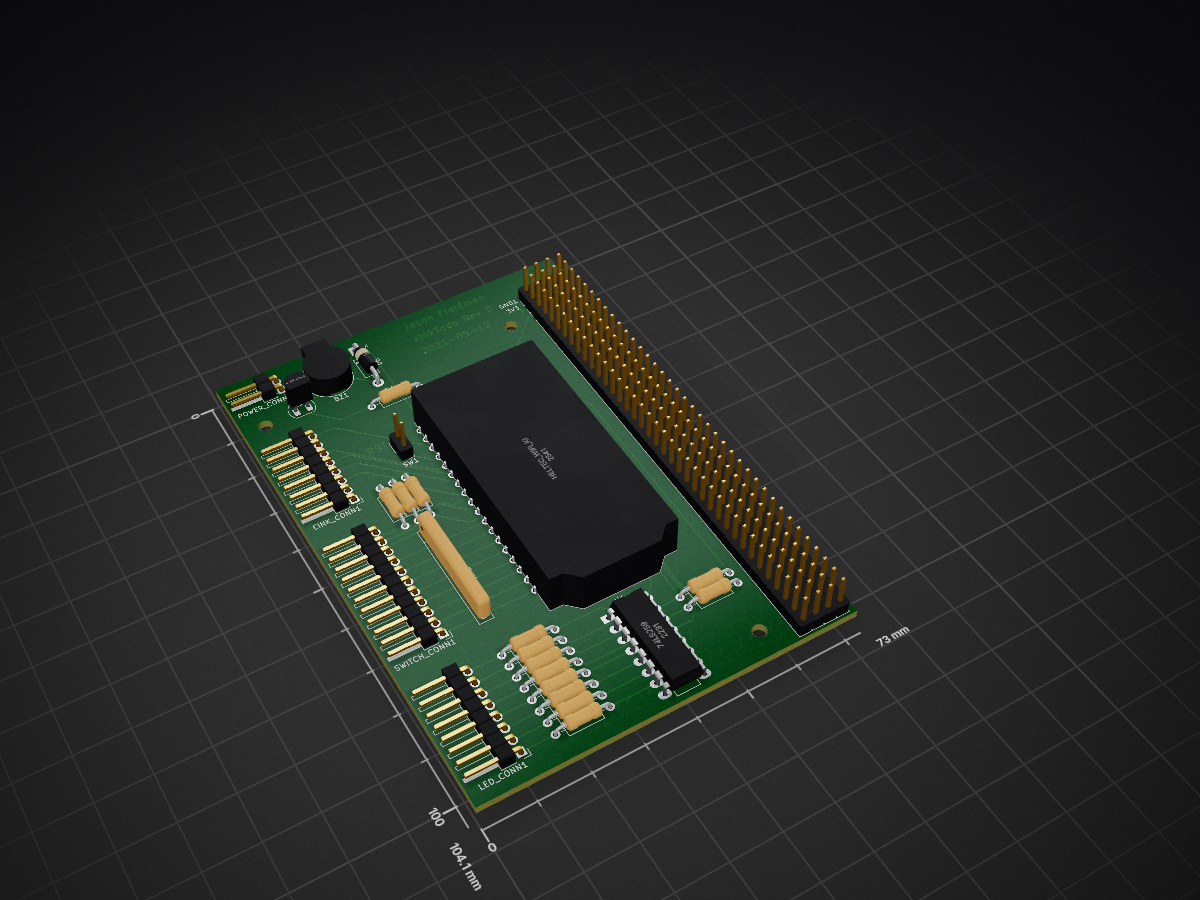
EInkTodo is an open-source printed circuit board by compnski, from the compnski/eInkTodo repository on GitHub, published under the AGPL-3.0 licence. It is a 2-layer board of 73 × 104.1 mm with 34 parts on 195 nets, routed with 145 tracks and 0 vias.
It is built around the 74LS259DC. Its parts include 14 resistors, 4 connectors, 2 ICs, 1 diode and 1 transistor.
A mess of Arduino C++, a local python proxy and some google apps script.
This is used to get the calendar events and format into a easily parsable list. Copy the code from googleAppScript.gs into a project. Then update the calendarId with your own, deploy it as a webapp and you're in business! https://script.google.com/
I was having an awful lot of trouble connecting to google via SSL. In particular, the apps script webapp sends a few Location header redirects and my ESP32 would get stuck after following one or two. No idea why.
My fix was to set up a local proxy on my computer. This also removes the need for an SSL client, removing one more troublesome part from the equation.
Update the taskURL with the URL of your google app script webapp, and you're good to go.
The /done/ stuff is hardcoded and not ready yet, eventually it'll take the event Id to mark it complete.
This stuff is a huge pile of spaghetti C++. It's been maybe 10 years since I last wrote anything with C++ and it shows. I've also not done too much Arduino, so have no idea how to setup the file structure.
For this, symlink todo.cpp into your Arduino folder as anything with a .ino file extension. Then add your SSID/password + taskURL. (Or create a secrets.h and copy/symlink that over too).
Then symlink the two library folders, HttpClient and TodoList into ~/Arduino/libraries, they should be found automatically.
You'll also need the ESP32 SDK and the waveshare SDK -- I used instructions from the waveshare wiki -- https://www.waveshare.com/wiki/7.5inch_HD_e-Paper_HAT_(B).
The wifi only seems to connect like 1 in 100 times. It worked great in the prototype step, now, not so much. Good luck!
| Qty | Value | Footprint | References |
|---|---|---|---|
| 11 | 330 | Resistor_THT:R_Axial_DIN0207_L6.3mm_D2.5mm_P10.16mm_Horizontal | R4, R5, R6, R7, R8, R9, R10, R11, R12, R13, R14 |
| 4 | BREADBOARD | Connector_PinHeader_2.54mm:PinHeader_1x36_P2.54mm_Vertical | J2, J3, J4, J5 |
| 3 | MountingHole | MountingHole:MountingHole_2.7mm_M2.5 | H1, H3, H4 |
| 2 | R | Resistor_THT:R_Axial_DIN0207_L6.3mm_D2.5mm_P10.16mm_Horizontal | R2, R3 |
| 1 | 180 | Resistor_THT:R_Axial_DIN0207_L6.3mm_D2.5mm_P10.16mm_Horizontal | R1 |
| 1 | 330 | Resistor_THT:R_Array_SIP9 | RN2 |
| 1 | 74LS259 | Package_DIP:DIP-16_W7.62mm_LongPads | U1 |
| 1 | BREAD 3v3 | Connector_PinHeader_2.54mm:PinHeader_1x04_P2.54mm_Vertical | 3v3 |
| 1 | BREAD GND | Connector_PinHeader_2.54mm:PinHeader_1x04_P2.54mm_Vertical | GND1 |
| 1 | Buzzer | Buzzer_Beeper:MagneticBuzzer_CUI_CST-931RP-A | BZ1 |
| 1 | Conn_01x02 | Connector_PinHeader_2.54mm:PinHeader_1x02_P2.54mm_Horizontal | POWER_CONN1 |
| 1 | Conn_01x08 | Connector_PinHeader_2.54mm:PinHeader_1x08_P2.54mm_Horizontal | LED_CONN1 |
| 1 | Conn_01x08 | Connector_PinHeader_2.54mm:PinHeader_1x11_P2.54mm_Horizontal | SWITCH_CONN1 |
| 1 | D | Diode_THT:D_DO-41_SOD81_P10.16mm_Horizontal | D6 |
| 1 | E-InkScreen | Connector_PinHeader_2.54mm:PinHeader_1x08_P2.54mm_Horizontal | EINK_CONN1 |
| 1 | Heltec_Wifi_Kit_32_V2 | schematics:Heltec_WiFi_Kit_32 | U2 |
| 1 | Q_NPN_BCE | Package_TO_SOT_THT:TO-92_HandSolder | Q1 |
| 1 | SW_SPST | Connector_PinHeader_2.54mm:PinHeader_1x02_P2.54mm_Vertical | SW1 |
It measures 73 × 104.1 mm and has 2 copper layers, 1.6 mm thick.
34 parts, built around the 74LS259DC. The full list of its parts is on this page, with links to each part's symbol and footprint where PCBKit's library has them.
From the compnski/eInkTodo repository on GitHub, at the commit this page was made from: the board is schematics/eInkTodo.kicad_pcb. PCBKit opens the board in the browser, with nothing to install.
Its repository publishes it under the AGPL-3.0 licence: you may reuse it on that licence's terms (keep the author's notice, and for a copyleft licence share your changes alike).

Nakazoto/CenturionComputer
This is just a simple backup of all the files related to the Centurion that I have stored on my HD. The Wiki itself has far more in-depth information about the Centurion and it's individual cards.


fortinsylvain/MyCpu
Home brew CPU Hardware with 1-bit ALU implementation using 74LSxx, a micro-code and assembler coded in C#.

clemarfolly/Microdigital-TK2000
Reprodução da PCB do TK-2000 da Microdigital, clone do Micro-Professor MPF-II


danwerner21/CortexPC
Powertran Cortex clone. PC formfactor, based on Stuart Conner's MiniCortex