2 layers143.3 × 116.6 mm

 cmsteinBR/sb-cnc-shield2
SB CNC Shield for the Arduino One
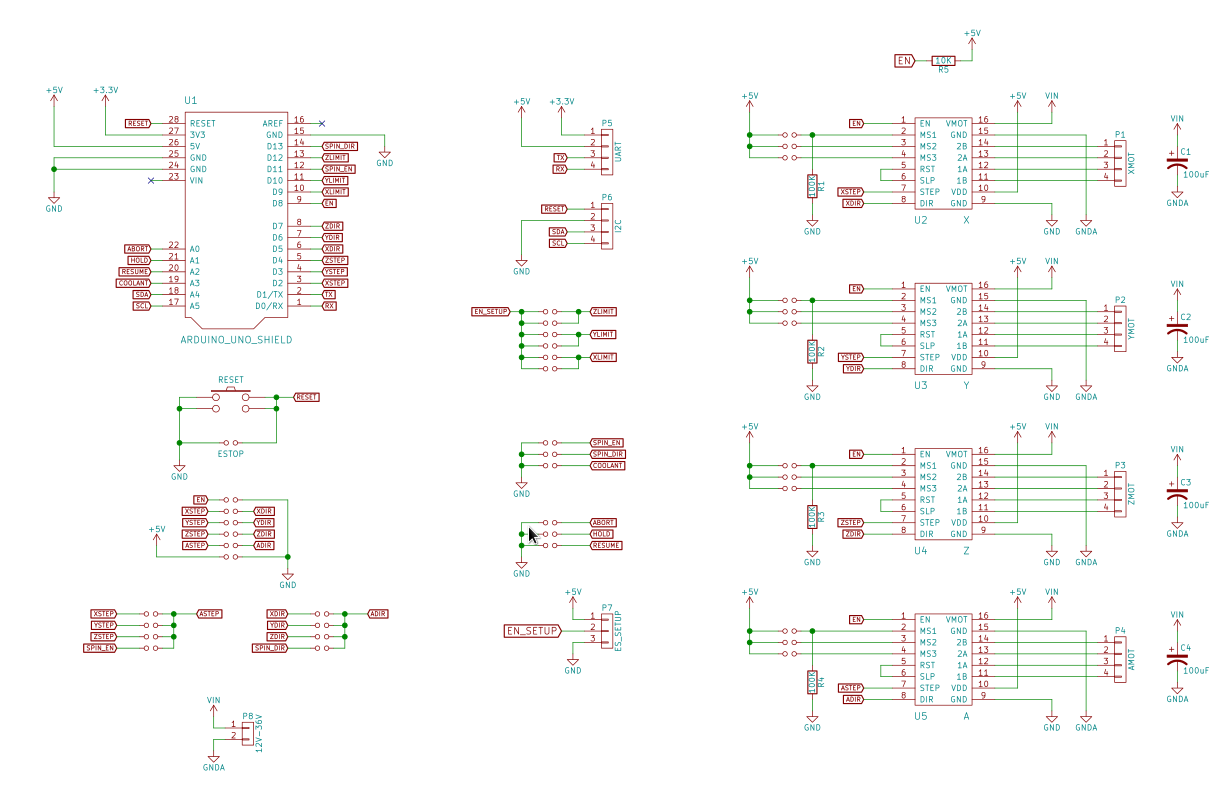
Sb cnc shield is an open-source printed circuit board by cmsteinBR, from the cmsteinBR/sb-cnc-shield repository on GitHub. It is a 2-layer board of 68.6 × 53.3 mm with 63 parts on 61 nets, routed with 787 tracks and 17 vias.
Its parts include 8 connectors, 5 resistors, 5 ICs, 4 capacitors and 1 switch. It belongs with the robots and motor control boards and the AVR (ATmega, ATtiny) boards of this library.
This is a rework of the original arduino cnc shiled http://blog.protoneer.co.nz/arduino-cnc-shield/
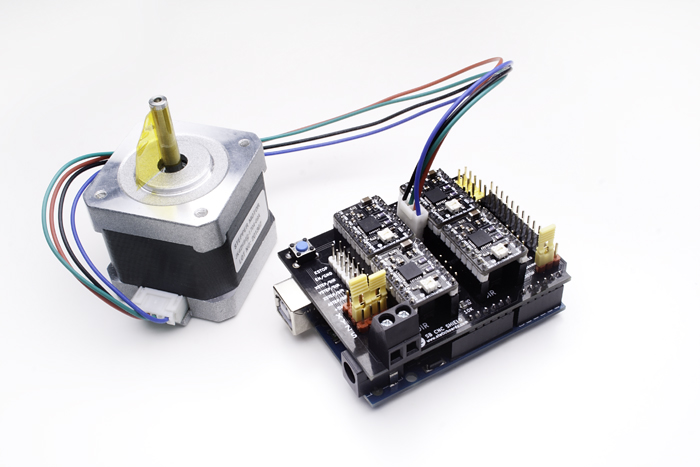
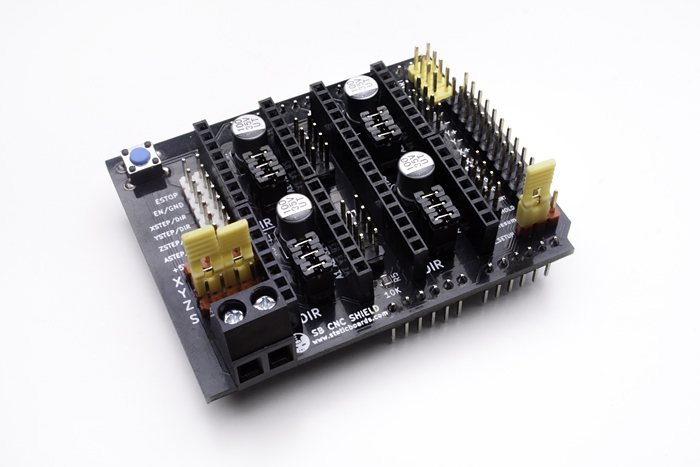
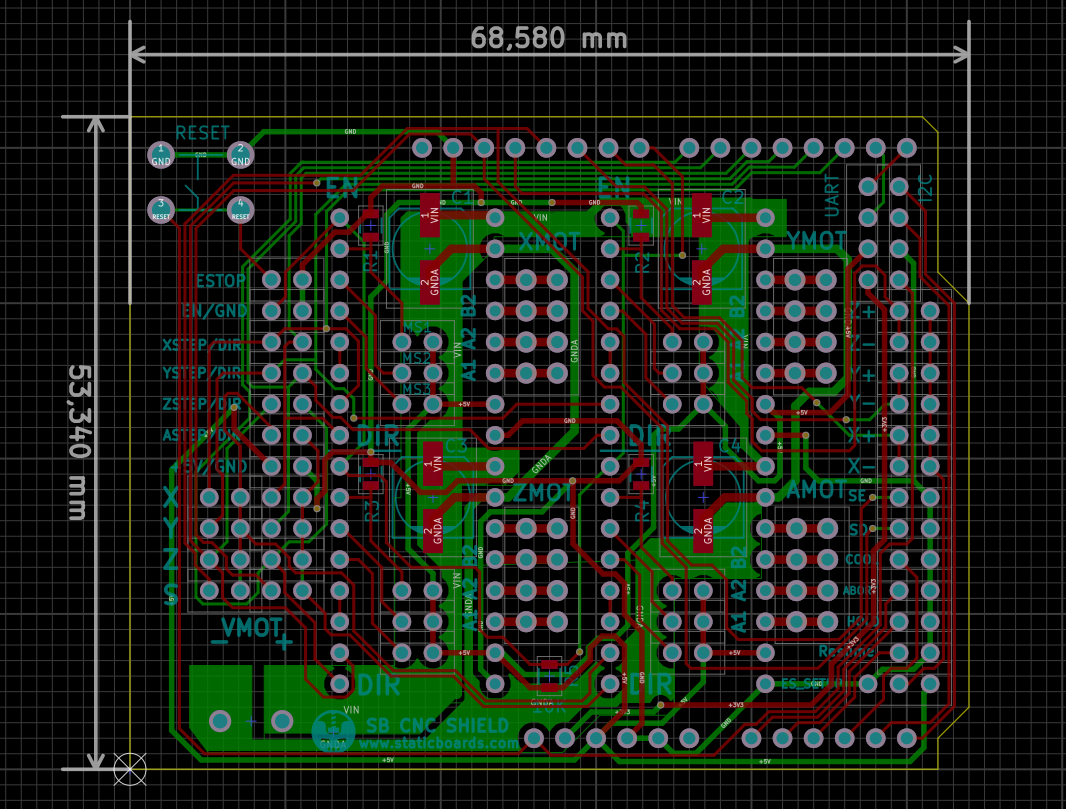
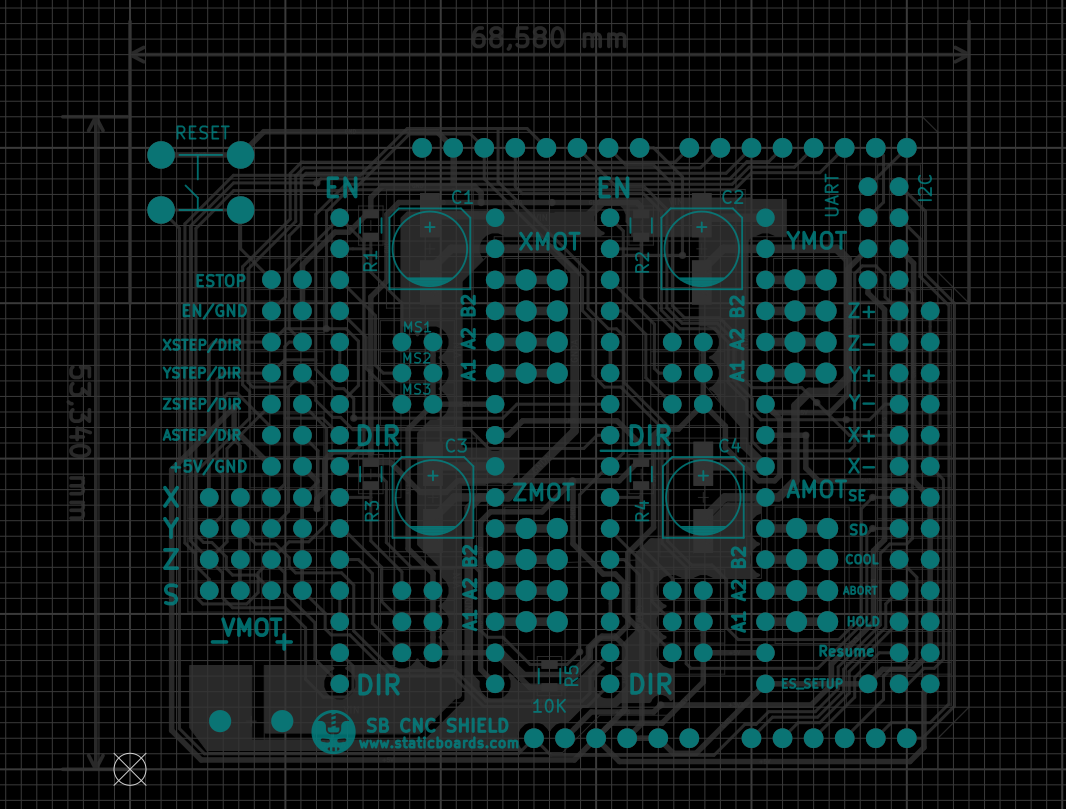
We were trying to make a new low-cost CNC machine for makers and hobbyist.
We found that it is not hard to design a simple aluminum structure with some 3d printed parts, using open software like FreeCAD.
But surprising, there are not many options for electronics part. And we didn’t find any open source shield for Arduino. Maybe we are wrong! But with a quick search, we didn't find anything.
We found one Arduino CNC shield that is being sold on eBay or Aliexpress. But the authors don’t like the idea of Chinese manufacturers making boards without any real collaboration (something that I agree, open hardware is about community). I couldnt find source files for this board.
So, as we decided that it is time to learn KiCad (a real open source software for PCB design), and we decided to make the PCB of this board, using the same pin layout, to get experience with KiCad.
And this is the final result: The SB CNC Shield for Arduino Uno, 100% compatible with GRBL.
We followed the same philosophy of our popular RAMPS 1.4 SB: Branded components, like the Molex connector, beautiful design with the black PCB and golden finish, and fully tested before shipping.
The main idea behind this shield is that you can make your own functional CNC with a limited budget.
If you are interested in robots, you should make your own CNC machine. There are many problems that are not obvious at first. Motors, drivers, heat, software, belts, backslash.
Even if you want to buy an expensive machine, and you don't have any previous experience with CNC, it is a very good idea to make one by yourself.
SB CNC SHIELD is 100% open hardware. It is designed with KiCad, and you can read the schematics, check the PCB design, learn about electronics, improve it, whatever.
And the most important part with Open Hardware, we can create a community, share experiences, new ideas and fix problems.
This board is 100% compatible with the popular GRBL firmware. You don't need special configurations. Plug and Play.
And there is a huge community behind this project, You can be part of it!
Well, you can go with a complete board. If you are serious about CNC, you should do it. A complete board is autonomous. You don't need a computer to send commands to the machine.
There are some boards open source, with a good community. That is very important if you want good support. But most of them, they are closed source. Or they have a custom firmware.
For example, some integrated boards include the drivers within the board. That could be a problem. Drivers can get hot and it is not difficult to burn one. And in some cases, it is a good idea to use different drivers for each axis.
And they have a higher price. Usually more than $100. If you are making a small CNC, for casual projects, this is a big deal.
To build a complete CNC machine you will need:
Creative-Commons 3.0 CC BY-SA
| Qty | Value | Footprint | References |
|---|---|---|---|
| 20 | Jumper_NO_Small | footprints:Pin_100mil_Header_Straight_1x02 | JP1, JP2, JP3, JP4, JP5, JP10, JP11, JP12, JP32, JP33, JP34, JP35, JP36, JP37, JP38, JP39 +4 |
| 4 | 100K | Resistors_SMD:R_0805 | R1, R2, R3, R4 |
| 4 | 100uF | Capacitors_SMD:c_elec_6.3x7.7 | C1, C2, C3, C4 |
| 1 | +5V/GND | footprints:Pin_100mil_Header_Straight_1x02 | JP31 |
| 1 | 10K | Resistors_SMD:R_0805 | R5 |
| 1 | A | footprints:POLOLU_STEPPER_DRIVER | U5 |
| 1 | ABORT | footprints:Pin_100mil_Header_Straight_1x02 | JP22 |
| 1 | AMOT | Pin_Headers:Pin_Header_Straight_2x04 | P4 |
| 1 | ARDUINO_UNO_SHIELD | footprints:ARDUINO_SHIELD | U1 |
| 1 | ASTEP/DIR | footprints:Pin_100mil_Header_Straight_1x02 | JP30 |
| 1 | COOL | footprints:Pin_100mil_Header_Straight_1x02 | JP21 |
| 1 | EN/GND | footprints:Pin_100mil_Header_Straight_1x02 | JP26 |
| 1 | ESTOP | footprints:Pin_100mil_Header_Straight_1x02 | JP25 |
| 1 | ES_SETUP | Pin_Headers:Pin_Header_Straight_1x03 | P7 |
| 1 | HOLD | footprints:Pin_100mil_Header_Straight_1x02 | JP23 |
| 1 | I2C | Pin_Headers:Pin_Header_Straight_1x04 | P6 |
| 1 | LOGO | footprints:staticboards_logo | G*** |
| 1 | RESET | footprints:SWITCH_TACTILE_6.5_PTH | SW1 |
| 1 | Resume | footprints:Pin_100mil_Header_Straight_1x02 | JP24 |
| 1 | SD | footprints:Pin_100mil_Header_Straight_1x02 | JP20 |
| 1 | SE | footprints:Pin_100mil_Header_Straight_1x02 | JP19 |
| 1 | UART | Pin_Headers:Pin_Header_Straight_1x04 | P5 |
| 1 | VMOT | footprints:CONN_01x02_PITCH_5.08mm | P8 |
| 1 | X | footprints:POLOLU_STEPPER_DRIVER | U2 |
| 1 | X+ | footprints:Pin_100mil_Header_Straight_1x02 | JP17 |
| 1 | X- | footprints:Pin_100mil_Header_Straight_1x02 | JP18 |
| 1 | XMOT | Pin_Headers:Pin_Header_Straight_2x04 | P1 |
| 1 | XSTEP/DIR | footprints:Pin_100mil_Header_Straight_1x02 | JP27 |
| 1 | Y | footprints:POLOLU_STEPPER_DRIVER | U3 |
| 1 | Y+ | footprints:Pin_100mil_Header_Straight_1x02 | JP15 |
| 1 | Y- | footprints:Pin_100mil_Header_Straight_1x02 | JP16 |
| 1 | YMOT | Pin_Headers:Pin_Header_Straight_2x04 | P2 |
| 1 | YSTEP/DIR | footprints:Pin_100mil_Header_Straight_1x02 | JP28 |
| 1 | Z | footprints:POLOLU_STEPPER_DRIVER | U4 |
| 1 | Z+ | footprints:Pin_100mil_Header_Straight_1x02 | JP13 |
| 1 | Z- | footprints:Pin_100mil_Header_Straight_1x02 | JP14 |
| 1 | ZMOT | Pin_Headers:Pin_Header_Straight_2x04 | P3 |
| 1 | ZSTEP/DIR | footprints:Pin_100mil_Header_Straight_1x02 | JP29 |
It measures 68.6 × 53.3 mm and has 2 copper layers, 1.6 mm thick.
63 parts. The full list of its parts is on this page, with links to each part's symbol and footprint where PCBKit's library has them.
From the cmsteinBR/sb-cnc-shield repository on GitHub, at the commit this page was made from: the board is sb-cnc-shield.kicad_pcb. PCBKit opens the board in the browser, with nothing to install.
Its repository states no licence, so its author keeps all rights: ask cmsteinBR before reusing the design.


coseyfannitutti/discipad
17-key numpad assembled with only through hole components, including usb type-c

eddyem/stm32samples
Code samples and ready projects based on bare-metal STM32

pekkaroi/bldc-drive
Cheap and simple brushless DC motor driver designed for CNC applications using STM32 microcontroller


mzuelch/CATs-Eurosynth
Analog Synth Eurorack Modules