4 layers123.5 × 108.7 mm
Shredder pcb
jackmday-uofa/compact-shredder-pcb
PCB schematic and design for the Compact Shredder Design Version 2
114 parts
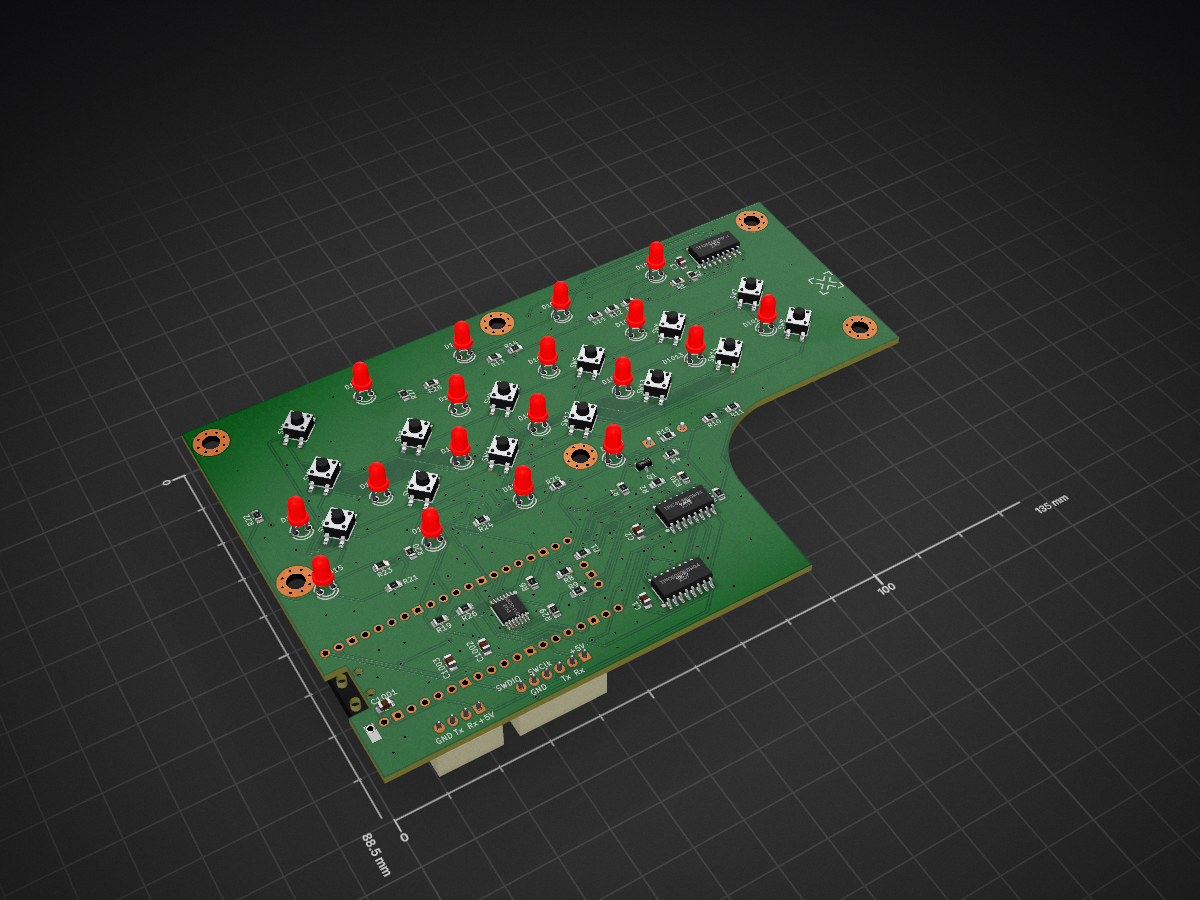
 ClemensElflein/CoverUI7
This repository contains the firmware files required to use the mowers CoverUI (ButtonBoard).
CoverUI is an open-source printed circuit board by ClemensElflein, from the ClemensElflein/CoverUI repository on GitHub, published under the MIT licence. It is a 2-layer board of 135 × 88.5 mm with 103 parts on 98 nets, routed with 997 tracks and 205 vias.
It is built around the RS0104YQ and BSS138. Its parts include 30 resistors, 18 diodes, 14 switches, 6 capacitors and 5 ICs.


[!NOTE] Starting from YardForce Mainboard v1.2.0, the stock CoverUI board is supported natively — nothing from this repo is needed anymore. Kept archived here for reference.

This repository contains the firmware files required to use the mowers CoverUI (ButtonBoard).
Custom DIY CoverUI-PCB which replaces the stock (top-cover) PCB.
Please check the Cover UI board assembly instructions for more detailed infos.
Also available in Vermut's Shop (as part of his 'Upgrade Kit')
Stock YardForce CoverUI for the following models:
For this, you need to solder some cables and flash a modified firmware to it.
Please check the detailed Stock CoverUI Readme (as you've also the option to use your stock 'hall', 'stop' and 'rain' cables).
Distributed under the MIT License. See LICENSE for more information.
| Qty | Value | Footprint | References |
|---|---|---|---|
| 18 | 150 | Resistor_SMD:R_0805_2012Metric_Pad1.20x1.40mm_HandSolder | R10, R11, R12, R13, R14, R15, R16, R18, R19, R20, R21, R22, R23, R24, R25, R27 +2 |
| 18 | 20mA 2V, Red | lcsc:LED-TH_BD3.0-P2.54-FD | D1001, D1002, D1003, D1004, D1005, D1006, D1007, D1008, D1009, D1010, D1011, D1012, D1013, D1014, D1015, D1016 +2 |
| 16 | LedSpacer | lcsc:LED_SPACER_3mm | SP01, SP02, SP03, SP04, SP05, SP06, SP07, SP08, SP09, SP10, SP11, SP12, SP13, SP14, SP15, SP16 |
| 14 | SW_MEC_5G | lcsc:SW-SMD_4P-L4.5-W4.5-P3.00-LS7.0 | SW1, SW2, SW3, SW4, SW5, SW6, SW7, SW8, SW9, SW10, SW11, SW12, SW13, SW14 |
| 9 | 10k | Resistor_SMD:R_0805_2012Metric_Pad1.20x1.40mm_HandSolder | R3, R6, R7, R8, R9, R17, R26, R29, R30 |
| 6 | MountingHole_Pad | MountingHole:MountingHole_3.5mm_Pad_Via | H1001, H1002, H1003, H1004, H1005, H1006 |
| 5 | 100nF | Capacitor_SMD:C_0805_2012Metric_Pad1.18x1.45mm_HandSolder | C1, C2, C3, C1001, C1002 |
| 3 | LED_SPACER_3mm | lcsc:LED_SPACER_3mm | SP17, SP18, SP20 |
| 3 | TPIC6C596DRG4 | lcsc:SOIC-16_L10.8-W4.5-P1.27-LS6.8-BL | U2, U3, U4 |
| 2 | 1k | Resistor_SMD:R_0805_2012Metric_Pad1.20x1.40mm_HandSolder | R1, R4 |
| 1 | 1uF | Capacitor_SMD:C_0805_2012Metric_Pad1.18x1.45mm_HandSolder | C1003 |
| 1 | 47k | Resistor_SMD:R_0805_2012Metric_Pad1.20x1.40mm_HandSolder | R2 |
| 1 | BSS138 | Package_TO_SOT_SMD:SOT-23 | Q1 |
| 1 | Buzzer | Buzzer_Beeper:Buzzer_12x9.5RM7.6 | BZ1 |
| 1 | Conn_01x04_Male | Connector_JST:JST_XH_B4B-XH-A_1x04_P2.50mm_Vertical | J1001 |
| 1 | Conn_01x06_Male | Connector_JST:JST_XH_B6B-XH-A_1x06_P2.50mm_Vertical | J2 |
| 1 | LOGO | x-tech-logo:x-tech-logo | G*** |
| 1 | RS0104YQ | lcsc:TSSOP-14_L5.0-W4.4-P0.65-LS6.4-BL | U5 |
| 1 | Raspberry-Pico | ene9ba_footprint:RPi_Pico_SMD_TH | U1 |
It measures 135 × 88.5 mm and has 2 copper layers, 1.6 mm thick.
103 parts, built around the RS0104YQ and BSS138. The full list of its parts is on this page, with links to each part's symbol and footprint where PCBKit's library has them.
From the ClemensElflein/CoverUI repository on GitHub, at the commit this page was made from: the board is Hardware/CoverUI.kicad_pcb and its schematic Hardware/CoverUI.kicad_sch. PCBKit opens the board in the browser, with nothing to install.
Its repository publishes it under the MIT licence: you may reuse it on that licence's terms (keep the author's notice, and for a copyleft licence share your changes alike).
jackmday-uofa/compact-shredder-pcb
PCB schematic and design for the Compact Shredder Design Version 2

StuckAtPrototype/Racer
These are structured into their own files. I could have used submodules, but decided against it.

willem-pennings/balancing-cube
A cube that balances itself in a corner or edge using reaction wheels

abhishek-kakkar/BeagleLogic
A Software Suite that implements a logic analyzer with the PRU on the BeagleBone / BeagleBone Black.


lachlanA/eagle-to-kicad
Eagle SCH/LIB to KiCad SCH/LIB ULP conversion script

No0ne/ps2x2pico
USB keyboard/mouse to PS/2 interface converter using a Raspberry Pi Pico

StuckAtPrototype/AirCube
Works standalone out of the box. Pairs with Home Assistant in minutes. Other platforms are supported through community-contributed extensions.