
4 layers36 × 50.2 mm
Racer
StuckAtPrototype/Racer
These are structured into their own files. I could have used submodules, but decided against it.
83 parts3.8kApache-2.0

 Cleboost/mitsubishi2zigbee1
KiCad PCB for a Waveshare ESP32-C6-Zero carrier that plugs into a Mitsubishi CN105 service port.
Mitsubishi2zigbee is an open-source printed circuit board by Cleboost, from the Cleboost/mitsubishi2zigbee repository on GitHub. It is a 2-layer board of 30 × 45 mm with 10 parts on 22 nets, routed with 69 tracks and 0 vias.
It is built around the BSS138. Its parts include 5 resistors, 2 transistors, 1 capacitor, 1 IC and 1 connector. It belongs with the ESP32 and RISC-V boards of this library.
KiCad PCB for a Waveshare ESP32-C6-Zero carrier that plugs into a Mitsubishi CN105 service port.
| Item | Details |
|---|---|
| MCU footprint | Waveshare-ESP32:Waveshare-ESP32-C6-Zero_THT (2×9 pin headers) |
| CN105 connector | JST:JST_PA_B05B-PASK-1_1x05_P2.00mm_Vertical_CN105 |
| Level shifting | 5 V UART from the unit → 3.3 V for the ESP |
Mitsubishi CN105 pinout (viewed from the board):
| Pin | Signal | Direction (unit) |
|---|---|---|
| 4 | TX | unit → ESP (ESP must receive here) |
| 5 | RX | ESP → unit (ESP must transmit here) |
Rev 1 PCB bug: pins 4 and 5 were swapped at the JST connector (ESP TX was routed to unit TX pin 4, ESP RX to unit RX pin 5). Symptom: yellow LED (Zigbee OK but CN105 silent), no UART traffic - no amount of firmware fixes this.
Fix on assembled board: cross only CN105 pins 4 ↔ 5 (swap the two UART wires on the cable or at J1). GND / 5 V unchanged.
Fixed in mitsubishi2zigbee.kicad_pcb for the next fabrication run.
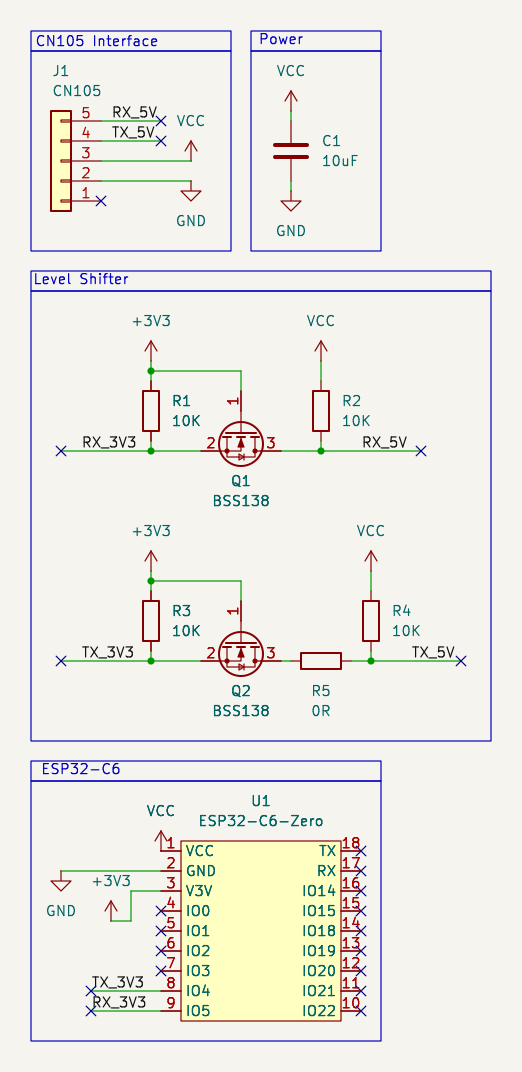
kicad hardware/mitsubishi2zigbee.kicad_proProject-specific symbol and footprint libraries live in libs/.
hardware/
├── README.md
├── schematic.png
├── mitsubishi2zigbee.kicad_pro
├── mitsubishi2zigbee.kicad_sch
├── mitsubishi2zigbee.kicad_pcb
├── fp-lib-table
├── sym-lib-table
└── libs/
    ├── JST.pretty/
    ├── Waveshare-ESP32.pretty/
└── Waveshare-ESP32.kicad_sym| Qty | Value | Footprint | References |
|---|---|---|---|
| 4 | 10K | Resistor_SMD:R_0805_2012Metric_Pad1.20x1.40mm_HandSolder | R1, R2, R3, R4 |
| 2 | BSS138 | Package_TO_SOT_SMD:SOT-23 | Q1, Q2 |
| 1 | 0R | Resistor_SMD:R_1206_3216Metric_Pad1.30x1.75mm_HandSolder | R5 |
| 1 | 10uF | Capacitor_SMD:C_0805_2012Metric_Pad1.18x1.45mm_HandSolder | C1 |
| 1 | CN105 | JST:JST_PA_B05B-PASK-1_1x05_P2.00mm_Vertical_CN105 | J1 |
| 1 | ESP32-C6-Zero | Waveshare-ESP32:Waveshare-ESP32-C6-Zero_THT | U1 |
It measures 30 × 45 mm and has 2 copper layers, 1.6 mm thick.
10 parts, built around the BSS138. The full list of its parts is on this page, with links to each part's symbol and footprint where PCBKit's library has them.
From the Cleboost/mitsubishi2zigbee repository on GitHub, at the commit this page was made from: the board is hardware/mitsubishi2zigbee.kicad_pcb and its schematic hardware/mitsubishi2zigbee.kicad_sch. PCBKit opens the board in the browser, with nothing to install.
Its repository states no licence, so its author keeps all rights: ask Cleboost before reusing the design.
StuckAtPrototype/Racer
These are structured into their own files. I could have used submodules, but decided against it.

willem-pennings/balancing-cube
A cube that balances itself in a corner or edge using reaction wheels

abhishek-kakkar/BeagleLogic
A Software Suite that implements a logic analyzer with the PRU on the BeagleBone / BeagleBone Black.


lachlanA/eagle-to-kicad
Eagle SCH/LIB to KiCad SCH/LIB ULP conversion script

No0ne/ps2x2pico
USB keyboard/mouse to PS/2 interface converter using a Raspberry Pi Pico

StuckAtPrototype/AirCube
Works standalone out of the box. Pairs with Home Assistant in minutes. Other platforms are supported through community-contributed extensions.
