
2 layers47.7 × 20.6 mm
 Choccy-vr/Modpad1
A modular macropad
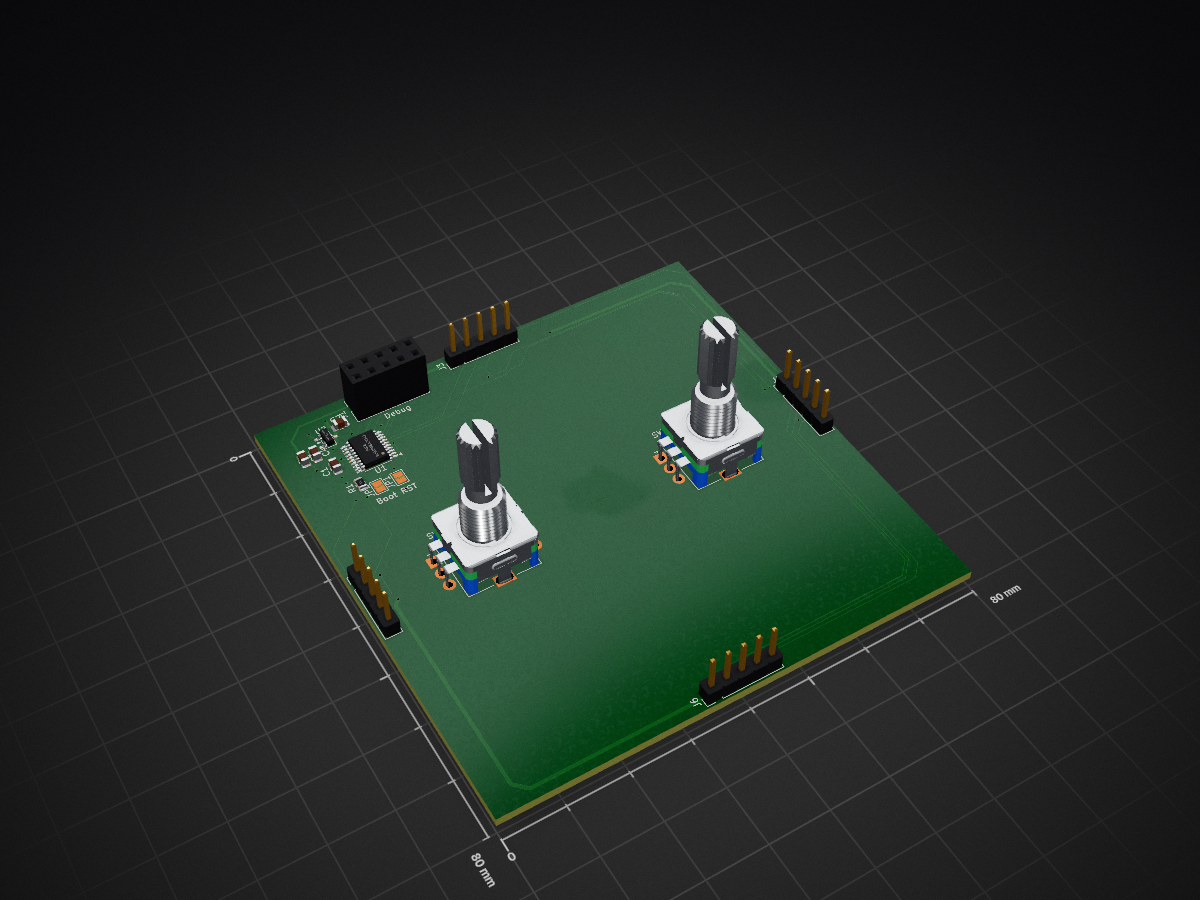
Knobs module[ is an open-source printed circuit board by Choccy-vr, from the Choccy-vr/Modpad repository on GitHub. It is a 2-layer board of 80 × 80 mm with 16 parts on 24 nets, routed with 193 tracks and 30 vias.
It is built around the CH32V203F6P6. Its parts include 5 connectors, 4 capacitors, 2 ICs, 2 switches and 1 resistor. It belongs with the keyboards and input boards and the RISC-V boards of this library.
An open-source, hot-swappable modular macro pad system with live browser-based key mapping.
Modpad combines hardware and software to create an adaptable modular macropad. Rather than locking users in a fixed, rigid layout, keyboard layout, or proprietary config software, Modpad allows users to magnetically hot-swap satellite modules into a main module and reconfigure key actions and layout all in real time.
Configurator URL: https://modpad.vercel.app/ Demo Video: https://youtu.be/VHo8qCPebk0
The web configurator and the main module communicate over USB serial (115200 baud) using newline-delimited JSON. Each message is a single JSON object ending in \n.
| Message | Direction | Description | Example |
|---|---|---|---|
get_layout | Web -> Board | Requests the keymap of every module | {"cmd":"get_layout"} |
layout | Board -> Web | Returns each module's keymap as a list of actions | {"status":"layout","modules":{"Macro":[{"code":4,"mod":0,"consumer":false}, ...]}} |
get_modules | Web -> Board | Requests which modules are currently connected | {"cmd":"get_modules"} |
modules | Board -> Web | Returns the connection state of each module | {"status":"modules","modules":{"Macro":true,"Knobs":false}} |
set_key | Web -> Board | Rebinds one key or knob direction in RAM | {"cmd":"set_key","module":"Macro","index":2,"code":4,"modifiers":0,"consumer":false} |
ok / error | Board -> Web | Reply to set_key | {"status":"ok"} / {"status":"error","msg":"invalid_key_or_module"} |
press | Board -> Web | Sent whenever a button or knob is used | {"status":"press","module":{"name":"Macro","index":2,"type":"button"}} |
log | Board -> Web | Debug message, so the serial stream stays pure JSON | {"status":"log","msg":"..."} |
code: HID keyboard usage ID, or a consumer usage ID when consumer is true (for example 0xE9 for Volume +).modifiers / mod: Modifier bitmask (0x01 LCtrl, 0x02 LShift, 0x04 LAlt, 0x08 LGui, 0x10 RCtrl, 0x20 RShift, 0x40 RAlt, 0x80 RGui).index: Position in the module's keymap. It's the same index for set_key and press.| Qty | Value | Footprint | References |
|---|---|---|---|
| 3 | 4.7uF | Capacitor_SMD:C_0805_2012Metric | C2, C3, C4 |
| 2 | RotaryEncoder_Switch_MP | Rotary_Encoder:RotaryEncoder_Alps_EC11E-Switch_Vertical_H20mm | SW1, SW2 |
| 2 | SolderJumper_2_Open | Jumper:SolderJumper-2_P1.3mm_Open_Pad1.0x1.5mm | JP1, JP2 |
| 1 | 100nF | Capacitor_SMD:C_0805_2012Metric | C1 |
| 1 | 10k | Resistor_SMD:R_0805_2012Metric | R1 |
| 1 | Bottom Modular Port | Connector_PinHeader_2.54mm:PinHeader_1x05_P2.54mm_Vertical | J6 |
| 1 | CH32V203F6P6 | Package_SO:TSSOP-20_4.4x6.5mm_P0.65mm | U1 |
| 1 | Conn_02x05_Odd_Even | Connector_PinSocket_2.54mm:PinSocket_2x05_P2.54mm_Vertical | J1 |
| 1 | Left Modular Port | Connector_PinHeader_2.54mm:PinHeader_1x05_P2.54mm_Vertical | J5 |
| 1 | Right Modular Port | Connector_PinHeader_2.54mm:PinHeader_1x05_P2.54mm_Vertical | J4 |
| 1 | Top Modular Port | Connector_PinHeader_2.54mm:PinHeader_1x05_P2.54mm_Vertical | J3 |
| 1 | XC6206PxxxMR | Package_TO_SOT_SMD:SOT-23-3 | U2 |
It measures 80 × 80 mm and has 2 copper layers, 1.6 mm thick.
16 parts, built around the CH32V203F6P6. The full list of its parts is on this page, with links to each part's symbol and footprint where PCBKit's library has them.
From the Choccy-vr/Modpad repository on GitHub, at the commit this page was made from: the board is PCB/knobs_module[/knobs_module[.kicad_pcb and its schematic PCB/Main Module/modpad.kicad_sch. PCBKit opens the board in the browser, with nothing to install.
Its repository states no licence, so its author keeps all rights: ask Choccy-vr before reusing the design.


holly-hacker/RTN-Badge-2026NL-PCB
The open source hardware of the 2026 RTN badge (NL edition)

google/mozc-devices
Circuit diagrams and firmware source code for Gboard DIY keyboards

conorpp/u2f-zero
U2F USB token optimized for physical security, affordability, and style

rusefi/rusefi
rusefi - GPL internal combustion engine control unit