4 layers269.8 × 158.8 mm
Mithril
sanfeps/mithril_kb
mithril keyboard, a split keyboard with 4x6 column ortholinear staggered keys and 3 thumb keys.
247 parts1
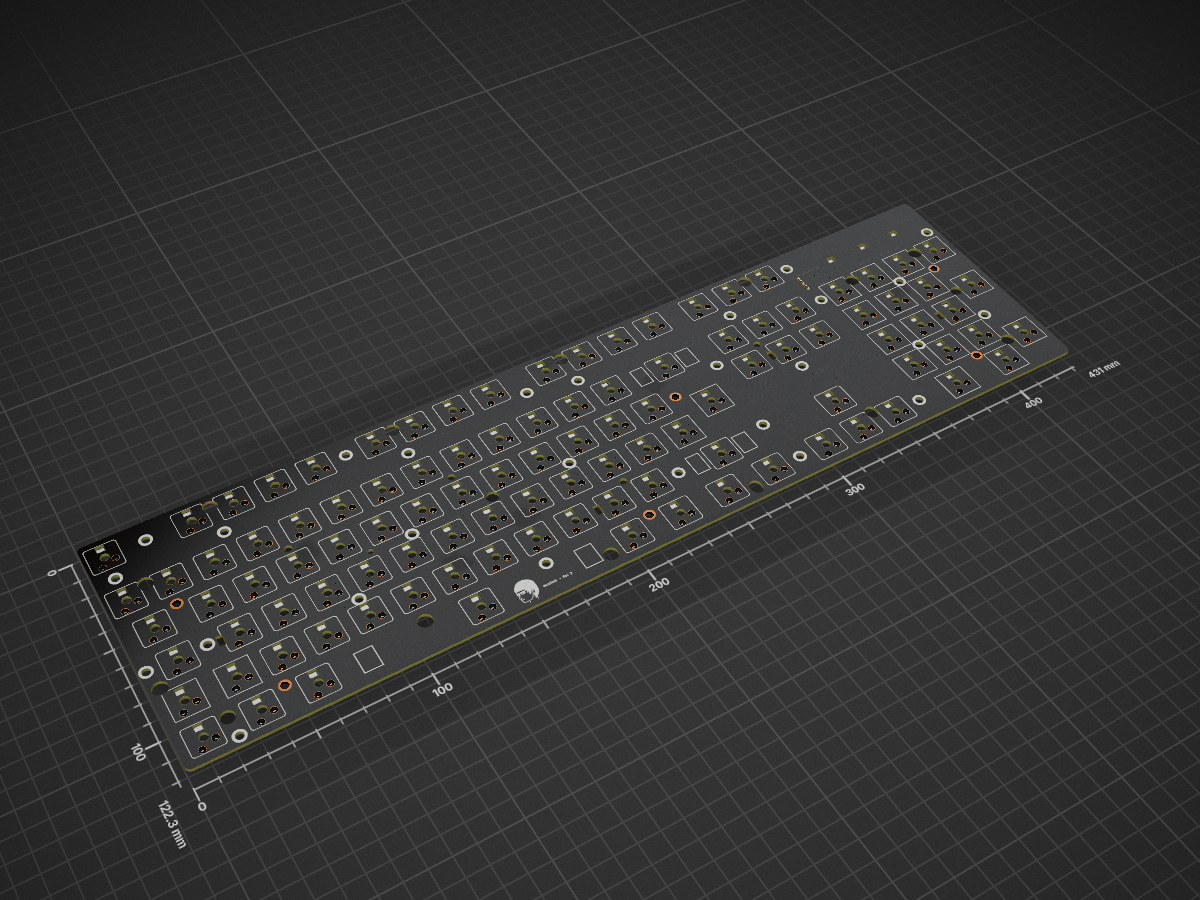
 buu342/BuuKeeb
A custom keyboard PCB with 105 keys and ISO Enter, designed to fit in the case of a "Glorious PC GMMK 100% Barebones"
Keyboard is an open-source printed circuit board by buu342, from the buu342/BuuKeeb repository on GitHub. It is a 2-layer board of 431 × 122.3 mm with 453 parts on 267 nets, routed with 2,569 tracks and 204 vias.
It is built around the 74AHCT1G125SE, USB6B1 and SK6812MINI-E. Its parts include 213 diodes, 119 capacitors, 4 ICs, 3 resistors and 1 connector. It belongs with the keyboards and input boards and the STM32 boards of this library.


I've been wanting a decent mechanical keyboard for a while but I've been having a hard time finding something which fit into all of these categories:
I saw a Glorious PC GMMK Barebones Keyboard for 30€ which seemed to check all of these boxes (including per-key RGB which is a nice to have), but unfortunately the PCB revision I received had a crappy 8-bit MCU, which meant that writing QMK support for it would be infeasible. The case it came with was mostly metal and pretty nice however, so I decided to make a clone of the PCB, but with an STM32. This would also serve as a cool hardware design learning experience for me!
The BuuKeeb™®© features:
The design uses marbastlib for some components so make sure you have that installed before opening the project in KiCad.
The production folder provides all the files you need for JLCPCB. You can zip up the entire folder and feed it to JLC.
During the BOM selection, you can refer to the bom-JLCPCB Assembly Order.xls file to look at what components I used when I ordered my PCBs.
qmk_firmware/modules folder and rename it to openrgbbuukeeb folder inside the qmk_firmware/keyboards folder, copy the QMK folder from my repository and put it inside the qmk_firmware/keyboards, renaming it to buukeeb (alternatively place a symbolic link instead).qmk compile -kb buukeeb -km default.qmk flash -kb buukeeb -km default.| Qty | Value | Footprint | References |
|---|---|---|---|
| 115 | 100nF | Capacitor_SMD:C_0402_1005Metric | C1, C10, C11, C100, C101, C102, C103, C104, C105, C106, C107, C108, C109, C110, C111, C112 +99 |
| 108 | SK6812MINI-E | CustomTweaks:LED_6028R_NoHoles | LED1, LED10, LED11, LED12, LED13, LED14, LED15, LED100, LED101, LED102, LED103, LED104, LED105, LED106, LED107, LED108 +92 |
| 105 | D | Diode_SMD:D_SOD-123 | D1, D10, D11, D12, D13, D14, D15, D16, D17, D18, D100, D101, D102, D103, D104, D105 +89 |
| 105 | MX_SW_HS | CustomTweaks:SW_MX_HS_CPG151101S11_1.5u_NoHoles | MX1, MX10, MX11, MX12, MX13, MX14, MX15, MX16, MX17, MX18, MX100, MX101, MX102, MX103, MX104, MX105 +89 |
| 6 | MountingHole | CustomTweaks:MountingHole_3.5mm_Pad_5.5mm | H1, H2, H3, H4, H5, H6 |
| 2 | 1uF | Capacitor_SMD:C_0603_1608Metric | C8, C9 |
| 2 | 5.1K | Resistor_SMD:R_0402_1005Metric | R1, R4 |
| 1 | 10uF | Capacitor_SMD:C_0603_1608Metric | C7 |
| 1 | 4.7uF | Capacitor_SMD:C_0603_1608Metric | C119 |
| 1 | 470R | Resistor_SMD:R_0402_1005Metric | R2 |
| 1 | 500mA | Fuse:Fuse_1206_3216Metric | F1 |
| 1 | 74AHCT1G125 | Package_SO:TSOP-5_1.65x3.05mm_P0.95mm | U2 |
| 1 | Conn_01x05_Pin | Connector_PinHeader_2.00mm:PinHeader_1x05_P2.00mm_Horizontal | J1 |
| 1 | STM32F072C8Tx | Package_QFP:LQFP-48_7x7mm_P0.5mm | U1 |
| 1 | SW_Push | Button_Switch_SMD:SW_SPST_TL3342 | SW1 |
| 1 | USB6B1 | Package_SO:SOIC-8_3.9x4.9mm_P1.27mm | U4 |
| 1 | XC6206PxxxMR | Package_TO_SOT_SMD:SOT-23-3 | U3 |
It measures 431 × 122.3 mm and has 2 copper layers, 1.6 mm thick.
453 parts, built around the 74AHCT1G125SE, USB6B1 and SK6812MINI-E. The full list of its parts is on this page, with links to each part's symbol and footprint where PCBKit's library has them.
From the buu342/BuuKeeb repository on GitHub, at the commit this page was made from: the board is keyboard.kicad_pcb and its schematic KeyboardMatrix.kicad_sch. PCBKit opens the board in the browser, with nothing to install.
Its repository states no licence, so its author keeps all rights: ask buu342 before reusing the design.
sanfeps/mithril_kb
mithril keyboard, a split keyboard with 4x6 column ortholinear staggered keys and 3 thumb keys.

reven/V6-conversion
Hardware and firmware to convert a V6 Keychron keyboard to north-facing LEDs.


calvin-mcd/the-nicholas-van
EC (topre) PCB for trashman's vanagon


amperolithic/bolide-65-keeb
Bolide65 is a 66 key, 65% keyboard with a rotary encoder and RGB backlighting under each key.

Catsarepro21/hackpad_v2
Wireless ESP32-S3 macropad: KiCad PCB, case STEP models, and Gerber/drill fabrication files.
