

2 layers102.3 × 110.3 mm
Makropad
larshasstdas/4x5-Makropad-with-433Mhz-transmitter
A 4x5 Makropad with a 433Mhz transmitter that is used to power the PC. An app on the PC is supposed to do most things e.g. setting the individuell LEDs.
86 partsMIT

 amperolithic/bolide-65-keeb
Bolide65 is a 66 key, 65% keyboard with a rotary encoder and RGB backlighting under each key.
Bolide-65-pcb is an open-source printed circuit board by amperolithic, from the amperolithic/bolide-65-keeb repository on GitHub, published under the GPL-3.0 licence. It is a 2-layer board of 307 × 101 mm with 272 parts on 158 nets, routed with 3,129 tracks and 459 vias.
It is built around the 74AHCT1G125SE, RP2040-ZERO and SK6812MINI-E. Its parts include 133 diodes, 67 capacitors, 66 switches, 2 ICs and 1 resistor. It belongs with the keyboards and input boards and the RP2040 boards of this library.


Bolide65 is a 66 key, 65% keyboard with a rotary encoder and RGB backlighting under each key. It was built as a submission to Hack Club's Forge YSWS program.
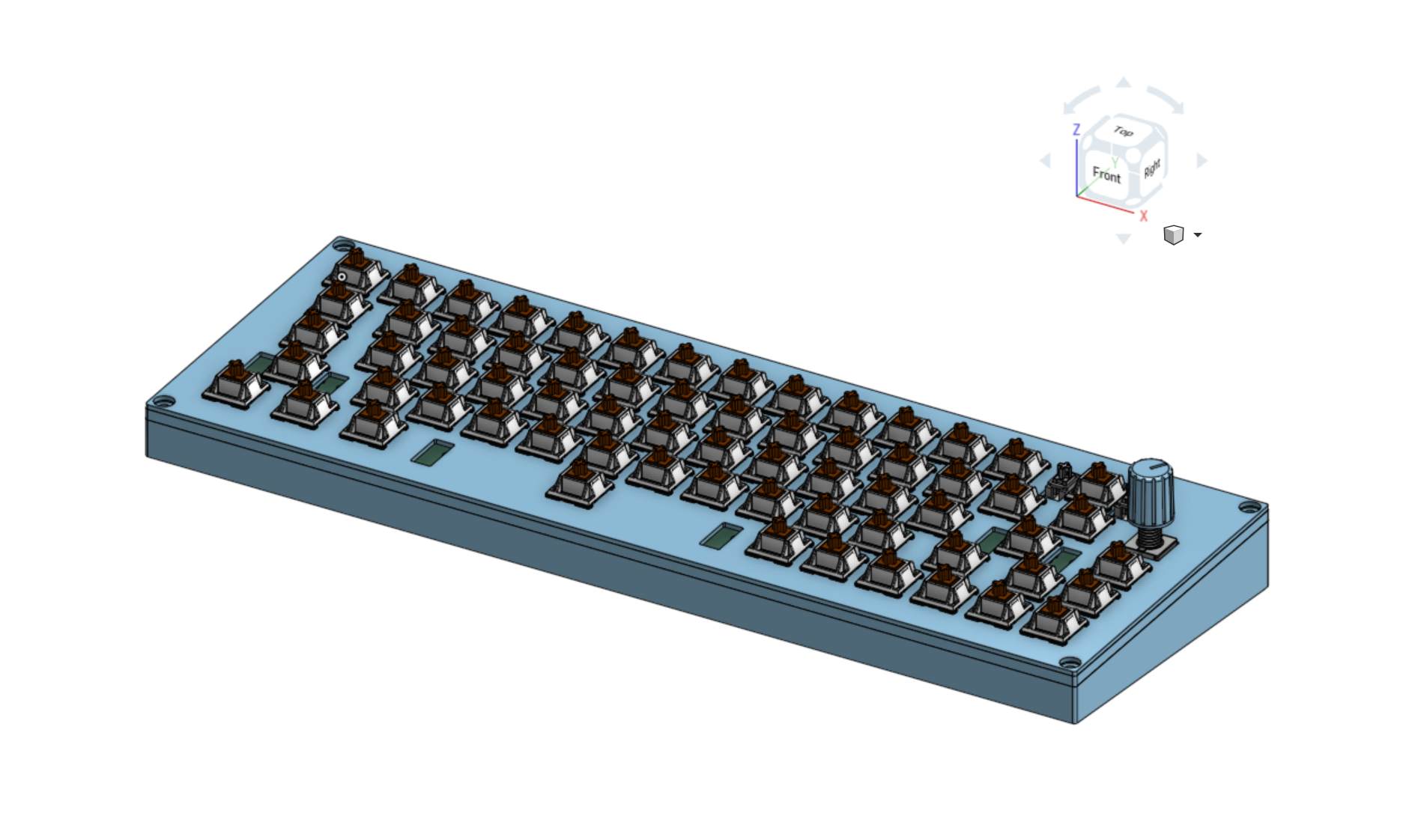
I was inspired to pursue this project after my sister's laptop's keyboard began acting up, preventing her from using the t and u key. She has to wait awhile before she can get a new laptop, so decided to make a keyboard for her in the meantime, using her design ideas (of incorporationg lights) to make the keyboard and consulting her on its appearance and functionality throughout the process. Not only am I helping my sister, but this project really helped me gain more hardware experience (especially regarding routing and CAD).
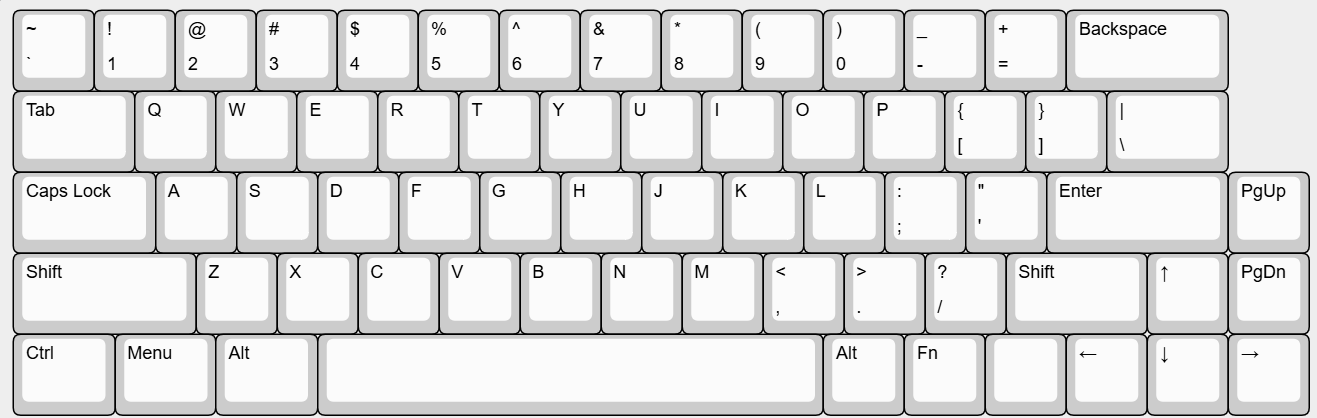
*The keymap layout (Bolide65_Layout.json) was made with Keyboard Layout Editor NG.
A 6.25u screw-in stabilizers is needed for the Backspace key, while 2u screw-in stabilizers are needed for the Enter, Left Shift, and Space keys. Any 65% compatible keycap set will work with this project. The one listed in the BOM was chosen for its see-through effect and low cost. The blank space in the top-right corner of the keymap is on purpose, as it leaves room for the microcontroller and the encoder. The blank keys is meant to be a custom macro.
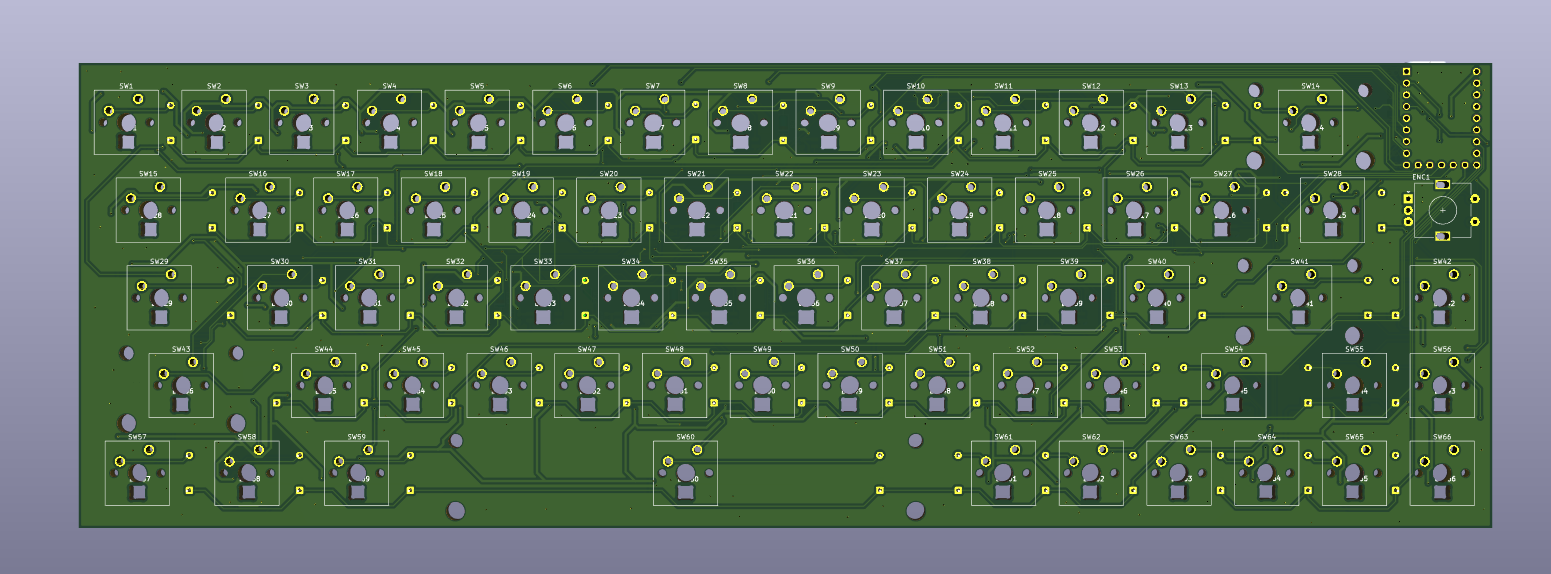
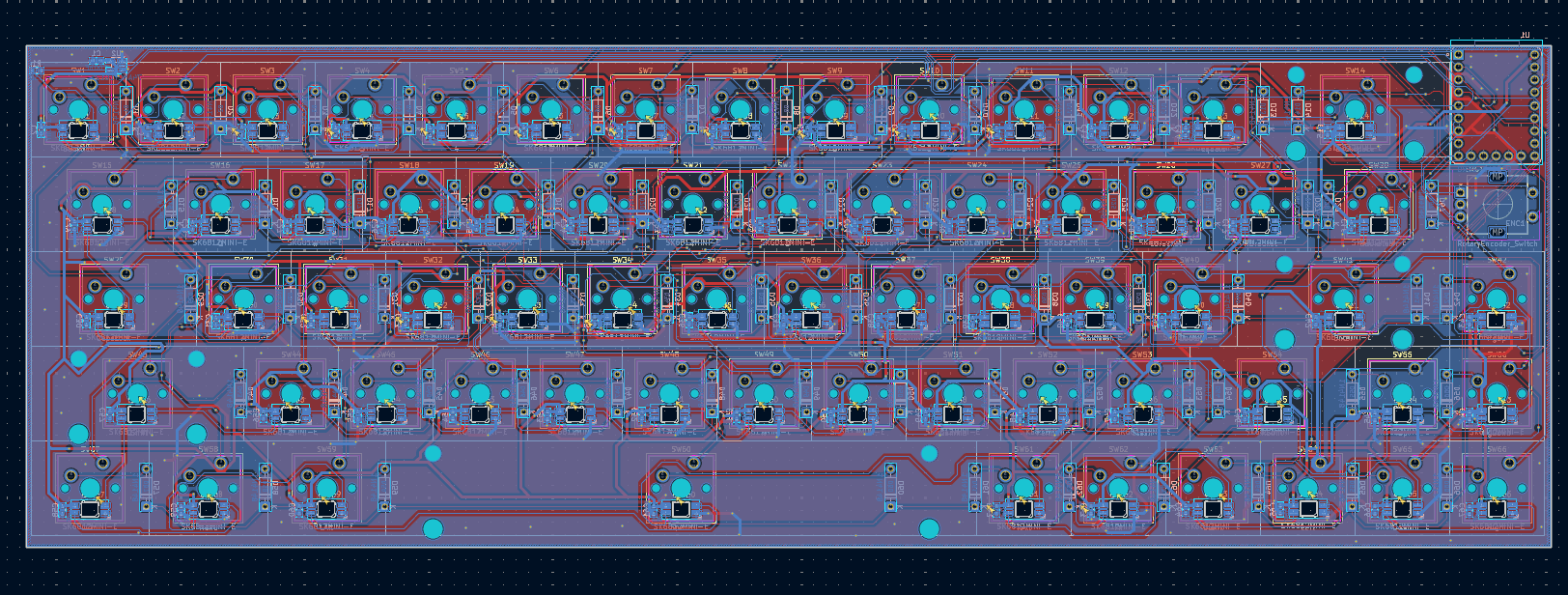
This is the PCB (307x101mm) I made for Bolide65, made in KiCad 10.0. Most of the footprints came from the Marbastlib library, the microcontroller footprint was sourced from SnapMagic, and anything else came from KiCad's default libraries. I used the kbplacer plugin to correctly arrage the switches according to my keymap.
The microcontroller, LEDs, diodes, resistors, and capacitors are meant to be soldered to the back of the board, while everything else is soldered tot the front. It is a 2 layer PCB with GND copper pours on both sides, and DRC passes with only silkscreen warnings. (No errors)
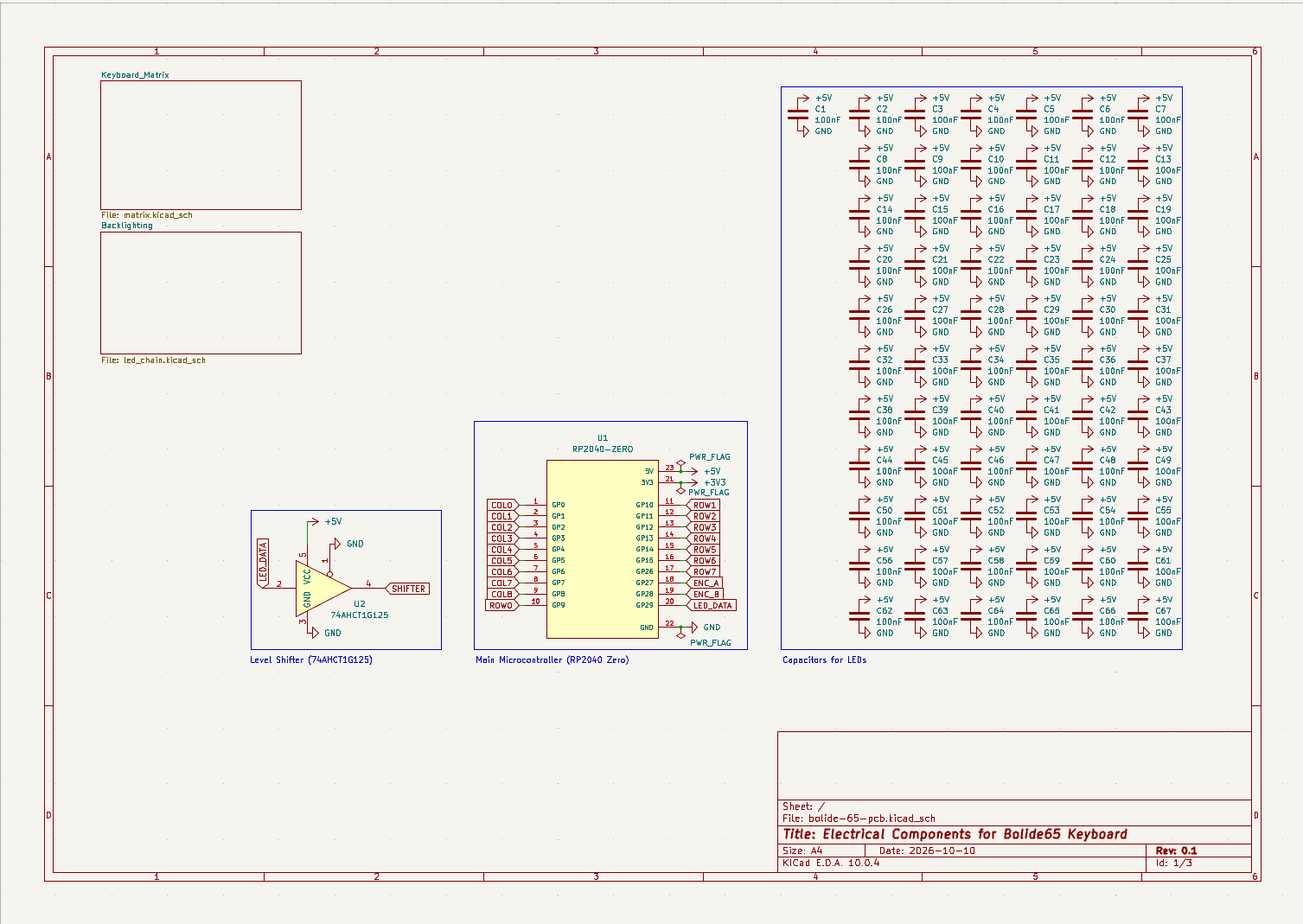
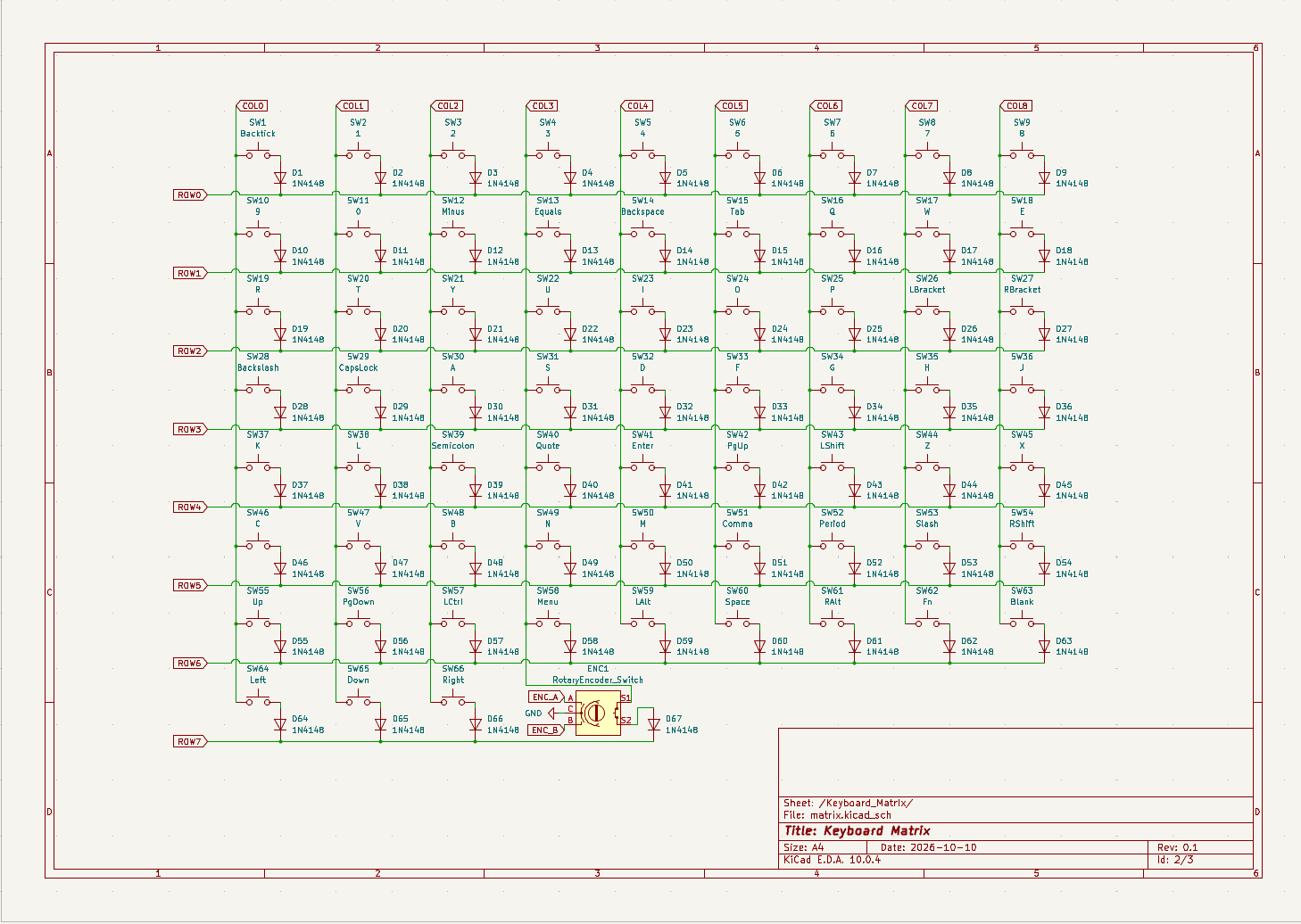
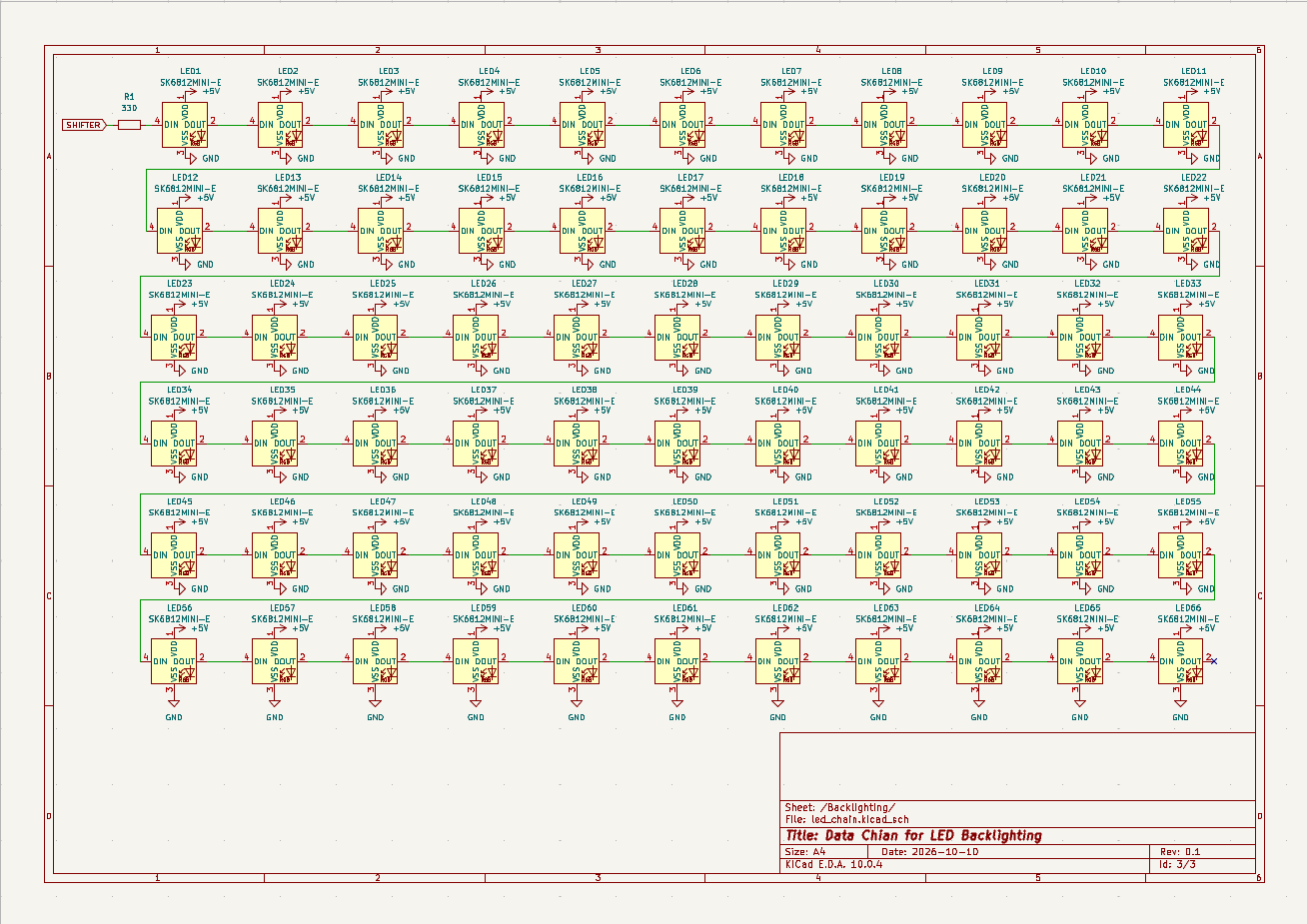
Schematic:
The project is split across three sheets: the root sheet (microcontroller, level shifter, LED capacitors, stabilizers), the key matrix, and the LED chain.
PCB:
The QMK firmware the keyboard microcontroller must be flashed with includes the matrix, encoder, and RGB matrix settings for the RP2040. Some notable firmware features are:
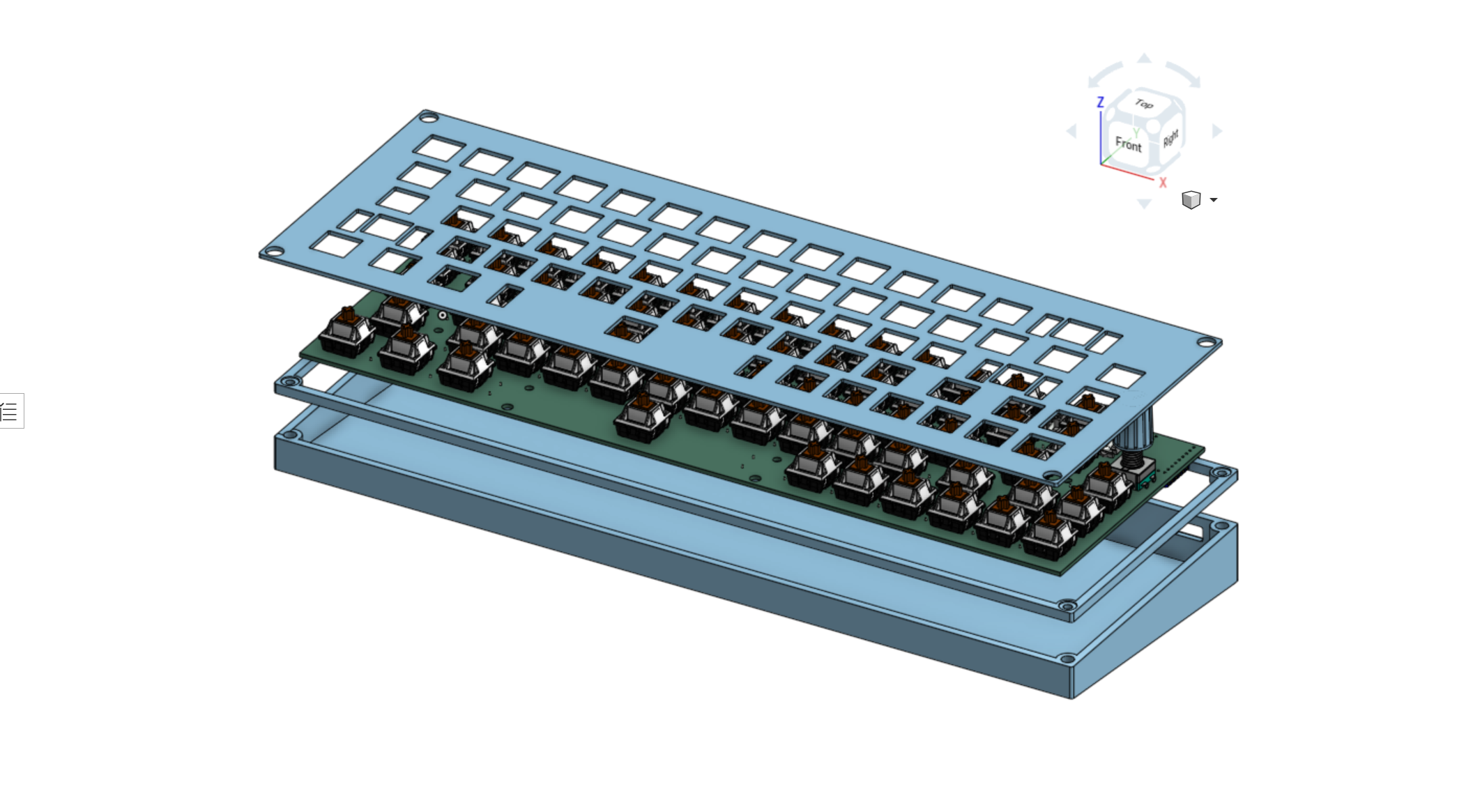
fn key.fn setting changes the LED color.~ and pressing it while on the fn setting inputs the backtick `.The PCB enclosure, designed in Onshape, utilizes a 'reverse' sandwich keyboard mount style: the top plate is the top most layer and there is a transluscent middle part that allows light to diffuse through the case and give a streak of color to the enclosure design (like a bolide does to the night sky). The case is designed for 4 M3x16mm screws, which are meant to screw into M3 heatset inserts with a 5mm OD and 4mm height. The inserts are inserted into the bottom case. Although the rotary encoder has a custom knob, keycaps are meant to be outsourced. See through keycaps are recommneded fo rthis keyboard design.
| Item Name | Qty | Price (USD) | Item link | Notes |
|---|---|---|---|---|
| 330 Ω 0603 resistor [Uni-Royal 0603WAF3300T5E] | 100 | $0.26 | LCSC | Must purchase 100 in order to source the 1 resistor needed. 0603, SMD |
| 0.1 µF Ceramic Capacitors [Samsung Electro-Mechanics CL10B104KB8NNNC] | 100 | $0.79 | LCSC | Must purchase 100 in order to source the 67 capacitors needed. 0603, SMD |
| 74AHCT1G125 Level Shifter [TI SN74AHCT1G125DBVR] | 5 | $0.50 | LCSC | Must purchase 5 in order to source the 1 level shifter needed. SOT-23-5, use the AHCT version, not AHC |
| Fast Switching Diode [Changzhou Starsea Elec 1N4148] | 100 | $1.34 | LCSC | Must purchase 100 in order to source the 67 diodes needed. Through-hole (DO-35) |
| SK6812 MINI-E Addressable LEDs | 70 | $4.56 | LCSC | Must purchase 70 in order to source the 66 LEDs needed. Reverse mount |
| PCB | 1 | $19.00 | JLCPCB | Uses default PCB settings on JLCPCB |
| Womier Pudding Keycaps, Black PBT Shine Through (130 Keycap Set) | 1 | $12.61 | Amazon | Keycap choice is not mandatory. Can choose other keycap set; see-through recommended. Matching key sizes specified in additional notes |
| PCB Mount Screw In Stabilizers (1x 6.25u, 4x 2u) | 1 | $4.72 | Amazon | Stabilizer choice is not mandatory. Can choose other screw in stabilizer set. 3x 2u, 1x 6.25u |
| Glorious Fox Linear Mechanical Switches (110 pcs) | 1 | $23.09 | Amazon | Switch choice is not mandatory. Can choose other MX-style switch |
| Waveshare RP2040 Zero | 1 | $4.20 | RobotShop | Ensure you have pin headers |
| EC11 Rotary Encoder | 1 | $2.22 | LCSC | CAD files have custom knob |
| Bottom Case | 1 | $16.73 | JLCPCB | Uses 9000HE Resin |
| Middle Case | 1 | $3.22 | JLCPCB | Uses Translucent 8001 Resin |
| Top Plate | 1 | $4.66 | JLCPCB | Uses LEDO 6060 Resin (too thin for 9600HE) |
| Rotary Encoder Knob | 1 | $0.32 | JLCPCB | Uses 9600 Resin |
| M3x16mm screws | 4 | $8.69 | Amazon | Price is only for 12 screws; likely better price at local stores |
| M3x5mmx4mm Heatset Inserts | 4 | $7.69 | AliExpress | Price is for 100pcs |
| Total Price (USD): | $114.60 |
This was my second ever PCB project and I am quite satisfied with what I could get done in a week! Below is an explanation of some technical choices I made for my PCB schematics:
| Keycap | Size |
|---|---|
| Backspace | 2u |
| Tab, Backslash | 1.5u |
| Caps Lock, Right Shift | 1.75u |
| Enter, Left Shift | 2.25u |
| Ctrl, Menu, Left Alt | 1.25u |
| Space | 6.25u |
| All remaining keys | 1u |
Many thanks to the creators of Marbastlib and kbplacer for making my life easier during the design process. Also, I would like to say thank you so much to the organizers of Forge and those at the HackClub hq for this wonderful hardware exploration opportunity!
| Qty | Value | Footprint | References |
|---|---|---|---|
| 67 | 100nF | Capacitor_SMD:C_0603_1608Metric | C1, C2, C10, C11, C12, C13, C14, C15, C16, C17, C18, C19, C20, C21, C22, C23 +51 |
| 67 | 1N4148 | Diode_THT:D_DO-35_SOD27_P7.62mm_Horizontal | D1, D2, D10, D11, D12, D13, D14, D15, D16, D17, D18, D19, D20, D21, D22, D23 +51 |
| 66 | SK6812MINI-E | footprints:SK6812MINI-E_fixed | LED1, LED2, LED10, LED11, LED12, LED13, LED14, LED15, LED16, LED17, LED18, LED19, LED20, LED21, LED22, LED23 +50 |
| 2 | LOGO | LOGO | G***, G*** |
| 1 | 0 | Button_Switch_Keyboard:SW_Cherry_MX_1.00u_PCB | SW11 |
| 1 | 1 | Button_Switch_Keyboard:SW_Cherry_MX_1.00u_PCB | SW2 |
| 1 | 2 | Button_Switch_Keyboard:SW_Cherry_MX_1.00u_PCB | SW3 |
| 1 | 3 | Button_Switch_Keyboard:SW_Cherry_MX_1.00u_PCB | SW4 |
| 1 | 330 | Resistor_SMD:R_0603_1608Metric | R1 |
| 1 | 4 | Button_Switch_Keyboard:SW_Cherry_MX_1.00u_PCB | SW5 |
| 1 | 5 | Button_Switch_Keyboard:SW_Cherry_MX_1.00u_PCB | SW6 |
| 1 | 6 | Button_Switch_Keyboard:SW_Cherry_MX_1.00u_PCB | SW7 |
| 1 | 7 | Button_Switch_Keyboard:SW_Cherry_MX_1.00u_PCB | SW8 |
| 1 | 74AHCT1G125 | Package_TO_SOT_SMD:SOT-23-5 | U2 |
| 1 | 8 | Button_Switch_Keyboard:SW_Cherry_MX_1.00u_PCB | SW9 |
| 1 | 9 | Button_Switch_Keyboard:SW_Cherry_MX_1.00u_PCB | SW10 |
| 1 | A | Button_Switch_Keyboard:SW_Cherry_MX_1.00u_PCB | SW30 |
| 1 | B | Button_Switch_Keyboard:SW_Cherry_MX_1.00u_PCB | SW48 |
| 1 | Backslash | Button_Switch_Keyboard:SW_Cherry_MX_1.50u_PCB | SW28 |
| 1 | Backspace | Button_Switch_Keyboard:SW_Cherry_MX_2.00u_PCB | SW14 |
| 1 | Backtick | Button_Switch_Keyboard:SW_Cherry_MX_1.00u_PCB | SW1 |
| 1 | Blank | Button_Switch_Keyboard:SW_Cherry_MX_1.00u_PCB | SW63 |
| 1 | C | Button_Switch_Keyboard:SW_Cherry_MX_1.00u_PCB | SW46 |
| 1 | CapsLock | Button_Switch_Keyboard:SW_Cherry_MX_1.75u_PCB | SW29 |
| 1 | Comma | Button_Switch_Keyboard:SW_Cherry_MX_1.00u_PCB | SW51 |
| 1 | D | Button_Switch_Keyboard:SW_Cherry_MX_1.00u_PCB | SW32 |
| 1 | Down | Button_Switch_Keyboard:SW_Cherry_MX_1.00u_PCB | SW65 |
| 1 | E | Button_Switch_Keyboard:SW_Cherry_MX_1.00u_PCB | SW18 |
| 1 | Enter | Button_Switch_Keyboard:SW_Cherry_MX_2.25u_PCB | SW41 |
| 1 | Equals | Button_Switch_Keyboard:SW_Cherry_MX_1.00u_PCB | SW13 |
| 1 | F | Button_Switch_Keyboard:SW_Cherry_MX_1.00u_PCB | SW33 |
| 1 | Fn | Button_Switch_Keyboard:SW_Cherry_MX_1.00u_PCB | SW62 |
| 1 | G | Button_Switch_Keyboard:SW_Cherry_MX_1.00u_PCB | SW34 |
| 1 | H | Button_Switch_Keyboard:SW_Cherry_MX_1.00u_PCB | SW35 |
| 1 | I | Button_Switch_Keyboard:SW_Cherry_MX_1.00u_PCB | SW23 |
| 1 | J | Button_Switch_Keyboard:SW_Cherry_MX_1.00u_PCB | SW36 |
| 1 | K | Button_Switch_Keyboard:SW_Cherry_MX_1.00u_PCB | SW37 |
| 1 | L | Button_Switch_Keyboard:SW_Cherry_MX_1.00u_PCB | SW38 |
| 1 | LAlt | Button_Switch_Keyboard:SW_Cherry_MX_1.25u_PCB | SW59 |
| 1 | LBracket | Button_Switch_Keyboard:SW_Cherry_MX_1.00u_PCB | SW26 |
| 1 | LCtrl | Button_Switch_Keyboard:SW_Cherry_MX_1.25u_PCB | SW57 |
| 1 | LShift | Button_Switch_Keyboard:SW_Cherry_MX_2.25u_PCB | SW43 |
| 1 | Left | Button_Switch_Keyboard:SW_Cherry_MX_1.00u_PCB | SW64 |
| 1 | M | Button_Switch_Keyboard:SW_Cherry_MX_1.00u_PCB | SW50 |
| 1 | Menu | Button_Switch_Keyboard:SW_Cherry_MX_1.25u_PCB | SW58 |
| 1 | Minus | Button_Switch_Keyboard:SW_Cherry_MX_1.00u_PCB | SW12 |
| 1 | N | Button_Switch_Keyboard:SW_Cherry_MX_1.00u_PCB | SW49 |
| 1 | O | Button_Switch_Keyboard:SW_Cherry_MX_1.00u_PCB | SW24 |
| 1 | P | Button_Switch_Keyboard:SW_Cherry_MX_1.00u_PCB | SW25 |
| 1 | Period | Button_Switch_Keyboard:SW_Cherry_MX_1.00u_PCB | SW52 |
| 1 | PgDown | Button_Switch_Keyboard:SW_Cherry_MX_1.00u_PCB | SW56 |
| 1 | PgUp | Button_Switch_Keyboard:SW_Cherry_MX_1.00u_PCB | SW42 |
| 1 | Q | Button_Switch_Keyboard:SW_Cherry_MX_1.00u_PCB | SW16 |
| 1 | Quote | Button_Switch_Keyboard:SW_Cherry_MX_1.00u_PCB | SW40 |
| 1 | R | Button_Switch_Keyboard:SW_Cherry_MX_1.00u_PCB | SW19 |
| 1 | RAlt | Button_Switch_Keyboard:SW_Cherry_MX_1.00u_PCB | SW61 |
| 1 | RBracket | Button_Switch_Keyboard:SW_Cherry_MX_1.00u_PCB | SW27 |
| 1 | RP2040-ZERO | RP2040-ZERO-footprint:MODULE_RP2040-ZERO | U1 |
| 1 | RShift | Button_Switch_Keyboard:SW_Cherry_MX_1.75u_PCB | SW54 |
| 1 | Right | Button_Switch_Keyboard:SW_Cherry_MX_1.00u_PCB | SW66 |
| 1 | RotaryEncoder_Switch | Rotary_Encoder:RotaryEncoder_Alps_EC11E-Switch_Vertical_H20mm | ENC1 |
| 1 | S | Button_Switch_Keyboard:SW_Cherry_MX_1.00u_PCB | SW31 |
| 1 | Semicolon | Button_Switch_Keyboard:SW_Cherry_MX_1.00u_PCB | SW39 |
| 1 | Slash | Button_Switch_Keyboard:SW_Cherry_MX_1.00u_PCB | SW53 |
| 1 | Space | Button_Switch_Keyboard:SW_Cherry_MX_6.25u_PCB | SW60 |
| 1 | T | Button_Switch_Keyboard:SW_Cherry_MX_1.00u_PCB | SW20 |
| 1 | Tab | Button_Switch_Keyboard:SW_Cherry_MX_1.50u_PCB | SW15 |
| 1 | U | Button_Switch_Keyboard:SW_Cherry_MX_1.00u_PCB | SW22 |
| 1 | Up | Button_Switch_Keyboard:SW_Cherry_MX_1.00u_PCB | SW55 |
| 1 | V | Button_Switch_Keyboard:SW_Cherry_MX_1.00u_PCB | SW47 |
| 1 | W | Button_Switch_Keyboard:SW_Cherry_MX_1.00u_PCB | SW17 |
| 1 | X | Button_Switch_Keyboard:SW_Cherry_MX_1.00u_PCB | SW45 |
| 1 | Y | Button_Switch_Keyboard:SW_Cherry_MX_1.00u_PCB | SW21 |
| 1 | Z | Button_Switch_Keyboard:SW_Cherry_MX_1.00u_PCB | SW44 |
larshasstdas/4x5-Makropad-with-433Mhz-transmitter
A 4x5 Makropad with a 433Mhz transmitter that is used to power the PC. An app on the PC is supposed to do most things e.g. setting the individuell LEDs.


calvin-mcd/the-nicholas-van
EC (topre) PCB for trashman's vanagon


buu342/BuuKeeb
A custom keyboard PCB with 105 keys and ISO Enter, designed to fit in the case of a "Glorious PC GMMK 100% Barebones"

Catsarepro21/hackpad_v2
Wireless ESP32-S3 macropad: KiCad PCB, case STEP models, and Gerber/drill fabrication files.

It measures 307 × 101 mm and has 2 copper layers, 1.6 mm thick.
272 parts, built around the 74AHCT1G125SE, RP2040-ZERO and SK6812MINI-E. The full list of its parts is on this page, with links to each part's symbol and footprint where PCBKit's library has them.
From the amperolithic/bolide-65-keeb repository on GitHub, at the commit this page was made from: the board is pcb/bolide-65-pcb.kicad_pcb and its schematic pcb/Alternative Top Plate/bolide-65-top_plate.kicad_sch. PCBKit opens the board in the browser, with nothing to install.
Its repository publishes it under the GPL-3.0 licence: you may reuse it on that licence's terms (keep the author's notice, and for a copyleft licence share your changes alike).