2 layers57.3 × 19 mm

 Bonemind/RSMP
KMK based macropad for a team rockstars workshop
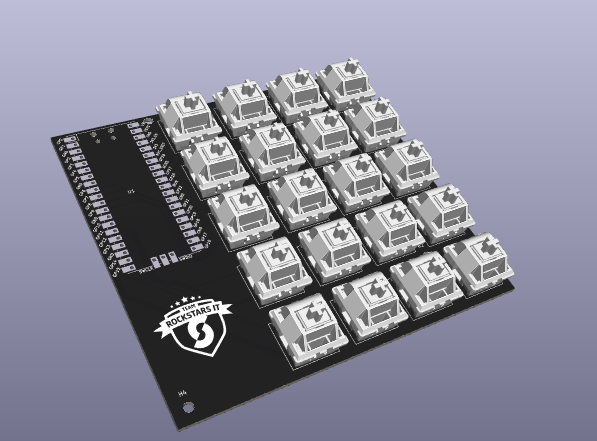
RSMP is an open-source printed circuit board by Bonemind, from the Bonemind/RSMP repository on GitHub. It is a 2-layer board of 105.9 × 95.8 mm with 26 parts on 43 nets, routed with 180 tracks and 0 vias.
Its parts include 20 switches and 1 IC. It belongs with the keyboards and input boards and the RP2040 boards of this library.
AKA "Rockstars Macropad". A KMK and Raspberry pi based 20 key macropad. The macropad is direct pin, meaning every button uses a dedication gpio pin, so no diodes are needed.
This was created for a workshop at Team Rockstars IT
code.py file from the storage devicefirmware folder to the root of the driveIt should now behave as a keyboard.
This macropad uses KMK for it's firmware. KMK is a flexible circuitpython based project for mechanical keyboards that offers a lot of options. The basic firmware for the RSMP is simple, in that every button outputs a letter. To customize the behavior, you can modify main.py.
As an example of layers, the bottom left button will output a space when tapped, and when held, the buttons will output numbers and various symbols instead of letters.
| Qty | Value | Footprint | References |
|---|---|---|---|
| 20 | SW_Push | Library:SW_Cherry_MX_1.00u_PCB | SW1, SW2, SW3, SW4, SW5, SW10, SW11, SW12, SW13, SW14, SW15, SW16, SW17, SW18, SW19, SW20 +4 |
| 4 | MountingHole | MountingHole:MountingHole_2.7mm_M2.5 | H1, H2, H3, H4 |
| 1 | LOGO | LOGO | G*** |
| 1 | Pico | MCU_RaspberryPi_and_Boards:RPi_Pico_SMD_TH | U1 |
It measures 105.9 × 95.8 mm and has 2 copper layers, 1.6 mm thick.
26 parts. The full list of its parts is on this page, with links to each part's symbol and footprint where PCBKit's library has them.
From the Bonemind/RSMP repository on GitHub, at the commit this page was made from: the board is RSMP.kicad_pcb and its schematic RSMP.kicad_sch. PCBKit opens the board in the browser, with nothing to install.
Its repository states no licence, so its author keeps all rights: ask Bonemind before reusing the design.

hackclub/OnBoard
💡 Join 1,000 teenagers and make your first PCB with a $100 grant!


harbaum/galagino
A Galaga, Pac-Man and Donkey Kong arcade emulator for the ESP32

Luos-io/luos_engine
Open-source and real-time orchestrator for cyber-physical-systems, to easily design, test and deploy embedded applications and digital twins.

google/walt
A device for measuring latency of physical sensors and outputs on phones and computers
