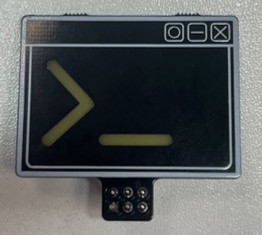
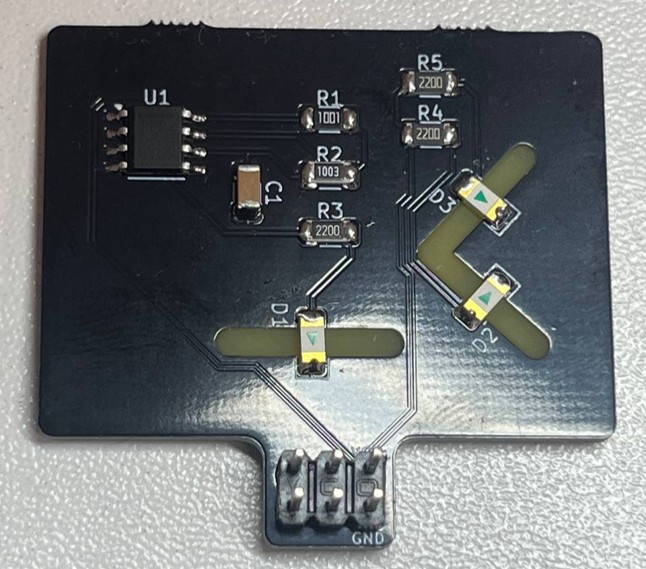
Cube green addon
- Size
- 40.5 × 38.5 mm
- Copper layers
- 2
- Thickness
- 1.6 mm
- Parts
- 5
- Nets
- 5
- Pads
- 12
- Tracks, vias
- 22, 0
- Pours
- 1
- Routed
- Yes
- KiCad
- KiCad 10.0 (file 20260206)
- Created
- 2 Jun 2026
- Updated
- 10 Aug 2026
Overview
Cube green addon is an open-source printed circuit board by bi-zone, from the bi-zone/offzone-hw repository on GitHub. It is a 2-layer board of 40.5 × 38.5 mm with 5 parts on 5 nets, routed with 22 tracks and 0 vias.
Its parts include 3 diodes, 1 resistor and 1 connector.
README
2025/terminal_addon/README.mdterminal_addon

Для заказа платы
- Количество проводящих слоев: 2
- Базовый материал (Core): FR4
- Суммарная толщина платы, мм: 1.5
- Толщина фольги, мкм: 18 или 35
- Финишное покрытие площадок: HASL
- Паяльная маска: чёрная
- Маркировка обозначений: белая
Для сборки
- 3 светодиода 1206 Белые
- 3 резистора 1206 220 Ом
- Резистор 1206 1 кОм
- Резистор 1206 100 кОм
- Конденсатор 1206 10 мкФ
- Микросхема LMC555
- Коннектор PLD-6
Подробнее в terminal_addon_BOM.html
Инструкция
- Припаиваем микросхему U1. Стрелка на плате указывает расположение первого пина. Первый пин на микросхеме отмечен жирной линией. Жирная линия должна быть возле надписи U1.
- Припаиваем резисторы номиналом вверх. Размещать их можно в любом порядке, они не имеют полярности. Главное расставить все по своим местам.
- R1 - 1 кОм
- R2 - 100 кОм
- R3, R4, R5 - 220 Ом
- Припаиваем светодиоды линзой вниз, соблюдая полярность. Стрелка светодиода должна указывать на белую линию.
- D1 - смотрит вниз
- D2, D3 - смотрят вправо
- Припаиваем конденсатор C1.
- Припаиваем коннектор.

Parts
5| Qty | Value | Footprint | References |
|---|---|---|---|
| 3 | LED_GREEN | LED_SMD:LED_1206_3216Metric_Pad1.42x1.75mm_HandSolder | D1, D2, D3 |
| 1 | 100 | Resistor_SMD:R_1206_3216Metric_Pad1.30x1.75mm_HandSolder | R1 |
| 1 | Conn_02x02 | badgelife_sao_v169bis:Badgelife-Shitty-2x2 | J1 |
More from bi-zone/offzone-hw
12- 2 layers46.4 × 37.7 mm

- 2 layers64.4 × 34.5 mm

- 2 layers19.9 × 67.8 mm

- 2 layers48.4 × 49.9 mm

- 2 layers40 × 37.6 mm

- 2 layers41.5 × 47.8 mm

- 2 layers55.9 × 38.7 mm

- 2 layers39.6 × 48 mm

- 2 layers44.7 × 55.8 mm

- 2 layers38.5 × 34.7 mm

- 2 layers34.4 × 44.7 mm

- 2 layers47.3 × 43.9 mm

Similar boards
- 2 layers98 × 27 mm

- 2 layers21 × 33 mm

24g2usb pico2w
joypad-ai/joypad-os
Universal controller firmware for building adapters, dongles, and custom controllers.
5 parts1.7kApache-2.0 - 2 layers53.2 × 59.6 mm

A10 OLinuXino Lime Rev B SHIELD TEMPLATE
OLIMEX/OLINUXINO
OLINUXINO is Open Source / Open Hardware, low cost from EUR 24 Linux Industrial grade Single Board Computer capable to operate -25+85C
5 parts1.5k - 2 layers30 × 11 mm

Main control board servo tester
jamro/tiny-engineer
A small desktop robot that brings an AI coding assistant to life, physically acting out when it reads files, thinks, writes code, and finishes work.
5 parts1.1k - 2 layers78.8 × 35.3 mm

KiCadTest
hackclub/OnBoard
💡 Join 1,000 teenagers and make your first PCB with a $100 grant!
5 parts915 - 2 layers50 × 23 mm

- 2 layers43.2 × 28.5 mm

- 2 layers20.3 × 15.2 mm

L0 light sensor
Luos-io/luos_engine
Open-source and real-time orchestrator for cyber-physical-systems, to easily design, test and deploy embedded applications and digital twins.
5 parts546MIT
Questions
How big is the Cube green addon PCB?
It measures 40.5 × 38.5 mm and has 2 copper layers, 1.6 mm thick.
What parts does the Cube green addon use?
5 parts. The full list of its parts is on this page, with links to each part's symbol and footprint where PCBKit's library has them.
Where can I download the Cube green addon KiCad files?
From the bi-zone/offzone-hw repository on GitHub, at the commit this page was made from: the board is 2024/cube_green_addon/cube_green_addon.kicad_pcb. PCBKit opens the board in the browser, with nothing to install.
Can I use the Cube green addon design in my own project?
Its repository states no licence, so its author keeps all rights: ask bi-zone before reusing the design.