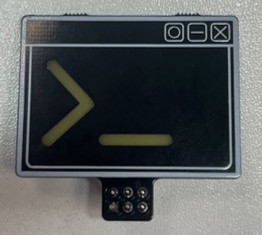
Bear addon
- Size
- 47.3 × 43.9 mm
- Copper layers
- 2
- Thickness
- 1.6 mm
- Parts
- 7
- Nets
- 9
- Pads
- 18
- Tracks, vias
- 29, 0
- Pours
- 16
- Routed
- Yes
- KiCad
- KiCad 10.0 (file 20260206)
- Created
- 2 Jun 2026
- Updated
- 10 Aug 2026
Overview
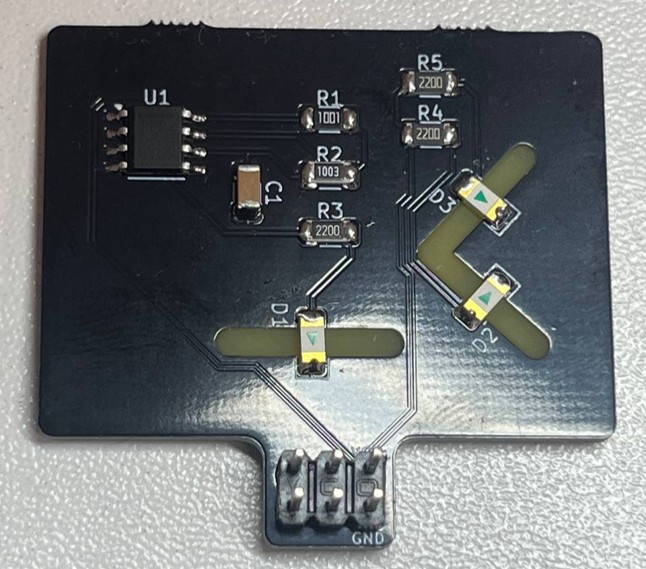
Bear addon is an open-source printed circuit board by bi-zone, from the bi-zone/offzone-hw repository on GitHub. It is a 2-layer board of 47.3 × 43.9 mm with 7 parts on 9 nets, routed with 29 tracks and 0 vias.
Its parts include 3 resistors, 3 diodes and 1 connector.
README
2025/terminal_addon/README.mdterminal_addon

Для заказа платы
- Количество проводящих слоев: 2
- Базовый материал (Core): FR4
- Суммарная толщина платы, мм: 1.5
- Толщина фольги, мкм: 18 или 35
- Финишное покрытие площадок: HASL
- Паяльная маска: чёрная
- Маркировка обозначений: белая
Для сборки
- 3 светодиода 1206 Белые
- 3 резистора 1206 220 Ом
- Резистор 1206 1 кОм
- Резистор 1206 100 кОм
- Конденсатор 1206 10 мкФ
- Микросхема LMC555
- Коннектор PLD-6
Подробнее в terminal_addon_BOM.html
Инструкция
- Припаиваем микросхему U1. Стрелка на плате указывает расположение первого пина. Первый пин на микросхеме отмечен жирной линией. Жирная линия должна быть возле надписи U1.
- Припаиваем резисторы номиналом вверх. Размещать их можно в любом порядке, они не имеют полярности. Главное расставить все по своим местам.
- R1 - 1 кОм
- R2 - 100 кОм
- R3, R4, R5 - 220 Ом
- Припаиваем светодиоды линзой вниз, соблюдая полярность. Стрелка светодиода должна указывать на белую линию.
- D1 - смотрит вниз
- D2, D3 - смотрят вправо
- Припаиваем конденсатор C1.
- Припаиваем коннектор.

Parts
7| Qty | Value | Footprint | References |
|---|---|---|---|
| 3 | 220 | Resistor_SMD:R_1206_3216Metric_Pad1.30x1.75mm_HandSolder | R1, R2, R3 |
| 3 | LED_WHITE | LED_SMD:LED_1206_3216Metric_Pad1.42x1.75mm_HandSolder | D1, D2, D3 |
| 1 | Conn_02x03 | badgelife_sao_v169bis:Badgelife-SAOv169-SAO-2x3 | J1 |
More from bi-zone/offzone-hw
12- 2 layers46.4 × 37.7 mm

- 2 layers64.4 × 34.5 mm

- 2 layers19.9 × 67.8 mm

- 2 layers48.4 × 49.9 mm

- 2 layers40 × 37.6 mm

- 2 layers41.5 × 47.8 mm

- 2 layers55.9 × 38.7 mm

- 2 layers39.6 × 48 mm

- 2 layers44.7 × 55.8 mm

- 2 layers38.5 × 34.7 mm

- 2 layers34.4 × 44.7 mm

- 2 layers30.9 × 49.4 mm

Similar boards
- 2 layers

Encoder
byrantech/laptop
anyon_e, a highly integrated, high end, open source laptop. Attempt the impossible.
7 parts4.3kMIT - 2 layers40 × 20 mm

- 2 layers19.8 × 30 mm

- 2 layers35.6 × 58.2 mm

Display Carrier
AxxAxx/AxxSolder
STM32 Based soldering station for JBC cartridges, 9-24 VDC and USB-PD power
7 parts1.7kGPL-3.0 - 2 layers20.3 × 16.3 mm

- 2 layers26 × 44 mm

Compact carrier board
jamro/tiny-engineer
A small desktop robot that brings an AI coding assistant to life, physically acting out when it reads files, thinks, writes code, and finishes work.
7 parts1.1k - 2 layers26.4 × 53.8 mm

Atari pickup
hoglet67/RGBtoHDMI
Bare-metal Raspberry Pi project that provides pixel-perfect sampling of Retro Computer RGB/YUV video and conversion to HDMI
7 parts1kGPL-3.0 - 2 layers

Questions
How big is the Bear addon PCB?
It measures 47.3 × 43.9 mm and has 2 copper layers, 1.6 mm thick.
What parts does the Bear addon use?
7 parts. The full list of its parts is on this page, with links to each part's symbol and footprint where PCBKit's library has them.
Where can I download the Bear addon KiCad files?
From the bi-zone/offzone-hw repository on GitHub, at the commit this page was made from: the board is 2025/bear_addon/bear_addon.kicad_pcb. PCBKit opens the board in the browser, with nothing to install.
Can I use the Bear addon design in my own project?
Its repository states no licence, so its author keeps all rights: ask bi-zone before reusing the design.