
2 layers104.7 × 135.6 mm

 BamdadKh/ArduinoLightsaber1
A lightsaber prop built around an Arduino Nano on a custom PCB. It has a 144-LED blade, sound from a DFPlayer Mini, swing detection with an MPU-6050, a small OLED and two buttons. I built it for a Halloween costume.
Lightsaber is an open-source printed circuit board by BamdadKh, from the BamdadKh/ArduinoLightsaber repository on GitHub, published under the MIT licence. It is a 2-layer board of 25 × 100 mm with 15 parts on 45 nets, routed with 60 tracks and 0 vias.
It is built around the DFR0299. Its parts include 8 connectors and 2 ICs. It belongs with the AVR (ATmega, ATtiny) boards of this library.
A lightsaber prop built around an Arduino Nano on a custom PCB. It has a 144-LED blade, sound from a DFPlayer Mini, swing detection with an MPU-6050, a small OLED and two buttons. I built it for a Halloween costume.
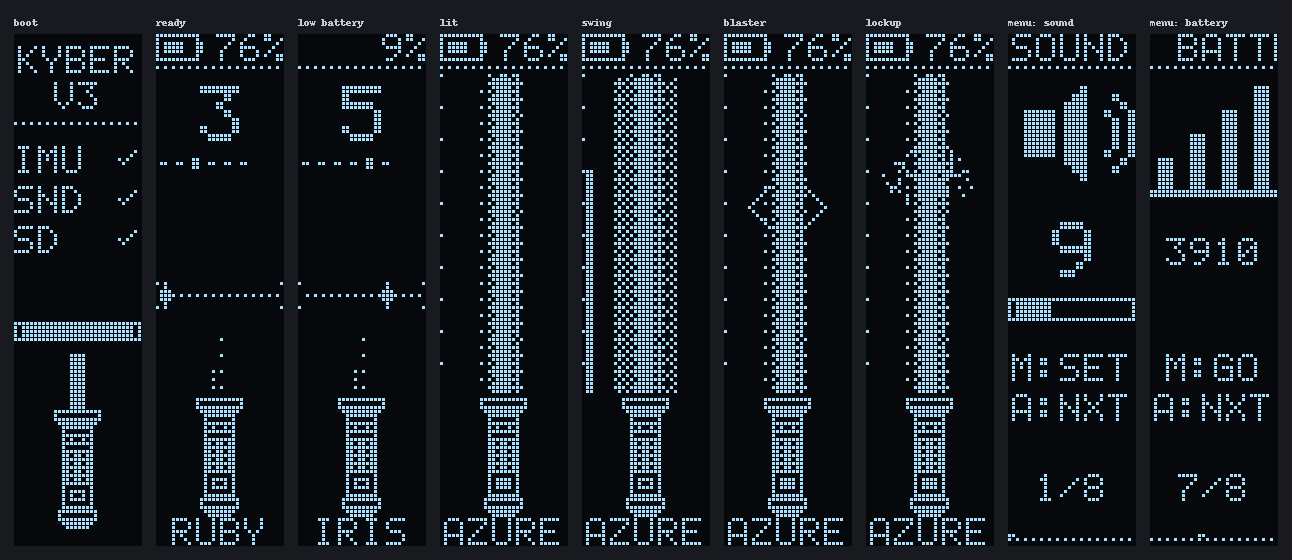
The OLED screens, rendered by the firmware's own UI code in a PC simulator.
| Microcontroller | Arduino Nano (ATmega328P) |
| Motion | GY-521 (MPU-6050) on I²C |
| Sound | DFPlayer Mini, external amplifier and speaker |
| Blade | WS2812B strip, 144 LEDs, data on D6 |
| Buttons | main on D2, aux on D3 |
| Display | 0.91" SSD1306 128×32 OLED, software I²C on D8 (SDA) and D9 (SCL) |
| Power | one 18650 cell wired to the Nano's 5V pin, no boost converter |
The pin map, bill of materials and the known problems with the V3 board are in
docs/hardware.md. The schematic is in
hardware/exports. The schematic has mistakes the
board inherited; the firmware works around them, so trust the board and docs/hardware.md
over the schematic.
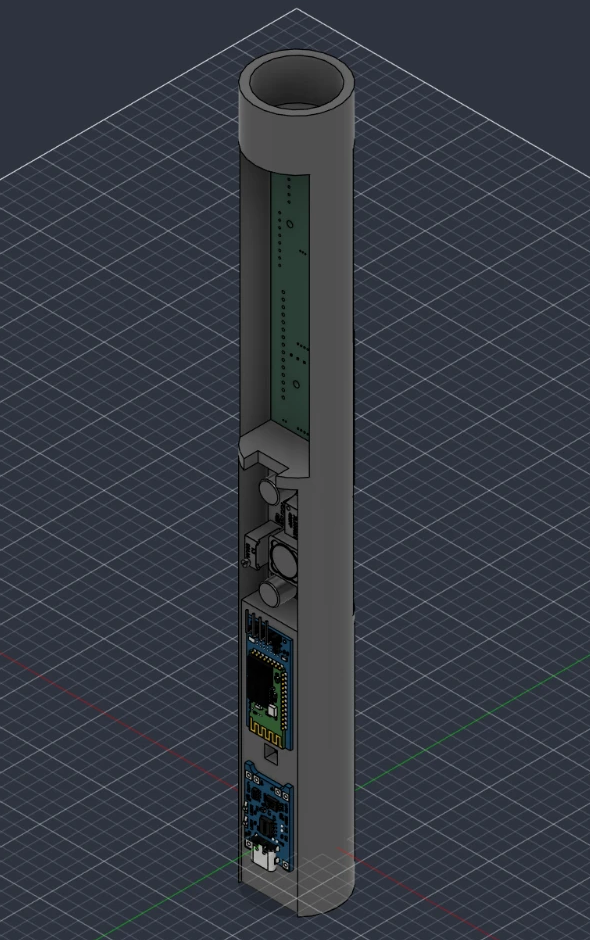
The hilt is modelled in Fusion 360 (lightsaber-hilt.f3z), and the printable tube is hilt-tube.stl, which GitHub shows in a 3D viewer.
You need arduino-cli with the arduino:avr core.
The sketch has no third-party libraries.
arduino-cli compile -b arduino:avr:nano firmware/lightsaber
arduino-cli upload -b arduino:avr:nano -p COM3 firmware/lightsaber
Nano clones with the old bootloader need arduino:avr:nano:cpu=atmega328old. The build uses
about 18 KB of the 30 KB of flash and 42% of RAM. Pins, LED count, current limit and the
battery and motion thresholds are in config.h.
Building with -DDEBUG_SERIAL=1 prints swing speed and battery voltage over USB at 115200 baud:
arduino-cli compile -b arduino:avr:nano --build-property "compiler.cpp.extra_flags=-DDEBUG_SERIAL=1" firmware/lightsaberpip install numpy
python firmware/tools/build_sd_card.pyThis fills firmware/sd-card/ and writes sound_lengths.h. Copy the MP3 and ADVERT
folders to the root of a FAT32 micro-SD card. Details and the track list are in
firmware/sd-card/README.md.
BANDGAP_MV
in config.h; the Nano's voltage reference is only accurate to about 10%.| Blade off | |
|---|---|
| MAIN click | Ignite |
| AUX click, double click | Next colour, previous colour |
| AUX hold | Open the menu |
| Blade on | |
|---|---|
| MAIN click | Retract |
| AUX click | Blaster block |
| AUX hold | Lockup, until released |
| Swing | Swing sound (automatic) |
| Menu | |
|---|---|
| AUX click, double click | Next page, previous page |
| MAIN click | Change the value or run the action |
| AUX hold | Save and exit |
The menu pages are sound, light, colour, sensitivity, flip, calibrate, battery and exit. Light and colour preview on the blade. The saber retracts by itself after five minutes without movement.
The blade is rendered per pixel into the LED array, which is the only frame buffer in the
sketch. The OLED has none either. The panel is mounted on its side and driven in vertical
addressing mode, so one physical column is one 32-pixel row of the portrait screen. Each
screen is a function that returns a row as a uint32_t, and the UI streams a few rows per
loop() pass.
The LED strip needs interrupts off for about 4 ms per frame, which rules out serial receive. The DFPlayer is therefore driven blind. The hum loops on the main channel, effects play as DFPlayer adverts that pause and then resume it, and the one-shot lengths are compiled in so the firmware can stop them when they end.
The cell feeds the Nano's supply directly, so the supply voltage is the cell voltage. The firmware measures it against the internal 1.1 V reference. Charge level and warnings use the voltage with the blade off, because the strip pulls it down by several tenths of a volt when lit.
| Module | Job |
|---|---|
saber.cpp | modes and controls |
imu.cpp | MPU-6050 reading and swing detection |
blade.cpp | blade colours, ignition and effects |
color.cpp | WS2812B driver, current limit |
ui.cpp, gfx.h, oled.cpp | OLED screens and display driver |
audio.cpp | DFPlayer protocol and sound playback |
buttons.cpp | debouncing, clicks, holds |
power.cpp | battery voltage |
settings.cpp | EEPROM settings, colour table |
firmware/lightsaber/   the sketch
firmware/sd-card/      sounds for the DFPlayer
firmware/tools/        asset and SD card builders, PC simulator
hardware/kicad/        KiCad 8 project
hardware/fabrication/  gerbers exactly as ordered (V3)
hardware/exports/      schematic PDF, PCB renders
hardware/3d/           hilt model, tube STL, PCB STEP
docs/                  hardware notes, images
The simulator runs the real ui.cpp and blade.cpp on a PC (it needs MSYS2 g++ or MSVC):
python firmware/tools/sim/run_sim.py
python firmware/tools/make_readme_images.py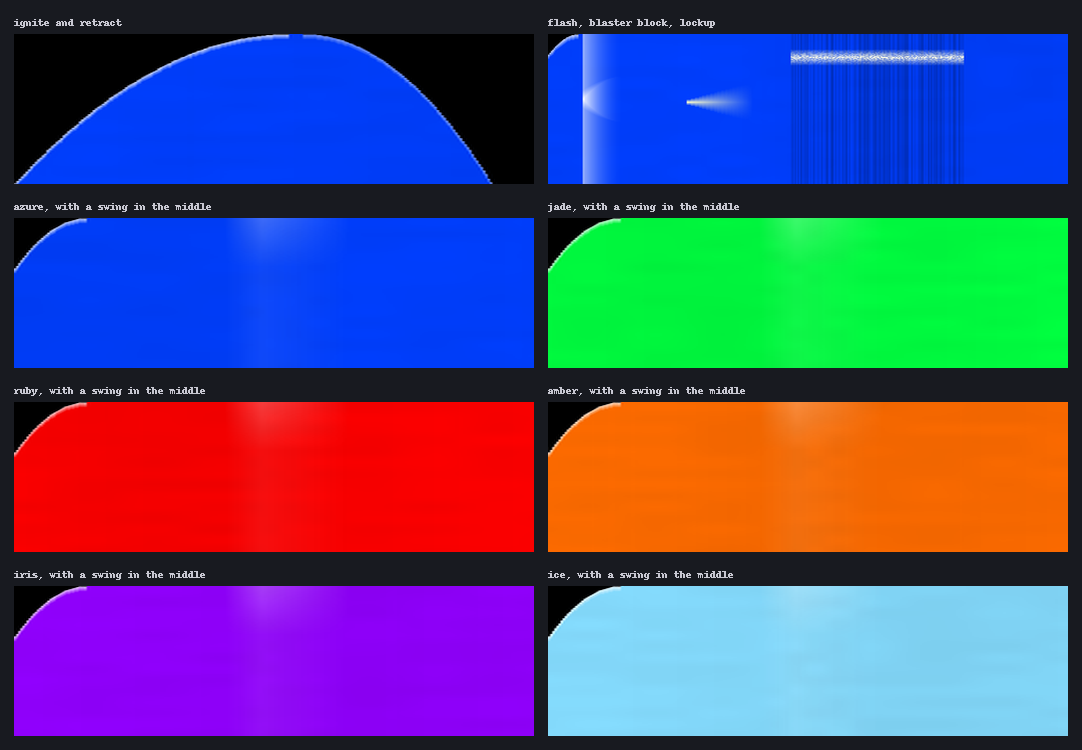
Blade timelines from the simulator. Time runs left to right and the hilt is at the bottom.
The blade sounds come from the TeensySF font in the ProffieOS default SD card, by Fredrik Hubinette (CC BY-SA 4.0). The menu and boot sounds are synthesized by the repository's tools.
MIT. The sound files are under their own licence, see above.
| Qty | Value | Footprint | References |
|---|---|---|---|
| 1 | 5vG | Connector_PinHeader_1.00mm:PinHeader_1x02_P1.00mm_Vertical | J6 |
| 1 | Arduino_Nano_v3.x | Module:Arduino_Nano | A1 |
| 1 | DFR0299 | DFR0299:MODULE_DFR0299 | U2 |
| 1 | GY-521 | mpu6050:GY-521 | U1 |
| 1 | bat | Connector_PinHeader_1.00mm:PinHeader_1x01_P1.00mm_Vertical | J8 |
| 1 | bt | Connector_PinHeader_1.27mm:PinHeader_1x04_P1.27mm_Vertical | J3 |
| 1 | oled | Connector_PinHeader_1.27mm:PinHeader_1x04_P1.27mm_Vertical | J5 |
| 1 | push | Connector_PinHeader_1.00mm:PinHeader_1x02_P1.00mm_Vertical | J2 |
| 1 | push2 | Connector_PinHeader_1.00mm:PinHeader_1x02_P1.00mm_Vertical | J4 |
| 1 | spk | Connector_PinHeader_1.00mm:PinHeader_1x03_P1.00mm_Vertical | J7 |
| 1 | ws1218b | Connector_PinHeader_1.00mm:PinHeader_1x03_P1.00mm_Vertical | J1 |
The 11 most common of 15 parts.
It measures 25 × 100 mm and has 2 copper layers, 1.6 mm thick.
15 parts, built around the DFR0299. The full list of its parts is on this page, with links to each part's symbol and footprint where PCBKit's library has them.
From the BamdadKh/ArduinoLightsaber repository on GitHub, at the commit this page was made from: the board is hardware/kicad/lightsaber.kicad_pcb and its schematic hardware/kicad/lightsaber.kicad_sch. PCBKit opens the board in the browser, with nothing to install.
Its repository publishes it under the MIT licence: you may reuse it on that licence's terms (keep the author's notice, and for a copyleft licence share your changes alike).


Animal-Crate/Animal-Crate
This is a public repository for the Animal Crate project. Please review the README for more information.

MelexinVN/bs_kombo_bs
Электронная беспроводная система для проведения интеллектуальных игр на микроконтроллерах stm32 и радиомодулях nrf24l01+.

janikkaden/self-sufficient-audio-station
A solar-powered, self-sufficient audio station for outdoor exhibitions — ESP32 + DFPlayer, wakes from deep sleep on a button press and plays info tracks in three languages plus music.
