2 layers43.9 × 27.7 mm

 attraktorhh/Micropython_Demoboard1
There is three areas that the workshops cover:
Micropython Demoboard is an open-source printed circuit board by attraktorhh, from the attraktorhh/Micropython_Demoboard repository on GitHub, published under the MIT licence. It is a 2-layer board of 95.3 × 78.1 mm with 19 parts on 34 nets, routed with 178 tracks and 4 vias.
Its parts include 6 switches, 4 connectors, 3 resistors and 1 diode. It belongs with the RP2040 boards of this library.
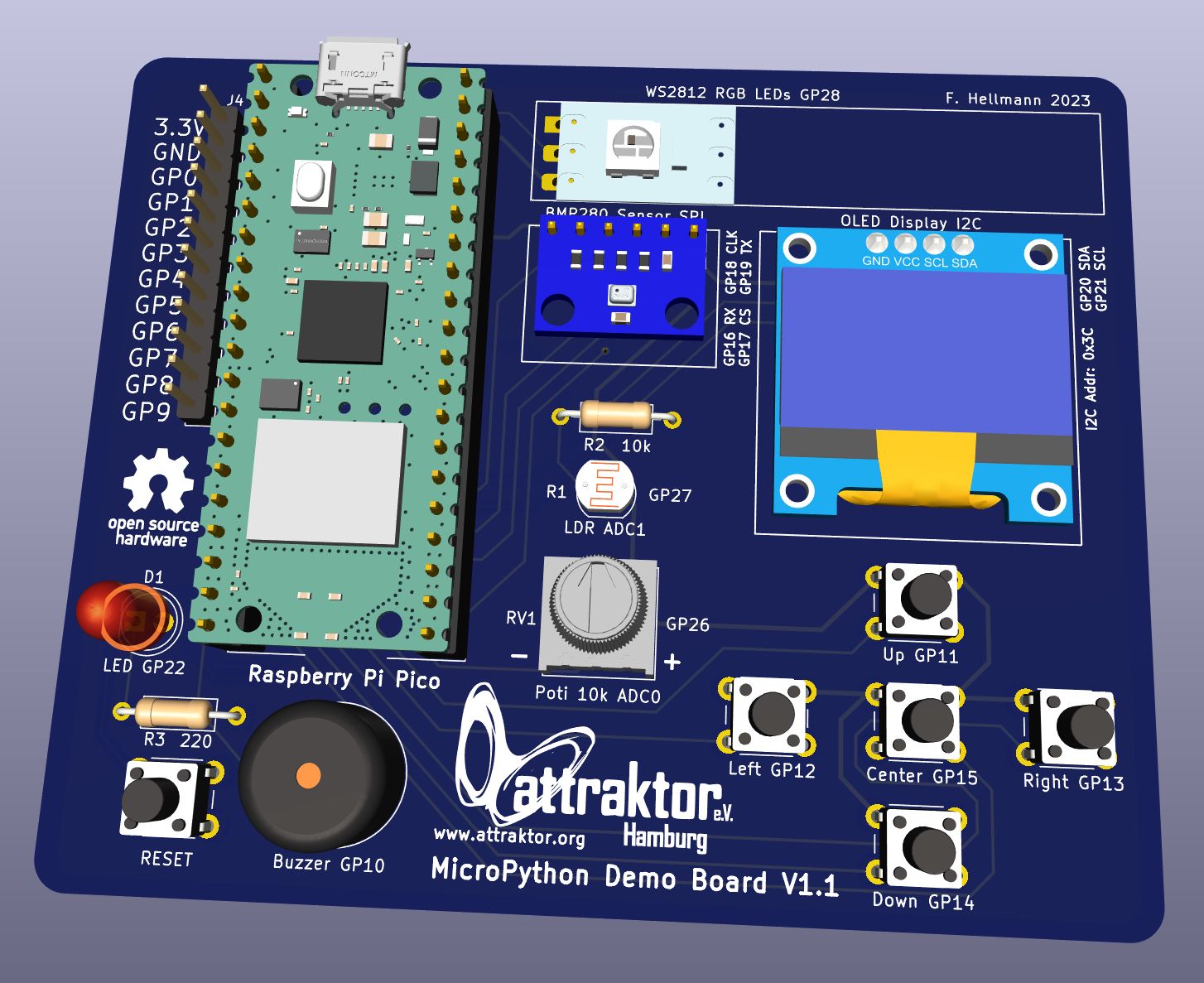
This started out as a little PCB that we could use in our MicroPython Workshops. We quickly found out during the workshops that breadboarding sensors, buttons and other components took a lot of extra time, was prone to error and sometimes frustrating for beginners. So I decided to create a PCB with some standard components that a Raspberry Pi Pico could be plugged into. No mess of wires anymore.
There is three areas that the workshops cover:
This repo contains all necessary files for our MicroPython Hardware Workshop at the Attraktor e.V. Makerspace in Hamburg, Germany: Attraktor MicroPython Workshop
I have provided extensive documentation about the build process, how to program with MicroPython and included a lot of examples. You can find the documentation in the Docs directory:
English MicroPython Demo Board EN Doc (pdf)
German MicroPython Demo Board DE Doc (pdf)
The Demo Board works with a Raspberry Pi Pico WH plugged into the pinheaders and connects it to various sensors, buttons, LEDs and an OLED display.
I have provided Gerber files to get your own boards produced under the releases tab on the right and in the hardware directory.
Sometimes "leftover" boards from our workshops can be found on my Ebay page.
You can find an interactive BOM (Bill of Material) here: iBOM
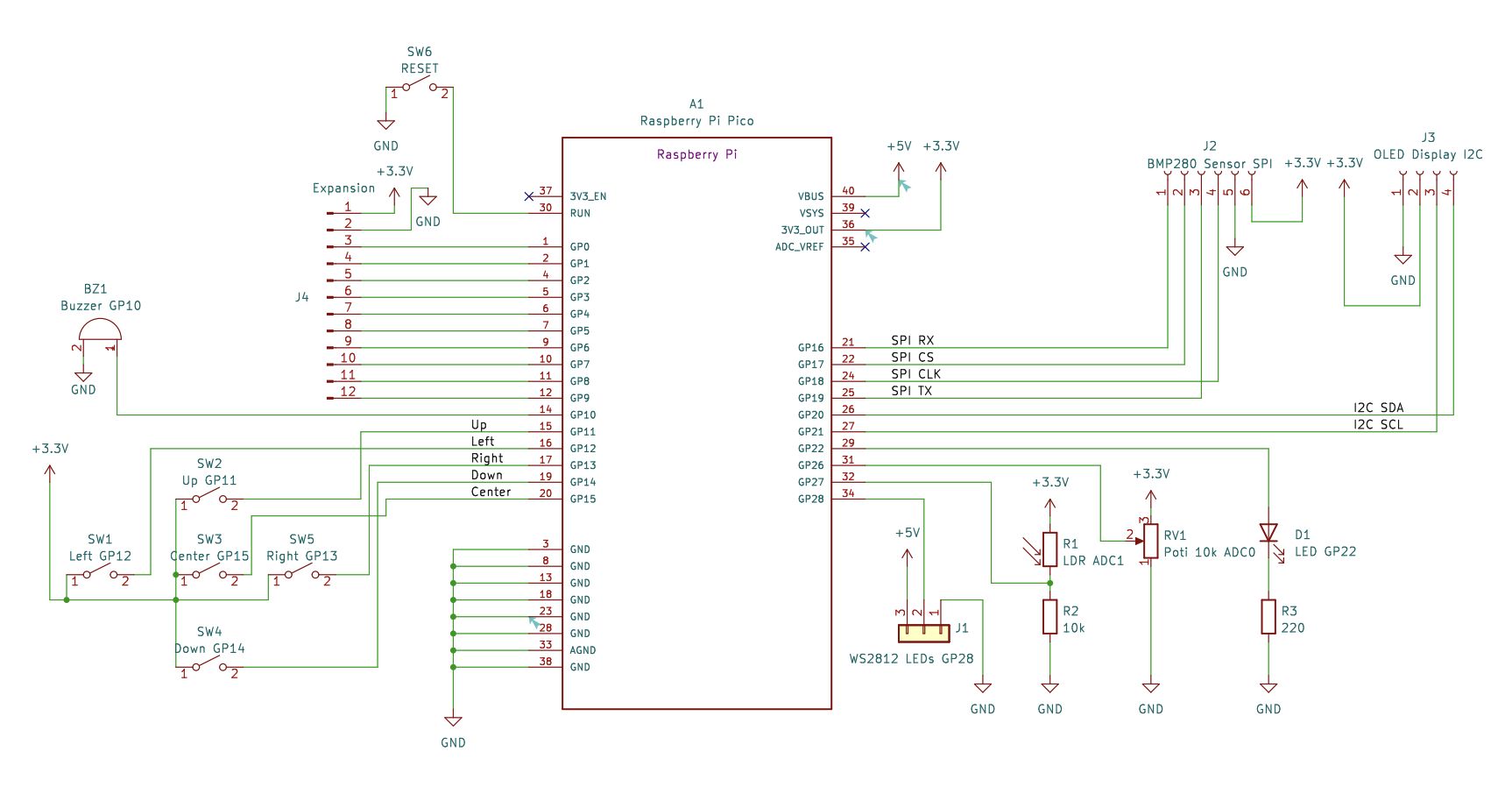
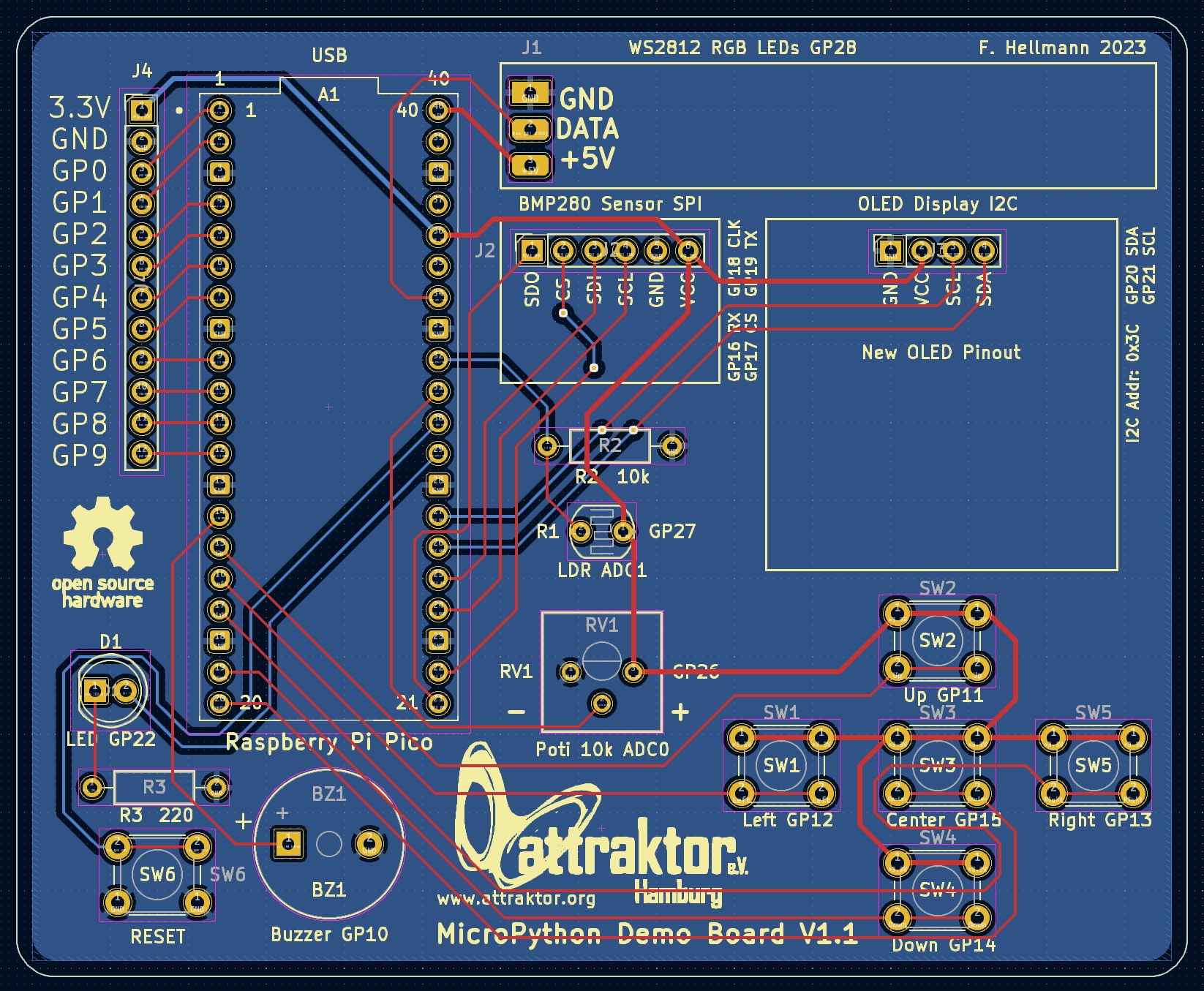
Included in the firmware directory is a board test file and the invaders game as self contained UF2 files.
Simply enter the bootsel mode (hold down the bootsel button, while plugging the Pi Pico in) and copy one for the firmwares over.
The default startup will enter a Menu where you can select games and board demos. Connect to the board with a MicroPython Editor like Thonny to programm.
The software folder contains some demo scripts to try out the different sensors, buttons, buzzer, LEDs and display.
Included are some games like space invaders, flappy bird, snake and pong as well.
Also you'll find the test scripts there.
| Qty | Value | Footprint | References |
|---|---|---|---|
| 1 | 10k | Resistor_THT:R_Axial_DIN0207_L6.3mm_D2.5mm_P10.16mm_Horizontal | R2 |
| 1 | 220 | Resistor_THT:R_Axial_DIN0207_L6.3mm_D2.5mm_P10.16mm_Horizontal | R3 |
| 1 | BMP280 Sensor SPI | Connector_PinSocket_2.54mm:PinSocket_1x06_P2.54mm_Vertical | J2 |
| 1 | Buzzer GP10 | Buzzer_Beeper:Buzzer_12x9.5RM7.6 | BZ1 |
| 1 | Center GP15 | Button_Switch_THT:SW_PUSH_6mm_H7.3mm | SW3 |
| 1 | Down GP14 | Button_Switch_THT:SW_PUSH_6mm_H7.3mm | SW4 |
| 1 | Erweiterung | Connector_PinHeader_2.54mm:PinHeader_1x12_P2.54mm_Vertical | J4 |
| 1 | LDR ADC1 | OptoDevice:R_LDR_5.1x4.3mm_P3.4mm_Vertical | R1 |
| 1 | LED GP22 | LED_THT:LED_D5.0mm | D1 |
| 1 | LOGO | Logos:attraktor | G*** |
| 1 | LOGO | Logos:osh_logo | G*** |
| 1 | Left GP12 | Button_Switch_THT:SW_PUSH_6mm_H7.3mm | SW1 |
| 1 | OLED Display I2C | Connector_PinSocket_2.54mm:PinSocket_1x04_P2.54mm_Vertical | J3 |
| 1 | Poti 10k ADC0 | Potentiometer_THT:Potentiometer_Bourns_3386P_Vertical | RV1 |
| 1 | RESET | Button_Switch_THT:SW_PUSH_6mm_H7.3mm | SW6 |
| 1 | Raspberry Pi Pico | footprints:Raspberry_Pi_Pico_W_SC0918 | A1 |
| 1 | Right GP13 | Button_Switch_THT:SW_PUSH_6mm_H7.3mm | SW5 |
| 1 | Up GP11 | Button_Switch_THT:SW_PUSH_6mm_H7.3mm | SW2 |
| 1 | WS2812 RGB LEDs GP28 | Connector_PinHeader_2.54mm:PinHeader_1x03_P2.54mm_Vertical | J1 |
It measures 95.3 × 78.1 mm and has 2 copper layers, 1.6 mm thick.
19 parts. The full list of its parts is on this page, with links to each part's symbol and footprint where PCBKit's library has them.
From the attraktorhh/Micropython_Demoboard repository on GitHub, at the commit this page was made from: the board is Hardware/MicroPython_DemoBoard.kicad_pcb and its schematic Hardware/MicroPython_DemoBoard.kicad_sch. PCBKit opens the board in the browser, with nothing to install.
Its repository publishes it under the MIT licence: you may reuse it on that licence's terms (keep the author's notice, and for a copyleft licence share your changes alike).

hackclub/OnBoard
💡 Join 1,000 teenagers and make your first PCB with a $100 grant!

polpo/picogus
Emulation of ISA sound cards and CD-ROM on Raspberry Pi Pico (GUS, SB/Adlib, MPU-401, Tandy, CMS, Panasonic CD-ROM) with USB mouse/joystick support


nkitanov/iaq_board
IAQ Board is a DIY (Do-It-Yourself) device for measuring internal air quality


Ardumower/ardumower
Develop an open source robotic lawn mower (HW+SW reference platform)

zmaker/arduino_cookbook
gli sketch del nuovo progetto Arduino Cookbook e dei video di YouTube