2 layers83.3 × 65.3 mm
SimonShield
github-linguist/linguist
Language Savant. If your repository's language is being reported incorrectly, send us a pull request!
46 parts14kMIT

 atopile/ai-pin18
Vibe electronics AI pin
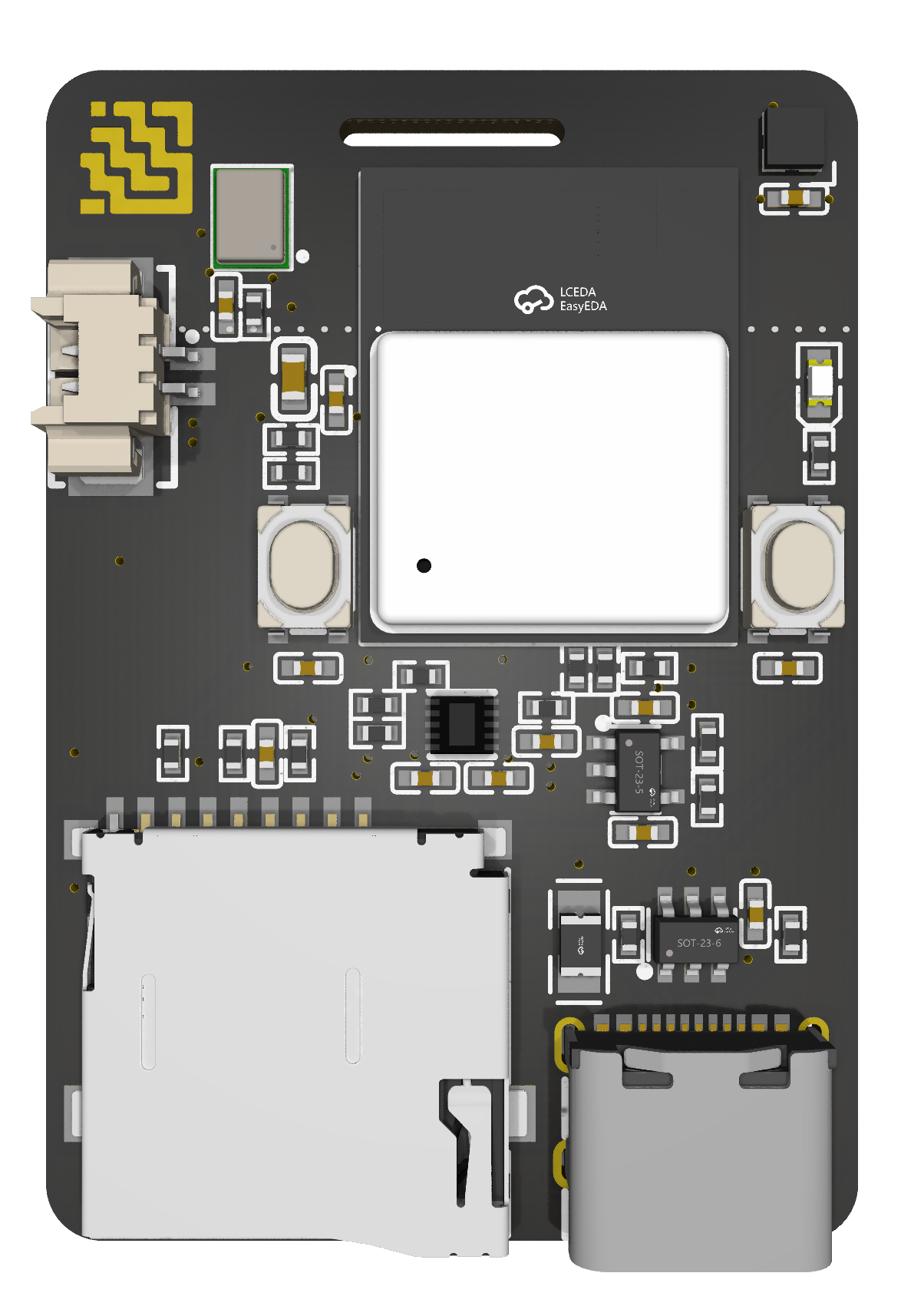
Layouts is an open-source printed circuit board by atopile, from the atopile/ai-pin repository on GitHub, published under the MIT licence. It is a 2-layer board of 28.8 × 41.5 mm with 46 parts on 56 nets, routed with 368 tracks and 49 vias.
Its parts include 18 resistors, 13 capacitors, 5 ICs, 3 diodes and 2 switches.
Stop forgetting what matters. AI Pin is a privacy‑first wearable that captures your conversations throughout the day, then—when you’re home—offloads to your own local server to transcribe and make everything searchable. Ask, “What did I promise Alex yesterday?” or “What did I get done today?” and get instant answers from your own life.
atopile (a declarative electronics DSL) and lives as code in ai-pin.ato.graph TD
Wearable["ESP32‑C3 AI Pin<br/>I2S mic → microSD (WAV)"] -->|Wi‑Fi offload| API[FastAPI Ingestion]
API --> MINIO[(MinIO Object Storage)]
API --> REDIS[(Redis Queue)]
REDIS --> WORKER[Whisper Worker]
MINIO --> WORKER
WORKER --> MINIO
WORKER --> DB[(Postgres + pgvector)]
UI[Search & Daily Digest UI] --> API
API --> DBsequenceDiagram
participant Dev as Device
participant API as Ingestion API
participant S3 as MinIO
participant Q as Redis Queue
participant W as Whisper Worker
participant DB as Postgres/pgvector
Dev->>API: POST /v1/upload (WAV)
API->>S3: putObject(wav)
API->>Q: enqueue({ key, device_id })
W-->>Q: blpop()
Q-->>W: { key, device_id }
W->>S3: getObject(wav)
W->>W: transcribe (Whisper)
W->>S3: putObject(txt/json)
W->>DB: upsert chunks + embeddings
Note over W,DB: hybrid index: BM25 + vector
UI->>API: /v1/search?q=...&time=...
API->>DB: retrieve + rank
API-->>UI: results/snippetsI2S, SPI, Wi‑Fi)See ai-pin.ato for the complete, declarative hardware design.
faster-whisper)You can point a local agent at your private transcripts to answer questions and automate tasks—without sending data to the cloud.
Planned Agent API (local):
GET /v1/search – hybrid search over transcriptsPOST /v1/agents/query – higher‑level query that returns stitched context windows for LLMsPOST /v1/agents/sessions – create a scoped session with time/person/topic constraintsExample (planned) search call:
curl "http://localhost:8080/v1/search?q=what+did+I+promise+Alex&from=2025-01-01&to=2025-01-31&top_k=10"Privacy boundaries:
.env.Create backend/compose/.env with these defaults (edit as needed):
API_HOST=0.0.0.0
API_PORT=8080

MINIO_ENDPOINT=minio:9000
MINIO_ACCESS_KEY=minio
MINIO_SECRET_KEY=minio12345
MINIO_SECURE=false
MINIO_BUCKET=aipin

REDIS_URL=redis://redis:6379/0
WHISPER_MODEL=small
WHISPER_COMPUTE_TYPE=auto
Then launch:
cd backend/compose
docker compose up -d
Services:
http://localhost:8080http://localhost:9001 (user: minio, pass: minio12345)localhost:5432localhost:6379Health check:
curl http://localhost:8080/healthzcurl -X POST \
-F "device_id=test-device" \
-F "file=@/path/to/sample.wav;type=audio/wav" \
http://localhost:8080/v1/uploadThe worker will pick it up, transcribe, and write a .txt next to the .wav in MinIO.
See detailed instructions in firmware/zephyr/README.md. Quickstart:
Prereqs (one‑time):
/opt/homebrew/bin/python3 -m venv "$HOME/zephyr-venv"
source "$HOME/zephyr-venv/bin/activate"
pip install -U pip west
cd "$HOME/zephyrproject"
export ZEPHYR_SDK_INSTALL_DIR="$HOME/zephyr-sdk-0.17.2"
export ZEPHYR_TOOLCHAIN_VARIANT=zephyr
west zephyr-export
Build & flash:
source "$HOME/zephyr-venv/bin/activate"
cd "$HOME/zephyrproject"
west build -b esp32c3_devkitm $(pwd -P)/../projects/ai-pin/firmware/zephyr/app -p always -- \
  -DDTC_OVERLAY_FILE=boards/esp32c3_devkitm.overlay \
  -DPython3_EXECUTABLE="$HOME/zephyr-venv/bin/python" -DWEST_PYTHON="$HOME/zephyr-venv/bin/python"
west flash
Provision Wi‑Fi on SD card (root):
ssid=YOUR_SSID
psk=YOUR_PASSWORD
Troubleshooting highlights:
west blobs fetch hal_espressif&dma { status = "okay"; } and &i2s { dmas = <&dma 0>, <&dma 1>; }, and CONFIG_DMA=y in prj.confai-pin.ato (Atopile)See spec.md and todo.md for detailed scope, milestones, and open questions.
Issues and PRs welcome. The goal is a great local‑first reference design for private, wearable memory.
MIT
| Qty | Value | Footprint | References |
|---|---|---|---|
| 13 | 10kΩ ±1% 62.5mW | UNI_ROYAL_0402WGF1002TCE:R0402 | R1, R2, R3, R5, R6, R7, R11, R12, R14, R15, R16, R17, R19 |
| 7 | 100nF ±10% 16V X7R | Samsung_Electro_Mechanics_CL05B104KO5NNNC:C0402 | C3, C4, C6, C7, C8, C12, C13 |
| 4 | 1µF ±10% 25V X5R | Samsung_Electro_Mechanics_CL05A105KA5NQNC:C0402 | C1, C2, C9, C11 |
| 2 | ALPSALPINE_SKRPACE010:KEY-SMD_4P-L4.2-W3.2-P2.20-LS4.6 | SW1, SW2 | |
| 2 | 5.1kΩ ±1% 62.5mW | UNI_ROYAL_0402WGF5101TCE:R0402 | R9, R10 |
| 1 | STMicroelectronics_LDK220M_R:SOT-23-5_L3.0-W1.7-P0.95-LS2.8-BL | U1 | |
| 1 | BQ25185DLHR_BQ25185DLHR:WSON-10_L2.2-W2.0-P0.40-BL-EP_TI_DLH0010A | U5 | |
| 1 | Korean_Hroparts_Elec_TF_01A:TF-SMD_TF-01A | Card1 | |
| 1 | MOLEX_532610271:CONN-SMD_532610271 | U4 | |
| 1 | OPSCO_Optoelectronics_SK6805_EC20:LED-SMD_4P-L2.0-W2.0-BR | LED1 | |
| 1 | EEMB_BATTERY_LP402535:EEMB_BATTERY_LP402535 | B1 | |
| 1 | Hubei_KENTO_Elec_KT_0603R:LED0603-RD | LED3 | |
| 1 | Espressif_Systems_ESP32_C3_MINI_1_N4:WIFIM-SMD_ESP32-C3-MINI-1 | U2 | |
| 1 | TDK_InvenSense_ICS_43434:MIC-SMD_6P-L3.5-W2.7-P0.90-BL | U3 | |
| 1 | STMicroelectronics_USBLC6_2SC6:SOT-23-6_L2.9-W1.6-P0.95-LS2.8-BL | D1 | |
| 1 | BHFUSE_BSMD0805_050_15V:F0805 | F1 | |
| 1 | SHOU_HAN_TYPE_C_16PIN_2MD_073:USB-C-SMD_TYPE-C-6PIN-2MD-073 | USB1 | |
| 1 | atopile_Logo_4x4mm:atopile_Logo_4x4mm | LOGO1 | |
| 1 | 100kΩ ±1% 62.5mW | UNI_ROYAL_0402WGF1003TCE:R0402 | R8 |
| 1 | 10µF ±20% 6.3V X5R | Murata_Electronics_GRM155R60J106ME44D:C0402 | C10 |
| 1 | 16kΩ ±1% 62.5mW | UNI_ROYAL_0402WGF1602TCE:R0402 | R4 |
| 1 | 18kΩ ±1% 62.5mW | YAGEO_RC0402FR_0718KL:R0402 | R13 |
| 1 | 22µF ±20% 6.3V X5R | Samsung_Electro_Mechanics_CL10A226MQ8NRNC:C0603 | C5 |
github-linguist/linguist
Language Savant. If your repository's language is being reported incorrectly, send us a pull request!

byrantech/laptop
anyon_e, a highly integrated, high end, open source laptop. Attempt the impossible.

VoronDesign/Voron-Hardware
Cool Hardware designed by the Voron Design group


hackclub/OnBoard
💡 Join 1,000 teenagers and make your first PCB with a $100 grant!


OLIMEX/DIY-LAPTOP
Do It Yourself Open Source Hardware and Software Modular Hacker's Friendly Laptop
It measures 28.8 × 41.5 mm and has 2 copper layers, 1.6 mm thick.
46 parts. The full list of its parts is on this page, with links to each part's symbol and footprint where PCBKit's library has them.
From the atopile/ai-pin repository on GitHub, at the commit this page was made from: the board is layouts/default/default.kicad_pcb. PCBKit opens the board in the browser, with nothing to install.
Its repository publishes it under the MIT licence: you may reuse it on that licence's terms (keep the author's notice, and for a copyleft licence share your changes alike).