
4 layers190 × 100 mm
Rioctrl controller
festlv/rioctrl-hw
Hardware design for modular CNC controller
281 parts16CERN-OHL-S-2.0

Generates canonical "basic dev board" KiCad schematics for the Espressif modules that have a PCB antenna + native USB (12 modules across S2/S3/C3/C5/C6/H2).
Baseline is an open-source printed circuit board by atomic14, from the atomic14/kicad-esp32-dev-boards repository on GitHub. It is a 2-layer board with 18 parts on 15 nets, routed with 58 tracks and 9 vias.
It is built around the TS-1088-AR02016 and TYPE-C-31-M-12. Its parts include 6 resistors, 5 capacitors, 3 diodes, 2 switches and 1 IC.


Generates canonical "basic dev board" KiCad schematics for the Espressif modules that have a PCB antenna + native USB (12 modules across S2/S3/C3/C5/C6/H2). Each board takes a shared skeleton (USB-C, 3V3 LDO, BOOT/EN buttons, LEDs) and adds the module symbol + two break-out pin headers, wired entirely with net labels (no routing). Output is a complete, openable KiCad project per module.
Why / design rationale: see
DECISIONS.md. This file is the operational guide; DECISIONS.md is the why.
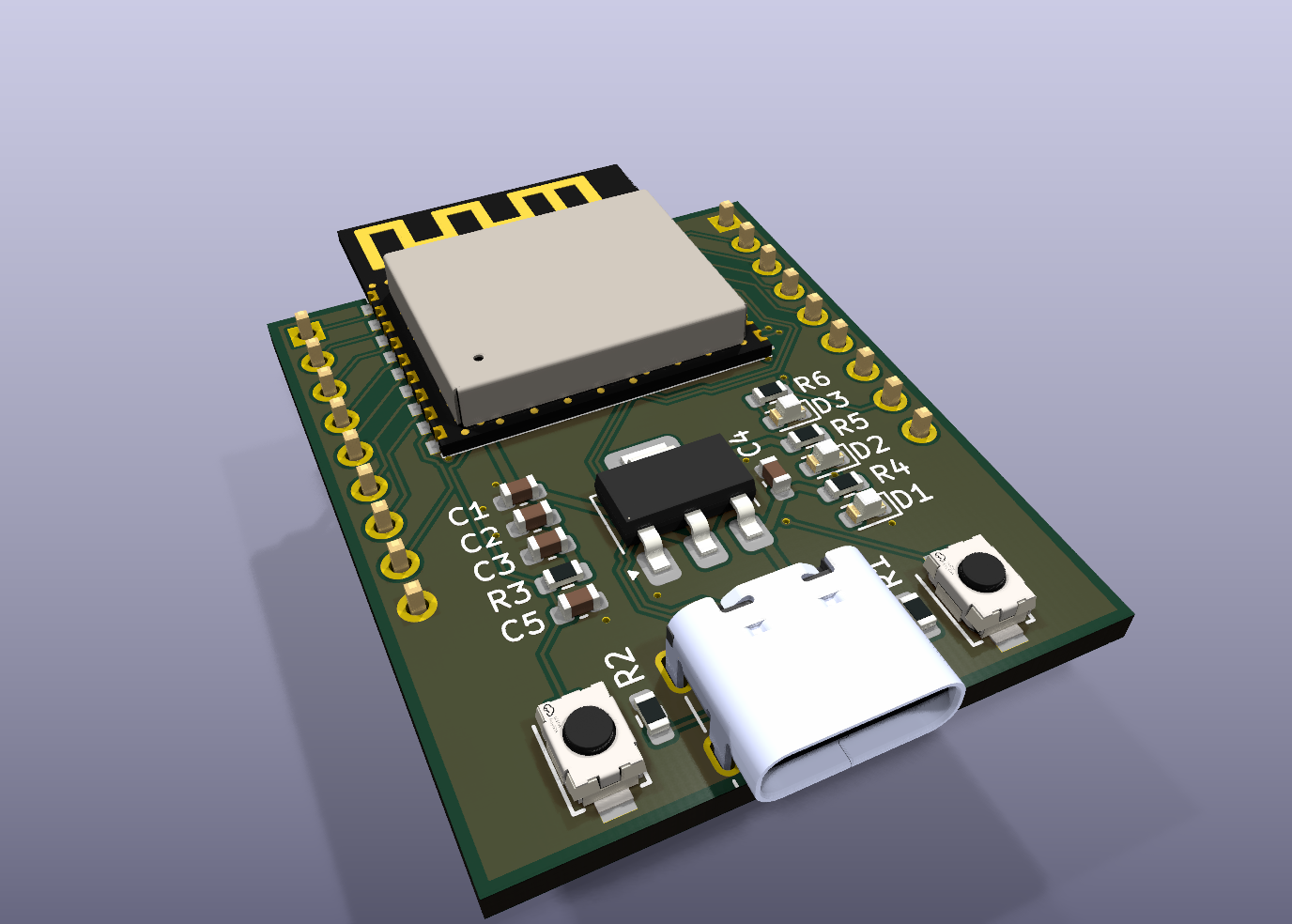
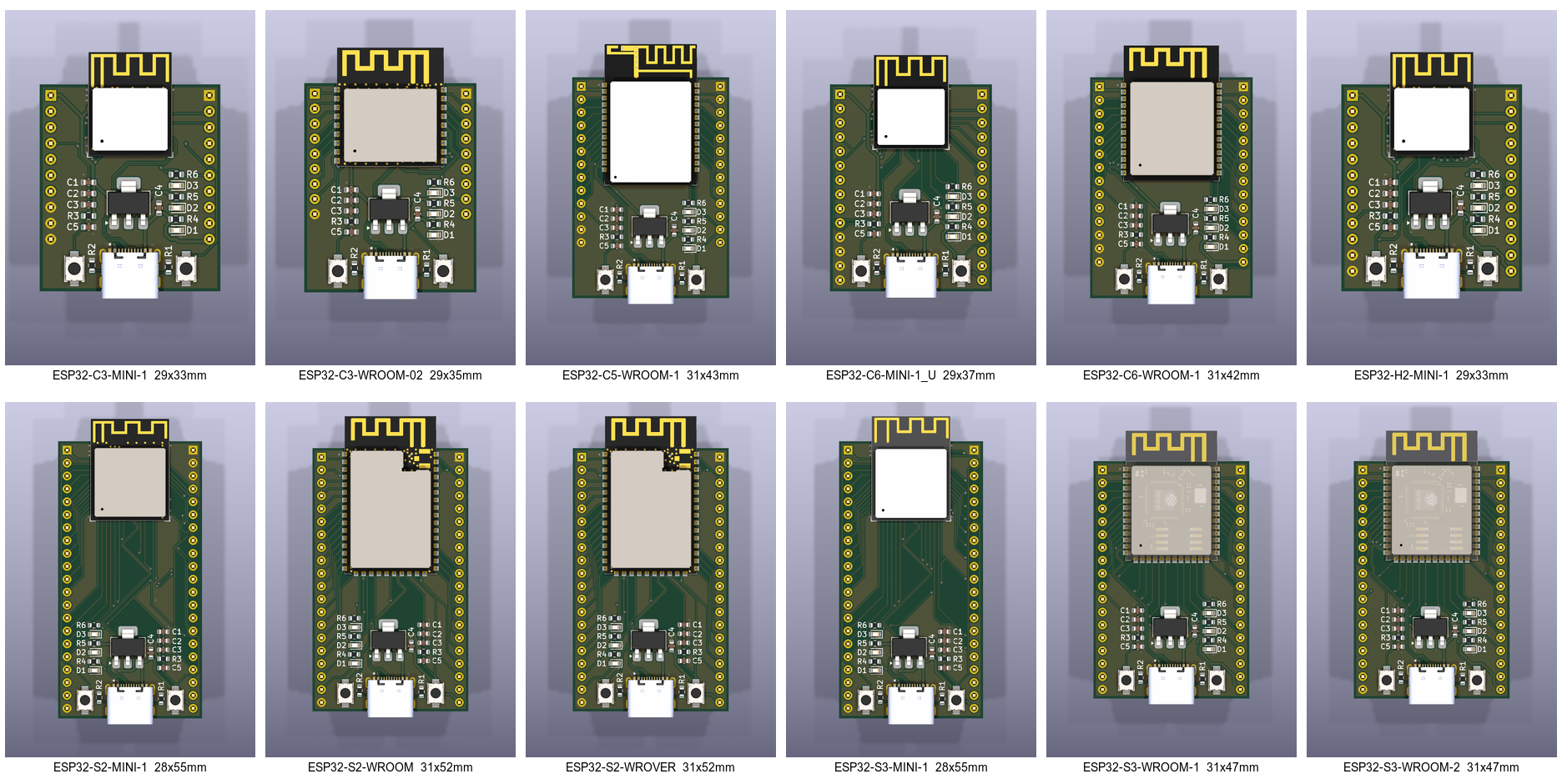
Every board is the same canonical dev board — USB-C, 3V3 LDO, BOOT/EN buttons, power + user LEDs — plus the module and its full GPIO break-out on two headers (that's the ESP32-C3-WROOM-02 above; every component carries its 3D model, so each board renders assembly-ready). The views below are to scale (equal mm-per-pixel; each label carries the board's WxH):
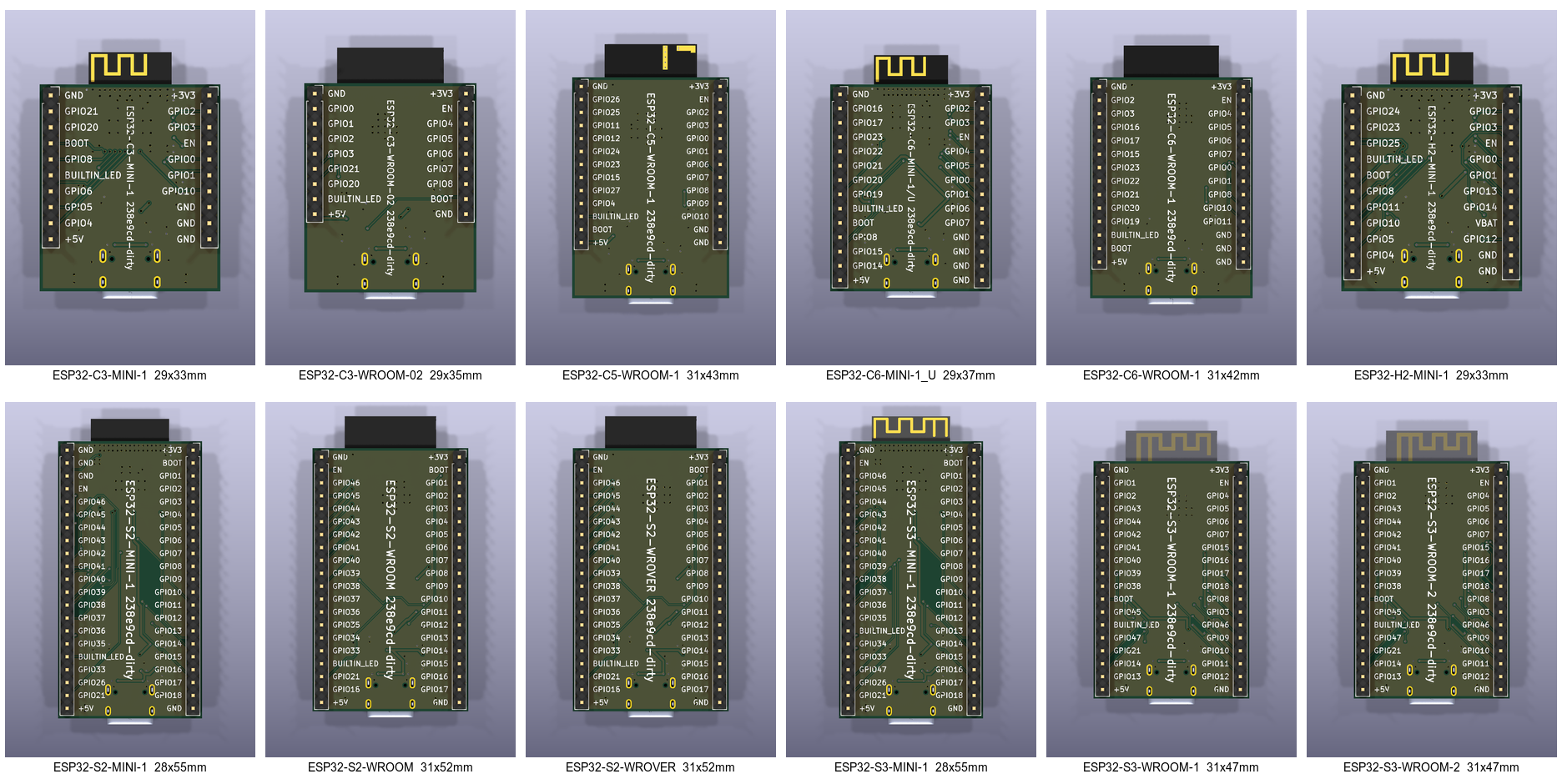
The back silk labels every header pin with its net name and carries a vertical
board identifier — the module name plus the git revision that generated it
(git describe --tags --always --dirty):
These are snapshots of what make.py --render writes to build/: seven
montages (montage_{top,top_bare,bottom}[_scale].png — auto-fit and to-scale —
plus montage_hero.png) and a perspective render_hero.png per board under
build/<MODULE>/. To refresh them:
cp build/montage_{top,bottom}_scale.png docs/images/
cp build/ESP32-C3-WROOM-02/render_hero.png docs/images/hero.png
make.py --animate adds the moving version: build/montage_spin.mp4, a
2560×1440 grid of all 12 boards each turning a full 360° on a three-quarter
tilt, staggered so the grid reads as a wave. The turn wraps exactly, so it
loops seamlessly. It renders ~1440 frames and takes roughly half an hour —
--frames/--supersample trade quality for time, and --boards X --grid 1x1
renders a single board full-frame.
PCM_Espressif symbol/footprint libraries. This is the one manual install
step and must be done before running anything.
⚠️ The addon is installed per KiCad major version. Having it for KiCad 8/9 does not count if you run KiCad 10 — the PCM stores each version's addons under a separate
Documents/KiCad/<version>/3rdpartydir.resolve_library.pypins to your runningkicad-cliversion and will hard-fail (with these instructions) if the addon is missing for it, rather than silently mixing libraries across versions.
dev-board-fixes branch) cloned as a sibling of this repo (or set
$KICAD_ROUTING_TOOLS), with its Rust router built:
git clone -b dev-board-fixes https://github.com/atomic14/KiCadRoutingTools.git ../KiCadRoutingTools
(cd ../KiCadRoutingTools && python3 build_router.py --from-source) # needs cargohttps://www.atomic14.com/esp32/ (only needed when
curating a new module's board.yaml).resolve_library.py auto-locates KiCad on macOS / Linux / Windows. If it can't,
set ESPRESSIF_3RDPARTY (the <kicad>/3rdparty dir) and/or KICAD_CLI
(path to kicad-cli) and re-run it. Re-run it after any KiCad upgrade /
reinstall — library.json records absolute, version-specific paths, and
make.py will refuse to run (pointing you back here) if those paths go stale.
uv sync                                   # restore the Python env (pinned in uv.lock)
uv run python scripts/resolve_library.py  # detect KiCad/libraries -> library.json (once/machine)
uv run python scripts/make.py             # build + route every board (THE command)
make.py is the one front door — it chains clean → build → route → render:
uv run python scripts/make.py            # build + route all modules
uv run python scripts/make.py --clean    # wipe prior output first
uv run python scripts/make.py --render    # also render the 3D montages
uv run python scripts/make.py --animate   # also render the spinning montage mp4 (~30 min)
uv run python scripts/make.py --fab       # also export fab zips (Gerbers + drill)
uv run python scripts/make.py --all       # clean + build + route + render + fab
uv run python scripts/make.py --no-route  # build only
Generated boards land in out/<MODULE>/<MODULE>.kicad_sch (+ .kicad_pro,
.kicad_pcb); validation artifacts (ERC JSON, PDF render) in build/<MODULE>/.
Open any out/<MODULE>/<MODULE>.kicad_pro in KiCad. Both out/ and build/ are
git-ignored and fully disposable — make.py --clean (or clean.py) just removes
them. The curated source in modules/ is never touched.
DECISIONS.md            design decisions + rationale (read for the "why")
library.json            GENERATED per machine by resolve_library.py (git-ignore-able)
pyproject.toml/uv.lock  pinned Python env (kicad-skip, sexpdata, pyyaml)
baseline-left-en/       skeleton KiCad project (INPUT — never edit); EN button on the left
baseline-right-en/      same skeleton mirrored, EN on the right — generator auto-picks per module
  BasicEsp32Footprints.pretty/, 3d-models/, fp-lib-table   project-local footprints + 3D models
scripts/                orchestrators (run these); scripts/lib/ holds the per-module primitives
modules/<MODULE>/        CURATED SOURCE only (committed) — clean never touches it
  board.yaml            the only hand-authored file (see below)
  pinout.json           extracted from the symbol (never hand-edit); cached source
out/<MODULE>/            GENERATED board (git-ignored, disposable: rm -rf out)
  <MODULE>.kicad_sch/pro/pcb   the board — open <MODULE>.kicad_pro in KiCad
  fp-lib-table + *.pretty/ + asset dirs   copied from baseline
  route_debug/          per-stage routing snapshots for inspection
  fab/ + <MODULE>-fab.zip   Gerbers + Excellon drill; the .zip is fab-ready
build/<MODULE>/          GENERATED validation artifacts (git-ignored, disposable)
docs/AGENT_END_TO_END.md  agent spec: curate every board.yaml, then pilot-verify one module
docs/images/ committed montage snapshots referenced by this READMEscripts/)Orchestrators — the top-level commands you run:
| Script | Role | Deterministic? |
|---|---|---|
make.py | THE command — chains clean → build → route → render → fab (flags toggle stages) | ✅ |
resolve_library.py | Find KiCad libs + kicad-cli → library.json | ✅ run once/machine |
build_all.py [--clean] | extract → build → validate every curated module | ✅ |
route_all.py [--no-diff] | autoroute every board (diff-pair with single-ended fallback; writes back in place) + DRC | ✅ |
render_boards.py | 3D montages of every board → build/ (top, top-bare/no-components, bottom — each auto-fit AND to-scale — plus a perspective hero shot per board) | ✅ |
animate_boards.py | 2560×1440 mp4 of all 12 boards on 3D turntables → build/montage_spin.mp4 (seamless 4 s loop; slow, ~30 min) | ✅ |
fab_all.py | Gerber + Excellon drill zip per board → out/<M>/<M>-fab.zip | ✅ |
clean.py | remove generated output for a fresh run — just rm -rf out build; the curated modules/ source is never touched | ✅ |
Primitives (scripts/lib/) — operate on one module; called by the orchestrators, rarely run directly:
| Script | Role |
|---|---|
extract_pinout.py "<MODULE>" | Parse the symbol → modules/<m>/pinout.json |
footprint_edges.py "<MODULE>" | Physical pin edges from the footprint |
build_board.py "<MODULE>" | The generator: module + perimeter-split headers + labels + footprints + project files (copies the baseline's fp-lib-table and all asset dirs — *.pretty footprint libs, 3d-models/, etc.) |
route_board.py "<MODULE>" | Autoroute one board (USB-C fine neck, signals, GND pour) |
place_pcb.py / gnd_finish.py / gnd_prestitch.py | PCB placement + GND-pour fill/stitch helpers (prestitch protects GND pads before routing) |
validate.py <sch> | ERC delta vs baseline + PDF render |
fab_export.py "<MODULE>" | Gerbers (--check-zones refills pours) + Excellon drill → zipped fab package |
~95% of the work is fully scripted. The only step needing human/agent
judgement is curating each module's board.yaml.
board.yaml is the one hand-authored file. Most wiring is auto-derived (power,
GND, EN, USB→D±, GPIO→GPIOxx labels). You decide:
do_not_break_out: pins that must NOT be exposed — internal flash/PSRAM
and any pin the atomic14 module page
marks as a hard "do not use". Strapping / JTAG / UART / USB pins are still
broken out (documented in notes, not excluded).strapping / input_only: GPIO numbers (curated from the atomic14 page /
datasheet) that are sampled at reset or have no output driver. They're still
broken out — these lists only steer the on-board LED away from unsafe pins.builtin_led: the GPIO the skeleton's on-board LED attaches to. The
generator routes it to the safe pad physically nearest the LED on the laid-out
PCB (shortest trace); build_board.py pick_builtin_led() computes exactly that,
and the build hard-errors if builtin_led names a strapping / input-only /
non-broken-out pin. "Safe" = I/O-capable, non-strapping, broken-out GPIO.boot: the download/boot strapping GPIO the on-board BOOT button pulls low —
GPIO0 on Xtensa (ESP32/-S2/-S3), GPIO9 on most RISC-V (-C3/-C6/-H2), GPIO28 on
-C5. Varies per module, so the generator aliases the skeleton's BOOT net onto it.module: ESP32-S3-WROOM-1
symbol: PCM_Espressif:ESP32-S3-WROOM-1
do_not_break_out: [SPIDQS, SPIIO6, SPIIO7] # octal flash/PSRAM, must not expose
overrides: {}
strapping: [0, 3, 45, 46] # sampled at reset — unsafe for the LED (GPIO45 = VDD_SPI)
input_only: [] # no output driver
builtin_led: GPIO48 # safe GPIO pad nearest the on-board LED (NOT GPIO45, a strap)
boot: GPIO0 # download/boot strapping pin the BOOT button pulls low
notes: >
Source: https://www.atomic14.com/esp32/modules/esp32-s3-wroom-1/ ...⚠️ Curation is symbol-specific, not name-based: e.g.
SPIIO6/7/SPIDQSare reserved on the octal S3-WROOM-1, but are freely-usable GPIO on the quad S3-MINI-1 (and are NC, so absent, on the WROOM-2). Check the atomic14 page; don't blindly exclude by name.
Then: uv run python scripts/lib/build_board.py "<MODULE>" and
uv run python scripts/lib/validate.py out/<m>/<m>.kicad_sch, and open the
rendered PDF — the visual check catches things ERC can't (it once passed a
board whose USB pins were unconnected).
validate.py gate = no new ERROR-severity ERC violations vs the baseline.
New warnings are expected and fine (notably the pin_to_pin from connecting
GPIO0 to the boot button — the EasyEDA button symbol uses Unspecified pin
types). The baseline itself has ~58 pre-existing violations, so the bar is the
delta, not zero. Always also eyeball the PDF render.
make.py --fab (or fab_all.py, or fab_export.py "<M>" for one) exports a
fab-ready package per board to out/<M>/<M>-fab.zip (loose files also in
out/<M>/fab/). The zip holds the standard 2-layer Gerber set (F.Cu B.Cu,
paste, silkscreen, mask, Edge.Cuts) plus an Excellon drill file, drill map,
and .gbrjob — flat-zipped, ready to upload to JLCPCB / PCBWay / most houses.
Key detail: the Gerber export runs with --check-zones, which refills the
copper pours during export, so the GND plane is always present in the copper
Gerbers even though headless tools save boards with empty fills — otherwise
you'd ship a board with no ground plane. Coordinates use an absolute origin for
both Gerbers and drill so they align. If your fab wants PTH/NPTH drills split,
add --excellon-separate-th in fab_export.py (currently combined).
Silk order-number marker. build_board drops a small F-silk text
(SILK_MARKER_TEXT, default "WayWayWay") centred in the clear band just above
the module's bottom pin row — under the body, so it's hidden once the module is
soldered down, and never on exposed copper (its real rendered bounding box is
clearance-checked against every pad, and the size auto-shrinks on tight modules).
This gives the board house a designated spot for its order number instead of it
landing on visible silk. Change the text via SILK_MARKER_TEXT in place_pcb.py.
Back-silk board identifier. Each board also gets a vertical B-silk text
centred on the back: "<module> <git describe --tags --always --dirty>" — so a
physical board always names its module and the exact repo revision that
generated it. Tag the repo (e.g. v1.0) to get a clean rev number on the silk;
between tags it reads v1.0-3-g<hash>, and -dirty flags uncommitted changes.
The text auto-sizes to the board height (1.5 mm down to a 0.8 mm floor,
dropping the revision before the name if it can't fit) — see
place_pcb.board_id_text.
.github/workflows/build.yml runs the whole pipeline on GitHub Actions
(Ubuntu): KiCad 10 from the official PPA, the Espressif PCM addon unpacked
headlessly into the layout resolve_library.py expects, then
xvfb-run make.py --all. Every push to main uploads the boards as a
workflow artifact; pushing a version tag (git tag v1.1 && git push --tags)
additionally publishes a GitHub release with the per-board fab zips, KiCad
project zips, and the montages attached. Boards built from a tag carry that
version on their back silk (the identifier bakes in git describe).
To pass this on: ship the whole directory except .venv/ (regenerated by
uv sync) and library.json/out//build/ (regenerated per machine). The
recipient runs the three Quick-start commands. The curated modules/<M>/board.yaml
(+ pinout.json) are the valuable hand-work and are the only committed per-module
files.
| Qty | Value | Footprint | References |
|---|---|---|---|
| 6 | 5.1K | Resistor_SMD:R_0603_1608Metric | R1, R2, R3, R4, R5, R6 |
| 2 | 100n | Capacitor_SMD:C_0603_1608Metric | C3, C4 |
| 2 | TS-1088-AR02016 | BasicEsp32Footprints:SW-SMD_L3.9-W3.0-P4.45 | SW1, SW2 |
| 1 | 10u | Capacitor_SMD:C_0603_1608Metric | C1 |
| 1 | 1u | Capacitor_SMD:C_0603_1608Metric | C5 |
| 1 | 22u | Capacitor_SMD:C_0603_1608Metric | C2 |
| 1 | BLUE | LED_SMD:LED_0603_1608Metric | D3 |
| 1 | GREEN | LED_SMD:LED_0603_1608Metric | D2 |
| 1 | LD1117S33TR_SOT223 | Package_TO_SOT_SMD:SOT-223-3_TabPin2 | U3 |
| 1 | RED | LED_SMD:LED_0603_1608Metric | D1 |
| 1 | TYPE-C-31-M-12 | BasicEsp32Footprints:HRO_TYPE-C-31-M-12 | J1 |
18 parts, built around the TS-1088-AR02016 and TYPE-C-31-M-12. The full list of its parts is on this page, with links to each part's symbol and footprint where PCBKit's library has them.
From the atomic14/kicad-esp32-dev-boards repository on GitHub, at the commit this page was made from: the board is baseline-left-en/baseline.kicad_pcb and its schematic baseline-left-en/baseline.kicad_sch. PCBKit opens the board in the browser, with nothing to install.
Its repository states no licence, so its author keeps all rights: ask atomic14 before reusing the design.
festlv/rioctrl-hw
Hardware design for modular CNC controller


Cptmeme/Nanoleaf-Shapes-controller
Bus-powered half-duplex interface board between a 3.3 V MCU and the Nanoleaf Shapes panel bus


alanrstalin2010/Drawing-robot
I want to create a drawing robot for my assignments. I think it will be helpful.This is my first project


igorwolfs/modular-processing-hw
MCU Breakout board with Hirose BM28B connector

okbrainhq/sMove
Applied to power.kicadsch, compute.kicadsch and smove-r2-main.kicadsch: