
2 layers426.4 × 120.4 mm
Win split left
alexcamlo/winsplit
Inspired by the Boardrun Bizarre and Red herring. I wanted to be able to use a normal keyset, so no full ortho, but split.
331 parts14

 alexcamlo/winsplit14
Inspired by the Boardrun Bizarre and Red herring. I wanted to be able to use a normal keyset, so no full ortho, but split.
Win split left is an open-source printed circuit board by alexcamlo, from the alexcamlo/winsplit repository on GitHub. It is a 2-layer board of 213.2 × 120.4 mm with 156 parts on 104 nets, routed with 570 tracks and 116 vias.
It is built around the 74AHCT1G125SE. Its parts include 68 diodes, 35 capacitors, 3 switches, 2 resistors and 2 ICs. It belongs with the RP2040 and AVR (ATmega, ATtiny) boards of this library.
Inspired by the Boardrun Bizarre and Red herring. I wanted to be able to use a normal keyset, so no full ortho, but split.
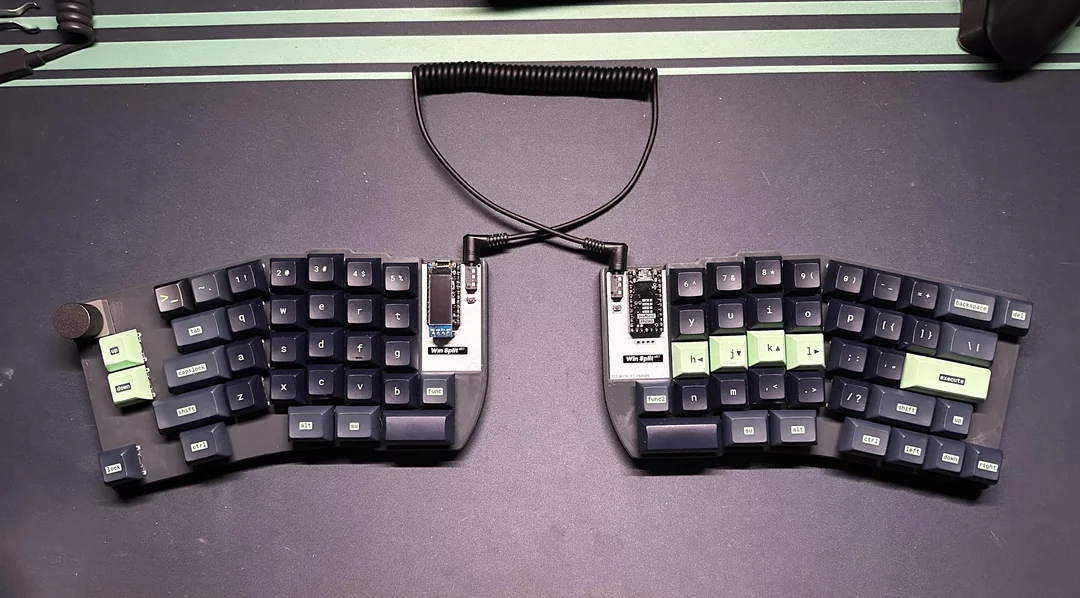
This is my first designed keyboard from the grounds up. I'm not responsible for any damage caused by using this keyboard or any production of this keyboard that doesn't work.
To be bought separately:
Diodes, capacitors, resistors and other small parts are to be soldered directly by JLCPCB. References in KiCad files.
| Qty | Value | Footprint | References |
|---|---|---|---|
| 35 | 100nF | Capacitor_SMD:C_0402_1005Metric | C1, C2, C10, C11, C12, C13, C14, C15, C16, C17, C18, C19, C20, C21, C22, C100 +19 |
| 34 | Diode | winkeebs:Diode_SOD-123 | D1, D2, D10, D11, D12, D13, D14, D15, D16, D17, D18, D19, D20, D21, D22, D23 +18 |
| 29 | MX_SW_HS | winkeebs:SW_MX_HS_CPG151101S11_1u | MX1, MX2, MX10, MX11, MX12, MX13, MX14, MX15, MX17, MX18, MX19, MX20, MX21, MX22, MX23, MX24 +13 |
| 20 | MX_SK6812MINI-E | PCM_marbastlib-mx:LED_MX_6028R | LED1, LED2, LED3, LED4, LED16, LED17, LED18, LED19, LED20, LED21, LED22, LED29, LED30, LED31, LED32, LED33 +4 |
| 14 | MX_SK6812MINI-E | PCM_marbastlib-mx:LED_MX_6028R-ROT | LED9, LED10, LED11, LED12, LED13, LED14, LED15, LED23, LED24, LED25, LED26, LED27, LED28, LED34 |
| 8 | MountingHole_Pad | winkeebs:HOLE_M2 | H1, H2, H3, H4, H5, H6, H7, H8 |
| 3 | MX_SW_HS | winkeebs:SW_MX_HS_CPG151101S11_1.25u | MX30, MX31, MX32 |
| 2 | MX_stab | PCM_marbastlib-mx:STAB_MX_P_2u | S23, S33 |
| 1 | 1K | Resistor_SMD:R_0805_2012Metric | R1 |
| 1 | 4.7K | Resistor_SMD:R_0805_2012Metric | R2 |
| 1 | 74AHCT1G125 | Package_TO_SOT_SMD:SOT-23-5 | U3 |
| 1 | Conn_01x04_Socket | Connector_PinHeader_2.54mm:PinHeader_1x04_P2.54mm_Vertical | J1 |
| 1 | MX_SW_HS | winkeebs:SW_MX_HS_CPG151101S11_1.75u | MX16 |
| 1 | MX_SW_HS | winkeebs:SW_MX_HS_CPG151101S11_1.5u | MX9 |
| 1 | Q_PMOS_GSD | Keebio:SOT-23 | Q1 |
| 1 | ROT_SKYLOONG_HS | PCM_marbastlib-various:ROT_SKYLOONG_HS-Switch | SW8 |
| 1 | RP2040_ProMicro | winkeebs:RP2040_ProMicro_USBup | U1 |
| 1 | Switch | Button_Switch_SMD:SW_SPST_B3U-1000P | Reset1 |
| 1 | TRRS | ScottoKeebs_Components:TRRS_PJ-320A | TRRS1 |
alexcamlo/winsplit
Inspired by the Boardrun Bizarre and Red herring. I wanted to be able to use a normal keyset, so no full ortho, but split.

alexcamlo/winsplit
Inspired by the Boardrun Bizarre and Red herring. I wanted to be able to use a normal keyset, so no full ortho, but split.


wntrblm/Big_Honking_Button
A simple Eurorack sampler and performance module in a silly package.

arturo182/keyboard_featherwing_hw
The Keyboard FeatherWing is an easy way to add a handheld Qwerty keyboard and a 2.6” color display (+ more) to your project! It fits well in your hands and is great for typing with your thumbs, early 2000s-style.

realworldpixel/home-assistant-keypad
A 9-key macro keypad for Home Assistant, running ESPHome. Every key is RGB backlit, and comes in two variants: one that sits on a desk and one that mounts on a wall, with magnets or screws.

romix123/P1-wifi-gateway
Deze software brengt verschillende componenten bij elkaar in een handzaam pakket.


It measures 213.2 × 120.4 mm and has 2 copper layers, 1.6 mm thick.
156 parts, built around the 74AHCT1G125SE. The full list of its parts is on this page, with links to each part's symbol and footprint where PCBKit's library has them.
From the alexcamlo/winsplit repository on GitHub, at the commit this page was made from: the board is pcb/left/Win-split-left.kicad_pcb. PCBKit opens the board in the browser, with nothing to install.
Its repository states no licence, so its author keeps all rights: ask alexcamlo before reusing the design.