
2 layers50 × 20 mm
Rc filter
afkiwers/GroundTruth
KiCad 10 plugin and CLI that simulates return currents, EMI, power stages, PDN impedance and thermal rise with a field solver, and suggests vias and design fixes.
6 partsGPL-3.0

 afkiwers/GroundTruth
KiCad 10 plugin and CLI that simulates return currents, EMI, power stages, PDN impedance and thermal rise with a field solver, and suggests vias and design fixes.
Opamp path lp is an open-source printed circuit board by afkiwers, from the afkiwers/GroundTruth repository on GitHub, published under the GPL-3.0 licence. It is a 2-layer board with 13 parts on 8 nets, routed with 46 tracks and 12 vias.
It is built around the OPA376AIDBVR-MS. Its parts include 5 capacitors, 3 resistors, 3 connectors and 2 ICs.
[!WARNING] Vibe-coded, for illustrative purposes only. GroundTruth was written largely with an AI assistant. Many of its results look reasonable, but they have not all been validated on real hardware: don't base design or compliance decisions on them alone.
GroundTruth finds where the return currents of fast signals and switching power stages really flow on a KiCad 10+ board, and what that does to emissions. It flags return-path problems (a trace crossing a plane split, a layer change with no stitching via, a trace along a plane edge), solves the return current in every plane layer, and estimates how much each detour adds to radiated and conducted emission, with fixes it checks before suggesting them.
On the same board model it also analyses:
It comes as a KiCad plugin (the window shown under The plugin, with heatmaps, markers drawn on the board and an HTML report) and
as the groundtruth command line for CI, which needs neither KiCad nor a display. Both use the same analysis core
and the same settings file, and give the same results.
The KiCad plugin. In KiCad, enable the API (Preferences → Plugins → Enable KiCad API, restart KiCad). Then
Tools → Plugin and Content Manager → Manage… → Add the repository
https://afkiwers.github.io/GroundTruth/repository.json, select it and install GroundTruth; new releases show up
as updates. Each release also has the package as a zip for
Install from File…. On the first start KiCad builds the plugin's Python environment (a few minutes); the button
Analyse return paths then appears in the PCB editor's top toolbar. The plugin has a fair few dependencies, so it can
take a couple of KiCad restarts before the buttons show.
The command line. Python 3.11 or newer; install a release's wheel (GroundTruth is not on PyPI):
pip install "groundtruth-pcb @ https://github.com/afkiwers/GroundTruth/releases/download/0.1.44625/groundtruth_pcb-0.1.44625-py3-none-any.whl"More, including the development setup, GPU acceleration and where everything is on disk: Installing.
Optional speed-ups (once per computer, KiCad closed; the installers are in the installed plugin's tools
folder): the faster sparse solver on Windows, install_sparse.cmd (Intel MKL PARDISO, ~250 MB; a Mac has Apple
Accelerate built in), and GPU support for an NVIDIA or AMD card, install_gpu.py / install_gpu_amd.cmd
(PyTorch, ~2.5 GB). Both only change the speed. Steps: Installing, Optional speed-ups.
In KiCad: open the board in the PCB editor and click Analyse return paths.
The plugin folder has a demo board to try this on (demo\README.txt). On the command line:
groundtruth init board.kicad_pcb                 # the settings file, with every part's suggested model
groundtruth detect board.kicad_pcb --write       # nets, power stages and motor bridges to analyse (review them)
groundtruth check board.kicad_pcb                # the rule checks (seconds)
groundtruth simulate board.kicad_pcb --format html --out-dir report   # the field solver, an HTML report
Getting there. Once installed, GroundTruth puts two buttons at the right end of the PCB editor's top toolbar (red box above). They are two separate actions, so each has its own button:
Analyse return paths (the right one, the ground symbol) opens the GroundTruth window for the board open in the PCB editor. This is where everything happens: setup, Run checks, Simulate, results and issues.
Add selected net to GroundTruth (the left one, with the green plus) adds a net you pick on the board to the window's Signal paths tab, so you don't need to find it in a list:
To add a whole path through several nets (for example a current-sense amplifier → op-amp → microcontroller ADC), Ctrl+click one bit of copper on each net, then press the button once. GroundTruth puts the nets in order through the parts joining them and adds one signal path, with the series resistors as pass-through parts and the op-amp modelled as an amplifier. Ground, supply and power-stage nets (switch node, inductor output) are refused with the reason. KiCad 10 doesn't let plugins add entries to the right-click menu, hence the toolbar button.
A third action, Clear GT markers, removes the markers, contours and arrows GroundTruth drew on the board. It has no toolbar button: find it under Tools → External Plugins, or in the window's top bar.
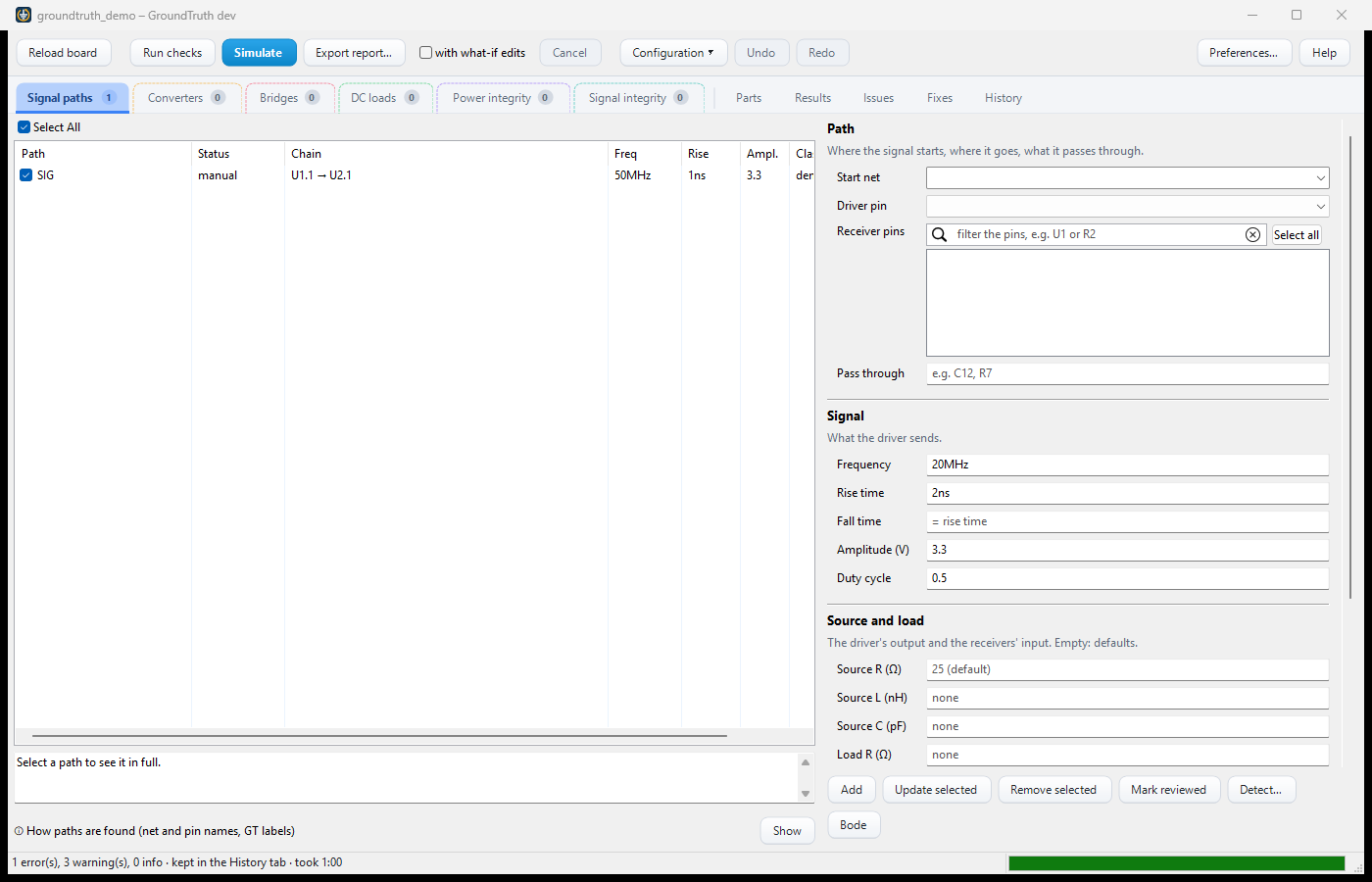
Set up. The coloured tabs are what a run analyses: signal paths, converters, motor bridges, DC loads, power integrity rails and signal-integrity pairs, each row with a tick box. GroundTruth detects them when a board is opened (orange until you review them); each tab's badge counts the rows the next run takes. Run checks gives the rule checks in seconds, Simulate the field solver in minutes. Configuration ▾ saves and loads a set-up, Undo takes back a change.
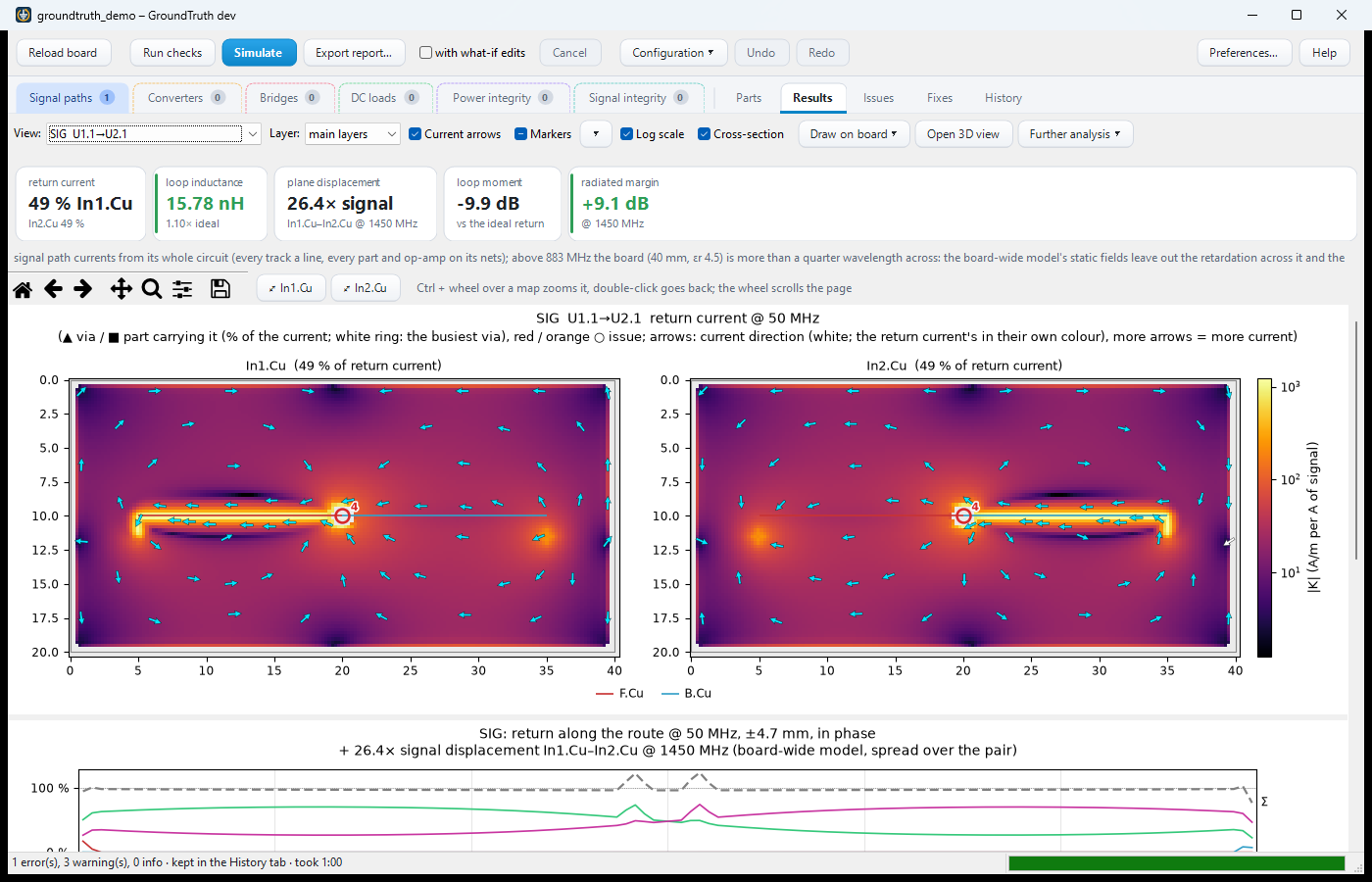
Results. The return current in each plane layer as a heatmap with current arrows, and the vias that carry it between layers. Markers ▾ picks what is drawn over the map, Draw on board ▾ puts the contours, the arrows or the hot loop into KiCad, Open 3D view opens the board in your browser, and Further analysis ▾ adds the thermal solve, the current capacity of a stage and a sharper (finer) map.
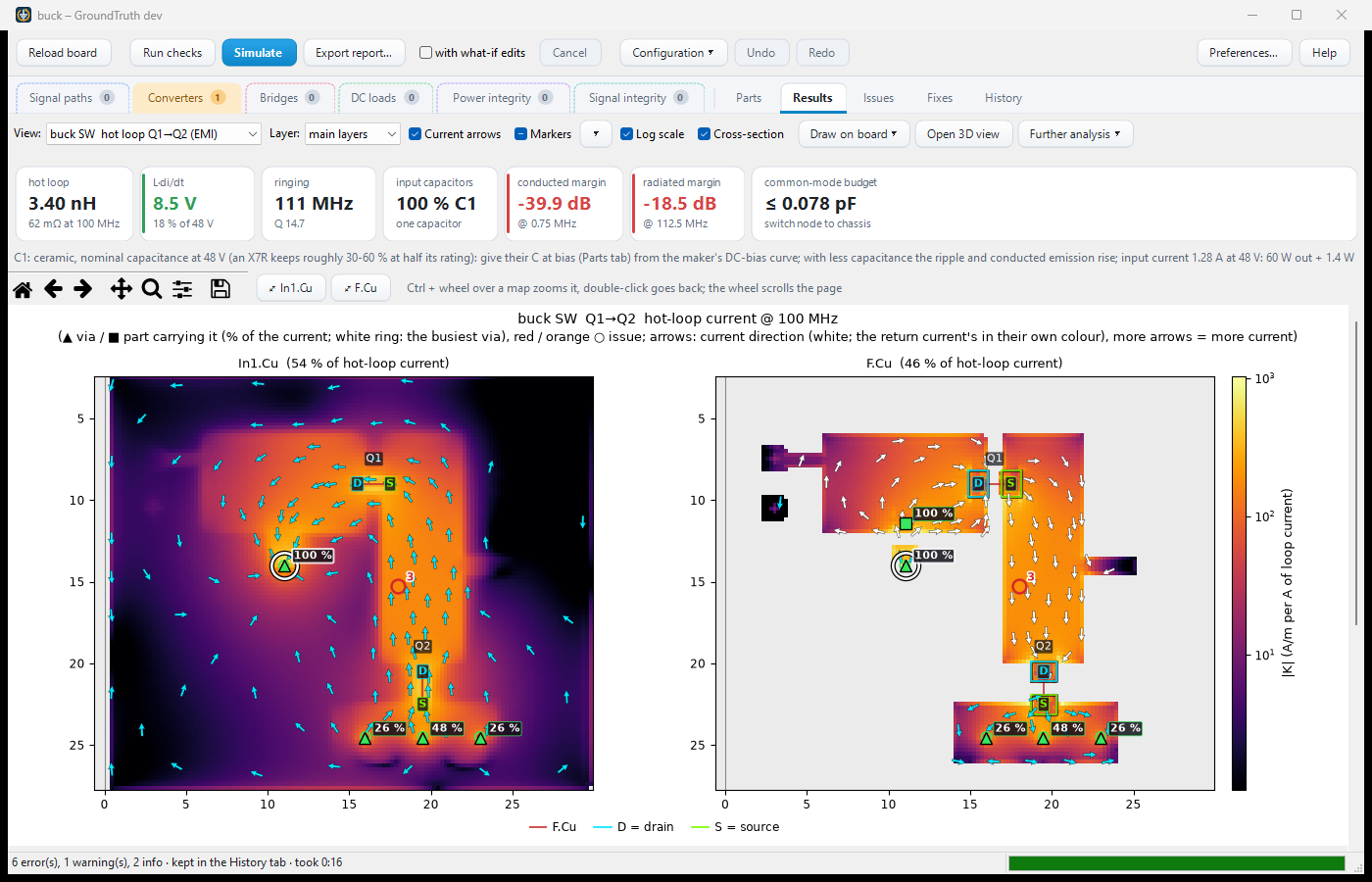
A power stage gets its own views: here a buck's hot loop in two layers, with the busiest via, the loop inductance, the switch-node ringing, the input capacitors' share and the radiated and conducted margins in the tiles above it.
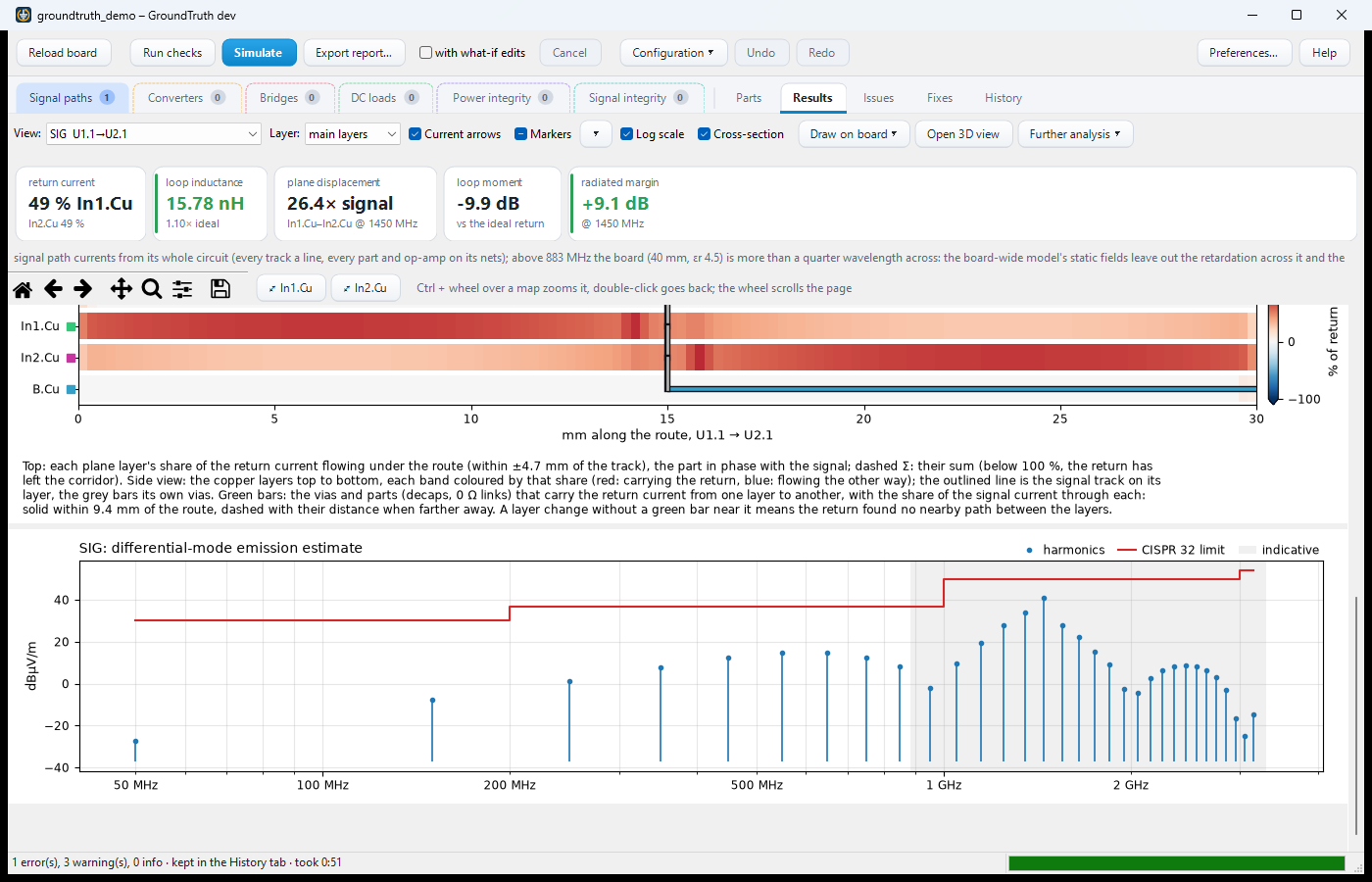
Scrolling down, the cross-section shows each plane layer's share of the return current along the route (red: carrying the return, blue: flowing the other way) and the emission spectrum against its limit.
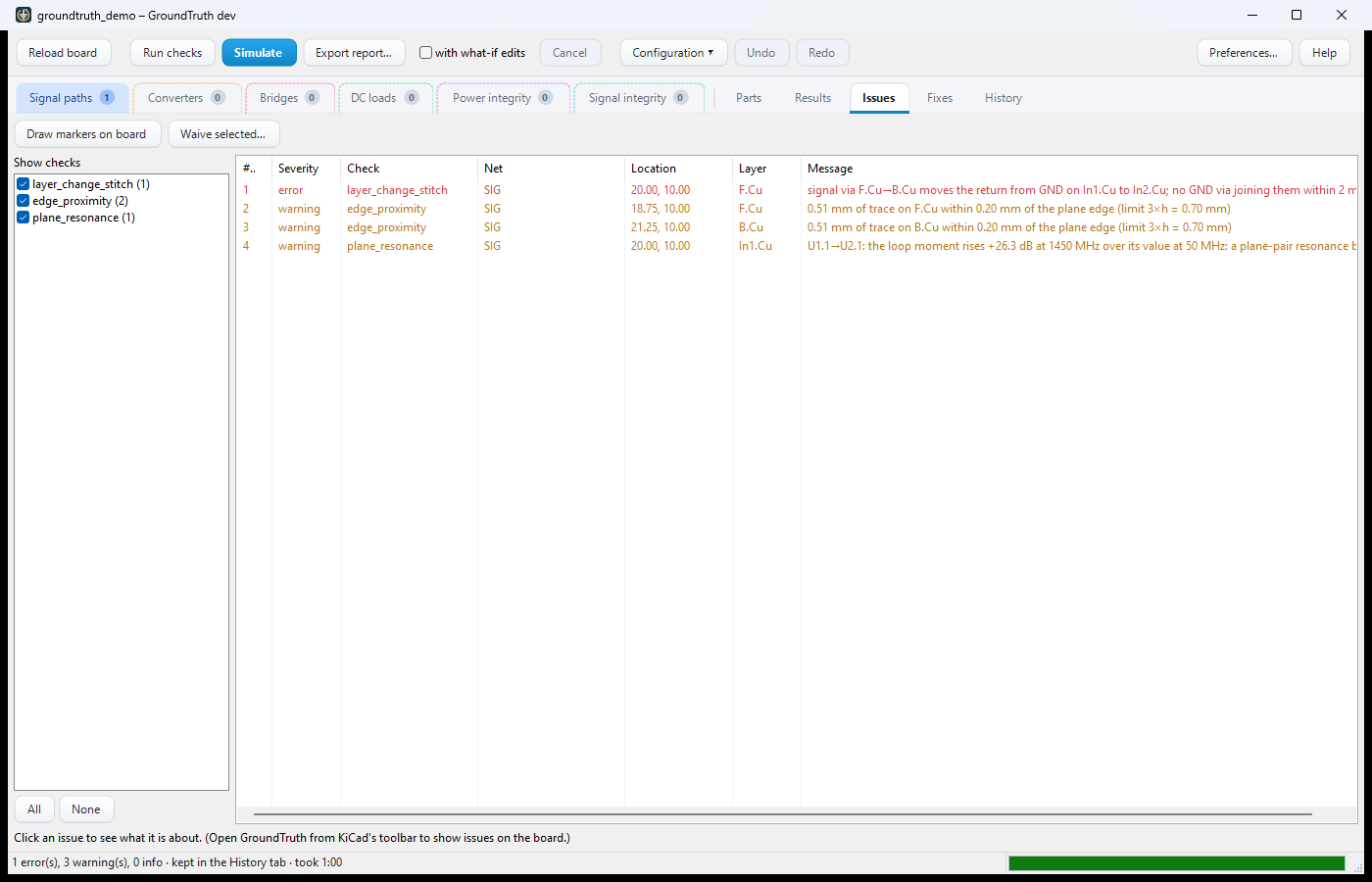
Issues. Every finding with its severity; a click selects, highlights and zooms to it in KiCad.
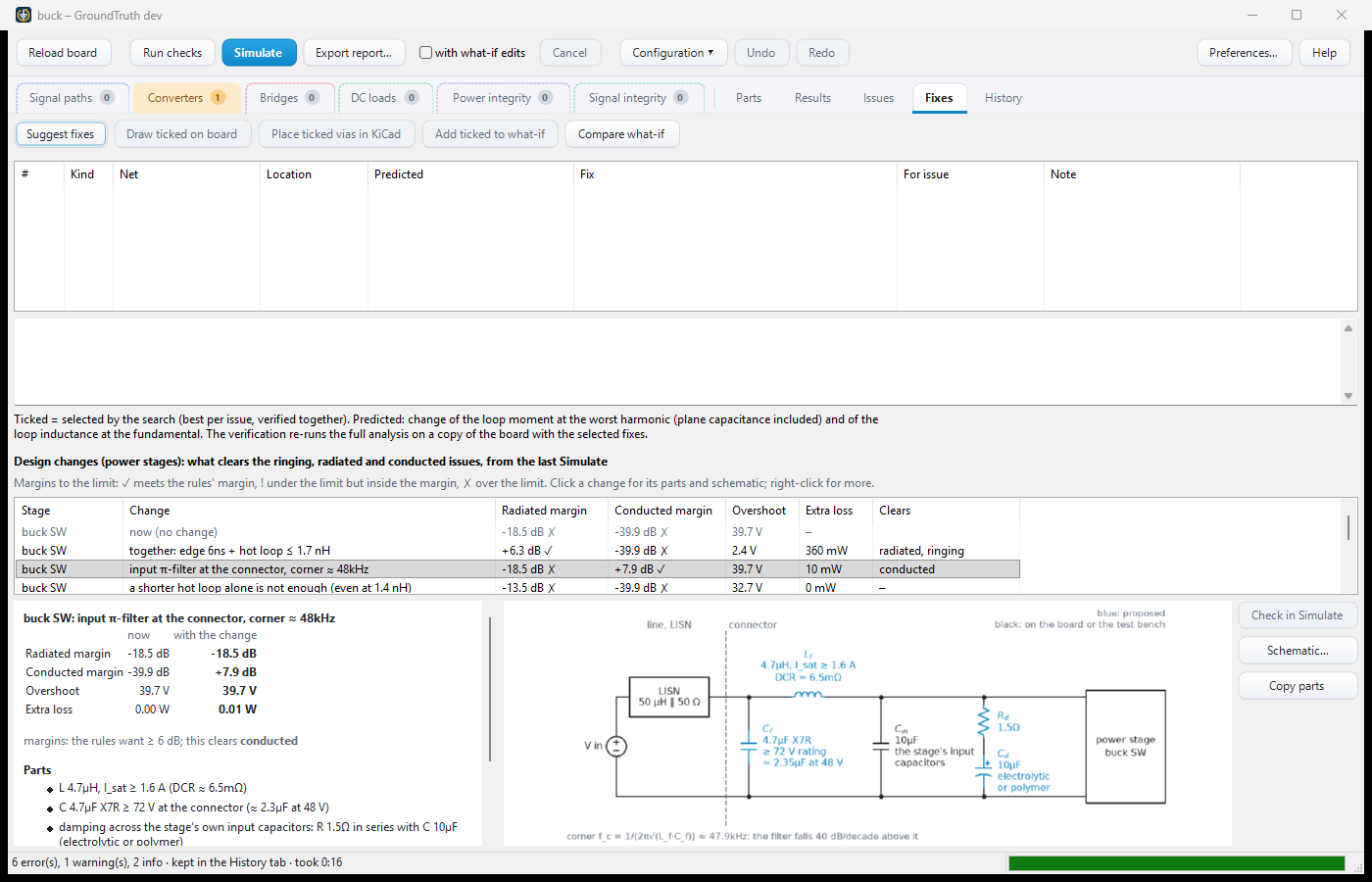
Fixes proposes stitching vias and capacitors for a route, and design changes for a power stage: a slower switch-node edge, a snubber, an input filter, a common-mode budget. Each is predicted, then verified by running the whole analysis again on a copy of the board, with its margins, overshoot and extra loss, the parts to buy and a circuit (here an input π-filter and its corner frequency). History keeps every Simulate to compare; Export report… writes the results as one HTML page. The plugin's own Help (F1) explains each tab.
GroundTruth reads part parameters (a FET's Rds(on) and Coss, a capacitor's ESR and Cbias, an op-amp's GBW,
a controller's Vref …) from the symbols' fields. Add them to the parts in your parts database, and KiCad's HTTP
library interface brings them into the schematic with the parts, where GroundTruth reads them on every run. The full
list, grouped by the tab that uses each (a parameter used on several tabs is listed under each, with where else it is
used): Part parameters.
| Guide | What's in it |
|---|---|
| Installing | the plugin and the command line, the development setup, GPU acceleration, where things are |
| How it works | the analyses, how the solver splits the work, accuracy and what the numbers mean |
| Part parameters | every part parameter GroundTruth reads from the symbols' fields, by tab: to add to your parts database |
| The settings file | what a board's settings hold, configurations, part models from the schematic, the checks and their severities, finding the nets, GT labels |
| Working in KiCad | showing issues on the board, drawing on it, fix suggestions and what-if edits |
| Power stages and bridges | DC-DC converters, motor bridges, victims, control loops, the thermal solve |
| Other analyses | op-amp circuits and Bode plots, capacitance at DC bias, DC loads, power integrity, safety checks, signal integrity |
| The command line | the commands, options and exit codes |
| CI (GitLab) | checking a board repository in a pipeline, the release gate groundtruth verify and its thresholds |
| Compute server | running the heavy analyses on other machines on the network |
| Status and roadmap | what is done and what is planned |
| Releases | for maintainers: how a release is built, signed and published |
For developers: Development (the source tree), ARCHITECTURE.md (the physics, data flow and design decisions) and REFERENCES.md (every source and assumption). Example boards with their settings: examples/.
GroundTruth is free software under the GNU General Public License v3.0: see LICENSE.
| Qty | Value | Footprint | References |
|---|---|---|---|
| 3 | Conn_01x02_Male | Connector_Hirose:Hirose_DF57H-2P-1.2V_1x02_P1.2mm_Socket | J1, J2, J3 |
| 2 | 1u0 | Capacitor_SMD:C_0805_2012Metric | C7, C8 |
| 1 | 100n0 | Capacitor_SMD:C_0603_1608Metric_HomePlatePaste | C6 |
| 1 | 1n0 | Capacitor_SMD:C_0402_1005Metric_RoundPaste | C5 |
| 1 | 2k94 | Resistor_SMD:R_0603_1608Metric | R4 |
| 1 | 39n0 | Capacitor_SMD:C_0603_1608Metric | C2 |
| 1 | 499R0 | Resistor_SMD:R_0603_1608Metric | R3 |
| 1 | 590R0 | Resistor_SMD:R_0603_1608Metric | R1 |
| 1 | NCP718ASN330T1G | Package_TO_SOT_SMD:SOT-23-5 | U2 |
| 1 | OPA376AIDBVR | Package_TO_SOT_SMD:SOT-23-5 | U1 |
afkiwers/GroundTruth
KiCad 10 plugin and CLI that simulates return currents, EMI, power stages, PDN impedance and thermal rise with a field solver, and suggests vias and design fixes.

afkiwers/GroundTruth
KiCad 10 plugin and CLI that simulates return currents, EMI, power stages, PDN impedance and thermal rise with a field solver, and suggests vias and design fixes.

afkiwers/GroundTruth
KiCad 10 plugin and CLI that simulates return currents, EMI, power stages, PDN impedance and thermal rise with a field solver, and suggests vias and design fixes.

afkiwers/GroundTruth
KiCad 10 plugin and CLI that simulates return currents, EMI, power stages, PDN impedance and thermal rise with a field solver, and suggests vias and design fixes.

afkiwers/GroundTruth
KiCad 10 plugin and CLI that simulates return currents, EMI, power stages, PDN impedance and thermal rise with a field solver, and suggests vias and design fixes.


DylanLockyer/Black_Body
Electrical system for black body MKID tester


samyk/magspoof
A portable device that can spoof/emulate any magnetic stripe, credit card or hotel card "wirelessly", even on standard magstripe (non-NFC/RFID) readers.

fossasia/pslab-scripts
Pocket Science Lab - Scripts for Sensor Experiments

13 parts, built around the OPA376AIDBVR-MS. The full list of its parts is on this page, with links to each part's symbol and footprint where PCBKit's library has them.
From the afkiwers/GroundTruth repository on GitHub, at the commit this page was made from: the board is examples/opamp_mfb_lowpass/opamp_path_lp.kicad_pcb and its schematic examples/opamp_mfb_lowpass/opamp_path_lp.kicad_sch. PCBKit opens the board in the browser, with nothing to install.
Its repository publishes it under the GPL-3.0 licence: you may reuse it on that licence's terms (keep the author's notice, and for a copyleft licence share your changes alike).