

4 layers100 × 79 mm
ESP32 Interface
dennowiggle/ESP32_Interface
Facilitate learning the Z80 Retro! hardware and software.
114 parts1LGPL-2.1

 Z80-Retro/2063-Z8096
Retro Z80 CPU Board
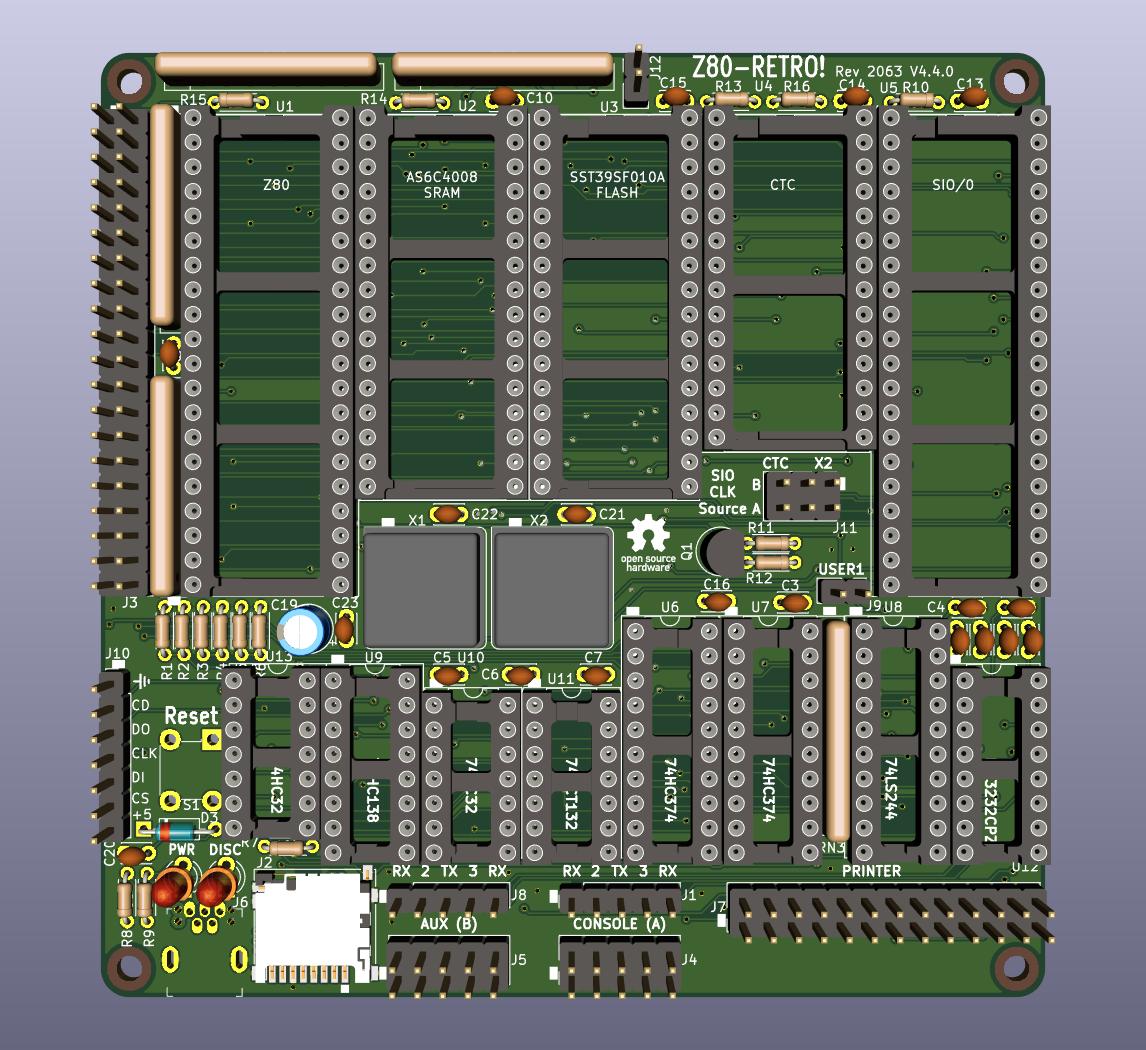
2063-Z80 is an open-source printed circuit board by Z80-Retro, from the Z80-Retro/2063-Z80 repository on GitHub. It is a 4-layer board of 100 × 100 mm with 86 parts on 152 nets, routed with 1,997 tracks and 244 vias.
It is built around the ICL3232CPZ, DM3D-SF(41) and 74HC32D, with the 74HC374, 74HC138 and 74HCT132D among its other parts. Its parts include 24 capacitors, 16 resistors, 14 ICs, 12 connectors and 3 diodes. It belongs with the retro computing and games boards of this library.


This project was designed to run CP/M 2.2 from an SD card. It should be an attainable goal for anyone that can solder through-hole parts to assemble it. Note that J10 is an optional header that allows a Sparkfun SD card breakout board DEV-13743 to used instead of soldering on the surface-mount SD socket part.
Here is an easy-to-find direct link to the PDF of the schematic for a quick view.
You can order boards from any prototype PCB vendor. For example, I show how you can order these boards from JLCPCB or OSHPark by uploading the gerber files found in the releases of this and the flash programmer projects as shown in this Z80 Retro! - How To Order PC Boards video on YouTube.
Software for this project can be found in my 2063-Z80-cpm repo.
Note that the FLASH programmer has been designed to work with a Raspberry PI in the event that you don't already own such programmer. This companion programmer PCB should cost about $2 more when it is ordered at the same time as the CPU board from JLCPCB or other similar proto-board shops as shown in the Z80 Retro! - How To Order PC Boards video on YouTube.
| Qty | Value | Footprint | References |
|---|---|---|---|
| 16 | .1 | Capacitor_THT:C_Disc_D3.0mm_W2.0mm_P2.50mm | C2, C3, C4, C5, C6, C7, C8, C9, C10, C13, C14, C15, C16, C21, C22, C23 |
| 5 | 10K | Resistor_THT:R_Array_SIP9 | RN1, RN2, RN3, RN4, RN5 |
| 4 | .47 | Capacitor_THT:C_Disc_D3.0mm_W2.0mm_P2.50mm | C1, C11, C12, C20 |
| 4 | 10K | Resistor_THT:R_Axial_DIN0204_L3.6mm_D1.6mm_P5.08mm_Horizontal | R7, R10, R13, R14 |
| 4 | MountingHole | MountingHole:MountingHole_2.7mm | H1, H2, H3, H4 |
| 3 | 2K7 | Resistor_THT:R_Axial_DIN0204_L3.6mm_D1.6mm_P5.08mm_Horizontal | R1, R3, R5 |
| 3 | 4K7 | Resistor_THT:R_Axial_DIN0204_L3.6mm_D1.6mm_P5.08mm_Horizontal | R2, R4, R6 |
| 2 | 120 | Resistor_THT:R_Axial_DIN0204_L3.6mm_D1.6mm_P5.08mm_Horizontal | R15, R16 |
| 2 | 1K | Resistor_THT:R_Axial_DIN0204_L3.6mm_D1.6mm_P5.08mm_Horizontal | R11, R12 |
| 2 | 680 | Resistor_THT:R_Axial_DIN0204_L3.6mm_D1.6mm_P5.08mm_Horizontal | R8, R9 |
| 2 | 74HC32 | Package_DIP:DIP-14_W7.62mm_Socket | U10, U13 |
| 2 | 74HC374 | Package_DIP:DIP-20_W7.62mm_Socket | U6, U7 |
| 2 | Conn_01x02 | Connector_PinHeader_2.54mm:PinHeader_1x02_P2.54mm_Vertical | J9, J12 |
| 2 | Conn_01x05 | Connector_PinHeader_2.54mm:PinHeader_1x05_P2.54mm_Vertical | J1, J8 |
| 2 | Conn_02x05 | Connector_PinHeader_2.54mm:PinHeader_2x05_P2.54mm_Vertical | J4, J5 |
| 2 | LED_ALT | LED_THT:LED_D3.0mm | D1, D2 |
| 2 | Net-Tie_2 | NetTie:NetTie-2_SMD_Pad0.5mm | NT1, NT2 |
| 1 | .1 | Capacitor_SMD:C_0805_2012Metric_Pad1.15x1.40mm_HandSolder | C24 |
| 1 | .1 | Capacitor_SMD:C_0805_2012Metric_Pad1.18x1.45mm_HandSolder | C17 |
| 1 | 0548190519 | digikey-footprints:USB_Mini_B_Female_548190519 | J6 |
| 1 | 10uF | Capacitor_SMD:C_0805_2012Metric_Pad1.18x1.45mm_HandSolder | C18 |
| 1 | 10uF | Capacitor_THT:CP_Radial_D5.0mm_P2.50mm | C19 |
| 1 | 1825910-6 | digikey-footprints:Switch_Tactile_THT_6x6mm | S1 |
| 1 | 1N914 | Diode_THT:D_DO-35_SOD27_P7.62mm_Horizontal | D3 |
| 1 | 74HC138 | Package_DIP:DIP-16_W7.62mm_Socket | U9 |
| 1 | 74HCT132 | Package_DIP:DIP-14_W7.62mm_Socket | U11 |
| 1 | 74LS244 | Package_DIP:DIP-20_W7.62mm_Socket | U8 |
| 1 | ACH-10.000MHZ-EK | jb-footprint:Oscillator_DIP-8_combo | X1 |
| 1 | AS6C4008-55PCN | Package_DIP:DIP-32_W15.24mm_Socket | U2 |
| 1 | Conn_01x07 | Connector_PinHeader_2.54mm:PinHeader_1x07_P2.54mm_Vertical | J10 |
| 1 | Conn_02x03 | Connector_PinHeader_2.54mm:PinHeader_2x03_P2.54mm_Vertical | J11 |
| 1 | Conn_02x13 | jb-footprint:PinHeader_2x13_P2.54mm_Top_Bottom | J7 |
| 1 | Conn_02x20 | jb-footprint:PinHeader_2x20_P2.54mm_Vertical_counterclock | J3 |
| 1 | DM3D-SF(41) | jb-footprint:microSD_HC_Hirose_DM3D-SF-bigpad | J2 |
| 1 | ECS-2100A-018 | jb-footprint:Oscillator_DIP-8_combo | X2 |
| 1 | ICL3232CPZ | Package_DIP:DIP-16_W7.62mm_Socket | U12 |
| 1 | LM1117-3.3 | digikey-footprints:SOT-223 | U20 |
| 1 | OSHW_Logo | Symbol:OSHW-Logo_11.4x12mm_SilkScreen | LOGO1 |
| 1 | OSHW_Logo | Symbol:OSHW-Logo_5.7x6mm_SilkScreen | LOGO2 |
| 1 | PN2222 | Package_TO_SOT_THT:TO-92L | Q1 |
| 1 | SST39SF010 | Package_DIP:DIP-32_W15.24mm_Socket | U3 |
| 1 | Z80-CPU | Package_DIP:DIP-40_W15.24mm_Socket | U1 |
| 1 | Z80-CTC | Package_DIP:DIP-28_W15.24mm_Socket | U4 |
| 1 | Z80-SIO-0 | Package_DIP:DIP-40_W15.24mm_Socket | U5 |
dennowiggle/ESP32_Interface
Facilitate learning the Z80 Retro! hardware and software.

sladek/SBC_8080_ECB
This is my attempt to build a single-board microcomputer based on the Intel 8080 CPU. It contains the following features:

CrafterSteve/ESP32_Temp_Con
An temperture control device, based on ESP32. With custom PCB board, it can fit an ESP32-DevKit as controller, DAC and ADC is done on board, as well as, a 5 to +-12v power supply..

slu4coder/Minimal-64x4-Home-Computer
My DIY TTL home computer with VGA and PS/2 and 4x the processing power of a Commodore C64 or Apple II.

slu4coder/Minimal-64-Home-Computer
Legacy: Full TTL-only home computer with VGA and PS/2 and twice the processing power of a Commodore 64

ifilot/p2000t-ram-expansion-board
RAM expansion board for the P2000T


pkoning2/lk201emu
Emulate DEC LK201 keyboard using a standard PC USB keyboard
It measures 100 × 100 mm and has 4 copper layers, 1.6 mm thick.
86 parts, built around the ICL3232CPZ, DM3D-SF(41), 74HC32D and 74HC374. The full list of its parts is on this page, with links to each part's symbol and footprint where PCBKit's library has them.
From the Z80-Retro/2063-Z80 repository on GitHub, at the commit this page was made from: the board is 2063-Z80.kicad_pcb. PCBKit opens the board in the browser, with nothing to install.
Its repository states no licence, so its author keeps all rights: ask Z80-Retro before reusing the design.