
2 layers57 × 24 mm
Power supply
martinquattro/SmartAquariumGuardian
Smart Aquarium Guardian is an ESP32-based IoT aquarium monitoring and automation system for hobbyists and small-scale aquariums.
36 parts1MIT
University EE labs share 10 workbenches between many student groups. Today, a lab staff member must physically walk to each table to switch power on or off, and there is no record of who used which table, when, or for…
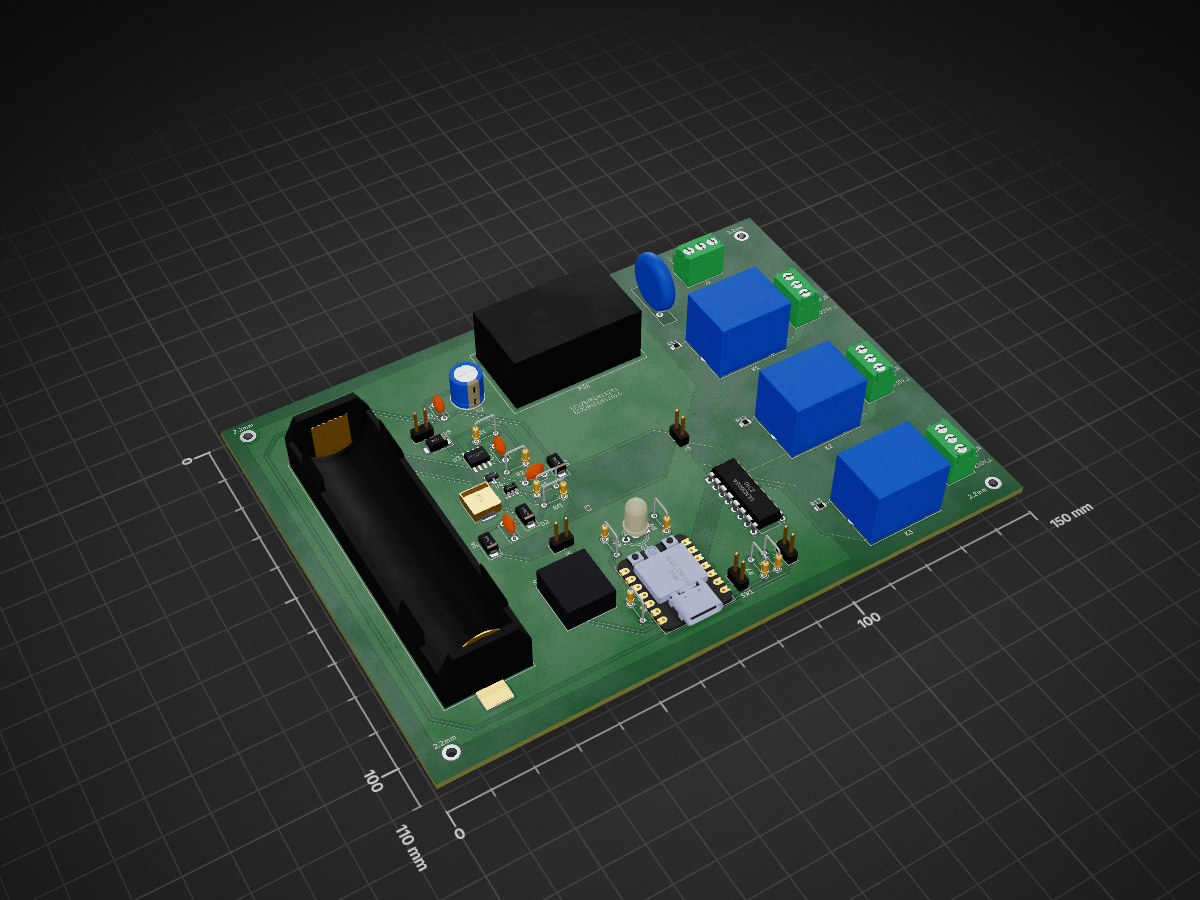
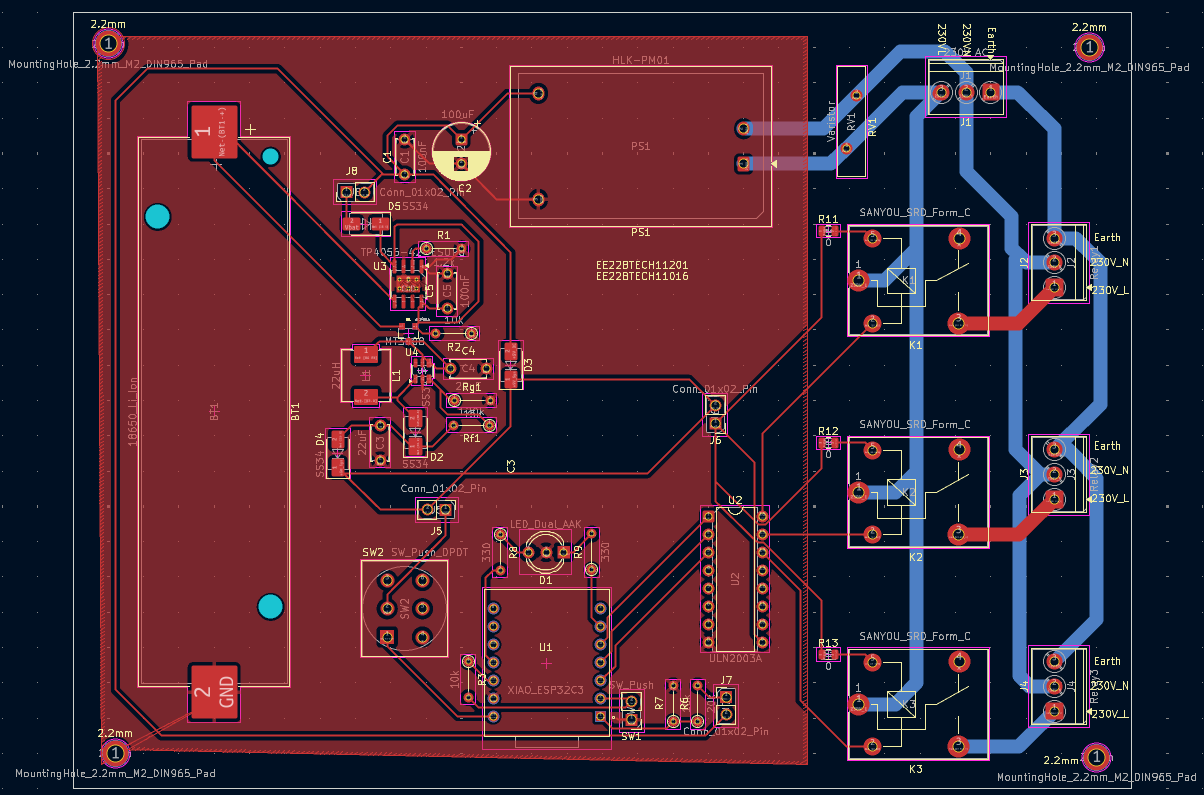
Lab is an open-source printed circuit board by Yashwanth786, from the Yashwanth786/Centralized_Power_Distribution_System repository on GitHub. It is a 2-layer board of 150 × 110 mm with 48 parts on 59 nets, routed with 221 tracks and 0 vias.
It is built around the HLK-PM01, MT3608 and TP4056-42-ESOP8, with the ULN2003A, XIAO ESP32C3 and SS34 among its other parts. Its parts include 10 resistors, 8 connectors, 5 capacitors, 5 diodes and 5 switches. It belongs with the ESP32 and RISC-V boards of this library.


An IoT-based smart power management system for EE lab workbenches. Students request table power through a web portal by entering their roll number; lab staff monitor and control all 10 tables in real time from a central dashboard — powered by ESP32-C3 microcontrollers, Firebase Realtime Database, and automatic 18650 Li-Ion battery backup.
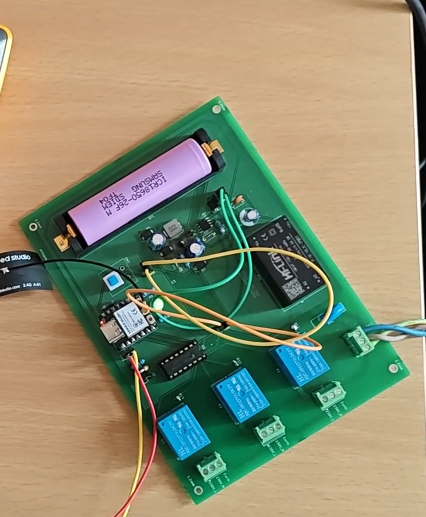



University EE labs share 10 workbenches between many student groups. Today, a lab staff member must physically walk to each table to switch power on or off, and there is no record of who used which table, when, or for how long. Power is sometimes left ON after students leave, equipment runs unattended, and there is no centralized emergency cut-off.
The Centralized Power Distribution System (CPDS) eliminates this entirely. A custom PCB at each table drives three relay-controlled socket outlets under the control of a cloud-connected Seeed Studio XIAO ESP32-C3. A React + Firebase web portal provides two portals in one URL — a Student Portal where students type their roll number and choose an available table, and a Staff Dashboard where one instructor sees all 10 tables live and can cut any session in one click.
Communication flows through Firebase Realtime Database — the portal writes isOn: true to a table's path, the ESP32 there reads it within 2 seconds and closes the relays, and the sockets go live. All events are logged with timestamps. A built-in 18650 Li-Ion battery automatically takes over if mains power is lost, and a physical emergency button on each table cuts power instantly without needing a network round-trip.
| Feature | Description |
|---|---|
| Manual Roll Number Entry | Students type their roll number in the portal — no QR scan, no app install, works on any browser |
| Live Table Availability | Student portal dropdown shows only currently available (unoccupied) tables in real time |
| 3-Hour Session Timer | Each table allocation runs for 3 hours; staff dashboard shows live countdown per table |
| Staff Dashboard | Live grid of all 10 tables: status badge, student roll, session start time, countdown, power source, and action button |
| Firebase Real-Time Sync | Portal ↔ ESP32 changes propagate in under 2 seconds via Firebase onValue listeners |
| Mains / Battery Auto-Failover | ADC on GPIO D0 monitors mains via voltage divider; AO3401A P-MOSFET switches to 18650 + MT3608 boost when mains drops |
| Physical Emergency Button | NO push button on each table — immediately cuts all 3 relays and writes to Firebase without waiting for a network response |
| Bi-Color LED Indicator | Green = mains present & running; Red = battery mode / error / boot |
| 10-Second Heartbeat | Each ESP32 writes lastSeen every 10 s; dashboard shows 🔴 Offline if heartbeat stops |
| Activity Log Panel | Every session start, end, expiry, emergency, and power event is logged to Firebase with a human-readable timestamp |
| All-Off Emergency Button | Staff button with confirmation modal cuts power to all 10 tables simultaneously |
| Session Auto-Expiry | Dashboard Countdown component auto-calls deallocateTable() when a 3-hour session reaches zero |
| Recent Allocations Table | Student roll-entry page shows the last 5 active allocations live — helps students see if their table is already taken |
┌──────────────────────────────────────────────────────────────────────┐
│                          Firebase Cloud                              │
│                                                                      │
│   Realtime Database                    Firebase Hosting              │
│   ────────────────                     ────────────────              │
│   tables/T-XX/isOn          ◄──────    React Web Portal             │
│   tables/T-XX/studentRoll              ├── Student Portal            │
│   tables/T-XX/starttimeLabel  ──────►  │   Roll number entry         │
│   tables/T-XX/sessionEnd               │   Table selection           │
│   power/T-XX/source         ◄──────    │   Confirmation screen       │
│   power/T-XX/lastSeen                  └── Staff Dashboard           │
│   logs/{id}                                All 10 tables live        │
│   logCount                                 End Session / All Off     │
└──────────────────────┬───────────────────────────────────────────────┘
                       │  Wi-Fi  IEEE 802.11 b/g/n
         ┌─────────────┼──────────────┐
         │             │              │
   ┌─────▼──────┐ ┌────▼───────┐ ┌──▼──────────┐
   │  Table T-01│ │ Table T-02 │ │  Table T-10  │
   │ XIAO ESP32 │ │ XIAO ESP32 │ │  XIAO ESP32  │
   │ Custom PCB │ │ Custom PCB │ │  Custom PCB  │
   │ ULN2003APG │ │ ULN2003APG │ │  ULN2003APG  │
   │ 3× Relays  │ │ 3× Relays  │ │  3× Relays   │
│ HLK-PM01 │ │ HLK-PM01 │ │ HLK-PM01 │Data flow summary:
allocateTable(id, roll) → Firebase tables/T-XX/isOn = trueisOn = true → setRelays(true) → sockets livepower/T-XX/lastSeen every 10 s → dashboard flags Offline if misseddeallocateTable(id) → Firebase isOn = false → ESP32 reads → relays openStudent opens web portal on any browser
│
▼
Home Page → clicks "Student Portal" card
│
▼
Roll Number Entry page (StudentScanPage):
- Text input: type roll number e.g. "EE22BTECH11001" → press Next / Enter
- Recent Allocations table shows last 5 active sessions live from Firebase
│
▼
Table Selection page (StudentSelectPage):
- Dropdown populated in real time with ONLY unoccupied tables
- Occupied tables are excluded automatically
- If all tables are full → yellow warning banner appears
- Student selects table → "Allocate Table"
│
▼
allocateTable("T-03", "EE22BTECH11001") writes to Firebase:
tables/T-03/isOn = true
tables/T-03/studentRoll = "EE22BTECH11001"
tables/T-03/starttimeLabel = "07/05/2026, 03:45:12 pm"
tables/T-03/sessionEnd = <epoch ms + 3 hours>
tables/T-03/sessionEndLabel = "07/05/2026, 06:45:12 pm"Staff opens portal → "Technical Staff Portal" → Password entry
│
▼
StaffLoginPage:
- Password compared against hardcoded STAFF_PASSWORD
- Correct → sessionStorage.setItem("staffAuth","true") → navigate to dashboard
- Wrong → inline error message, password cleared
│
▼
StaffDashboardPage (auth guard: redirects if staffAuth not set):
- Three Firebase listeners started on mount:
subscribeToTables → setTables state
subscribeToPower → setPower state
subscribeToLogs → setLogs state
- Cleanup: all three unsubscribed on unmount
│
▼
Dashboard header shows live stats chips: "3 Occupied | 6 Available | 1 Offline"
Dashboard table row per T-01…T-10:
[Table ID] [Status badge] [Student Roll] [Start Time] [Countdown] [Power badge] [Action]
│
▼
Staff clicks "⛔ End Session" on T-03:Student presses NO push button on table edge (GPIO D1, INPUT_PULLUP)
│
▼
ESP32 loop: digitalRead(PIN_EMERG_BTN) = LOW
50 ms debounce elapsed, btnWasPressed was false
│
▼
emergTripped = true
setRelays(false) IMMEDIATELY — no Firebase wait
D4, D3, D2 → LOW → relay contacts open → sockets DEAD
│
▼
Firebase writes (best-effort):
firebaseDeallocate("emergency_button") → tables/T-XX/isOn = false
firebaseAddLog("Emergency button pressed — relays OFF", "emergency")
Red LED ON
│
▼
Button released: btnWasPressed=false, emergTripped=false (auto-reset latch)
Table ready for next studentMains power drops → HLK-PM01 output falls
│
▼
ADC on GPIO D0 reads voltage divider: analogRead(PIN_MAINS_ADC) < 500
mains (bool) becomes false, lastMailsState was true → change detected
│
▼
updateLED(false): Green OFF, Red ON
firebaseSetPower("battery"):
power/T-XX/source = "battery"
power/T-XX/lastSeen = <readable time>
│
▼
If relays were ON when mains dropped:
setRelays(false)
firebaseDeallocate("mains_lost")
firebaseAddLog("Mains power lost — relays turned OFF", "power")
│
▼
AO3401A P-MOSFET hardware path (automatic, no firmware needed):
HLK-PM01 rail drops → MOSFET gate control switches
18650 Li-Ion → MT3608 boost converter → 5V rail maintained
ESP32 and relays stay powered
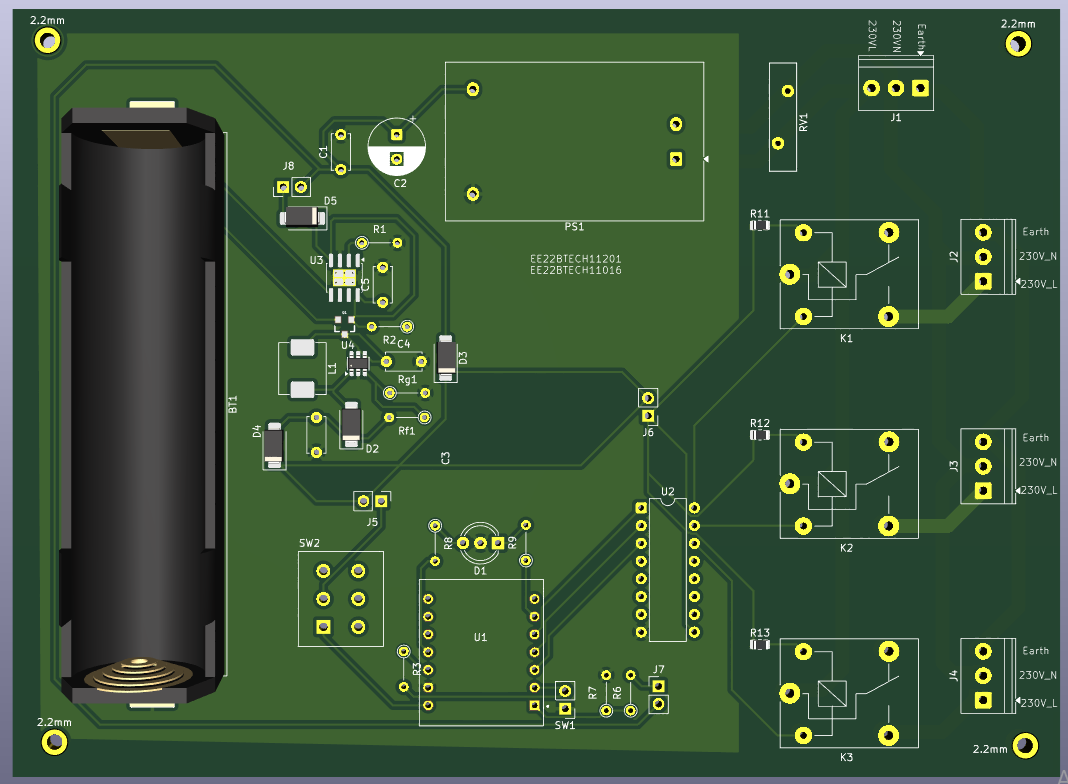
│Custom 2-layer PCB designed in KiCad 9. One board per lab table — 10 boards total.
| Parameter | Value |
|---|---|
| Design Tool | KiCad 9.x |
| Layers | 2 — F.Cu (signal + power) / B.Cu (High Voltage AC Power) |
| Min trace width | 0.3 mm signal / 1.5 mm mains |
| Mains isolation | 3 mm creepage gap + PCB slot (Edge.Cuts) |
| Surface finish | HASL |
| Board thickness | 1.6 mm |
| Copper weight | 1 oz (35 µm) |
| Label | GPIO | Direction | Function |
|---|---|---|---|
| D0 | 2 | INPUT (ADC 12-bit) | Voltage divider output — mains sense, threshold 500 |
| D1 | 3 | INPUT (INPUT_PULLUP) | Emergency button — NO contact, active LOW |
| D2 | 4 | OUTPUT | ULN2003 I3 → Relay 3 — HIGH = relay energised = socket ON |
| D3 | 5 | OUTPUT | ULN2003 I2 → Relay 2 |
| D4 | 6 | OUTPUT | ULN2003 I1 → Relay 1 |
| D5 | 7 | OUTPUT | Green LED — HIGH = mains present, no error |
| D10 | 10 | OUTPUT | Red LED — HIGH = battery mode / error / boot |
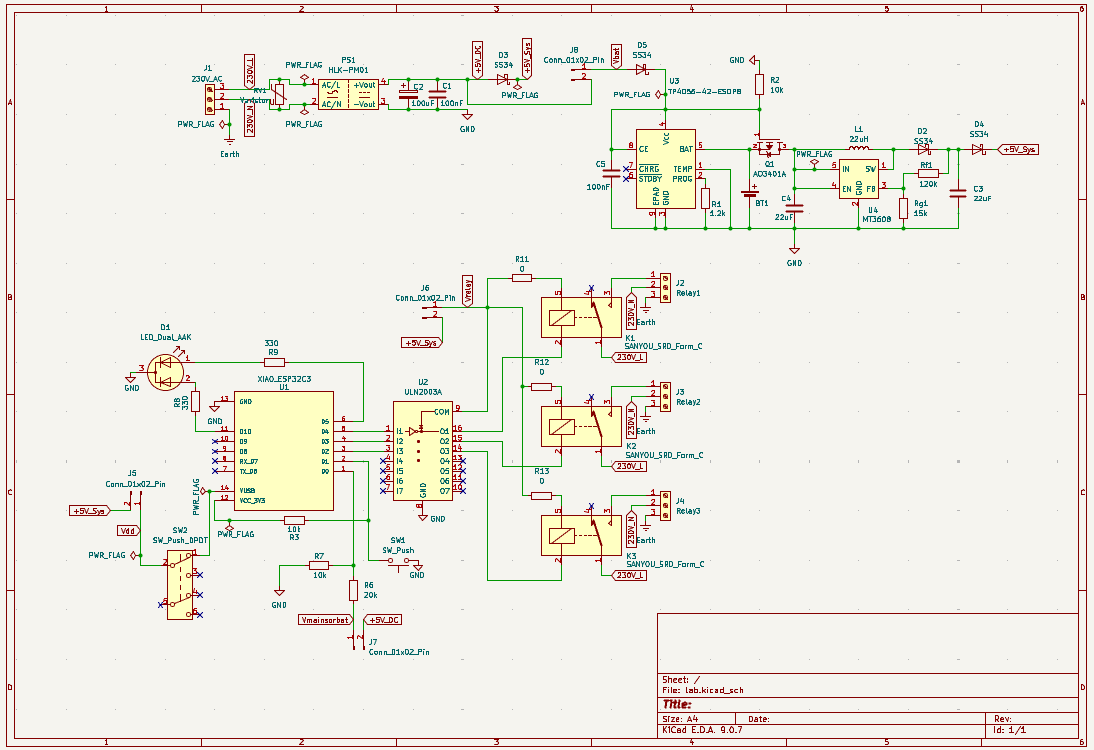
230V AC Mains
     │
 [Varistor MOV]   ← surge protection
     │
 [HLK-PM01]       ← isolated SMPS, 230VAC → 5V DC
     │
     ├──────────── 5V Rail ─────────────────────────────────────┐
     │                                                          │
     │         [TP4056 charger] ←─── charges 18650 from 5V     │
     │                │                                         │
     │           [18650 Li-Ion]                                 │
     │                │                                         │
     │           [MT3608 Boost] → 5V                            │
     │                │                                      [AO3401A P-MOSFET]
     │                └─────────────────────────────────────────┘
     │                                                          │
     └──────────────────────────── 5V Supply Rail ─────────────┘
                                         │
[ESP32-C3 + ULN2003 + 3× Relays]| # | Component | Description | MPN | Price (Rs.) | Qty |
|---|---|---|---|---|---|
| 1 | Seeed Studio XIAO ESP32-C3 | Wi-Fi microcontroller, USB-C, castellated | Generic | 600 | 1 |
| 2 | 5V 1-Channel Relay Module | SRD-05VDC-SL-C coil, 10A contacts | SRD-05VDC-SL-C | 33 | 3 |
| 3 | ULN2003APG (Toshiba) | 50V / 500mA 7-ch Darlington array — relay driver | ULN2003APG | 19 | 1 |
| 4 | Momentary Push Switch | NO contact, active-low emergency button | TSD001B07018A | 20 | 1 |
| 5 | Hi-Link HLK-PM01 | 230VAC → 5V / 3W isolated SMPS | HLK-PM01 | 200 | 1 |
| 6 | 18650 Li-Ion Battery | 3.7V, 2500mAh backup cell | INR18650-25P | 81 | 1 |
| 7 | 18650 Battery Holder | SMD/SMT single cell | 1042P | 33 | 1 |
| 8 | TP4056 Charging Module | Adjustable 1A Li-Ion charger | TP4056 | 14 | 1 |
| 9 | MT3608 Boost Converter | 2A max DC-DC step-up module | MT3608 | 36 | 1 |
| 10 | Bi-Color LED | 5mm Red/Green dual indicator | XL-A524SURSYGW | 3 | 1 |
| 11 | 6-Pin DPDT Self-Lock Switch | Latching power switch | — | 6 | 1 |
| 12 | AO3401A MOSFET | P-channel SOT-23, mains/battery path switch | AO3401A | 4 | 1 |
| 13 | 3-Pin Screw Terminal | 3.5mm pitch — mains & load connections | XY302V-3.5-3P | 12 | 4 |
| 14 | SS34 Schottky Diode | 3A / 40V — relay flyback + path blocking | — | 7 | 4 |
| 15 | 22µH Inductor SMD | MT3608 boost converter inductor | ASPI-0630LR-220M-T15 | 70 | 1 |
| 16 | Varistor D15.5mm P7.5mm | MOV surge protection on AC input | 561KD10J | 14 | 1 |
| 17 | PCB | Total PCB manufacturing cost | — | 2936 | 1 |
Total cost = Rs. 4211 /- per Table.
| Component | KiCad Footprint | Library |
|---|---|---|
| XIAO ESP32-C3 | SeeedStudio_XIAO_ESP32C3 | Custom (castellated pads) |
| Relay Module | Relay_THT:HF41F | Standard |
| ULN2003APG | Package_DIP:DIP-16_W7.62mm | Standard |
| Momentary Push Switch | Button_Switch_THT:SW_PUSH_6mm | Standard |
| HLK-PM01 | Converter_ACDC:HLK-PM01 | Standard |
| 18650 Battery Holder | BatteryHolder_THT:BatteryHolder_Keystone_1042P | Standard |
| TP4056 Module | Module_TP4056 | Custom |
| MT3608 Boost Module | Module_MT3608 | Custom |
| AO3401A MOSFET | mosfet.pretty:SOT23-3 | Custom — included in kicad/mosfet.pretty/ |
| Bi-Color LED | LED_THT:LED_D5.0mm_2pin | Standard |
| 3-Pin Screw Terminal | TerminalBlock_Phoenix:MKDS_3-3.5 | Standard |
| 100µF Cap DIP | Capacitor_THT:CP_Radial_D8.0mm_P3.50mm | Standard |
| 22µF Cap DIP | Capacitor_THT:CP_Radial_D6.3mm_P2.50mm | Standard |
| SS34 Schottky Diode | Diode_THT:D_DO-201AD | Standard |
| 22µH Inductor SMD | Inductor_SMD:L_Bourns_SRR1260 | Standard |
| All THT Resistors | Resistor_THT:R_Axial_DIN0207_L6.3mm_D2.5mm_P7.62mm | Standard |
| Varistor | Varistor_THT:RV_D15.5mm_P7.5mm | Standard |
Note: The
mosfet.pretty/folder is included inkicad/as a relative-path library. The project will open without missing footprint errors on any machine as long as the folder structure is kept intact.
| Layer | Technology | Details |
|---|---|---|
| Frontend | React 18.2 | create-react-app scaffold |
| Routing | React Router DOM v6.21 | BrowserRouter + Routes + Route |
| Database | Firebase Realtime Database v10.7 | Real-time onValue listeners + set / update writes |
| Auth | Session-based (hardcoded password) | sessionStorage.setItem("staffAuth","true") |
| Hosting | Firebase Hosting | Deployed via firebase deploy |
| Firmware | Arduino / C++ on ESP32-C3 | Firebase_ESP_Client by Mobizt, ArduinoJson by Blanchon |
| Route | Component | What it does |
|---|---|---|
/ | HomePage | Landing — two hover cards: Technical Staff Portal & Student Portal |
/student/scan | StudentScanPage | Roll number text input + Enter key support + recent allocations live table |
/student/select | StudentSelectPage | Live dropdown of available tables + "Allocate Table" button + loading state |
/student/confirm | StudentConfirmPage | Success card — roll, table (large green), "power is ON", 5-second countdown redirect |
/staff/login | StaffLoginPage | Password input with show/hide toggle — stores auth in sessionStorage |
/staff/dashboard | StaffDashboardPage | Full dashboard — 3 Firebase listeners, 10-table grid, logs panel, ALL OFF modal |
{
  "tables": {
    "T-01": {
      "isOn": true,
      "studentRoll": "EE22BTECH11001",
      "starttimeLabel": "07/05/2026, 03:45:12 pm",
      "sessionEnd": 1715079912000,
      "sessionEndLabel": "07/05/2026, 06:45:12 pm"
    }
  },
  "power": {
    "T-01": {
      "source": "mains",
      "lastSeen": "07/05/2026, 03:50:00 pm"
    }
  },
  "logs": {
    "1": {
      "message": "Table T-01 allocated to student EE22BTECH11001",
      "tableId": "T-01",
      "type": "session_start",
      "timestamp": "07/05/2026, 03:45:12 pm"
    }
  },
  "logCount": 1
}database.js| Function | Description |
|---|---|
subscribeToTables(cb) | onValue on tables/ — returns Firebase unsubscribe fn; called in useEffect cleanup |
subscribeToPower(cb) | onValue on power/ — same pattern |
subscribeToLogs(cb, limit) | onValue on logs/ with orderByKey + limitToLast(100), sorted newest-first |
allocateTable(id, roll) | Writes isOn=true, roll, start time label, sessionEnd epoch + label; adds session_start log |
deallocateTable(id, reason) | Writes isOn=false, lastUsed; adds session_end or expire log based on reason |
allTablesOff() | Promise.all over all 10 table deallocations; adds single staff log |
clearLogs() | Sets logs and logCount to null/0 |
clearAllData() | Called on App.js mount — resets all tables to isOn:false and power to offline |
addLog({message, tableId, type}) | Reads logCount, increments, writes to logs/{n} with human timestamp |
toReadable(ms) | Formats epoch ms → "DD/MM/YYYY, HH:MM:SS am/pm" (matches ESP32 output) |
#define | Value | Purpose |
|---|---|---|
MAINS_THRESHOLD | 500 (ADC counts) | 12-bit ADC reading below this = mains lost |
DEBOUNCE_MS | 50 ms | Emergency button software debounce window |
FIREBASE_POLL_MS | 2000 ms | Interval between Firebase getBool reads for isOn |
HEARTBEAT_INTERVAL_MS | 10000 ms | Interval between lastSeen + power source writes |
On every portal load, App.js calls clearAllData() in a useEffect. This resets all 10 tables to isOn: false and all power entries to source: "offline" — ensuring a clean slate each time staff open the portal.
centralized-power-distribution/
│
├── README.md                              ← This file
├── PCB.pdf                                ← Hardware reference (schematic, BOM, footprints, gerbers)
├── .gitattributes
│
├── kicad/                                 ← All KiCad design files
│   ├── lab.kicad_pro                      ← Open this in KiCad 7 to load the full project
│   ├── lab.kicad_sch                      ← Complete schematic
│   ├── lab.kicad_pcb                      ← PCB layout with copper pours and component placements
│   ├── lab.kicad_prl                      ← Project-level layer/render preferences
│   ├── New_Library.kicad_sym              ← Custom schematic symbols library
│   ├── mosfet.kicad_sym                   ← AO3401A schematic symbol
│   ├── mosfet.pretty/
│   │   └── SOT23-3.kicad_mod              ← Custom AO3401A PCB footprint (SOT-23-3, 0.95mm pitch)
│   ├── sym-lib-table                      ← Symbol library path references
│   ├── fp-lib-table                       ← Footprint library path references
│   └── lab_output/                        ← Gerber files — ZIP this folder and send to manufacturer
│       ├── lab-F_Cu.gbr                   ← Front copper traces
│       ├── lab-B_Cu.gbr                   ← Back copper ground plane
│       ├── lab-F_Mask.gbr                 ← Front solder mask
│       ├── lab-B_Mask.gbr                 ← Back solder mask
│       ├── lab-F_Silkscreen.gbr           ← Front silkscreen labels
│ ├── lab-B_Silkscreen.gbr ← Back silkscreen{ "rules": { ".read": true, ".write": true } }cd web-portal/
npm installOpen web-portal/src/firebase/config.js and replace the values directly:
const firebaseConfig = {
  apiKey:            "YOUR_WEB_API_KEY",
  authDomain:        "YOUR_PROJECT_ID.firebaseapp.com",
  databaseURL:       "https://YOUR_PROJECT_ID-default-rtdb.asia-southeast1.firebasedatabase.app",
  projectId:         "YOUR_PROJECT_ID",
  storageBucket:     "YOUR_PROJECT_ID.appspot.com",
  messagingSenderId: "YOUR_SENDER_ID",
  appId:             "YOUR_APP_ID"
};Open web-portal/src/pages/StaffLoginPage.jsx and find line near the top:
const STAFF_PASSWORD = "your_chosen_password";Install Arduino libraries (Tools → Manage Libraries):
Firebase ESP Client by MobiztArduinoJson by Benoit BlanchonAdd XIAO board package — File → Preferences → Additional Boards Manager URLs:
https://raw.githubusercontent.com/espressif/arduino-esp32/gh-pages/package_esp32_index.jsonThen install esp32 by Espressif Systems in Boards Manager.
Edit the 5 marked lines at the top of lab_controller_v3.ino:
#define WIFI_SSID         "YOUR_WIFI_SSID"        // your Wi-Fi network name
#define WIFI_PASSWORD     "YOUR_WIFI_PASSWORD"     // your Wi-Fi password
#define TABLE_ID          "T-01"                   // change per board: T-01 … T-10
#define FIREBASE_API_KEY  "YOUR_WEB_API_KEY"       // from Firebase Project Settings → General
#define DATABASE_URL      "YOUR_DATABASE_URL"      // from Firebase Realtime Database panel
Also update the legacy token:
config.signer.tokens.legacy_token = "YOUR_DATABASE_SECRET"; // from Project Settings → Service Accounts → Database SecretsArduino IDE board settings:
| Setting | Value |
|---|---|
| Board | XIAO_ESP32C3 |
| Upload Speed | 921600 |
| USB CDC On Boot | Enabled |
Flash each of the 10 boards with a unique TABLE_ID (T-01 through T-10). After flashing, open Serial Monitor at 115200 baud — first lines should be:
=== IIT-H EE Lab ESP32 v3.0 ===
Table: T-01
[WiFi] Connecting to YOUR_SSID
[Firebase] Connected OK
[Boot] Ready.cd web-portal/
npm start
# Opens at http://localhost:3000npm run build
npm install -g firebase-tools
firebase login
firebase init hosting
# → Public dir: build
# → Configure as SPA: Yes
# → Overwrite build/index.html: No
firebase deploy
# Live at https://your-project.web.appTABLE_ID for this boardOnce all boards are powered and connected to Wi-Fi, the staff dashboard will show ⚡ Mains for each online table within 10 seconds (first heartbeat).
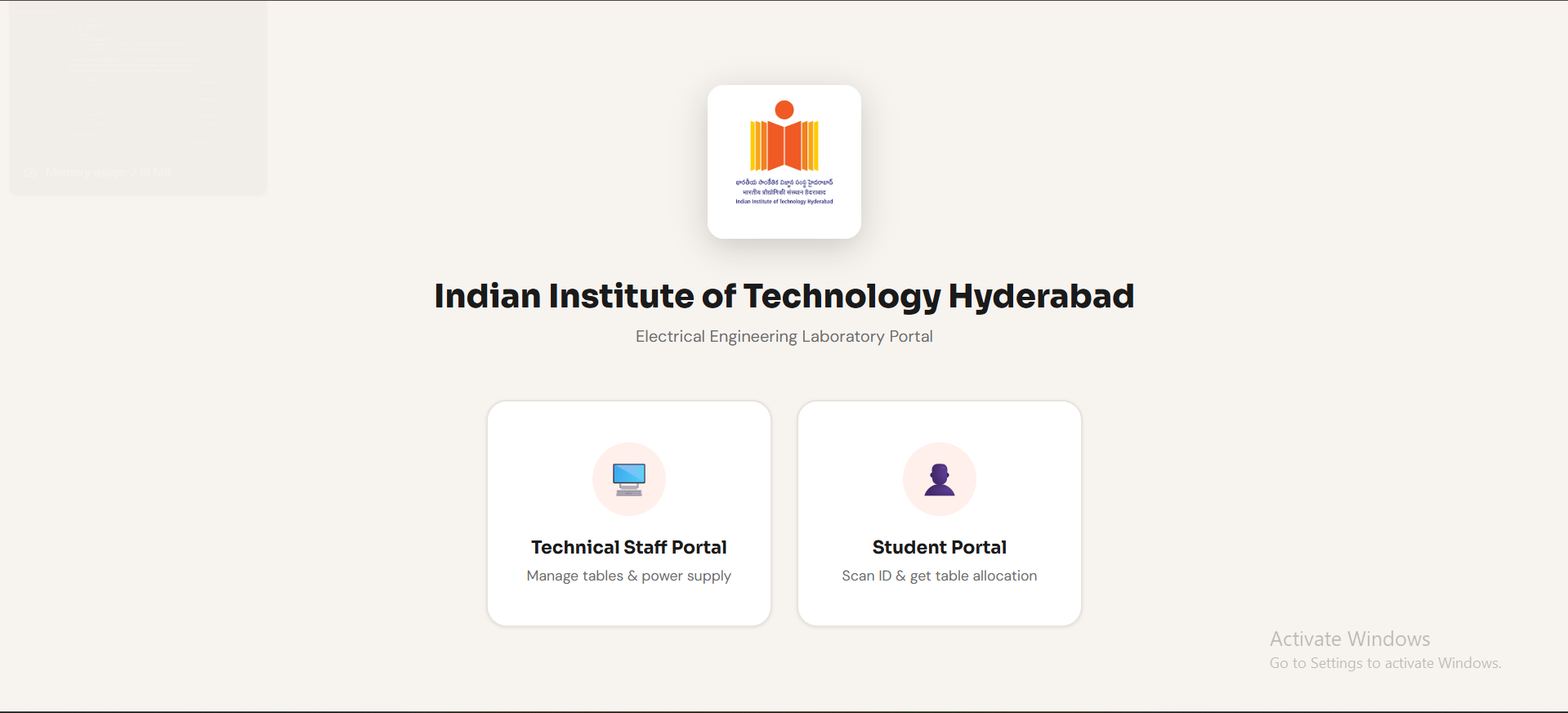
The landing page displays the IIT Hyderabad logo, university name, and lab title. Two clickable cards navigate to the Staff and Student portals. Cards lift and border turns orange on hover.
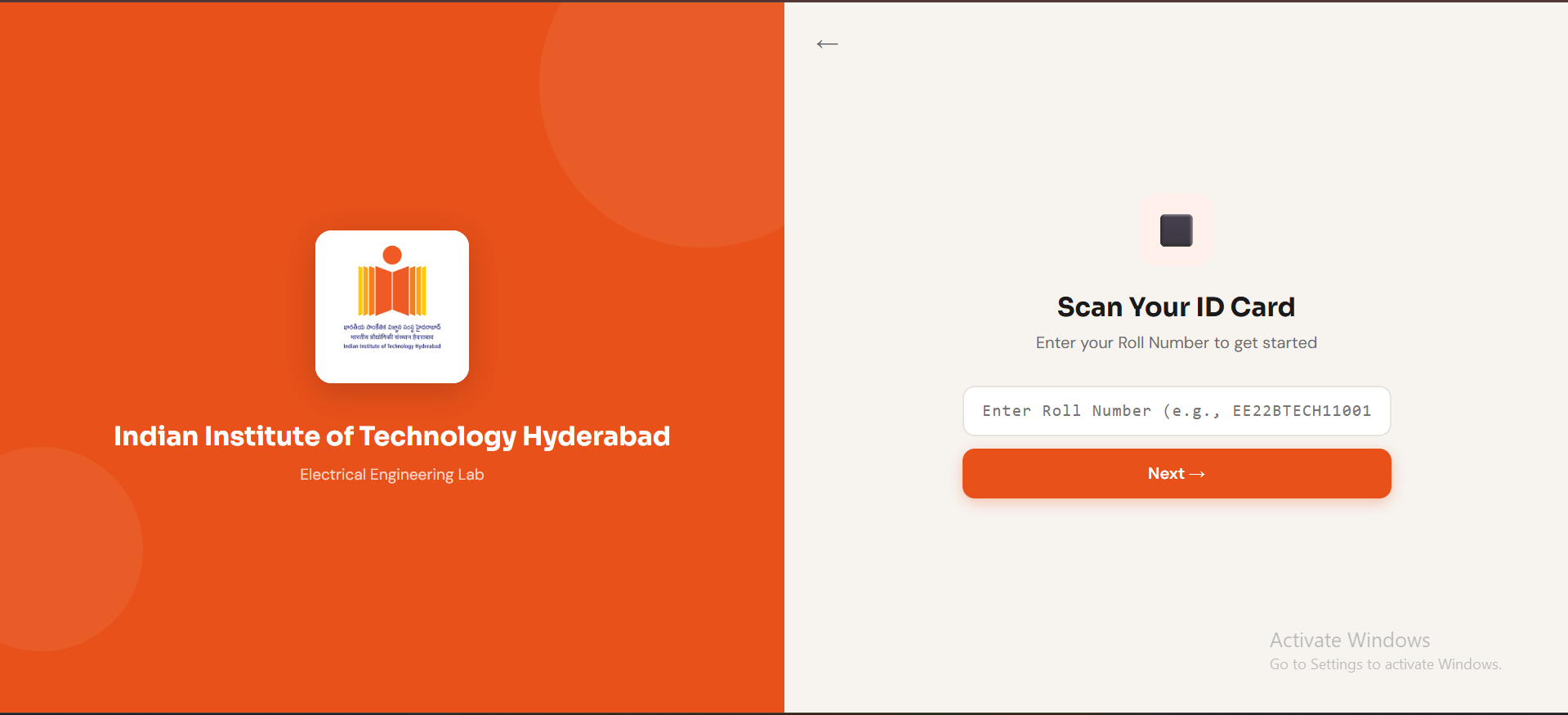
Students type their roll number (e.g. EE22BTECH11001) and press Next or hit Enter. A "Recent Allocations" table below the input shows the last 5 active sessions — roll number, table, and date — pulled live from Firebase.
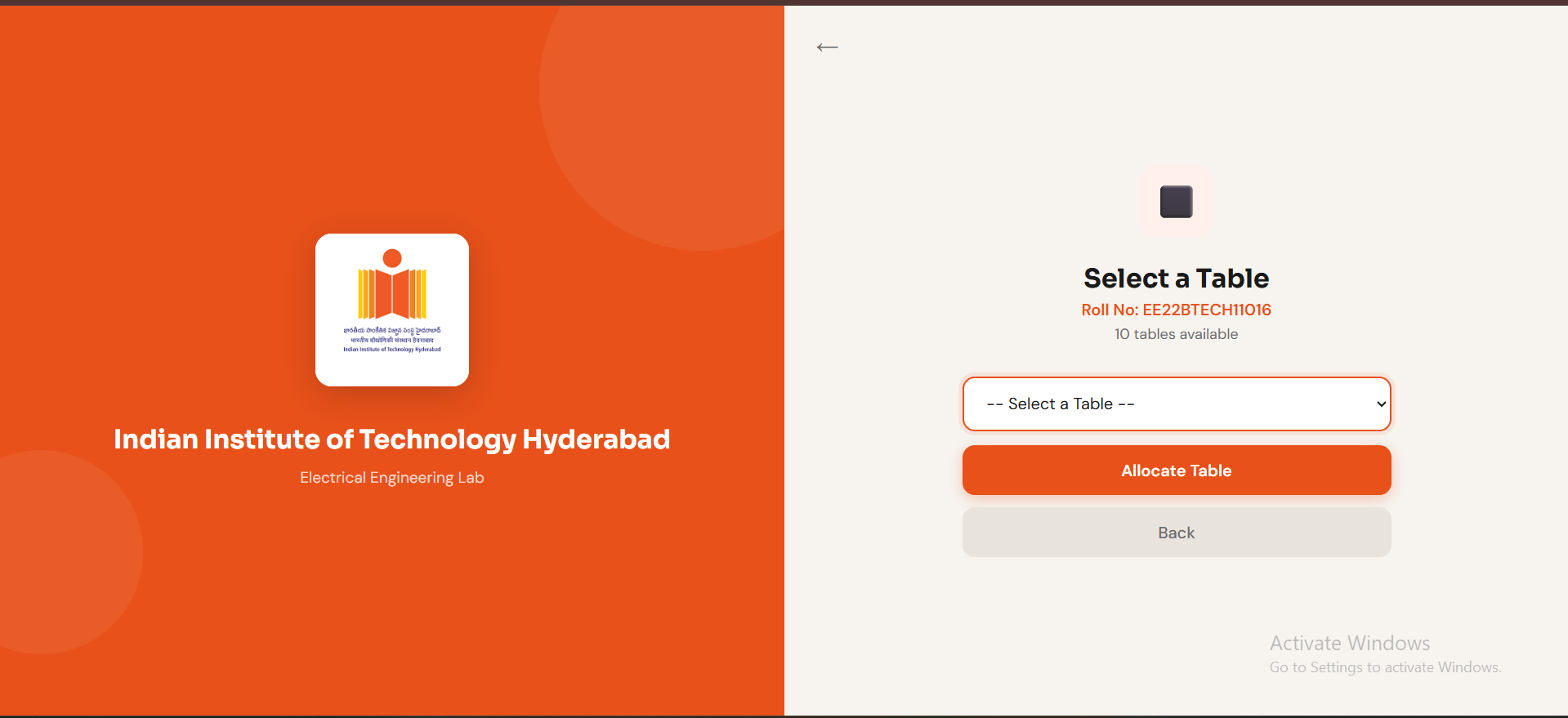
A dropdown lists only currently unoccupied tables in real time. The page shows how many tables are available. If all tables are occupied, a yellow warning banner appears instead of the dropdown. Student selects a table and clicks Allocate Table.
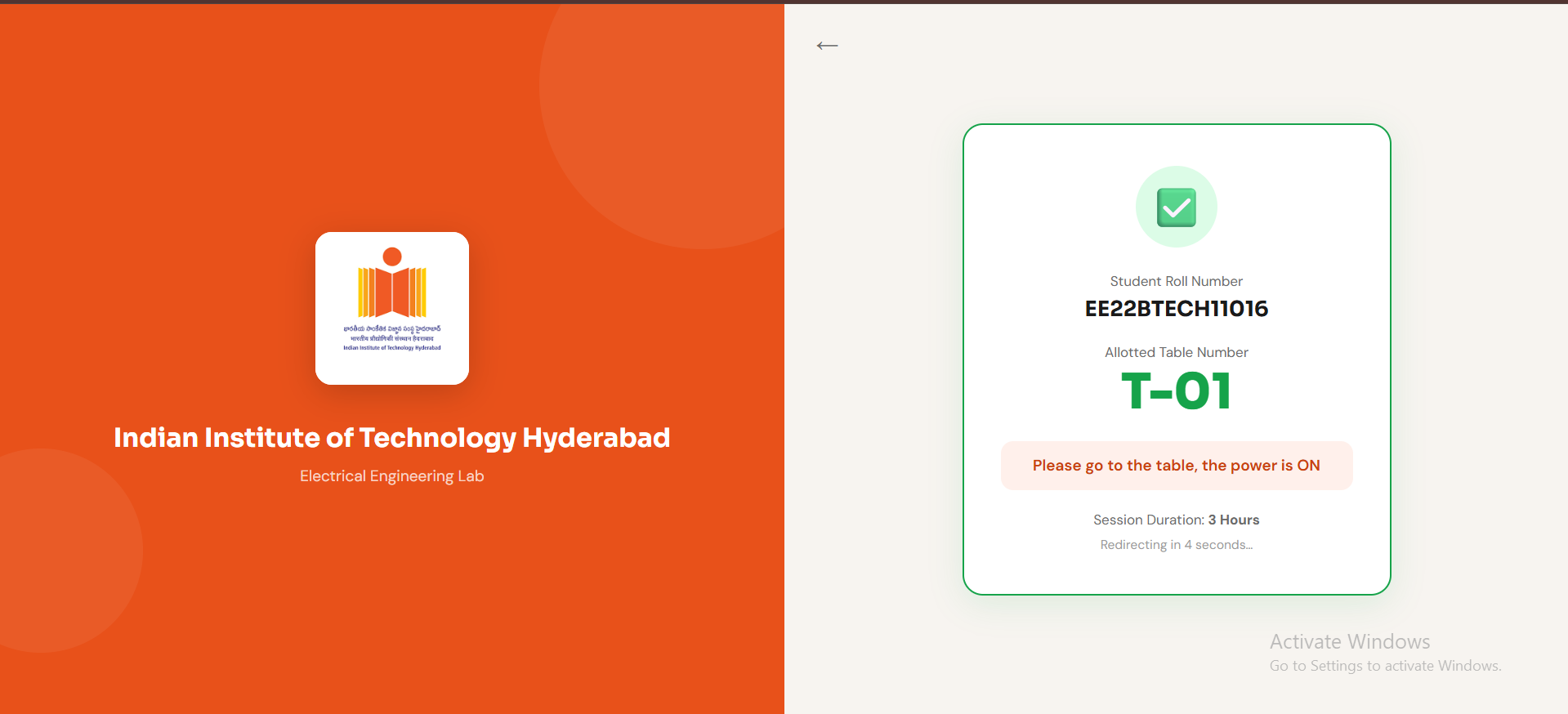
A green-bordered card confirms the allocation: roll number, allotted table number displayed large in green, "please go to the table, the power is ON", and session duration (3 hours). The page automatically redirects back to home after 5 seconds.
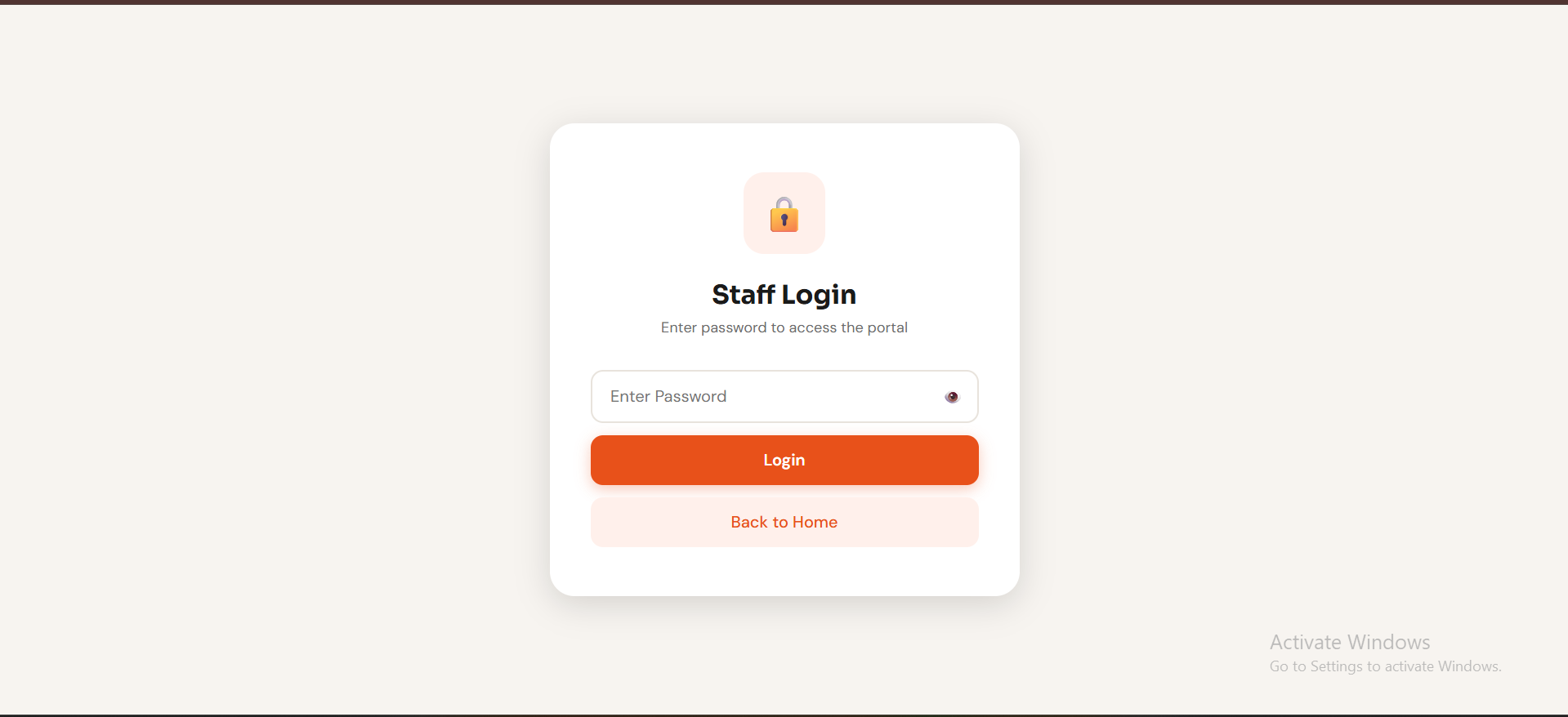
A centered card with a lock icon and a password field. The 👁️ button toggles password visibility. Correct password stores staffAuth in sessionStorage and navigates to the dashboard. Wrong password shows an inline red error.
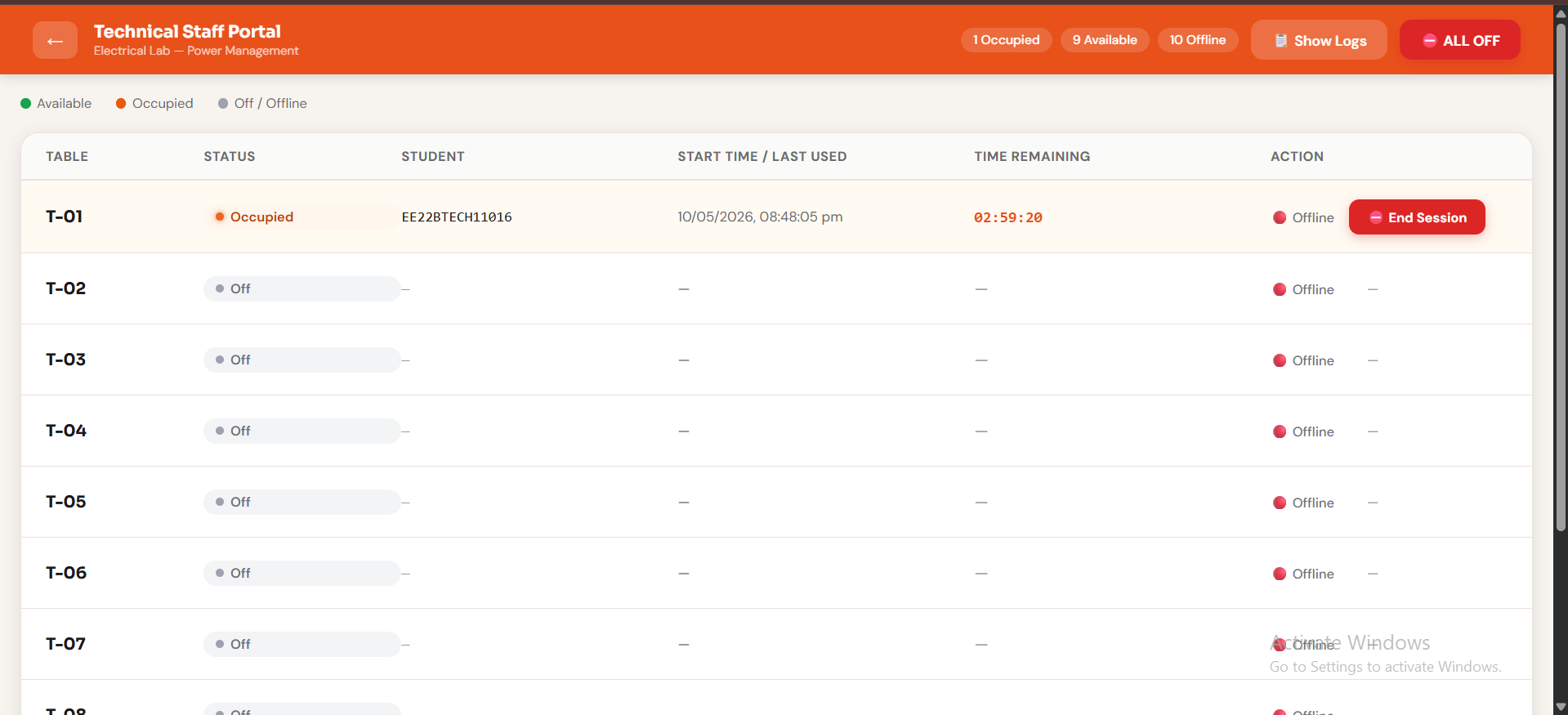
The full control centre. A sticky orange header shows "Technical Staff Portal", live status chips (Occupied / Available / Offline counts), a Show Logs toggle, and the red ⛔ ALL OFF emergency button.
The main table has one row per lab table (T-01 to T-10), each showing:
HH:MM:SS countdown (turns red in last 10 minutes)The Activity Logs panel (toggled from header) shows all events with type-coded badges: SESSION START / SESSION END / EXPIRE / EMERGENCY / POWER / STAFF. A "Clear Logs" button resets the log in Firebase.
Watch the demo video here: Demo Video)
What the demo shows:
| Domain | Use Case |
|---|---|
| University EE Labs | Controlled, authenticated, logged power access for shared workbenches — primary use case |
| School Electronics Labs | Staff-supervised power control preventing unsupervised student equipment use |
| Makerspaces | Per-member metered power access with session logging and time limits |
| Industrial Test Stations | Remote power management for shared test benches in manufacturing or R&D environments |
| Exam / Assessment Centres | Timed, per-seat power allocation with automatic expiry for practical examinations |
| # | Challenge | Category | Resolution |
|---|---|---|---|
| 1 | ADC mains-sense gave noisy readings — false failover triggers every few seconds | Hardware | Added 100µF + 22µF capacitors across voltage divider output to GND; 5-consecutive-reading hysteresis in firmware |
| 2 | Relay chatter during mains → battery transition (~80 ms power sag caused ESP32 brownout) | Hardware | Added 100µF bulk capacitor directly on 5V rail near ESP32 VCC pin — bridges the switchover gap |
| 3 | AO3401A gate drive: ESP32 3.3V GPIO cannot fully turn OFF a 5V P-channel MOSFET | Hardware | Added NPN transistor level-shift stage; 120kΩ pull-up to 5V rail for proper gate-high state |
| 4 | KiCad standard library had no AO3401A SOT-23-3 footprint at correct 0.95mm pin pitch | Hardware | Created mosfet.pretty custom footprint library — included in the repo |
| 5 | Initial PCB layout violated IPC-2221 mains creepage distance between AC and DC traces | Hardware | Redesigned layout with 3mm gap + physical PCB slot in Edge.Cuts layer |
| 6 | Firebase streaming (persistent HTTPS) connection dropped frequently on lab Wi-Fi idle timeout | Firmware | Switched to 2-second polling with Firebase.RTDB.getBool() — stable, latency acceptable for power control |
| 7 | Emergency button mechanical bounce caused 3–5 spurious LOW reads per single press | Firmware | 50 ms software debounce + btnWasPressed latch; latch clears only on release (HIGH), not press |
| 8 | onValue listeners stacked on re-navigation — 3 → 6 → 9 active listeners after 3 visits to dashboard | Software | useEffect cleanup returns and calls all three Firebase unsubscribe functions on component unmount |
| 9 | Session countdown timer drifted 5–10 s per hour using setInterval decrement counter | Software | Changed to Math.max(0, sessionEnd - Date.now()) per tick — always accurate, drift-free |
isOn writes to authenticated users only| Name | Role Number | Contribution |
|---|---|---|
| Chinthalapudi Yashwanth | EE22BTECH11016 | Hardware Design & PCB Layout (KiCad) |
| Abburi Naga Sai Ram | EE22BTECH11201 | ESP32 Firmware & Web Portal Development |
Institution: Indian Institute of Technology Hyderabad
Department: Electrical Engineering
Course: Electronic System Design Project Lab
Faculty Advisor: Dr. Abhishek Kumar
Academic Year: 2025–26
| Qty | Value | Footprint | References |
|---|---|---|---|
| 4 | Conn_01x02_Pin | Connector_PinHeader_2.54mm:PinHeader_1x02_P2.54mm_Vertical | J5, J6, J7, J8 |
| 4 | MountingHole_2.2mm_M2_DIN965_Pad | MountingHole:MountingHole_2.2mm_M2_DIN965_Pad | 2.2mm, 2.2mm, 2.2mm, 2.2mm |
| 4 | SS34 | Diode_SMD:D_SMA | D2, D3, D4, D5 |
| 3 | 0 | Resistor_SMD:R_0805_2012Metric | R11, R12, R13 |
| 3 | 10k | Resistor_THT:R_Axial_DIN0204_L3.6mm_D1.6mm_P5.08mm_Vertical | R2, R3, R7 |
| 3 | SANYOU_SRD_Form_C | Relay_THT:Relay_SPDT_SANYOU_SRD_Series_Form_C | K1, K2, K3 |
| 2 | 100nF | Capacitor_THT:C_Disc_D5.0mm_W2.5mm_P5.00mm | C1, C5 |
| 2 | 22uF | Capacitor_THT:C_Disc_D5.0mm_W2.5mm_P5.00mm | C3, C4 |
| 2 | 330 | Resistor_THT:R_Axial_DIN0204_L3.6mm_D1.6mm_P5.08mm_Vertical | R8, R9 |
| 1 | 1.2k | Resistor_THT:R_Axial_DIN0204_L3.6mm_D1.6mm_P5.08mm_Vertical | R1 |
| 1 | 100uF | Capacitor_THT:CP_Radial_D8.0mm_P3.50mm | C2 |
| 1 | 120k | Resistor_THT:R_Axial_DIN0204_L3.6mm_D1.6mm_P5.08mm_Vertical | Rf1 |
| 1 | 15k | Resistor_THT:R_Axial_DIN0204_L3.6mm_D1.6mm_P5.08mm_Vertical | Rg1 |
| 1 | 18650_Li_Ion | Battery:BatteryHolder_Keystone_1042_1x18650 | BT1 |
| 1 | 20k | Resistor_THT:R_Axial_DIN0204_L3.6mm_D1.6mm_P5.08mm_Vertical | R6 |
| 1 | 22uH | Inductor_SMD:L_Abracon_ASPI-0630LR | L1 |
| 1 | 230V_AC | TerminalBlock_Phoenix:TerminalBlock_Phoenix_PT-1,5-3-3.5-H_1x03_P3.50mm_Horizontal | J1 |
| 1 | AO3401A | mosfet:SOT23-3 | Q1 |
| 1 | HLK-PM01 | Converter_ACDC:Converter_ACDC_Hi-Link_HLK-PMxx | PS1 |
| 1 | LED_Dual_AAK | LED_THT:LED_D5.0mm-3 | D1 |
| 1 | MT3608 | Package_TO_SOT_SMD:SOT-23-6 | U4 |
| 1 | Relay1 | TerminalBlock_Phoenix:TerminalBlock_Phoenix_PT-1,5-3-3.5-H_1x03_P3.50mm_Horizontal | J2 |
| 1 | Relay2 | TerminalBlock_Phoenix:TerminalBlock_Phoenix_PT-1,5-3-3.5-H_1x03_P3.50mm_Horizontal | J3 |
| 1 | Relay3 | TerminalBlock_Phoenix:TerminalBlock_Phoenix_PT-1,5-3-3.5-H_1x03_P3.50mm_Horizontal | J4 |
| 1 | SW_Push | Connector_PinHeader_2.54mm:PinHeader_1x02_P2.54mm_Vertical | SW1 |
| 1 | SW_Push_DPDT | Button_Switch_THT:SW_PUSH_E-Switch_FS5700DP_DPDT | SW2 |
| 1 | TP4056-42-ESOP8 | Package_SO:SOIC-8-1EP_3.9x4.9mm_P1.27mm_EP2.41x3.3mm_ThermalVias | U3 |
| 1 | ULN2003A | Package_DIP:DIP-16_W7.62mm | U2 |
| 1 | Varistor | Varistor:RV_Disc_D15.5mm_W3.9mm_P7.5mm | RV1 |
| 1 | XIAO_ESP32C3 | XIAO_ESP32C3:MODULE_XIAO_ESP32C3 | U1 |
martinquattro/SmartAquariumGuardian
Smart Aquarium Guardian is an ESP32-based IoT aquarium monitoring and automation system for hobbyists and small-scale aquariums.


buzzwordExpert/LiPo-Charging-and-5V-Boost-
1S LiPo Charging and 5V Boost PCB

whysixmift/smarthome_v0.1
I wanted to control lights and appliances in my room over Wi-Fi without having loose relay modules, breadboards, and 220V AC wires floating around my desk.

MAATHES-THILAK-K/ESP32-S3_FLIGHT_CONTROLLER
A custom-designed flight controller based on the ESP32-S3 module, built for compatibility with the esp-fc firmware and Betaflight-like configuration.

nikolaus018/dji-fcc-esp32
ESP32-S3 firmware that switches a DJI N1 remote to FCC mode over USB (replaces the Android app)

devKOff/pcb-lipo-power-management-system
An integrated PCB power management system for single-cell Li-Po batteries featuring onboard charging, circuit protection, and a DC-DC boost converter with selectable 5V and 12V DC outputs.

alex1klimovich/nrf52840-macro-controller
Custom nRF52840 productivity controller for digital artists — PCB, BLE/USB firmware, OLED, haptics, RGB, and enclosure CAD.
It measures 150 × 110 mm and has 2 copper layers, 1.6 mm thick.
48 parts, built around the HLK-PM01, MT3608, TP4056-42-ESOP8 and ULN2003A. The full list of its parts is on this page, with links to each part's symbol and footprint where PCBKit's library has them.
From the Yashwanth786/Centralized_Power_Distribution_System repository on GitHub, at the commit this page was made from: the board is kicad/lab.kicad_pcb and its schematic kicad/lab.kicad_sch. PCBKit opens the board in the browser, with nothing to install.
Its repository states no licence, so its author keeps all rights: ask Yashwanth786 before reusing the design.