
4 layers100 × 70 mm
ZSWatch Watch DevKit
ZSWatch/Watch-DevKit-HW
The hardware repo for the ZSWatch Development Kit.
132 parts188GPL-3.0

 VulcanWM/lethe
Lethe is an educational device aimed at reducing student's screen times by using a speaker to ask questions / convey informations, and using tilts to get user input.
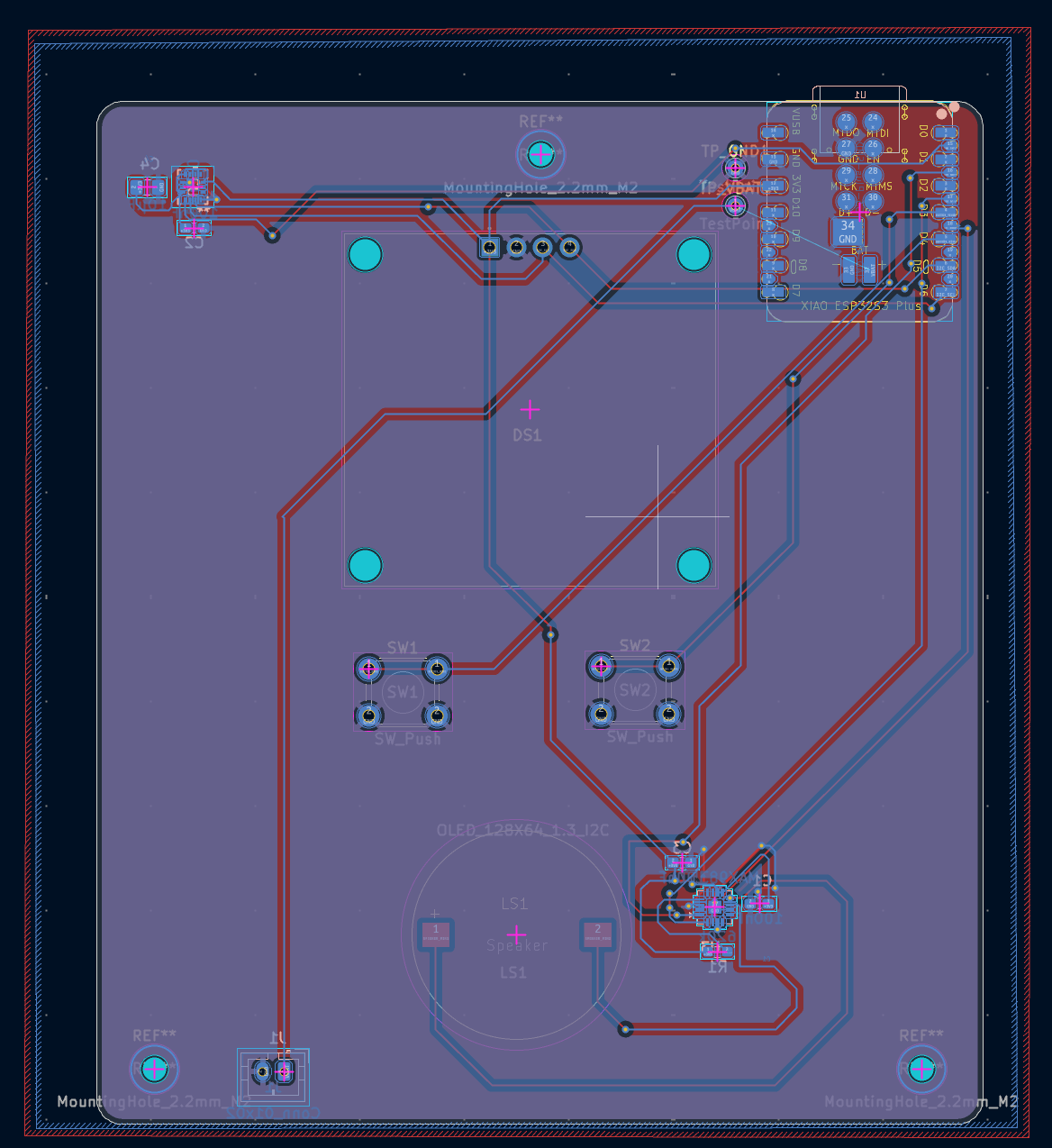
Lethe is an open-source printed circuit board by VulcanWM, from the VulcanWM/lethe repository on GitHub. It is a 2-layer board of 84.8 × 97.8 mm with 18 parts on 43 nets, routed with 216 tracks and 31 vias.
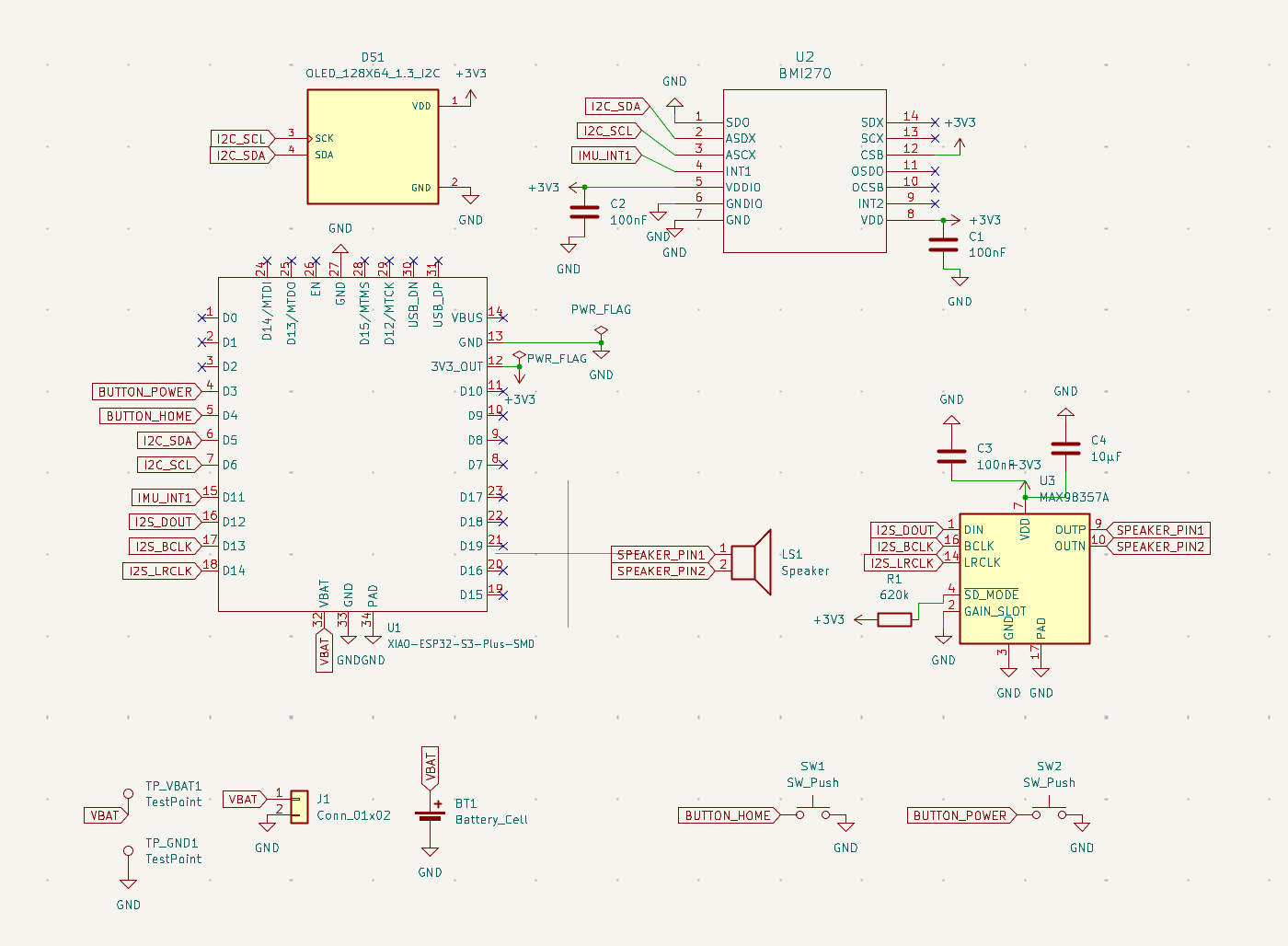
It is built around the BMI270. Its parts include 4 capacitors, 3 ICs, 2 switches, 1 resistor and 1 connector. It belongs with the ESP32 boards of this library.
Lethe is an educational device aimed at reducing student's screen times by using a speaker to ask questions / convey informations, and using tilts to get user input.
I made it because high screen time is a problem I face myself, and this device means I can move around while studying. I also wanted to experiment and see if listening rather than reading helps to remember stuff more or not.
Some of the components I'm using and why:
This repository contains all the hardware files you would need to replicate this project. The PCB + schematics was done in the KiCad, and the enclosure was designed in Fusion 360.
The pcb-files folder contains the KiCad source files (.kicad_sch, .kicad_pro, .kicad_pcb) and the gerbers.zip which was used to manufacture the PCB.
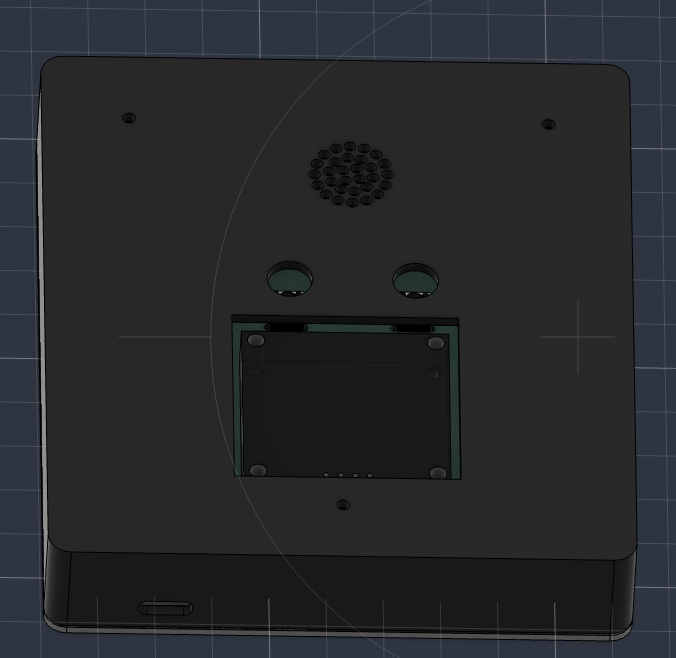
The cad-files folder contains .step, .stl and .f3d files for both the top and bottom cases of the enclosure for lethe.
There are 2 main components of the firmware: the code that will be uploaded onto the ESP32, and the code that will be used to transmit json sets on the user's device to the ESP32 when connected to the user's device via USB-C.
Both are located in the firmware-files folder: lethe.ino refers to the ESP32 code, and upload.py refers to the file transmission code.
The PCB is mounted to the bottom enclosure using three M2 self-tapping screws through the 2.2 mm mounting holes on the PCB and into standoffs printed as part of the enclosure. Then, the top and bottom parts of the enclosure are fitted together.
This is what the schematic looks like:
This is what the PCB looks like:
This is what the enclosure (top and bottom case) looks like:
Also in the BOM.csv file.
| Name | Quantity | Link To Buy | Cost (USD) |
|---|---|---|---|
| Seeed Studio XIAO ESP32-S3 Plus | 1 | Seeed Studio | $7.90 (+$3.80 shipping) |
| Bosch BMI270 | 1 | LCSC | $3.64 |
| MAX98357A | 1 | LCSC | $1.34 |
| 1.3" SH1106 OLED | 1 | AliExpress | $4.17 (shipping unknown) |
| JST-PH 2-pin Connector | 1 | LCSC | $0.71 for 20 |
| 20 mm 8Ω Speaker | 1 | LCSC | $0.85 |
| Button | 2 | LCSC | $0.97 for 50 |
| 620 kΩ Resistor | 1 | LCSC | $0.01 |
| 100 nF Ceramic Capacitor | 3 | LCSC | $1.81 for 50 |
| 10 µF Ceramic Capacitor | 1 | LCSC | $1.95 for 20 |
| 1000 mAh LiPo Battery | 1 | AliExpress | $6.87 |
| Total | $34.02 (excluding unknown AliExpress shipping) |
| Qty | Value | Footprint | References |
|---|---|---|---|
| 3 | 100nF | Capacitor_SMD:C_0603_1608Metric_Pad1.08x0.95mm_HandSolder | C1, C2, C3 |
| 2 | SW_Push | Button_Switch_THT:SW_PUSH_6mm_H5mm | SW1, SW2 |
| 2 | TestPoint | TestPoint:TestPoint_THTPad_D1.5mm_Drill0.7mm | TP_GND1, TP_VBAT1 |
| 1 | 10µF | Capacitor_SMD:C_0805_2012Metric_Pad1.18x1.45mm_HandSolder | C4 |
| 1 | 620k | Resistor_SMD:R_0603_1608Metric_Pad0.98x0.95mm_HandSolder | R1 |
| 1 | BMI270 | footprints:BMI270_BOS | U2 |
| 1 | Conn_01x02 | Connector_JST:JST_PH_B2B-PH-K_1x02_P2.00mm_Vertical | J1 |
| 1 | MAX98357A | Package_DFN_QFN:TQFN-16-1EP_3x3mm_P0.5mm_EP1.23x1.23mm | U3 |
| 1 | OLED_128X64_1.3_I2C | footprints:LCD_OLED_128X64_1.3_I2C | DS1 |
| 1 | Speaker | lethe:Speaker_HDK2008AA_1P2_20mm | LS1 |
| 1 | XIAO-ESP32-S3-Plus-SMD | footprints:XIAO-ESP32-S3-Plus-SMD | U1 |
The 15 most common of 18 parts.
ZSWatch/Watch-DevKit-HW
The hardware repo for the ZSWatch Development Kit.

OpenDrone-hw/OpenFC-Lite-Mini
Open-source Betaflight flight controller. RP2354A, 20x20 mm, 6-layer, 3-6S, CERN-OHL-S-2.0.

OpenDrone-hw/OpenFC-Lite
Open-source Betaflight flight controller. RP2354B, 30.5x30.5 mm, 6-layer, 3-8S, CERN-OHL-S-2.0.

nordstream3/FOC
Date | Manufacturer | amount | includes | shipping & tax | price | -------- | -------- | -------- | -------- | -------- | -------- | 2024-01-17 | JLCPCB | 10 boards | All assembled excl fets and caps | YES, to EU |…

onionharvester/boardwalk
A little gathering place for my PCBs. This is their favourite hangout spot! 🪼⋆.ೃ࿔*:・


OpenDrone-hw/OpenAIO
Open-source AIO for 2-6S toothpick quads: flight controller, 4-in-1 AM32 ESC and ExpressLRS receiver, 25.5x25.5 mm.

PandoroML/LOAF
LOAF (Local Observations and Atmospheric Forecasting) is an open source hyperlocal weather forecasting combining gridded forecasts with local station observations using machine learning and open-source hardware.
It measures 84.8 × 97.8 mm and has 2 copper layers, 1.6 mm thick.
18 parts, built around the BMI270. The full list of its parts is on this page, with links to each part's symbol and footprint where PCBKit's library has them.
From the VulcanWM/lethe repository on GitHub, at the commit this page was made from: the board is pcb-files/lethe.kicad_pcb and its schematic pcb-files/lethe.kicad_sch. PCBKit opens the board in the browser, with nothing to install.
Its repository states no licence, so its author keeps all rights: ask VulcanWM before reusing the design.