
2 layers49.6 × 78.3 mm
Odyssey
jotego/jtcores
FPGA cores compatible with multiple arcade game machines and KiCAD schematics of arcade games. Working on MiSTer FPGA/Analogue Pocket
24 parts346GPL-3.0

 SukkoPera/OpenC64KernalCart29
Open Hardware Multi-KERNAL Cartridge for the Commodore 64
OpenC64KernalCart is an open-source printed circuit board by SukkoPera, from the SukkoPera/OpenC64KernalCart repository on GitHub. It is a 2-layer board of 58.4 × 50.8 mm with 13 parts on 36 nets, routed with 234 tracks and 87 vias.
It is built around the 74LS30PC. Its parts include 5 connectors, 4 switches, 2 capacitors and 2 ICs. It belongs with the retro computing and games boards of this library.
OpenC64KernalCart is an Open Hardware Multi-KERNAL Cartridge for the Commodore 64.
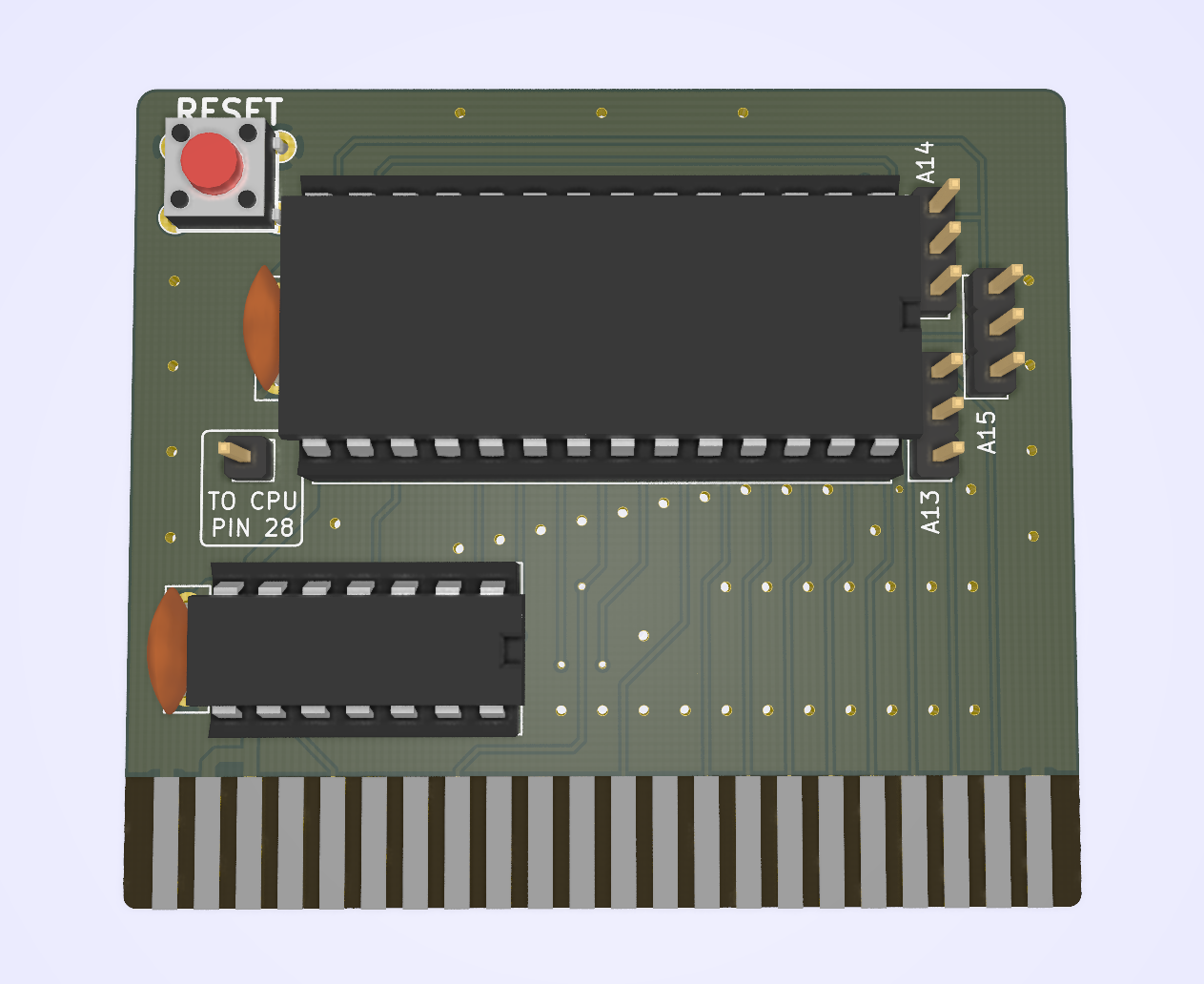
This project is derived from an old Turbo DOS V3 cartridge with the help of Jani. It allows replacing the KERNAL (i.e.: operating system) of a Commodore C64 computer with one that is stored on an external cartridge.
OpenC64KernalCart is designed to accept a 64 KB (512 Kilobit) (E)EPROM with a 27512-style pinout. Such chips can hold up to 8 KERNAL images, which can then be selected by jumpers. This makes it very easy to switch among KERNALs at will, without the need of opening the C64 every time. The recommended part is Winbond W27C512 (or W27E512, which is widely available, cheap and electrically erasable, which avoids the need for a clunky UV-eraser. This is the only part that was thoroughly tested. Other parts, even smaller in size, will probably work, but will require an ad-hoc configuration.
The only inconvenience is that you will need to open your C64 once, in order to connect a wire to CPU pin 28 (or wherever you can find the HIRAM signal, grab a multimeter and check for continuity here and there). You will need to connect this wire to the header that is provided on the cartridge for full KERNAL replacement. Note that the cartridge will also appear to work even when this wire is not connected, but that will not allow the external KERNAL to have access to the full RAM range of the C64, which will lead to incompatibilities.
Jani has published a nice article on how we developed this cartridge and how it works in detail, so please refer to it for further information.
IMPORTANT: ALWAYS TURN YOUR C64 OFF BEFORE MOVING THE CONFIGURATION JUMPERS.
When flashing the contents, make sure that every file is exactly 8192 bytes long and just concatenate them. Then use the following table to set the jumper configuration for your image of choice:
| KERNAL Image # | A13 | A14 | A15 |
|---|---|---|---|
| 1 | L | L | L |
| 2 | H | L | L |
| 3 | L | H | L |
| 4 | H | H | L |
| 5 | L | L | H |
| 6 | H | L | H |
| 7 | L | H | H |
| 8 | H | H | H |
The OpenC64KernalCart documentation, including the design itself, is copyright © SukkoPera 2019.
OpenC64KernalCart is Open Hardware licensed under the CERN OHL v. 1.2.
You may redistribute and modify this documentation under the terms of the CERN OHL v.1.2. This documentation is distributed as is and WITHOUT ANY EXPRESS OR IMPLIED WARRANTIES whatsoever with respect to its functionality, operability or use, including, without limitation, any implied warranties OF MERCHANTABILITY, SATISFACTORY QUALITY, FITNESS FOR A PARTICULAR PURPOSE or infringement. We expressly disclaim any liability whatsoever for any direct, indirect, consequential, incidental or special damages, including, without limitation, lost revenues, lost profits, losses resulting from business interruption or loss of data, regardless of the form of action or legal theory under which the liability may be asserted, even if advised of the possibility or likelihood of such damages.
A copy of the full license is included in file LICENSE.pdf, please refer to it for applicable conditions. In order to properly deal with its terms, please see file LICENSE_HOWTO.pdf.
The contact points for information about manufactured Products (see section 4.2) are listed in file PRODUCT.md.
Any modifications made by Licensees (see section 3.4.b) shall be recorded in file CHANGES.md.
The Documentation Location of the original project is https://github.com/SukkoPera/OpenC64KernalCart/.
Since the project is open you are free to get the PCBs made by your preferred manufacturer, however in case you want to support the development, you can order them from PCBWay through this link:

You get my gratitude and cheap, professionally-made and good quality PCBs, I get some credit that will help with this and other projects. You won't even have to worry about the various PCB options, it's all pre-configured for you!
Also, if you still have to register to that site, you can use this link to get some bonus initial credit (and yield me some more).
Again, if you want to use another manufacturer, feel free to, don't feel obligated :). But then you can buy me a coffee if you want:

| Qty | Value | Footprint | References |
|---|---|---|---|
| 2 | 100n | Capacitor_THT:C_Disc_D7.5mm_W2.5mm_P5.00mm | C1, C2 |
| 1 | 27512 | Package_DIP:DIP-28_W15.24mm_Socket_LongPads | U1 |
| 1 | 74LS30 | Package_DIP:DIP-14_W7.62mm_Socket_LongPads | U2 |
| 1 | BOTTOM_TRACKS | OpenC64KernalCart:bottom | J98 |
| 1 | C64-Exp-Port | OpenC64KernalCart:C64-Cart | J1 |
| 1 | CPU_WIRE | OpenC64KernalCart:PinHeader_1x01_P2.54mm_Vertical | J2 |
| 1 | KERNEL_BANK_A13 | OpenC64KernalCart:Switch | SW13 |
| 1 | KERNEL_BANK_A14 | OpenC64KernalCart:Switch | SW14 |
| 1 | KERNEL_BANK_A15 | OpenC64KernalCart:Switch | SW15 |
| 1 | OSHW_LOGO | Symbol:OSHW-Logo_5.7x6mm_Copper | J99 |
| 1 | RESET_SWITCH | OpenC64KernalCart:PCB_PUSH | SW2 |
| 1 | TOP_TRACKS | OpenC64KernalCart:top | J97 |
jotego/jtcores
FPGA cores compatible with multiple arcade game machines and KiCAD schematics of arcade games. Working on MiSTer FPGA/Analogue Pocket


yanataka60/MZ80K_SD
MZ-80KシリーズでSD-CARDからのアプリケーション起動、BASICなどのアプリケーションからSD-CARDへのロード、セーブを実現するものです


djtersteegc/Tandy-Color-Computer-Multi-Pak
Respin of the Tandy 26-3024 Multi-Pak (MPI) for the DIY builder.
It measures 58.4 × 50.8 mm and has 2 copper layers, 1.6 mm thick.
13 parts, built around the 74LS30PC. The full list of its parts is on this page, with links to each part's symbol and footprint where PCBKit's library has them.
From the SukkoPera/OpenC64KernalCart repository on GitHub, at the commit this page was made from: the board is OpenC64KernalCart.kicad_pcb. PCBKit opens the board in the browser, with nothing to install.
Its repository states no licence, so its author keeps all rights: ask SukkoPera before reusing the design.