2 layers60 × 30 mm
Controller
google/mozc-devices
Circuit diagrams and firmware source code for Gboard DIY keyboards
11 parts3kApache-2.0

 SukkoPera/OpenC64Cart16K53
Open Hardware 16 KB Cartridge for the Commodore 64
OpenC64Cart16K is an open-source printed circuit board by SukkoPera, from the SukkoPera/OpenC64Cart16K repository on GitHub. It is a 2-layer board of 58.4 × 50.8 mm with 11 parts on 29 nets, routed with 282 tracks and 18 vias.
Its parts include 4 connectors, 2 ICs, 2 diodes, 1 capacitor and 1 resistor. It belongs with the retro computing and games boards of this library.
OpenC64Cart16K is an Open Hardware Cartridge for the Commodore 64. It only supports 16 KB ROMs and uses a single (E)EPROM chip. It is the 16 KB counterpart to OpenC64Cart.
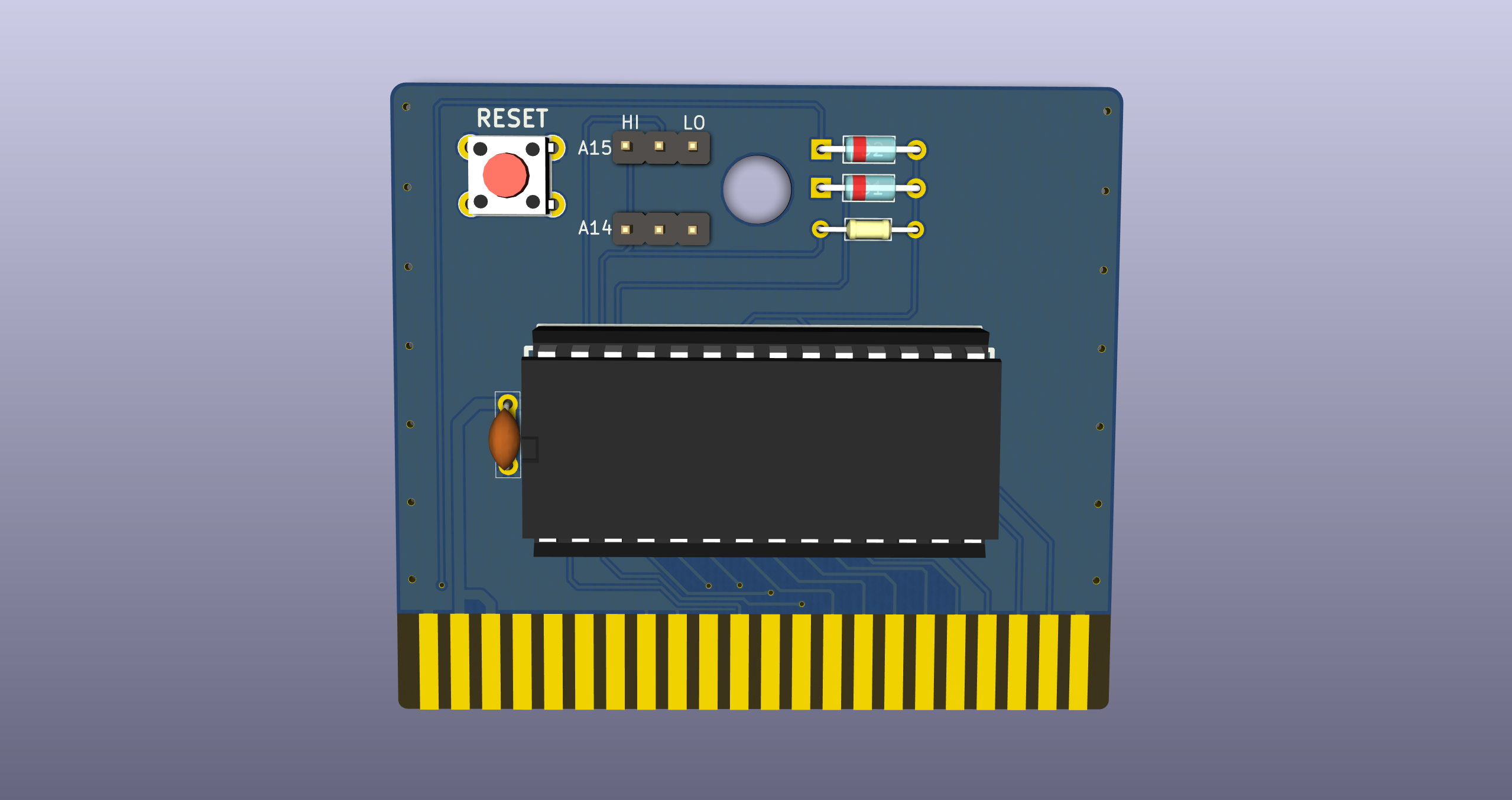
OpenC64Cart16K is designed to accept a 64 KB (512 Kilobit) (E)EPROM with a 27512-style pinout:
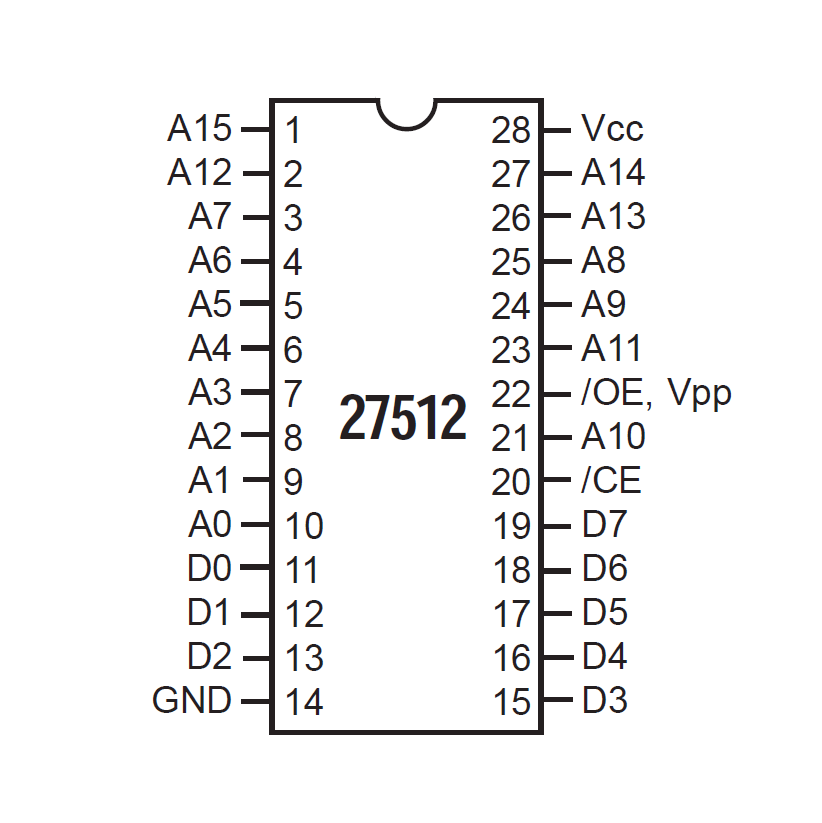
Such chips can hold up to 4 cartridge images, which can be selected by jumpers.
The recommended part is Winbond W27C512 (or W27E512, I don't understand what differences they have), which is widely available, cheap and electrically erasable, which avoids the need for a clunky UV-eraser. This is the only part that was thoroughly tested. Other parts, even smaller in size, will probably work, but will require an ad-hoc configuration.
Usage is straightforward: just insert the EEPROM in the socket making sure that the notch and all pins are aligned, set the jumpers as desired and plug the cartridge in your C64.
IMPORTANT: ALWAYS TURN YOUR C64 OFF BEFORE MOVING THE CONFIGURATION JUMPERS.
When flashing the contents, make sure that every file is exactly 16384 bytes long and just concatenate them. If your 16 KB ROM is split into two 8 KB files, concatenate them as well, with the "low" ROM before the "high" ROM.
Then use the following table to set the jumper configuration for your image of choice:
| ROM Image # | A14 | A15 |
|---|---|---|
| 1 | L | L |
| 2 | H | L |
| 3 | L | H |
| 4 | H | H |
OpenC64Cart16K is Open Hardware. If you make any modifications to the board, please contribute them back.
Since the project is open you are free to get the PCBs made by your preferred manufacturer, however in case you want to support the development, you can order them from PCBWay through this link:

You get my gratitude and cheap, professionally-made and good quality PCBs, I get some credit that will help with this and other projects. You won't even have to worry about the various PCB options, it's all pre-configured for you!
Also, if you still have to register to that site, you can use this link to get some bonus initial credit (and yield me some more).
Again, if you want to use another manufacturer, feel free to, don't feel obligated :). But then you can buy me a coffee if you want:

If you need help or have questions, you can join the official Telegram group.
The following links were useful during the development of this project:
| Qty | Value | Footprint | References |
|---|---|---|---|
| 2 | 1N4148 | OpenC64Cart16K:D_DO35+SMA | D1, D2 |
| 2 | CONN_01X03 | OpenC64Cart16K:Pin_Header_Straight_1x03-NoSilkS | P1, P2 |
| 1 | 100n | OpenC64Cart16K:C_0805+THT | C1 |
| 1 | 10k | OpenC64Cart16K:R_0805+THT-7.62mm | R1 |
| 1 | 27512 | w_pth_circuits:dil_28-600_socket | U2 |
| 1 | C64-Exp-Port | OpenC64Cart16K:C64-Cart | U1 |
| 1 | OSHW_LOGO | w_logo:Logo_copper_OSHW_6x6mm | J1 |
| 1 | PEG_HOLE | Connectors:1pin | J2 |
| 1 | RESET_SW | OpenC64Cart16K:PCB_PUSH | SW1 |
google/mozc-devices
Circuit diagrams and firmware source code for Gboard DIY keyboards


FrameworkComputer/ExpansionCards
Reference designs and documentation to create Expansion Cards for the Framework Laptop

hoglet67/RGBtoHDMI
Bare-metal Raspberry Pi project that provides pixel-perfect sampling of Retro Computer RGB/YUV video and conversion to HDMI

hackclub/OnBoard
💡 Join 1,000 teenagers and make your first PCB with a $100 grant!


tardate/LittleArduinoProjects
a collection of "Little Electronic & Arduino Projects", most involving electronics or an Arduino in one way or another!

basilfx/TRADFRI-Hacking
Hacking IKEA TRÅDFRI products, such as light bulbs, window blinds and other accessories.
It measures 58.4 × 50.8 mm and has 2 copper layers, 1.6 mm thick.
11 parts. The full list of its parts is on this page, with links to each part's symbol and footprint where PCBKit's library has them.
From the SukkoPera/OpenC64Cart16K repository on GitHub, at the commit this page was made from: the board is OpenC64Cart16K.kicad_pcb. PCBKit opens the board in the browser, with nothing to install.
Its repository states no licence, so its author keeps all rights: ask SukkoPera before reusing the design.