

2 layers50 × 87 mm
StackChanPwd
lipoyang/StackChanPwd
M5Stack-embedded super cute humanoid controller unit
47 parts6Apache-2.0
A comprehensive Ground Control System (GCS) firmware and satellite electronics PCB design for a CubeSat developed by the Students Satellite Program Team of IIT Kharagpur, competing in the ISRO In-Space competition.
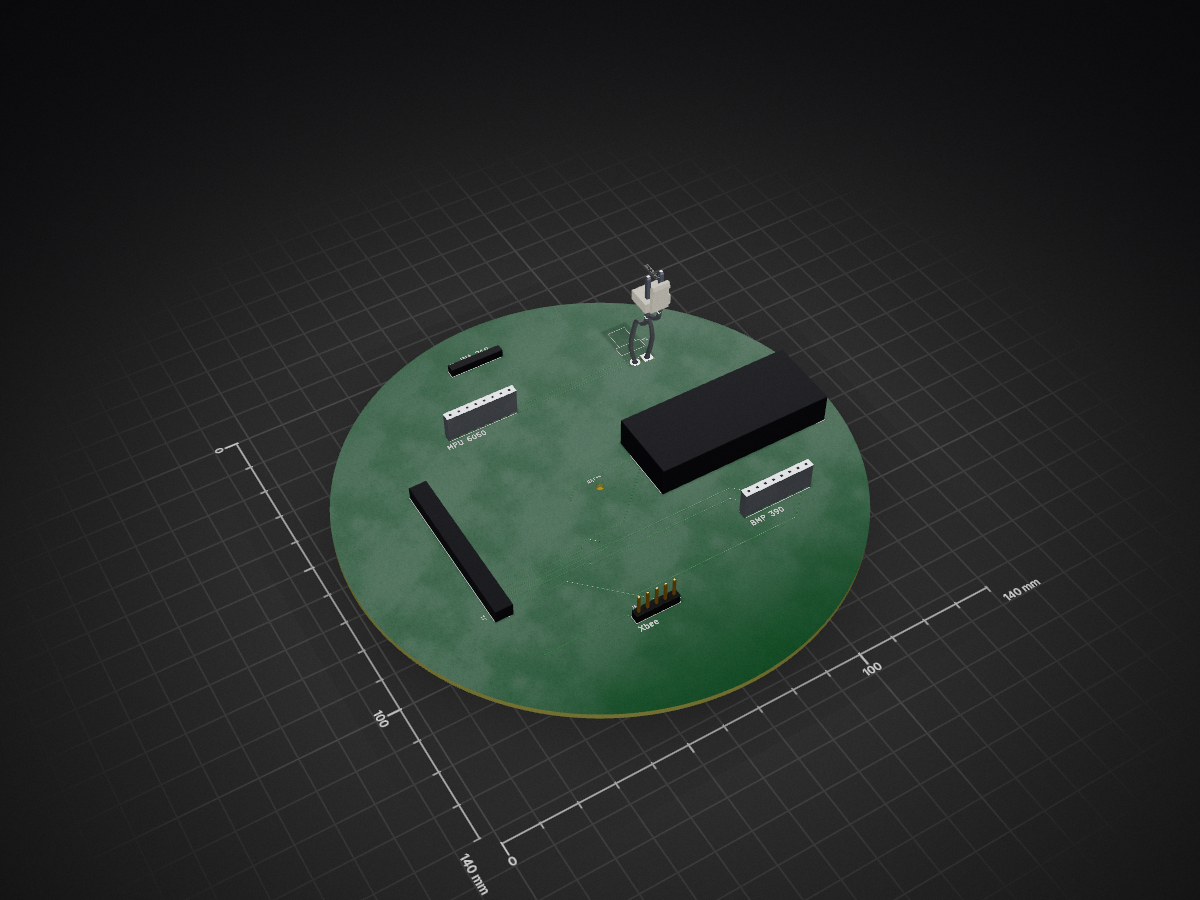
CANSAT PCB is an open-source printed circuit board by RoctorpalSandilya, from the RoctorpalSandilya/CANSAT-Ground-Control-System repository on GitHub. It is a 2-layer board with 8 parts on 51 nets, routed with 92 tracks and 8 vias.
It is built around the B2PS-VH, MTSW-118-06-G-D-050 and TSW-114-29-T-S. Its parts include 6 connectors and 1 crystal.
A comprehensive Ground Control System (GCS) firmware and satellite electronics PCB design for a CubeSat developed by the Students Satellite Program Team of IIT Kharagpur, competing in the ISRO In-Space competition.
This repository contains the complete Ground Control System firmware and satellite electronics design for our CANSAT project. The CubeSat was developed as part of the Students Satellite Program Team at Indian Institute of Technology (IIT) Kharagpur and participates in the ISRO organized In-Space competition.
CANSAT-Ground-Control-System/
├── CANSAT/                          # Ground Control System Firmware
│   ├── communication_module/        # Serial/RF communication handlers
│   ├── telemetry/                   # Telemetry data processing
│   ├── command_execution/           # Command handling and execution
│   ├── gui/                         # Ground station GUI components
│   ├── utils/                       # Utility functions and helpers
│   └── main.py                      # Main GCS application
│
├── CANSAT_PCB/                      # Satellite Electronics PCB Designs
│   ├── schematic/                   # Electronic schematics
│   ├── layout/                      # PCB layout files
│   ├── gerber/                      # Manufacturing files
│   └── documentation/               # PCB design documentation
│
└── README.md # This file✅ Real-time telemetry streaming and logging
✅ Command queue management with execution tracking
✅ Multi-sensor data visualization
✅ Satellite state estimation and monitoring
✅ Mission timeline management
✅ Data export in multiple formats (CSV, JSON)
✅ Error handling and automatic retry mechanisms
✅ Comprehensive event logging
✅ Modular subsystem design
✅ Redundant communication pathways
✅ Thermal management optimization
✅ EMI/RFI shielding
✅ Component protection and filtering
✅ On-board diagnostics circuits
git clone https://github.com/RoctorpalSandilya/CANSAT-Ground-Control-System.git
cd CANSAT-Ground-Control-Systempip install -r requirements.txtpython -m CANSAT.config# Launch the main GCS application
python CANSAT/main.py
# Or run specific modules
python -m CANSAT.telemetry.processorExample telemetry packet structure:
[SYNC][TYPE][TIMESTAMP][SENSOR_DATA][CHECKSUM][END]
- SYNC: 2 bytes (0xAA, 0xBB)
- TYPE: 1 byte (telemetry type identifier)
- TIMESTAMP: 4 bytes (mission elapsed time)
- SENSOR_DATA: Variable length sensor readings
- CHECKSUM: 2 bytes (CRC16)
- END: 2 bytes (0xCC, 0xDD)| Command | Description | Format |
|---|---|---|
ARM | Arm satellite systems | ARM [SUBSYSTEM] |
POWER | Control power states | POWER [ON/OFF] [SUBSYSTEM] |
RESET | Reset satellite module | RESET [MODULE] |
DATA_REQUEST | Request telemetry data | DATA_REQUEST [SENSOR_TYPE] |
CONFIG | Configure parameters | CONFIG [PARAM] [VALUE] |
The CANSAT_PCB/ directory contains:
All telemetry is automatically logged with timestamps for post-mission analysis:
Log files are stored in:
./data/logs/[MISSION_DATE]/telemetry_[TIMESTAMP].csvContributions are welcome! Please follow these guidelines:
mainThis project is developed under the Students Satellite Program at IIT Kharagpur for the ISRO In-Space competition. Please contact the team for licensing information.
Students Satellite Program Team
Indian Institute of Technology (IIT) Kharagpur
Project Lead: Rocktorpal Sandilya
For questions, issues, or contributions, please:
Last Updated: May 16, 2026
Status: Active Development
Version: 1.0
| Qty | Value | Footprint | References |
|---|---|---|---|
| 2 | MTSW-108-09-T-S-525 | 8x1 header:SAMTEC_MTSW-108-09-T-S-525 | J2, J3 |
| 1 | B2PS-VH | 2 JST:B2PS-VH | X1 |
| 1 | HTSW-106-20-SM-S | 6X1header:SAMTEC_HTSW-106-20-SM-S | J4 |
| 1 | MTSW-105-24-L-S-252 | 5x1 header:SAMTEC_MTSW-105-24-L-S-252 | J6 |
| 1 | MTSW-118-06-G-D-050 | Kicad:MTSW-118-06-G-D-050 | J1 |
| 1 | TSW-114-29-T-S | NaVIC:navic | J7 |
The 7 most common of 8 parts.
lipoyang/StackChanPwd
M5Stack-embedded super cute humanoid controller unit

INSA-GEI/gei-nxpcup-4w-pwr
Power part for 4 wheels model car used in NXPCUP contest at INSA-GEI


krups/RockSatX-GHOST-Hardware
Hardware files for the 2025 RockSat-X GHOST mission


joeycastillo/Sensor-Watch
A board replacement for the classic Casio F-91W wristwatch

rusefi/rusefi
rusefi - GPL internal combustion engine control unit
8 parts, built around the B2PS-VH, MTSW-118-06-G-D-050 and TSW-114-29-T-S. The full list of its parts is on this page, with links to each part's symbol and footprint where PCBKit's library has them.
From the RoctorpalSandilya/CANSAT-Ground-Control-System repository on GitHub, at the commit this page was made from: the board is CANSAT_PCB/CANSAT_PCB.kicad_pcb and its schematic CANSAT_PCB/CANSAT_PCB.kicad_sch. PCBKit opens the board in the browser, with nothing to install.
Its repository states no licence, so its author keeps all rights: ask RoctorpalSandilya before reusing the design.