2 layers57.3 × 19 mm

 Mokxsh404/TRASHPAD
a macropad
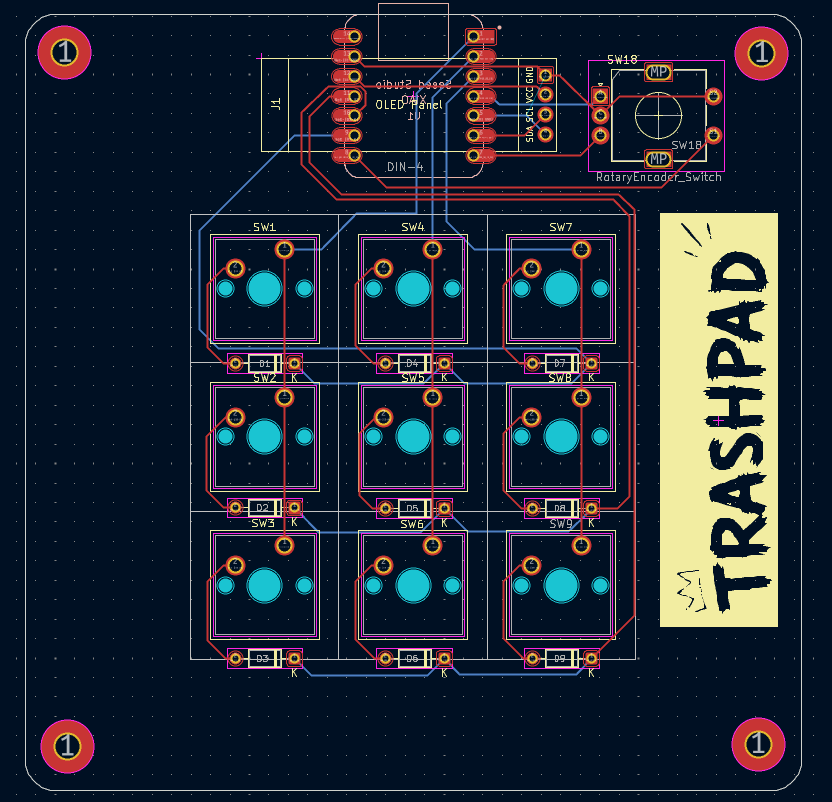
TRASHPAD is an open-source printed circuit board by Mokxsh404, from the Mokxsh404/TRASHPAD repository on GitHub. It is a 2-layer board of 99.8 × 99.8 mm with 26 parts on 22 nets, routed with 131 tracks and 0 vias.
Its parts include 10 switches, 9 diodes, 1 IC and 1 connector. It belongs with the keyboards and input boards of this library.
a macropad i built because i was tired of reaching for shortcuts that don't exist. got out of hand. zero regrets.
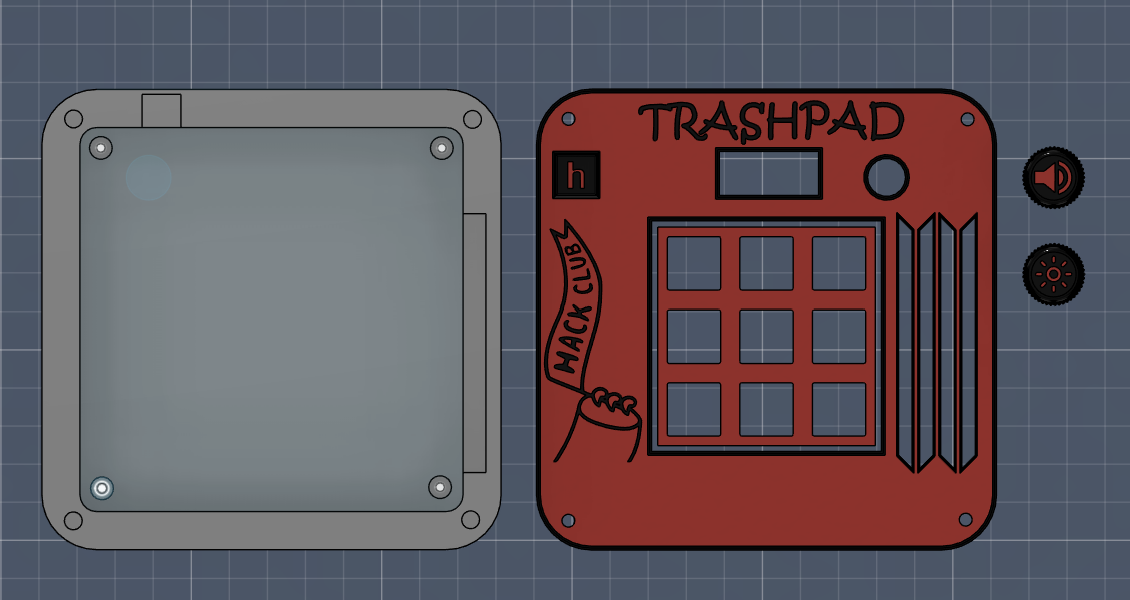
TRASHPAD is a custom programmable macropad — 9 keys, a rotary encoder, and a tiny OLED screen that actually tells you what's going on. built it for a hackathon and then kept going way past the point where "good enough" would've been fine. ended up with a full custom PCB, a 3D-printable case, and a website to go with it.
🔘 9 programmable keys — fully remappable through a QMK firmware matrix. bind them to whatever you actually use, not whatever the factory default thinks you need.
🎛️ EC11 rotary encoder — volume, scrubbing, scrolling through a timeline, whatever. smooth, satisfying, and somehow the part everyone immediately gravitates to when they pick it up.
📟 0.91" OLED display — shows live layer state and active macros so you're not just guessing what your own keyboard is doing. small detail, makes the whole thing feel like a real device instead of a breadboard with delusions of grandeur.
🧠 XIAO RP2040 — tiny controller, does all the heavy lifting, somehow still cheaper than a fancy keycap set.
PCB is designed, firmware is configured, and the production files (gerbers included) are ready to send to a fab. case is modeled and exported. basically: this thing exists in CAD and code, and the build/test phase is where it's at right now.
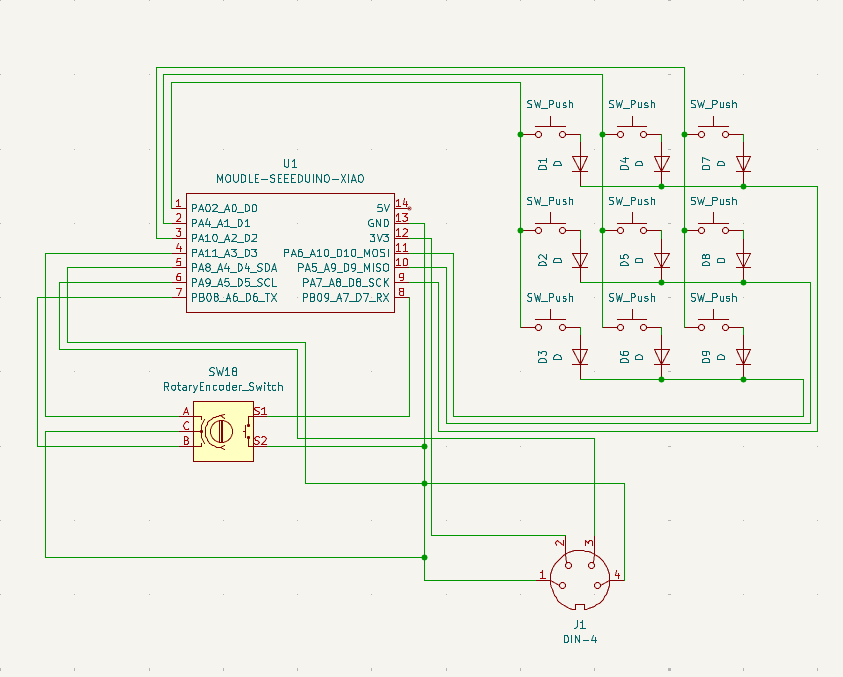
schematic
PCB
CAD model
Here is everything you need to source to build your own TRASHPAD. All parts are standard and easy to find on sites like AliExpress, Amazon, or specialized keyboard vendors.
| Component | Description | Qty | Est. Cost | Notes |
|---|---|---|---|---|
| Seeed Studio XIAO RP2040 | Dual-core Cortex-M0+ microcontroller, USB-C | 1 | ~$5.50 | Main controller footprint |
| 0.91" I2C OLED Display | SSD1306, 128x32 screen | 1 | ~$3.00 | 4-pin header connection |
| EC11 Rotary Encoder | EC11 encoder with push-button switch, D-shaft (15mm) | 1 | ~$1.50 | 5-pin footprint |
| Keyswitches | Cherry MX-compatible switches (Gateron, Kailh, etc.) | 9 | ~$4.00 | Soldered directly to PCB |
| 1u Keycaps | MX-style keycaps | 9 | ~$3.00 | Standard 1u size |
| 1N4148 Diodes | Switching diodes | 9 | ~$0.50 | SOD-123 surface mount |
| TRASHPAD Custom PCB | Custom printed circuit board (Fab & Shipping) | 1 | ~$6.00 | JLCPCB/PCBWay fab + shipping share |
| 3D Printed Case & Knob | Top casing, bottom plate, and encoder knob | 1 | ~$5.00 | Using local hub / custom printing service |
| M3 Threaded Inserts | Brass heat-set inserts | 4 | ~$0.50 | Ø 4.7mm × 4.0mm inserts |
| M3 Machine Screws | M3 screws for case | 4 | ~$0.50 | M3 × 6mm or 8mm button-head |
| Rubber Feet | Self-adhesive silicone bumpers | 4 | ~$0.50 | Ø 8mm x 2mm feet |
| Total Build Cost | ~$30.00 | (Excludes tools, shipping, USB-C) |
CAD/ — full assembled model for reference (assembled-model.step)docs/ — the interactive site/simulator, this is what's live on GitHub PagesFrimware/ — QMK config: keymaps, config.h, keyboard.json, rules.mkPCB/ — KiCad project, schematic, and PCB layout filesProduction/ — fab-ready output: gerbers, case STEPs (Top.step, Bottom.step), and the trashpad/ build folderKiCad for the PCB, QMK for firmware, plain HTML/CSS/JS for the site — no frameworks, no build step, just files that work.
I wanted a macropad.
Instead of buying one, I spent days learning PCB design, designing a case in Fusion, configuring firmware, and making a website for it.
TRASHPAD is the result.
| Qty | Value | Footprint | References |
|---|---|---|---|
| 9 | D | Diode_THT:D_DO-35_SOD27_P7.62mm_Horizontal | D1, D2, D3, D4, D5, D6, D7, D8, D9 |
| 9 | SW_Push | Button_Switch_Keyboard:SW_Cherry_MX_1.00u_PCB | SW1, SW2, SW3, SW4, SW5, SW6, SW7, SW8, SW9 |
| 1 | DIN-4 | KiCad-SSD1306-0.91-OLED-4pin-128x32.pretty-master:SSD1306-0.91-OLED-4pin-128x32 | J1 |
| 1 | LOGO | demo.preety:final | G*** |
| 1 | MOUDLE-SEEEDUINO-XIAO | footprints:XIAO-Generic-Hybrid-14P-2.54-21X17.8MM | U1 |
| 1 | RotaryEncoder_Switch | Rotary_Encoder:RotaryEncoder_Alps_EC11E-Switch_Vertical_H20mm | SW18 |
The 22 most common of 26 parts.

hackclub/OnBoard
💡 Join 1,000 teenagers and make your first PCB with a $100 grant!


harbaum/galagino
A Galaga, Pac-Man and Donkey Kong arcade emulator for the ESP32

Luos-io/luos_engine
Open-source and real-time orchestrator for cyber-physical-systems, to easily design, test and deploy embedded applications and digital twins.

google/walt
A device for measuring latency of physical sensors and outputs on phones and computers

It measures 99.8 × 99.8 mm and has 2 copper layers, 1.6 mm thick.
26 parts. The full list of its parts is on this page, with links to each part's symbol and footprint where PCBKit's library has them.
From the Mokxsh404/TRASHPAD repository on GitHub, at the commit this page was made from: the board is PCB/trashpad.kicad_pcb and its schematic PCB/trashpad.kicad_sch. PCBKit opens the board in the browser, with nothing to install.
Its repository states no licence, so its author keeps all rights: ask Mokxsh404 before reusing the design.