2 layers25 × 17 mm
 Mick3DIY/TinyRotaryPCB
A tiny PCB for the BOURNS PEC11R rotary encoder
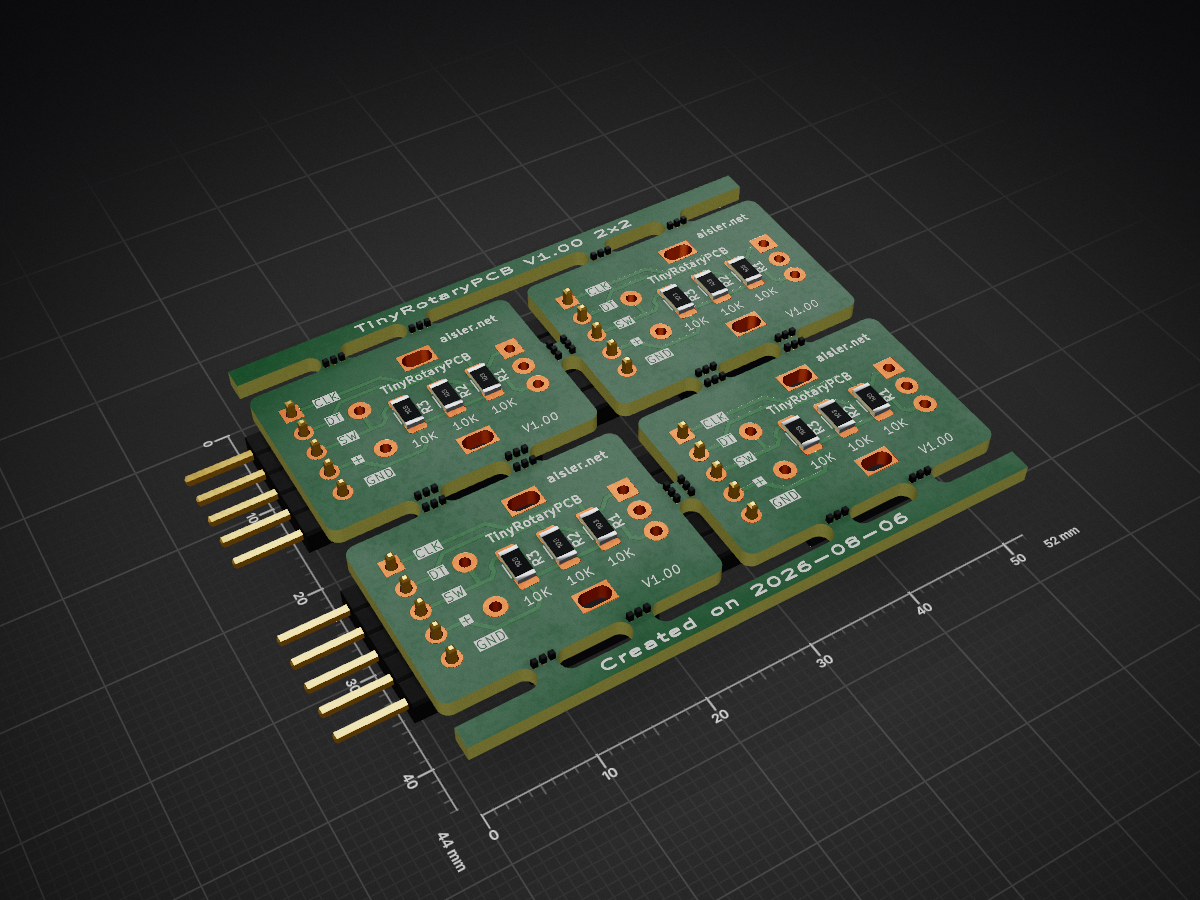
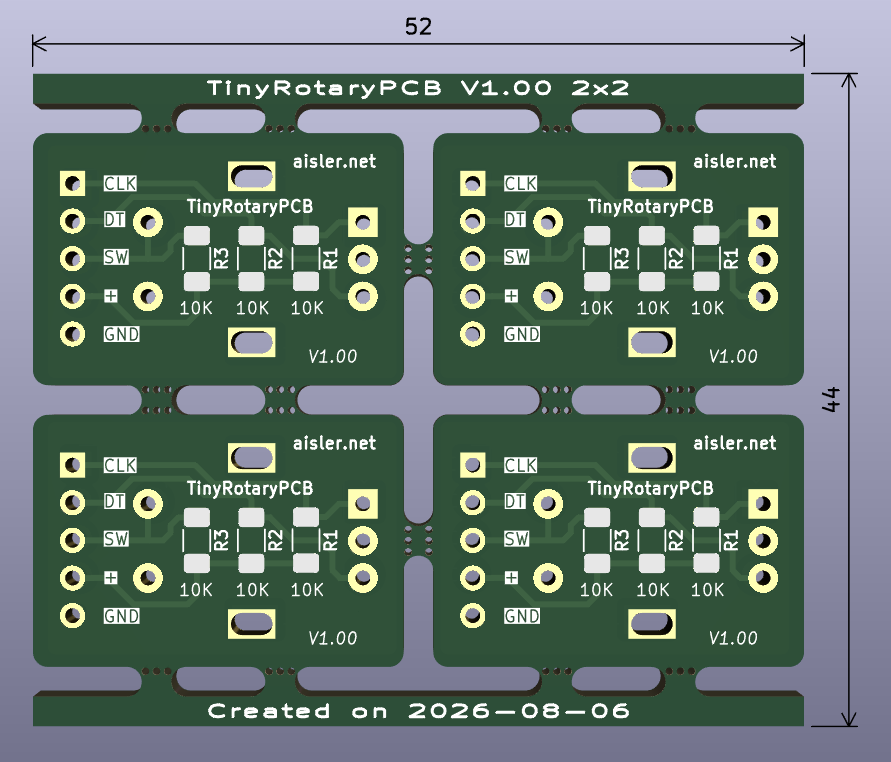
TinyRotaryPCB panel is an open-source printed circuit board by Mick3DIY, from the Mick3DIY/TinyRotaryPCB repository on GitHub, published under the MIT licence. It is a 2-layer board of 52 × 44 mm with 80 parts on 20 nets, routed with 152 tracks and 0 vias.
Its parts include 12 resistors, 4 connectors and 4 switches.

A tiny PCB (with surface resistors) for the BOURNS PEC11R rotary encoder.
As part of an educational project, the schematic and PCB are made with KiCad version 9 (kicad folder).
:bulb: All important parameters are stored in the schematic/PCB editors text variables (common project variables).
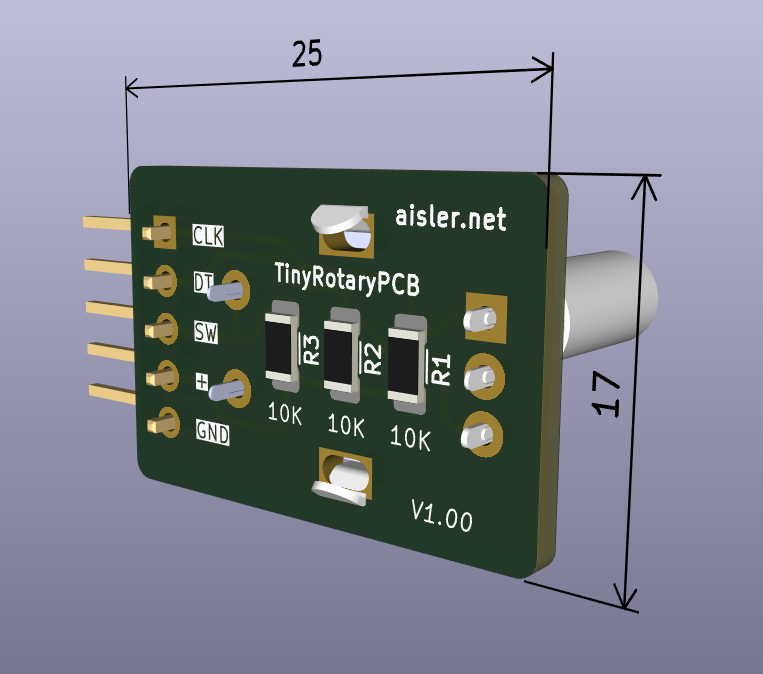
The TinyRotaryPCB itself with the rotary encoder (in reverse side for panel mount), dimensions (mm) :
The panelization option (2x2 boards with stencil) was generated with the KiCad plugin KiKit, dimensions (mm) in kicad/panel folder :
Thanks to AISLER PCB manufacturer :eu:
Get a unique 10€ coupon code in your first order in AISLER with my referral code : MakeInEurope-ECYPW :heart:
The shell script to easily generate panels (in kicad folder)… :laughing:
#!/bin/bash
# TinyRotaryPCB with KiCad and KiKit plugin for PCB panelization
# GitHub project : https://github.com/Mick3DIY/TinyRotaryPCB
# KiCad documentation : https://www.kicad.org
# KiKit plugin documentation : https://github.com/yaqwsx/KiKit

# Input and output files
INPUT_FILE="TinyRotaryPCB.kicad_pcb"
OUTPUT_DIR="panel"
OUTPUT_FILE="${OUTPUT_DIR}/TinyRotaryPCB_panel.kicad_pcb"

# Layout parameters, by default 2x2 -> panelize.sh <rows> <cols> parameters
LAYOUT_ROWS="${1:-2}"
LAYOUT_COLS="${2:-2}"
LAYOUT_SPACE="2mm"

# Tab parameters
TAB_TYPE="fixed"
TAB_HWIDTH="2mm"
TAB_VWIDTH="2mm"
TAB_VCOUNT="2"

# Cuts parameters
CUTS="mousebites; drill: 0.5mm; spacing: 0.75mm; offset: -0.3mm; prolong: 0.5mm"More panelization examples in KiKit plugin documentation : https://yaqwsx.github.io/KiKit/latest/panelization/examples/
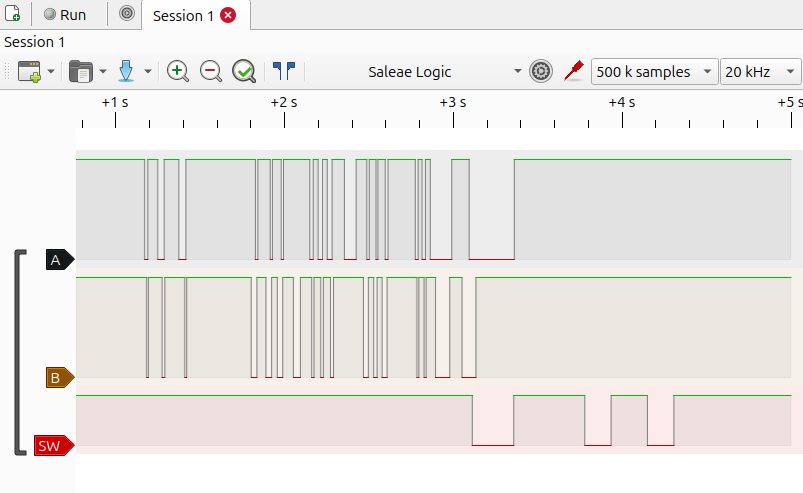
To understand how a rotary encoder "pulses" works, it is useful to visualise it with a software/hardware logic analysers.
Here an example with the same schematic (pins A, B, SW) in Sigrok and PulseView softwares :
BOURNS PEC11R Series 12 mm incremental rotary encoder (PEC11R-4220F-S0024) :
Sigrok, PulseView softwares, all cross-platform : https://sigrok.org :clap:
Elektor Ebook "Logic Analyzers in Practice" from Jörg Rippel :
[!NOTE] Big thanks to the open-source, KiCad, KiKit and plugins communities. :heart:
Happy soldering & have fun ! :partying_face:
| Qty | Value | Footprint | References |
|---|---|---|---|
| 60 | NPTH | NPTH | KiKit_MB_10_2, KiKit_MB_10_3, KiKit_MB_10_4, KiKit_MB_11_2, KiKit_MB_11_3, KiKit_MB_11_4, KiKit_MB_12_2, KiKit_MB_12_3, KiKit_MB_12_4, KiKit_MB_13_2, KiKit_MB_13_3, KiKit_MB_13_4, KiKit_MB_14_2, KiKit_MB_14_3, KiKit_MB_14_4, KiKit_MB_15_2 +44 |
| 12 | 10K | Resistor_SMD:R_1206_3216Metric_Pad1.30x1.75mm_HandSolder | R1, R1, R1, R1, R2, R2, R2, R2, R3, R3, R3, R3 |
| 4 | Conn_01x05_Pin | PinHeader_1x05_P2.54mm_H_W_S:PinHeader_1x05_P2.54mm_Horizontal_Without_Silkscreen | J1, J1, J1, J1 |
| 4 | RotaryEncoder_Switch | RotaryEncoders_PEC11R:RotaryEncoder_Bourns_Vertical_PEC11R-4xxxF-Sxxxx | SW1, SW1, SW1, SW1 |


Staacks/gbinterceptor
Capture or stream Game Boy gameplay footage via USB without modifying the Game Boy.

Chrismettal/EleLab_v2
Cheap DIY lab system for hobbyists and the tinkering folk

ohmtech-rdi/eurorack-blocks
Software to Hardware Prototyping for Eurorack using C++, Max/Gen~ or Faust

jpconstantineau/ErgoTravel
A Portable Ergonomic Split Keyboard inspired from the ErgoDox, Let's Split and Minidox

marksard/Keyboards
This repository is warehouse of my keyboard architecture.

tebl/RC6502-Apple-1-Replica
An expandable SBC-version of the Apple 1 computer, easy to get started with and lot of cool stuff that can be added to it!

It measures 52 × 44 mm and has 2 copper layers, 1.6 mm thick.
80 parts. The full list of its parts is on this page, with links to each part's symbol and footprint where PCBKit's library has them.
From the Mick3DIY/TinyRotaryPCB repository on GitHub, at the commit this page was made from: the board is kicad/panel/TinyRotaryPCB_panel.kicad_pcb and its schematic kicad/TinyRotaryPCB.kicad_sch. PCBKit opens the board in the browser, with nothing to install.
Its repository publishes it under the MIT licence: you may reuse it on that licence's terms (keep the author's notice, and for a copyleft licence share your changes alike).