
2 layers65 × 30 mm

 ManiacalLabs/PiPixel6
Rasperry PI & Digital LEDs Simplified
PiPixel is an open-source printed circuit board by ManiacalLabs, from the ManiacalLabs/PiPixel repository on GitHub. It is a 2-layer board of 65 × 30 mm with 13 parts on 40 nets, routed with 134 tracks and 8 vias.
It is built around the 74AHC125D. Its parts include 4 connectors and 1 IC.
If you require support, please post to the Maniacal Labs Google Group.
The PiPixel provides simplified hookup of digital LED strips to the Raspberry Pi family of single board computers. It uses the standard Pi "HAT" form-factor to provide two easy power input options, and data output of the SPI port as well as GPIO 18 and 13 (used for WS2812), along with built-in voltage level shifting to keep your LED strips happy being connected to the 3.3V Pi. No longer will you have a rats-nest of wires and power between your Pi and your LEDs. Slap on the PiPixel, connect power, connect LEDs, and go!
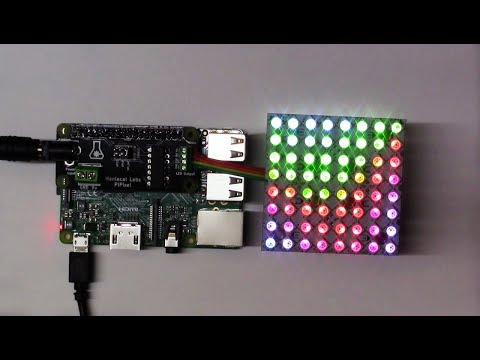
Your PiPixel is a user assembled kit which only requires basic soldering skills and comes with the following components:
We ship the PiPixel with a standard 2x20 Female header as that's what most users are likely to use. But it supports a few other options which we don't currently provide. See the list below for links of where to buy those, should you need them.
Check out the full Assembly doc
For all the details on using your PiPixel, check out the Usage doc
| Qty | Value | Footprint | References |
|---|---|---|---|
| 4 | RPi_Hat:RPi_Hat_Mounting_Hole | , , , | |
| 2 | Jumper_NO_Small | Custom:small_jump | JP2, JP3 |
| 1 | 74AHC125 | Custom:DIP_14 | U1 |
| 1 | BARREL_JACK | APM_BarrelJack:ML_BARREL_JACK_ROUND_PADS_SHORT | CON1 |
| 1 | CONN_01X02 | w_conn_mkds:mkds_1,5-2 | P2 |
| 1 | CONN_01X04 | w_conn_mpt:mpt_0,5%2f4-2,54 | P1 |
| 1 | Jumper_NC_Small | Custom:small_jump | JP1 |
| 1 | LOGO | LOGOS:logo_MLlabs_small | G*** |
| 1 | RPi_GPIO | RPi_Hat:Pin_Header_Straight_2x20 | J1 |

FreeYourStream/freedeck-hardware
all the stuff you need to build your own FreeDeck

d8ahazard/glimmr
Glimmr is a .Net Core application to synchronize Ambient LED strips with Hue Lights, Lifx Bulbs, and Nanoleaf Panels

adrienkohlbecker/BB816
A homebrew 16 bit breadboard computer based on WDC's 65C816 processor


It measures 65 × 30 mm and has 2 copper layers, 1.6 mm thick.
13 parts, built around the 74AHC125D. The full list of its parts is on this page, with links to each part's symbol and footprint where PCBKit's library has them.
From the ManiacalLabs/PiPixel repository on GitHub, at the commit this page was made from: the board is PCB/PiPixel.kicad_pcb. PCBKit opens the board in the browser, with nothing to install.
Its repository states no licence, so its author keeps all rights: ask ManiacalLabs before reusing the design.