4 layers45.6 × 28 mm
LICHEE JACK EXT BOARD
KaliAssistant/Lichee-Jack-pcb
Open hardware extension board for Lichee-Jack with battery, Ethernet, and LED integration.
41 parts4GPL-3.0

 KaliAssistant/Lichee-Jack-pcb4
Open hardware extension board for Lichee-Jack with battery, Ethernet, and LED integration.
LICHEE JACK USB DEBUGGER is an open-source printed circuit board by KaliAssistant, from the KaliAssistant/Lichee-Jack-pcb repository on GitHub, published under the GPL-3.0 licence. It is a 2-layer board of 45 × 20 mm with 56 parts on 59 nets, routed with 390 tracks and 37 vias.
It is built around the CP2102-GMR, USB2422/MJ and TPSPX3819M5-L-3-3, with the TPD1E10B06DPYR, AO3401A and XL7EL89CMI-111YLC-24M among its other parts. Its parts include 13 capacitors, 12 resistors, 11 diodes, 3 ICs and 1 transistor. It belongs with the interfaces and adapters boards of this library.


This sub-directory contains the USB 2.0 hub + UART converter board designed specifically for the Lichee-Jack project. It is intended to simplify development, debugging, and flashing by combining USB OTG, UART console, and power control into a single compact board.
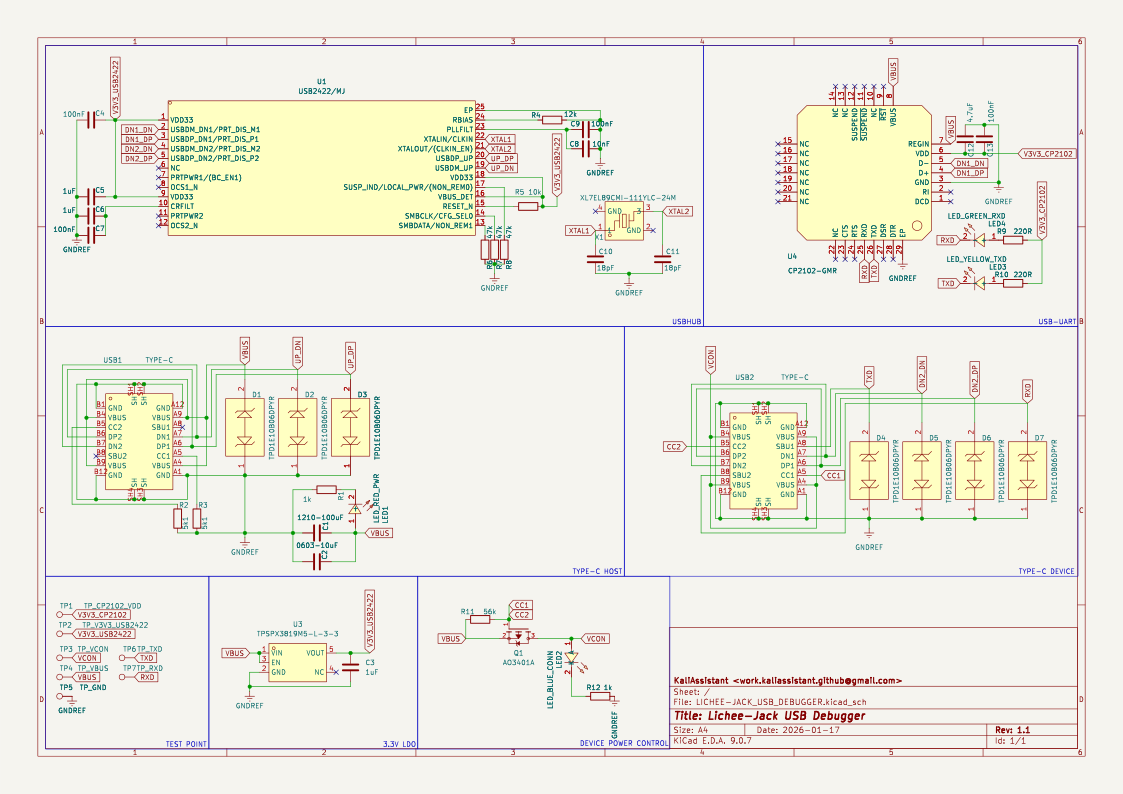
The LicheeRV Nano features a USB 2.0 Type-C OTG port implemented directly by the SoC PHY. This design is slightly different from a typical USB 2.0 Type-C implementation:
SUB1 / SUB2 pins are internally multiplexed as SoC UART0
printk, and Linux login consoleD+ / D- pins are used as a standard USB OTG interface
Because UART and USB share the same physical Type-C connector, direct connection to a PC is inconvenient during development.
[!IMPORTANT] This board is not a generic USB-C hub.
It is designed specifically around the LicheeRV Nano Type-C PHY behavior, where USB OTG and UART share the same connector. Using it with unrelated USB-C devices may lead to undefined behavior.
To solve this, the Lichee-Jack USB Debugger acts as a 2-port Type-C converter:
The board cleanly separates:
The board uses a Microchip USB2422/MJ USB 2.0 hub controller:
1 upstream port (PC)
2 downstream ports
This allows the Lichee-Jack USB gadget functions to work normally while UART is simultaneously available on the same PC connection.
[!NOTE] The hub architecture allows USB gadget functions and UART console to operate simultaneously over a single PC connection. No cable swapping or re-plugging is required during development.
UART is provided by CP2102-GMR:
Connected to Lichee-Jack UART0 (SUB1 / SUB2)
Exposes a standard USB CDC-ACM serial device on the host
Suitable for:
The debugger board implements CC-based power detection and control:
PMOS power switch controlled by CC logic
Behavior:
If Lichee-Jack is not connected, PMOS remains OFF
When Lichee-Jack is connected:
This prevents:
[!NOTE] Power delivery on this board is fully hardware-controlled via CC detection. No firmware or software control is involved.
PCB: 2-layer board, thickness 1.6 mm
Assembly side: Top side only
Solder paste:
[!CAUTION] The USB hub uses a QFN package and requires a proper reflow profile.
Insufficient temperature or uneven heating may cause:
- Hidden cold joints
- Unreliable USB enumeration
A controlled high-temperature reflow process is strongly recommended.
The following files are provided in the EXT-Board latest release:
[!WARNING] Type-C cable selection is critical.
Many USB 3.x Type-C cables are SuperSpeed-only and do not carry USB-2 / SBU signals. If such a cable is used, SUB1 / SUB2 (UART0) may be physically disconnected, resulting in no UART console output even when the hardware is correct.
Always use a Thunderbolt / USB4 Type-C cable, which is required by specification to include full USB-2 wiring.
[!TIP] No UART console? Try flipping the Type-C connector on the Lichee-Jack side.
Unlike USB D+ / D-, SUB1 / SUB2 (UART0) are not orientation-symmetric. Depending on plug orientation, the UART pins may not be connected.
Simply unplug and reverse the Type-C connector to restore UART functionality.
| Qty | Value | Footprint | References |
|---|---|---|---|
| 7 | TPD1E10B06DPYR | TPD1E10B06DPYR:X1SON-2_L1.0-W0.6-P0.65-BI | D1, D2, D3, D4, D5, D6, D7 |
| 4 | 100nF | Capacitor_SMD:C_0402_1005Metric | C4, C7, C9, C13 |
| 3 | 1uF | Capacitor_SMD:C_0402_1005Metric | C3, C5, C6 |
| 3 | 47k | Resistor_SMD:R_0402_1005Metric | R6, R7, R8 |
| 2 | 18pF | Capacitor_SMD:C_0402_1005Metric | C10, C11 |
| 2 | 1k | Resistor_SMD:R_0402_1005Metric | R1, R12 |
| 2 | 220R | Resistor_SMD:R_0402_1005Metric | R9, R10 |
| 2 | 5k1 | Resistor_SMD:R_0402_1005Metric | R2, R3 |
| 2 | TYPE-C | USB-TYPE-C-018:USB-C_SMD-TYPE-C-31-M-12 | USB1, USB2 |
| 1 | 0603-10uF | Capacitor_SMD:C_0603_1608Metric | C2 |
| 1 | 10k | Resistor_SMD:R_0402_1005Metric | R5 |
| 1 | 10nF | Capacitor_SMD:C_0402_1005Metric | C8 |
| 1 | 1210-100uF | Capacitor_SMD:C_1210_3225Metric | C1 |
| 1 | 12k | Resistor_SMD:R_0402_1005Metric | R4 |
| 1 | 4.7uF | Capacitor_SMD:C_0402_1005Metric | C12 |
| 1 | 56k | Resistor_SMD:R_0402_1005Metric | R11 |
| 1 | AO3401A | AO3401A:SOT23-3 | Q1 |
| 1 | CP2102-GMR | CP2102-GMR:WQFN-28_L5.0-W5.0-P0.50-BL-EP3.2 | U4 |
| 1 | LED_BLUE_CONN | YLED0603B:LED0603-FD | LED2 |
| 1 | LED_GREEN_RXD | YLED0603G:LED0603-FD | LED4 |
| 1 | LED_RED_PWR | YLED0603R:LED0603-FD | LED1 |
| 1 | LED_YELLOW_TXD | YLED0603G:LED0603-FD | LED3 |
| 1 | LOGO | UUID:23694cda-5ace-4d6f-9775-43e1d7cdbd87 | G*** |
| 1 | LOGO | ICON:sipeed_logo_3x3 | G*** |
| 1 | LOGO | ICON:debian_3x3 | G*** |
| 1 | LOGO | ICON:github_3x3 | G*** |
| 1 | LOGO | ICON:oshw_3x3 | G*** |
| 1 | LOGO | ICON:kali_3x3 | G*** |
| 1 | TPSPX3819M5-L-3-3 | TPSPX3819M5-L-3-3:SOT-23-5_L3.0-W1.6-P0.95-LS2.8-BR | U3 |
| 1 | TP_CP2102_VDD | TestPoint:TestPoint_Pad_D1.0mm | TP1 |
| 1 | TP_GND | TestPoint:TestPoint_Pad_D1.0mm | TP5 |
| 1 | TP_RXD | TestPoint:TestPoint_Pad_D1.0mm | TP7 |
| 1 | TP_TXD | TestPoint:TestPoint_Pad_D1.0mm | TP6 |
| 1 | TP_V3V3_USB2422 | TestPoint:TestPoint_Pad_D1.0mm | TP2 |
| 1 | TP_VBUS | TestPoint:TestPoint_Pad_D1.0mm | TP4 |
| 1 | TP_VCON | TestPoint:TestPoint_Pad_D1.0mm | TP3 |
| 1 | USB2422/MJ | USB2422:QFN-24_L4.0-W4.0-P0.50-BL-EP2.6 | U1 |
| 1 | XL7EL89CMI-111YLC-24M | XL7EL89CMI-111YLC-24M:CRYSTAL-SMD_4P-L2.0-W1.6-BL | X1 |
KaliAssistant/Lichee-Jack-pcb
Open hardware extension board for Lichee-Jack with battery, Ethernet, and LED integration.

KaliAssistant/Lichee-Jack-pcb
Open hardware extension board for Lichee-Jack with battery, Ethernet, and LED integration.

KaliAssistant/Lichee-Jack-pcb
Open hardware extension board for Lichee-Jack with battery, Ethernet, and LED integration.


lekangji/Pico-Devboard
A custom rp2040 devboard, but with 16MB flash and a lot of extra features!

nyuad-space/dumpling
Modular payload for high-speed logging and benchmarking of COTS sensors, enabling real-world performance data and open sharing.


shxshxshxshx/VoronToolheadPCB
USB Toolhead Board for Voron Stealthburner

It measures 45 × 20 mm and has 2 copper layers, 1.6 mm thick.
56 parts, built around the CP2102-GMR, USB2422/MJ, TPSPX3819M5-L-3-3 and TPD1E10B06DPYR. The full list of its parts is on this page, with links to each part's symbol and footprint where PCBKit's library has them.
From the KaliAssistant/Lichee-Jack-pcb repository on GitHub, at the commit this page was made from: the board is DEBUGGER/LICHEE-JACK_USB_DEBUGGER/LICHEE-JACK_USB_DEBUGGER.kicad_pcb and its schematic DEBUGGER/LICHEE-JACK_USB_DEBUGGER/LICHEE-JACK_USB_DEBUGGER.kicad_sch. PCBKit opens the board in the browser, with nothing to install.
Its repository publishes it under the GPL-3.0 licence: you may reuse it on that licence's terms (keep the author's notice, and for a copyleft licence share your changes alike).