4 layers50 × 42 mm
Receiver
JMET04/aicad-agent
Deterministic CAD/EDA agent plugin for 2D drawings, AutoCAD, SolidWorks, KiCad, review gates and auditable delivery.
46 parts1MIT

 JMET04/aicad-agent1
Deterministic CAD/EDA agent plugin for 2D drawings, AutoCAD, SolidWorks, KiCad, review gates and auditable delivery.
Receiver effects is an open-source printed circuit board by JMET04, from the JMET04/aicad-agent repository on GitHub, published under the MIT licence. It is a 4-layer board of 60 × 50 mm with 46 parts on 38 nets, routed with 291 tracks and 98 vias.
It is built around the MAX98357AETE+T, TPS62162DSGR and USBLC6-2SC6, with the RC0402JR-070RL, MF-MSMF150/24X-2 and RC0402FR-07100KL among its other parts. Its parts include 4 ICs, 3 connectors, 1 diode, 1 transistor and 1 inductor.


一个面向 Agent 的确定性 CAD 约束、审查与修改插件。你可以直接用自然语言告诉 Codex 要画什么、参考什么、哪些尺寸必须准确;插件负责把要求转换为逐实体计划、数学约束、CAD 文件、交互修改器和可审计验证结果。
默认不需要 API Key。 当前 Codex Agent 负责理解任务,本地插件负责约束验证、编译、审查和宿主适配。
aicad-agent 是安装在 Codex 中的本地工程流水线:它先冻结领域、交付阶段、标准和输入权威顺序,再生成带稳定 ID、用途、依赖和数学约束的 CAD/EDA 候选,最后交付可点击修改器、中文审计、机器验证和 SHA-256 文件清单。它面向需要“可编辑、可复核、可追溯”结果的设计与工程流程,而不是只输出一张看起来相似的图片。
产品覆盖通用 2D、建筑制图、包装刀版、参考图重建、受控 SolidWorks 3D,以及机械技术包和 PCB 证据合同检查。没有原生宿主或专业证据时会明确降级,绝不把候选一致性冒充制造、施工或投板授权。
统一入口显式覆盖机械、电子/电气、包装、土木、建筑和钢结构,并按对象需要提供 2D、3D 与交互审查;但各领域成熟度并不相同。通用制图、包装和建筑可进入受约束生成与审查,机械与 PCB 可形成哈希闭合的制造候选,土木当前仅接受权威来源绑定的受约束审查候选,钢结构当前仅提供诊断与构件关系审查。“覆盖”不等于生产级自动设计,任何施工、结构计算、加工或投板结论仍需相应专业人员和真实工具放行。
| 快速入口 | 内容 |
|---|---|
| 完整产品介绍 | 适用人群、工作方式、核心模块、支持范围、交付物和安全边界 |
| 四领域工程展示 | 建筑、钢结构、机械和 PCB 的预览、交互审查与验证材料 |
| v1.15.0 标准化重生成证据 | 新机械包与受阻电子包、预览、精确哈希和工程边界 |
| 安装和使用指南 | Marketplace、Release ZIP、首次使用和更新流程 |
| v1.17.2 Release | 发布说明、插件 ZIP 与 SHA256SUMS |
当前定位是工程候选与人工审核工具。所有交付继续保持
reviewOnly=true、accepted=false、ruleEnabled=false、packagingGated=true。通过插件门禁不等于材料试验、刀模公差、量产可制造性或负责工程师技术验收。
进入建筑平面、三层钢结构、复杂机械零件和四层工业控制器 PCB 的完整展示页。每个样例都包含白底预览、交互审核页、中文与机器验证报告,以及经过脱敏和双向哈希闭包校验的确定性审核候选 ZIP。
展示通过只代表相应审核门禁和证据闭包成立;机械样例不自动取得制造验收,PCB 样例在缺少原生 ERC/DRC、SPICE 或仍有未路由网络时继续保持 fabricationReady=false。
v1.15.0 的标准化重生成证据取代旧机械/电子图纸作为当前工程审查候选:机械证据闭包通过但不等于技术包或制造批准;电子包的原生 ERC 与几何 DRC 均为 0,但仍有 37 个未连接项,因此 Gerber、钻孔和 job 文件被有意扣留。
generate、compile、build3d 和 multiview 会生成绑定当前源哈希的审查 HTML 和打开记录;CLI/Agent 默认 review_launch=never,不会反复新建浏览器标签。显式使用 auto 时,HTML 会先复制到持久内容寻址目录并在 300 秒窗口内对相同内容去重;只有 always 才强制再次打开。临时源文件删除后,已打开页面仍有效;打开界面不等于接受设计。
普通“打开/看看/预览”请求必须调用 aicad_open_review_request,并且只打开通过 aicad_selectable_vector_modifier_v1 的当前交互修改器:真实 cad-view SVG、独立宽 view-hit、源对象/子对象 ID、图层、语义目录、模型测量和受控纠错缺一不可;单有 data-artifact-role 标签的 PDF/图片浏览器必须失败关闭。栅格内容只能作为已声明的次要底图。即使参数中有 PDF、DWG、STEP 或 KiCad 路径,也不得直接打开。只有用户明确要求原生 CAD 编辑或输出时才设置 open_native_cad=true,而且修改器必须先成功打开,否则原生 CAD 被阻断。
| 能力 | 用户看到的结果 | 插件内部保证 |
|---|---|---|
| 跨领域规范预检 | 明确领域、交付阶段、适用标准和规则包 | 规范治理是阶段 0 非补偿门禁;标准与批准工程输入优先于偏好、参考 CAD、图片和推测 |
| 自然语言画 2D CAD | DXF、SCR、AICAD、审计和清单 | 每条线都有 ID、用途、推理、依赖和数学约束 |
| 建筑平面专业制图 | 剖切粗实线、投影中实线、隐藏虚线、数学绑定轴网、原生尺寸 | 自动校验轴线坐标/覆盖、两端轴圈相切、轴号同值居中、房间用途来源、逐房间设备、全占用体净空、语义线宽线型、DIMSTYLE 与修改器显示一致性 |
| 规范报告质量 | 完整现象/根因/修正/预防规则记录、稳定唯一规则 ID | 相同记录折叠、冲突 ID 失败、同输入重复运行哈希一致 |
| 包装刀版设计与复核 | 切割/压痕/开槽/胶区分层图、白底预览、对象编号 | 先核对整体结构,再检查轮廓、闭合、槽口、胶区、公式和参数域 |
| 点击修改 2D/3D | 点线看长度和端点,点点看 XYZ,点圆看半径/直径/圆心 | 数值来自编译模型,不来自屏幕像素 |
| 多对象关系修改 | 选择两条线后直接提供平行、垂直、共线、等长等选项 | 修改绑定源对象、保留策略和依赖重放 |
| 坐标系与多视图 | 一个开关同步隐藏/显示二维轴、原点和三维轴 | 统一使用右手 MODEL_XYZ,单位为 mm |
| 网页/图片/PDF 参考重建 | 可编辑的 1:1 CAD、标注、文字和预览 | 图片只提供外观/拓扑;尺寸必须来自权威数据或校准关系 |
| AutoCAD 适配 | SCR/DXF、bundle、AICAD XData;有宿主时可生成 DWG | DWG、XData 和保存重开必须由真实 AutoCAD 门禁证明 |
| SolidWorks 3D | 受控拉伸、切除、孔阵列、SLDPRT/STEP | 事务式执行、重建回读、可选原生持久拓扑验证 |
| 错误学习闭环 | 报告“现象—根因—修复—新增规则” | 每个新错误必须加入永久规则和可重复回归测试 |
直接拼接 CAD 命令很容易出现三类低级错误:中文进入命令流导致乱码;局部线段看似正确但整体产品结构错误;同类错误每次依赖人工重新发现。
aicad-agent 使用不可跳过的四级门禁。规范不是最终润色项,而是任何几何生成之前的阶段 0:
flowchart LR
  A["用户要求与权威输入"] --> N["0. 领域、阶段、标准与规则包"]
  N -->|PASS| B["1. 整体要求一致性"]
  B -->|PASS| C["2. 逐实体与数学可靠性"]
  C -->|PASS| D["3. 隔离构建与哈希审计"]
  D --> E["CAD + 修改器 + 审计 + 验证"]
  N -->|FAIL| X["阻断后续输出"]
  B -->|FAIL| X
  C -->|FAIL| X
规范门禁要求声明 domain、deliveryStage、applicableStandards、selectedRulePacks 和输入权威顺序;任何高优先级规则都必须同时落到 schema/contract 字段、生成约束、独立 QA 与负向回归测试。整体门禁要求每条硬需求满足 boundActual = observed = expected;几何门禁计算独立约束秩并检查拓扑、功能面和参数域;构建门禁在隔离目录核对文件身份、ASCII 执行通道和 SHA-256。复制一个“正确数字”到报告里不能绕过验证。
准备:Codex CLI 或 Codex 桌面版、Git、Python 3.10+。
codex plugin marketplace add JMET04/aicad-agent --ref v1.17.2
codex plugin add aicad-agent@aicad-agent
codex plugin list
看到 aicad-agent 为 installed, enabled 后,新建一个 Codex 任务。插件技能和 MCP 工具会在新任务的干净上下文中加载。
更新:
codex plugin marketplace upgrade aicad-agent
codex plugin add aicad-agent@aicad-agent
卸载:
codex plugin remove aicad-agent从 GitHub Releases 或仓库的 dist 目录下载:
aicad-agent-1.17.2.zipSHA256SUMS先核对哈希:
Get-FileHash .\aicad-agent-1.17.2.zip -Algorithm SHA256
Get-Content .\SHA256SUMS
解压后顶层目录为 aicad-agent,其中包含插件清单、技能、MCP、规则、Schema、脚本、测试、AutoCAD bundle 源和 SolidWorks 宿主源。
在新 Codex 任务中直接输入,例如:
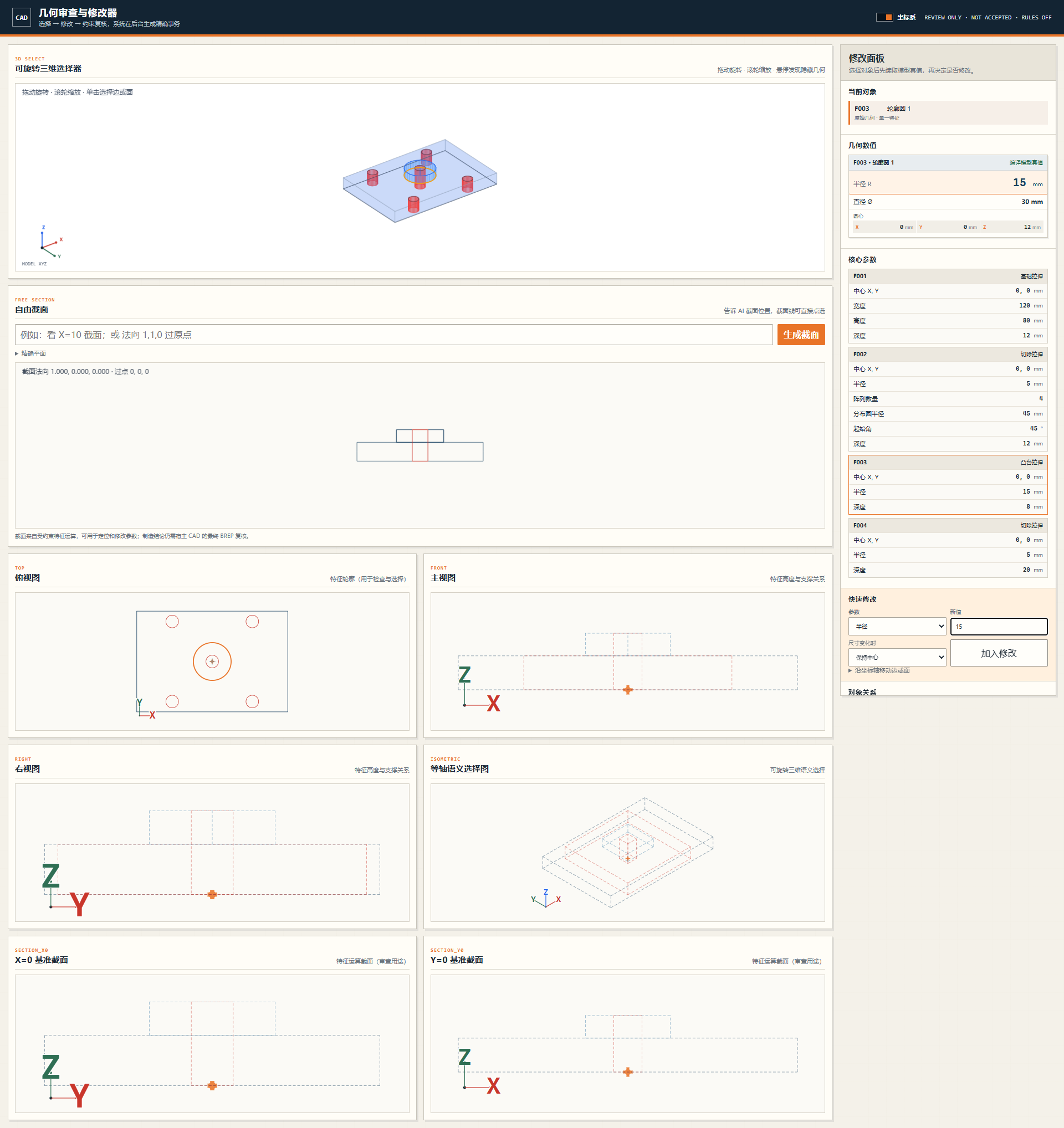
使用 aicad-agent 画一个 120×80×12 mm 的安装板,中心开直径 30 mm 的通孔。第一条生产线从原点开始,每个实体写明用途、依赖和数学约束。先核对整体要求,再输出 DXF、AICAD、审计、验证和多视图修改器。
如果有参考图纸、网页截图、PDF、DXF 或产品数据,直接附上并说明优先级。推荐写法:
尺寸以 design.json 为最高优先级,DXF 用于几何对象对应,图片只用于外观和标注布局,不允许从像素猜尺寸。
插件应先确认:
整体要求没有证明一致时,不应先画一堆线再返工。
基础 2D 编译通常会得到:
*.plan.json:规范化意图计划;*.aicad:ASCII 约束执行记录;*.scr:AutoCAD 脚本;*.dxf:便携二维几何;*.audit.md:中文逐实体用途、关系、根因和审计;*.manifest.json:版本、实体统计、源计划身份和文件哈希。包装或参考重建任务还可生成白底 PNG、原生中文 SVG、交互 HTML、对象目录、validation.json 和 validation.md。
对 Agent 说:
用 aicad-agent 打开这次结果的多视图修改器,我要逐项检查和修改。
在修改器中:
MODEL_XYZ 中的 X/Y/Z 坐标;参数化中心点可直接回填中心坐标。法向量 + 经过点 定义任意截面,并把截面曲线映射回语义参数。修改器记录的是受控修改请求。“复制并回传给 AI”会同时复制 JSON、发送浏览器/WebView 回传事件;Agent 必须先校验 handoff schema 与当前源 SHA-256,再预览、应用、写审计并重新生成可点选修改器。旧源、纯文字且无精确事务或约束失败都会在写文件前阻断,不能用一次点击绕过整体结构检查。
推荐直接说:
对最终结果做整体核验:逐项比对用户要求、权威尺寸、对象目录、几何、图层、标注、文字编码、视觉重叠、宿主重开和文件哈希。发现错误时同时给出根因和需要新增的永久规则。
只有有真实 AutoCAD/SolidWorks 宿主证据的项目,才能报告对应宿主保存重开通过。
使用 aicad-agent 绘制一块 200×120 mm 的板,四角 R10,中心孔直径 24 mm。尺寸以我提供的数值为准;逐实体解释用途和约束,验证后输出 DXF、SCR、审计和修改器。
使用 aicad-agent 设计插舌上盖、自锁底的包装展开图。先确认整体结构族和上下闭合,不允许上下镜像猜测;检查每个摇盖、插舌、槽口、胶区、闭合公式和参数组合,通过后再输出分层 CAD 和白底中文审查图。
使用 aicad-agent 按参考网页重建 1:1 CAD。尺寸以页面标注和我给的校准尺寸为准;图片像素不能作为尺寸真值。保持结构比例、文字、标注位置、旋转、线宽层级,并检查乱码和重叠。
使用 aicad-agent 建一个 120×80×12 mm 安装板,中心凸台直径 30 mm、高 8 mm,中心通孔直径 15 mm。先生成受控 3D 计划和多视图修改器;如果本机 SolidWorks 可用,再生成 SLDPRT/STEP 并保存重开验证。
支持 LINE、CIRCLE、ARC。每个实体必须包含稳定 ASCII ID、用途、推理、已生成依赖、数学约束、图层和生产语义。首实体锚定 (0,0),禁止前向引用、零长度、非正半径和重复几何;必要时可使用不会进入生产输出的 ORIGIN_BOOTSTRAP。
插件不是简单统计“写了多少条约束”,而是计算独立雅可比秩。等式满秩只证明几何唯一,不证明产品正确,所以还会检查单闭合轮廓、端点归属、结构面、功能面、工艺区、上下闭合、结构公式和参数组合。
当前规则覆盖切割/压痕/开槽/胶区语义、端点连续、轮廓简单性、圆角切线、槽宽、摇盖对口、插舌完整面与锥度、胶区、闭合公式、外包框、上下闭合分型和耦合参数域。默认模板是已建模回归结构,不会把“常见结构”当成所有包装的默认真值。
可见细线和点击命中区分离,既保持图纸精细,又让线段容易点中。对象使用稳定语义键跨视图同步;边号、角号、面号可保留;修改事务绑定源哈希、保留策略、共享阵列影响范围和完整依赖重放。
每个可选线、点、圆、面都携带类型化 measurement。长度、端点、坐标、半径、直径、面积和中心来自约束求解后的模型。屏幕缩放、透视投影和命中像素没有尺寸权威。统一坐标系是右手 MODEL_XYZ,单位为 mm。
支持校准网页 SVG、SVG、光栅图和 PDF。矢量对象可按真实 DOM/object ID 映射;光栅图必须由权威尺寸或校准点建立比例。几何、尺寸、文字内容、标注位置/旋转、线宽、比例、乱码和重叠分别设门禁。
无 AutoCAD 时仍可生成 AICAD、SCR、DXF、审计和清单。安装 AutoCAD 2025+ 后,可通过 bundle 执行、保存 DWG、写入 AICAD XData,并在保存重开后复核图层、坐标、中文和 XData。便携 DXF 不能冒充 DWG 宿主验证。
受控特征集包括基础拉伸、凸台拉伸、切除、中心矩形、圆和圆周阵列。无宿主时可以 --no-execute 生成计划与审计;有已授权 SolidWorks 2026 时可构建 SLDPRT/STEP、回读实体/体积/面积/包围框,并验证持久拓扑引用。未支持的特征会明确拒绝,不会静默近似。
AICAD/SCR 执行通道保持 ASCII;中文用途、推理、根因和说明进入 UTF-8 审计及 CAD TEXT/MTEXT。每个候选文件写入 SHA-256,验证源计划身份和必需工件完整性。
发现错误后必须记录 symptom、root cause、correction、prevention rule、永久规则 ID 和可稳定重现旧错误的回归样例。这样错误会在后续任务中被自动阻断,而不是每次重新画很多遍。
插件公开 9 个本地 MCP 工具:
aicad_capabilities;aicad_get_plan_schema、aicad_generate、aicad_validate_plan、aicad_compile_plan;aicad_solidworks_doctor、aicad_get_3d_plan_schema、aicad_validate_3d_plan、aicad_build_solidworks_part。克隆仓库并查看能力:
git clone https://github.com/JMET04/aicad-agent.git
cd aicad-agent
python agent-plugin/aicad-agent/scripts/aicad_agent.py capabilities
编译示例 2D 计划:
python agent-plugin/aicad-agent/scripts/aicad_agent.py compile `
  --plan examples/rectangle.plan.json `
  --out build/rectangle `
  --name rectangle
生成 3D 计划但不调用 SolidWorks:
python agent-plugin/aicad-agent/scripts/aicad_agent.py build3d `
  --plan examples/mounting_plate_3d.plan.json `
  --out build/mounting-plate `
  --name mounting_plate `
  --no-execute
包装任务的受控输出边界:
python agent-plugin/aicad-agent/scripts/aicad_guarded_delivery.py `
  --contract requirement-contract.json `
  --trace requirement-trace.json `
  --plan drawing.plan.json `
  --geometry geometry.json `
  --template structure.normality.json `
  --instance drawing.instance.json `
  --out build/candidate `
  --report-dir build/reports `
--name drawing| 环境 | 可用能力 | 明确不可声称 |
|---|---|---|
| Python 3.10+ 标准库 | 基础 2D 计划验证与编译 | 包装拓扑/预览依赖未安装时的完整 QA |
加装 jsonschema、ezdxf、Pillow、Shapely | 合同、DXF、预览、包装拓扑 QA | AutoCAD/SolidWorks 原生宿主结果 |
| AutoCAD 2025+ | DWG、XData、保存重开门禁 | 材料或量产验收 |
| SolidWorks 2026 + .NET Framework 4.8 | SLDPRT、STEP、原生拓扑重开 | 未建模特征族的正确性 |
安装可选包装依赖:
python -m pip install -r agent-plugin/aicad-agent/requirements-packaging.txt默认包不分发 SolidWorks 专有互操作 DLL。
python -B -m unittest discover -s tests -p "test_*.py" -v
python -B -m unittest discover -s agent-plugin/aicad-agent/tests -p "test_*.py" -v
.\scripts\build-agent-plugin.ps1 -OutputDirectory release/ci -Version 1.17.2
python -B scripts/verify_release_package.py release/ci/aicad-agent --source-root .
.\scripts\build-github-source.ps1 `
  -OutputDirectory release/ci/github-repository `
  -Version 1.17.2 `
  -PluginArchive release/ci/aicad-agent-1.17.2.zip `
  -PluginDirectory release/ci/aicad-agent
python -B scripts/verify_github_source.py release/ci/github-repository --source-root .
当前 1.14.0 新增机械/电子生成前规范门禁:它从同一份生产规则清单派生精确的 54 条机械和 63 条电子规则,在任何 2D/3D 几何或构建产物写出前检查规则完整性、适用标准、来源绑定、冲突和安全锁。v1.13.0 的 71/99 条生成后证据门禁继续保留;两层门禁分别约束“先按规范生成”和“生成后证据闭包”,均不授予技术、制造或投板批准。
以下两节保留机械、PCB 与持续学习门禁的精确定义;面向用户的中文说明请优先阅读完整产品介绍和发布说明。
Mechanical and electronics work now has a real pre-geometry gate, not only a post-generation evidence checklist. The gate derives one exact inventory from production_readiness_rules.json: 54 mechanical generation rules and 63 electronics generation rules, including seven shared authority/detail/drafting/sheet/discipline/non-compensation rules. Missing, extra, duplicate, unresolved, reference-only or unauthorized not_applicable rows block 2D validation/compilation and 3D validation/SolidWorks build before artifacts are written.
Use the MCP tools aicad_get_engineering_preflight_schema, aicad_get_engineering_preflight_template and aicad_validate_engineering_preflight, then embed the pass in the plan as engineering_normative_preflight. The CLI equivalent is scripts/aicad_engineering_preflight.py. See the complete preflight contract and coverage.
A preflight pass means only that controlled generation may start. It does not expose artifacts or grant technical, manufacturing, fabrication or release readiness. The post-generation v3 evidence contract remains mandatory.
The canonical v3 QA is deliberately narrower than a readiness assessor. It verifies that declared mechanical or PCB evidence satisfies the rule inventory, uses portable hash-correct artifacts, and has an exact bijection between expectedArtifactClosure and candidateArtifacts. Repeated artifact kinds are supported through unique artifactId, partId, revision and case-insensitive path identity, so multi-part assemblies and granular CAM do not have to be hidden in one archive. It does not authenticate evidence origin, replay native CAD/EDA tools, independently reproduce engineering analyses, expose candidate artifacts, or grant technical/manufacturing/fabrication readiness.
Mechanical gates cover frozen operating envelope, duty cycle, design life, load combinations and abnormal cases; equation/input/output/margin trace; strength, stiffness, fatigue, factors of safety, fasteners, joints, bearings and thermal behavior; risk controls; fits, threads, undefined edges, GD&T, roughness, process capability and measurement method; native material-database assignment; revision/BOM/inspection parity; and feature-bound drawing annotations. Every manufactured part and required assembly must contribute its own native CAD, STEP and manufacturing drawing, with artifact-ID source binding and native reopen evidence. Canonical QA parses one aicad_machine_mechanical_bom_v1 JSON BOM: it requires one positive-quantity row per subject with exact subject type, revision and artifact IDs, then requires the hash-bound product-structure manifest to repeat those subject-scoped BOM rows exactly. PCB gates cover exact MPN-to-symbol pin number/function/type resolution; ratings, derating, power/startup/fault recovery, transient protection, analog accuracy, clocks/reset/programming, grounding/isolation, connector and test access; bidirectional net/pad and BOM/footprint parity; zero final unconnected or ignored/excluded ERC/DRC items; enclosure/height checks; and granular Gerber/drill/CAM outputs from the same revision. Every pcb_design must independently own its KiCad project/schematic/board, schematic PDF, BOM, CPL, assembly drawing, fabrication drawing, 3D board, job file, CAM manifest and all Gerber/PTH/NPTH drill outputs; one package-level document cannot stand in for another PCB. Canonical QA parses each final .kicad_pcb S-expression to derive its copper-layer set and PTH/NPTH presence; the candidate board inventory must match that parse, and the CAM manifest must close every named Gerber layer, typed drill output and job artifact ID/hash in both directions. These checks establish candidate-declared consistency only, not external source authority or evidence authenticity.
Artifact-set SHA-256 binds each artifact ID, part ID, subject type, kind, revision, normalized relative path, byte size and content hash. Artifact IDs and case-folded paths must be unique; kinds may repeat. Rule-owned predicates and source-artifact selectors require complete artifact-ID/hash maps and cannot be replaced by one hash per kind. Required standards are checked as a minimum subset so project-specific standards remain permitted.
evidenceContractReady=true means only that this declared evidence contract passed. independentEvidenceAuthenticityVerified, nativeExecutionReplayedByThisQA, technicalPackageReady, productionReleaseEligible, manufacturingAuthorized, and fabricationAuthorized always remain false; exposedArtifacts remains empty. Recorded approval metadata is reported only as hash-bound evidence, never as an independently verified trust chain or authorization.
The plugin now has a fail-closed experience loop for structured test and gate failures. It maps every declared failed check to one deterministic, hash-bound lesson containing symptom, root cause, correction, disabled prevention candidate, negative regression and exact safe-relative evidence/source/artifact closure. The inventory rejects missing/extra/mixed lessons, conflicting event IDs, absolute or escaping paths, stale hashes and unsafe links.
This does not make the plugin silently rewrite itself. Candidate rules stay review-only and disabled, and both CLIs may write only explicit JSON outputs below learning/; authority, tests, plugin metadata and package surfaces are rejected as destinations. The promotion QA only verifies recorded prerequisites: red-before-fix/green-after-fix plus unrelated suites, two distinct recorded reviewer IDs bound to one bundle/rule/newer version, and no rule weakening or test deletion. It does not authenticate reviewer identity or grant eligibility; external authenticated review remains mandatory. It never edits rules/tests, changes an installed plugin, packages/publishes, accepts a design or grants technical/manufacturing/fabrication authorization.
项目采用 MIT License。SolidWorks 专有互操作程序集不会随仓库或默认发布包分发。
| Qty | Value | Footprint | References |
|---|---|---|---|
| 1 | 0R | MW_FACTORY:receiver-effects_R_GAIN | R_GAIN |
| 1 | 0R | MW_FACTORY:receiver-effects_R_SH | R_SH |
| 1 | 1.5A PTC | MW_FACTORY:receiver-effects_F1 | F1 |
| 1 | 100R | MW_FACTORY:receiver-effects_R_BL_SER | R_BL_SER |
| 1 | 100k | MW_FACTORY:receiver-effects_R_SD_PD | R_SD_PD |
| 1 | 100k | MW_FACTORY:receiver-effects_R_BL_PU | R_BL_PU |
| 1 | 100nF 16V X7R | MW_FACTORY:receiver-effects_C_NINA_HF | C_NINA_HF |
| 1 | 100nF 16V X7R | MW_FACTORY:receiver-effects_C_AUDIO_HF | C_AUDIO_HF |
| 1 | 100nF 16V X7R | MW_FACTORY:receiver-effects_C_BUS | C_BUS |
| 1 | 10k | MW_FACTORY:receiver-effects_R_PG | R_PG |
| 1 | 10uF 10V X5R | MW_FACTORY:receiver-effects_C_BUCK_IN | C_BUCK_IN |
| 1 | 10uF 10V X5R | MW_FACTORY:receiver-effects_C_NINA_BULK | C_NINA_BULK |
| 1 | 10uF 10V X5R | MW_FACTORY:receiver-effects_C_AUDIO_10U | C_AUDIO_10U |
| 1 | 150R | MW_FACTORY:receiver-effects_R_LED_B | R_LED_B |
| 1 | 150R | MW_FACTORY:receiver-effects_R_LED_G | R_LED_G |
| 1 | 1uF 10V X7R | MW_FACTORY:receiver-effects_C_USB_RAW | C_USB_RAW |
| 1 | 2.2k | MW_FACTORY:receiver-effects_R_SD | R_SD |
| 1 | 2.2uH | MW_FACTORY:receiver-effects_L1 | L1 |
| 1 | 22uF 10V X5R | MW_FACTORY:receiver-effects_C_AUDIO_BULK | C_AUDIO_BULK |
| 1 | 22uF 6.3V X5R | MW_FACTORY:receiver-effects_C_BUCK_OUT | C_BUCK_OUT |
| 1 | 330R | MW_FACTORY:receiver-effects_R_LED_R | R_LED_R |
| 1 | 3V3 | MW_FACTORY:receiver-effects_TP2 | TP2 |
| 1 | 4OHM BTL SPEAKER | MW_FACTORY:receiver-effects_J3 | J3 |
| 1 | 5.1k | MW_FACTORY:receiver-effects_R_CC2 | R_CC2 |
| 1 | 5.1k | MW_FACTORY:receiver-effects_R_CC1 | R_CC1 |
| 1 | AO3401A | MW_FACTORY:receiver-effects_Q1 | Q1 |
| 1 | GC9A01A 1.28in SPI | MW_FACTORY:receiver-effects_J2 | J2 |
| 1 | GND | MW_FACTORY:receiver-effects_TP3 | TP3 |
| 1 | I2S_BCLK | MW_FACTORY:receiver-effects_TP8 | TP8 |
| 1 | MAX98357AETE+T | MW_FACTORY:receiver-effects_U4 | U4 |
| 1 | MountingHole_2.4mm | MW_FACTORY:receiver-effects_H3 | H3 |
| 1 | MountingHole_2.4mm | MW_FACTORY:receiver-effects_H2 | H2 |
| 1 | MountingHole_2.4mm | MW_FACTORY:receiver-effects_H4 | H4 |
| 1 | MountingHole_2.4mm | MW_FACTORY:receiver-effects_H1 | H1 |
| 1 | NINA-B302-00B-00 | MW_FACTORY:receiver-effects_U1 | U1 |
| 1 | RESET_N | MW_FACTORY:receiver-effects_TP6 | TP6 |
| 1 | RGB COMMON ANODE | MW_FACTORY:receiver-effects_D1 | D1 |
| 1 | SPK_MINUS | MW_FACTORY:receiver-effects_TP10 | TP10 |
| 1 | SPK_PLUS | MW_FACTORY:receiver-effects_TP9 | TP9 |
| 1 | SWDCLK | MW_FACTORY:receiver-effects_TP5 | TP5 |
| 1 | SWDIO | MW_FACTORY:receiver-effects_TP4 | TP4 |
| 1 | TFT_SCK | MW_FACTORY:receiver-effects_TP7 | TP7 |
| 1 | TPS62162DSGR | MW_FACTORY:receiver-effects_U2 | U2 |
| 1 | USB-C 5V INPUT | MW_FACTORY:receiver-effects_J1 | J1 |
| 1 | USBLC6-2SC6 | MW_FACTORY:receiver-effects_U3 | U3 |
| 1 | USB_VBUS_5V | MW_FACTORY:receiver-effects_TP1 | TP1 |
JMET04/aicad-agent
Deterministic CAD/EDA agent plugin for 2D drawings, AutoCAD, SolidWorks, KiCad, review gates and auditable delivery.

JMET04/aicad-agent
Deterministic CAD/EDA agent plugin for 2D drawings, AutoCAD, SolidWorks, KiCad, review gates and auditable delivery.

noahcroit/access_control_rp2zk
Firmware for Fail-secure door controller of access control room. Activate when power outage is occured.

david0ha/astra-cm5-nano
KiCad files and specifications for a 55 × 40 mm CM5 carrier board.


Andreuxxx1977/esp32-p4
An open-hardware, actively cooled ESP32-P4 board for heavy multimedia work: a 2-lane MIPI camera, a 2-lane MIPI display, USB 2.0 High-Speed, 10/100 Ethernet, UHS-I microSD, 32 MB flash and 32 MB PSRAM.

harp-tech/device.faststepper
A fast moving stepper motor controller device, with acceleration, jerk control, and end stop support


Project-Emerge/rover-circuit
The Rover Circuit is a comprehensive controller board designed for robotics applications, specifically targeted at robot rovers.

It measures 60 × 50 mm and has 4 copper layers, 1.6 mm thick.
46 parts, built around the MAX98357AETE+T, TPS62162DSGR, USBLC6-2SC6 and RC0402JR-070RL. The full list of its parts is on this page, with links to each part's symbol and footprint where PCBKit's library has them.
From the JMET04/aicad-agent repository on GitHub, at the commit this page was made from: the board is projects/magic-wand/electronics/receiver-effects/verification/relayout-a1/receiver-effects.kicad_pcb and its schematic projects/magic-wand/electronics/receiver-effects/receiver-effects.kicad_sch. PCBKit opens the board in the browser, with nothing to install.
Its repository publishes it under the MIT licence: you may reuse it on that licence's terms (keep the author's notice, and for a copyleft licence share your changes alike).