Skip to the content
2 layers65 × 10 mmButton board-1, the printed circuit board in 3D

Virtual reality controller for playing FPS games

Size
65 × 10 mm
Copper layers
2
Thickness
1.6 mm
Parts
9
Nets
5
Pads
25
Tracks, vias
18, 5
Pours
2
Routed
Yes
KiCad
KiCad 5 (file 20171130)
Created
29 Nov 2021
Updated
13 Sep 2025

Overview

Button board-1 is an open-source printed circuit board by InputBlackBoxOutput, from the InputBlackBoxOutput/INGAME repository on GitHub, published under the MIT licence. It is a 2-layer board of 65 × 10 mm with 9 parts on 5 nets, routed with 18 tracks and 5 vias.

Its parts include 4 switches and 1 connector.

README

README.md

INGAME

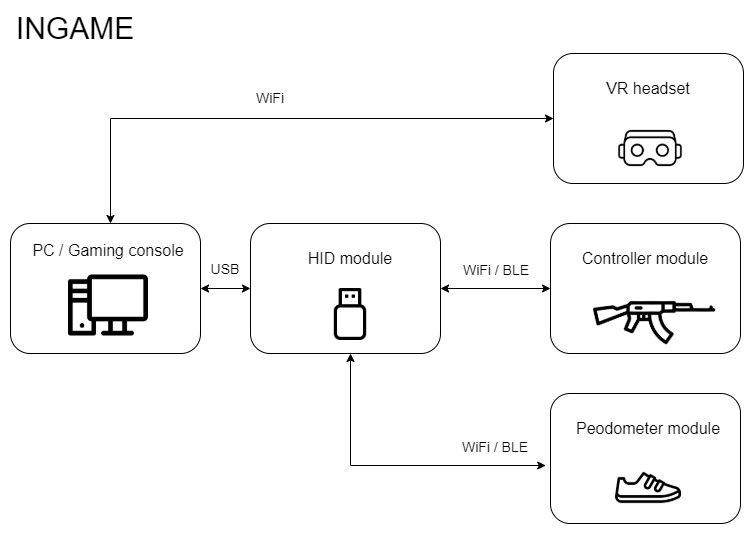
INGAME is a motion emulator with virtual reality features for playing first person shooting/adventure games. Virtual reality (VR) is a simulated experience that can be similar to or completely different from the real world. INGAME has been designed to provide the user with the feeling of being 'IN-the-GAME'. INGAME is modular in nature and consists of the following modules.

  1. HID module
  2. Controller module
  3. Pedometer module
  4. VR headset

The first three modules listed above have been explained in detail later in the document. The VR headset provides split stereo video to the user. The following image shows the functional block diagram of the INGAME system

System block diagram

Salient features

  • Modular to support addons
  • Tangle free gaming since the entire system is wireless
  • Adaptable to any first person shooting/adventure game
  • Minimal lag during gaming due to high-speed data transfer
  • Power saving mode to make the battery last longer
  • Product certifications: CE certified and ROHS compliant

HID module

Functions

  • Act as a wireless gateway between the modules worn by the user and the computer
  • Connect with the computer via USB as an HID device
  • Receive data wirelessly and then map the data to controls of the selected game and send appropriate key strokes to the computer
  • Switch the game controls mapping depending on the user selected game
  • Display a menu showing information about the system

Controller module

Functions

  • Connect with the HID module wirelessly
  • Send data associated with a button when a button is pressed
  • Read IMU data, compute equivalent mouse movement and send the data to the HID module
  • Calibrate the IMU device when the calibration button is pressed
  • Monitor battery level and sound a buzzer when the battery is low
  • Switch to power saving mode upon user inactivity
  • [Optional] Control a vibration motor to simulate gunfire which increases in intensity per trigger button press

Pedometer module

Functions

  • Connect with the HID module wirelessly
  • Read accelerometer data, detect steps and send the data to the HID module
  • Calibrate the IMU device when the calibration button is pressed
  • Monitor battery level and sound a buzzer when the battery is low
  • Switch to power saving mode upon user inactivity

Made with lots of ⏱️, 📚 and ☕ by InputBlackBoxOutput

Parts

9
QtyValueFootprintReferences
4BTNButton_Switch_SMD:SW_SPST_Omron_B3FS-100xPSW1, SW2, SW3, SW4
4MountingHoleMountingHole:MountingHole_2.2mm_M2H1, H2, H3, H4
1Conn_01x05Board:SolderWire_1x05_P2.54mmJ1

More from InputBlackBoxOutput/INGAME

5
  • 2 layers50 × 35 mmController module, the printed circuit board in 3D

    Controller module

    InputBlackBoxOutput/INGAME

    Virtual reality controller for playing FPS games

    73 partsMIT
  • 2 layers50 × 30 mmPedometer module, the printed circuit board in 3D

    Pedometer module

    InputBlackBoxOutput/INGAME

    Virtual reality controller for playing FPS games

    52 partsMIT
  • 2 layers50 × 30 mmHID module, the printed circuit board in 3D

    HID module

    InputBlackBoxOutput/INGAME

    Virtual reality controller for playing FPS games

    45 partsMIT
  • 2 layers45 × 30 mmStick module, the printed circuit board in 3D

    Stick module

    InputBlackBoxOutput/INGAME

    Virtual reality controller for playing FPS games

    24 partsMIT
  • 2 layers41 × 10 mmButton board-2, the printed circuit board in 3D

    Button board-2

    InputBlackBoxOutput/INGAME

    Virtual reality controller for playing FPS games

    8 partsMIT

Similar boards

  • 2 layers103 × 30.5 mmTS Back Endcap, the printed circuit board in 3D

    TS Back Endcap

    EEVengers/ThunderScope

    ThunderScope GitHub Repo

    9 parts1.3kMIT
  • 2 layers31.8 × 47.6 mmNGC 38 connector, the printed circuit board in 3D

    NGC 38 connector

    rusefi/rusefi

    rusefi - GPL internal combustion engine control unit

    9 parts1.2k
  • 2 layers24 × 27.3 mmExpansion Card Retrofit, the printed circuit board in 3D

    Expansion Card Retrofit

    FrameworkComputer/ExpansionCards

    Reference designs and documentation to create Expansion Cards for the Framework Laptop

    9 parts1.1kCC-BY-4.0
  • 2 layers15.6 × 17.3 mmSKR Mini TFT Thermistor Board, the printed circuit board in 3D

    SKR Mini TFT Thermistor Board

    VoronDesign/Voron-Hardware

    Cool Hardware designed by the Voron Design group

    9 parts1.1kGPL-3.0
  • 2 layers39.1 × 49.5 mmLearnoliver, the printed circuit board in 3D

    Learnoliver

    hackclub/OnBoard

    💡 Join 1,000 teenagers and make your first PCB with a $100 grant!

    9 parts915
  • 2 layers17.4 × 16.9 mmToolhead, the printed circuit board in 3D

    Toolhead

    tanaes/whopping_Voron_mods

    9 parts787GPL-3.0
  • 2 layers9.8 × 108 mmExpander, the printed circuit board in 3D

    Expander

    wntrblm/Castor_and_Pollux

    A Juno-inspired dual oscillator

    9 parts587
  • 2 layersKeyboard after, the printed circuit board in 3D

    Keyboard after

    adamws/kicad-kbplacer

    KiCad plugin for automatic keyboard's key placement and routing

    9 parts547GPL-3.0

Questions

How big is the Button board-1 PCB?

It measures 65 × 10 mm and has 2 copper layers, 1.6 mm thick.

What parts does the Button board-1 use?

9 parts. The full list of its parts is on this page, with links to each part's symbol and footprint where PCBKit's library has them.

Where can I download the Button board-1 KiCad files?

From the InputBlackBoxOutput/INGAME repository on GitHub, at the commit this page was made from: the board is modules/Controller module/button-board-1/board.kicad_pcb and its schematic modules/Controller module/board/BMS.kicad_sch. PCBKit opens the board in the browser, with nothing to install.

Can I use the Button board-1 design in my own project?

Its repository publishes it under the MIT licence: you may reuse it on that licence's terms (keep the author's notice, and for a copyleft licence share your changes alike).