

2 layers119.9 × 89.2 mm

 IcedOdin/mt-32_v2
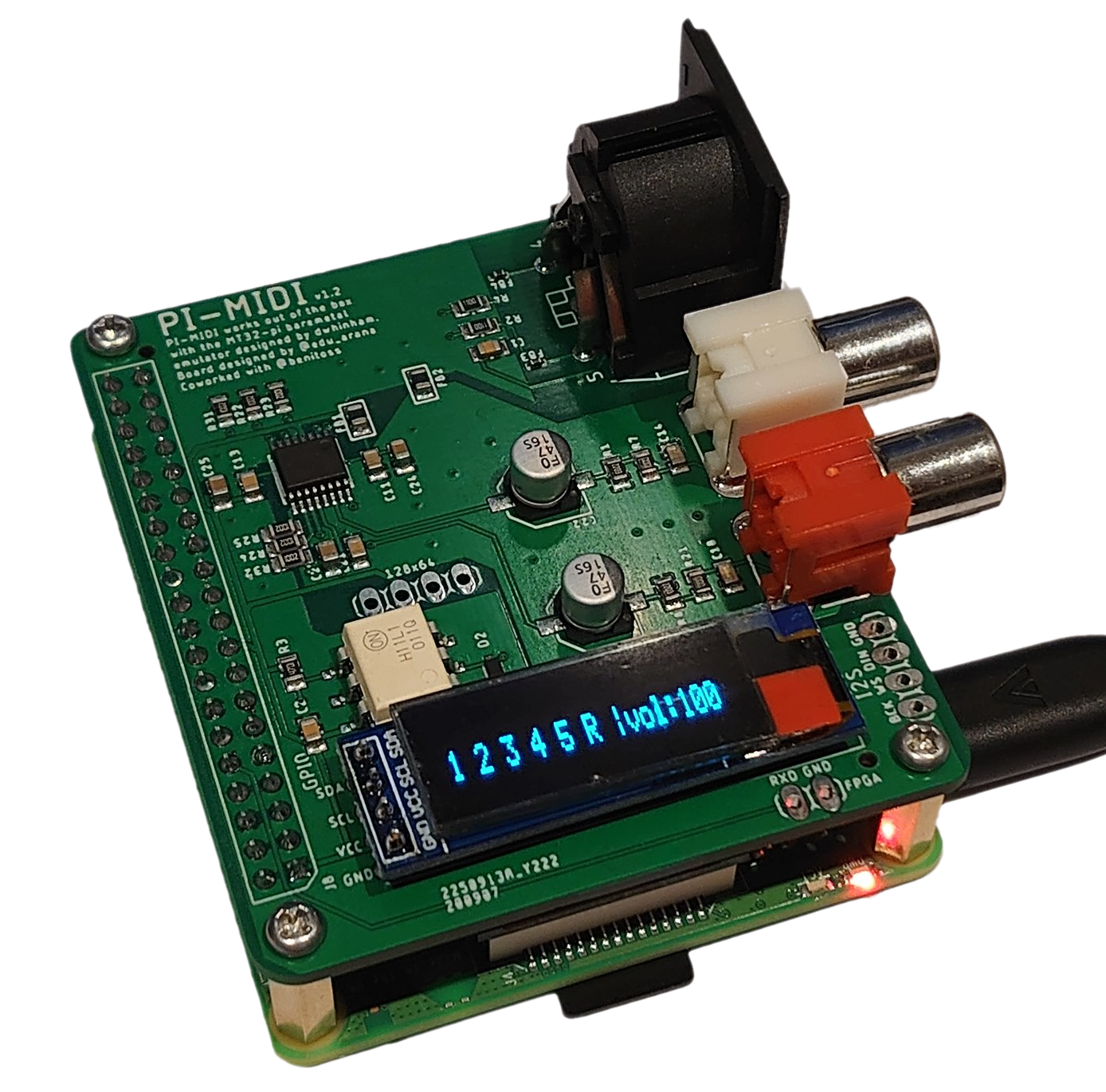
Update of old project based on MT32-pi
Pi MIDI v2.1 is an open-source printed circuit board by IcedOdin, from the IcedOdin/mt-32_v2 repository on GitHub, published under the GPL-3.0 licence. It is a 2-layer board of 119.9 × 89.2 mm with 30 parts on 67 nets, routed with 291 tracks and 42 vias.
It is built around the 74LS14PC. Its parts include 9 resistors, 7 connectors, 2 capacitors, 2 ICs and 1 diode. It belongs with the audio and music boards of this library.
It's unlikely that there will be any further releases of mt32-pi.
I have endured a sustained campaign of abuse from members of the VOGONS forum, been labelled a "clout-chaser", had threats sent to my personal email address, code been used in other projects without proper accreditation, my 3D print designs stolen and sold by faceless eBay/Etsy sellers, personal attacks made towards me when people don't get their feature request... the list goes on and on.
There is only so much I can take.
My mental health has been in decline as a direct result of this behavior; the joy of working on this project has pretty much gone. There is nothing to be gained from putting time and hard work into it any more. There is no gratitude, no encouragement - just entitled behavior and grift.
To those who supported this project in the past, especially whilst I was a struggling student who needed all the uplift I could get, thank you sincerely.


🆕 If you have a Linux computer or MiSTer FPGA device, you may wish to try the new interactive mt32-pi installer script.
Otherwise, for a manual installation:
roms directory - you have to provide these for copyright reasons.
soundfonts directory.
mt32-pi.cfg file to enable any optional hardware (Hi-Fi DAC, displays, buttons). Refer to the wiki to find supported hardware.
More detailed documentation for mt32-pi can now be found over at the mt32-pi wiki. Please read the wiki pages to learn about all of mt32-pi's features and supported hardware, and consider helping us improve it!
Take a look at our FAQ page for answers to the most common questions about mt32-pi.
If you need some help with mt32-pi and the wiki doesn't answer your questions, head over to the discussions area and feel free to start a topic.
⚠ Note: Please don't use the Issues area to ask for help - Issues are intended for reproducible bug reports and feature requests. Thank you!
This project is generally quite stable and very usable, but still considered by its author to be in early stages of development.
Hence, please DO NOT work on large features and open pull requests without prior discussion. There is a strong possibility that work-in-progress code for proposed features already exists, but may not yet be public, and your work will have to be rejected.
Trivial changes to the code that fix issues are always welcome, as are improvements to documentation, and hardware/software compatibility reports.
This project's source code is licensed under the GNU General Public License v3.0.
The mt32-pi logo was designed by and is © Dale Whinham. The terms of use for the logo are as follows:
| Qty | Value | Footprint | References |
|---|---|---|---|
| 5 | 220R | Resistor_THT:R_Axial_DIN0207_L6.3mm_D2.5mm_P10.16mm_Horizontal | R1, R4, R5, R6, R7 |
| 4 | SW_Push | Button_Switch_THT:SW_PUSH_6mm | Button_1, Button_2, Button_3, Button_4 |
| 2 | 5.1K | Resistor_THT:R_Axial_DIN0207_L6.3mm_D2.5mm_P10.16mm_Horizontal | R8, R9 |
| 2 | 5V | Capacitor_THT:CP_Radial_D10.0mm_P2.50mm_P5.00mm | C1, C2 |
| 2 | Conn_01x13_MountingPin | Connector_PinHeader_2.54mm:PinHeader_1x13_P2.54mm_Vertical | J6, J6 |
| 1 | 1K | Resistor_THT:R_Axial_DIN0207_L6.3mm_D2.5mm_P10.16mm_Horizontal | R3 |
| 1 | 1N4148 | Diode_THT:D_DO-35_SOD27_P7.62mm_Horizontal | D1 |
| 1 | 470R | Resistor_THT:R_Axial_DIN0207_L6.3mm_D2.5mm_P10.16mm_Horizontal | R2 |
| 1 | 6N138 | Package_DIP:DIP-8_W7.62mm_LongPads | U1 |
| 1 | 74LS14 | Package_DIP:DIP-14_W7.62mm_LongPads | U2 |
| 1 | GPIO | Module:Raspberry_Pi_Zero_Socketed_THT_FaceDown_MountingHoles | J1 |
| 1 | LOGO | Graphics:MT32-Pi | MT32-Pi Logo |
| 1 | LOGO | Graphics:RockTopus | RockTopus |
| 1 | MIDI IN | DIN-Connector:DIN-5-Variable | J2 |
| 1 | MIDI OUT | DIN-Connector:DIN-5-Variable | J4 |
| 1 | MIDI THRU | DIN-Connector:DIN-5-Variable | J3 |
| 1 | PinHeader_1x04_P2.54mm_Vertical | Connector_PinHeader_2.54mm:PinHeader_1x04_P2.54mm_Vertical | IIC |
| 1 | USB_C_Receptacle_PowerOnly_6P | Connector_USB:USB_C_Receptacle_GCT_USB4135-GF-A_6P_TopMnt_Horizontal | J5 |
| 1 | ~ | Breakout_Boards:PCM5102 | PCM5102 |
The 29 most common of 30 parts.


schlae/comix-35
The COMIX-35 is an improved clone of the COMX-35 1802 home computer

monotech/NuXT
MicroATX Turbo XT Motherboard, with VGA, Floppy, CF, Serial


skiselev/zeta_sbc
Zeta SBC is an Zilog Z80 based single board computer. It is inspired by Ampro Little Board Z80 and N8VEM project. Zeta SBC is software compatible with RomWBW Firmware

tebl/C64-Lumafix
An easier to solder version of the Lumafix board, components spaced out a bit more to make things easier on the beginner (mostly meaning me).


It measures 119.9 × 89.2 mm and has 2 copper layers, 1.6 mm thick.
30 parts, built around the 74LS14PC. The full list of its parts is on this page, with links to each part's symbol and footprint where PCBKit's library has them.
From the IcedOdin/mt-32_v2 repository on GitHub, at the commit this page was made from: the board is board/Pi-MIDI_v2.1/Pi-MIDI_v2.1.kicad_pcb and its schematic board/FPC/FPC/FPC.kicad_sch. PCBKit opens the board in the browser, with nothing to install.
Its repository publishes it under the GPL-3.0 licence: you may reuse it on that licence's terms (keep the author's notice, and for a copyleft licence share your changes alike).