2 layers40 × 53.6 mm

 CityScience-TaipeiTech/cityscope-hardware
Cityscope can module is an open-source printed circuit board by CityScience-TaipeiTech, from the CityScience-TaipeiTech/cityscope-hardware repository on GitHub. It is a 4-layer board of 45 × 40 mm with 35 parts on 39 nets, routed with 241 tracks and 196 vias.
It is built around the SN65HVD231D, HC-SR04 and LD39050PU33R. Its parts include 10 capacitors, 7 connectors, 4 resistors, 2 ICs and 1 diode. It belongs with the STM32 boards of this library.


config path
| Name | Path |
|---|---|
| CITYSCOPE_LIB | YOUR_FOLDER_PATH/cityscope-hardware/libraries |
Preferences -> Manage Symbol Libraries
| Nickname | Library Path |
|---|---|
| CityScope_Component | ${CITYSCOPE_LIB}/CityScope_Component.kicad_sym |
Preferences -> Manage Footprint Libraries
| Nickname | Library Path |
|---|---|
| CityScope_Component | ${CITYSCOPE_LIB}/CityScope_Component.pretty |
In File -> Plot...
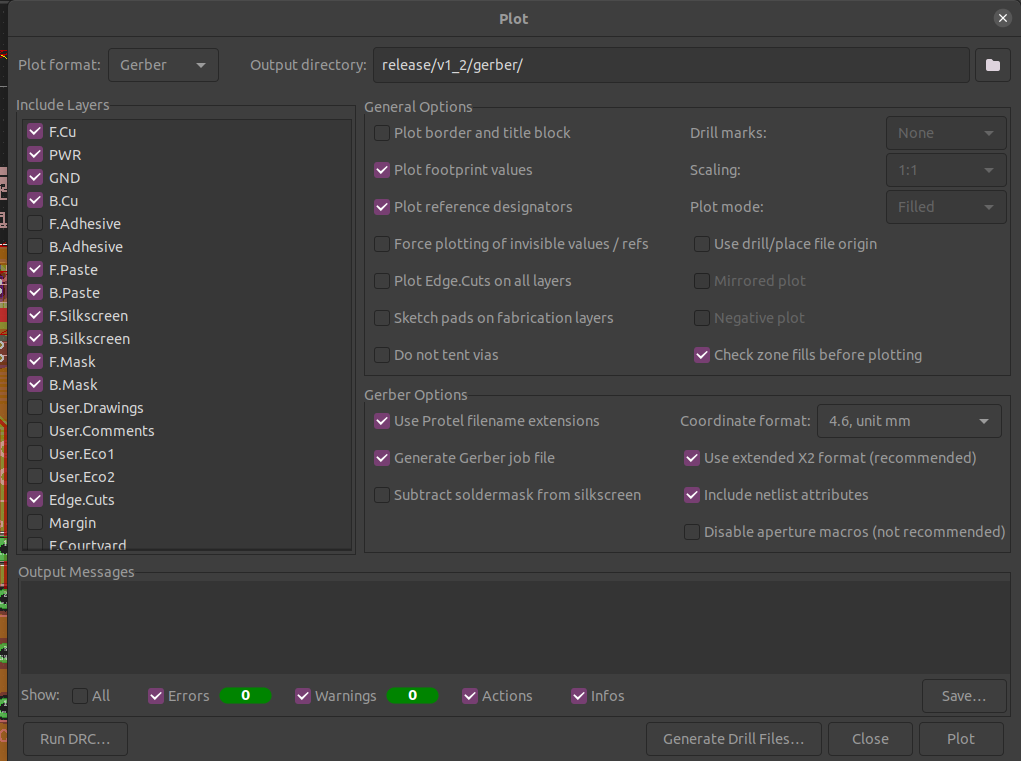
In File -> Plot...
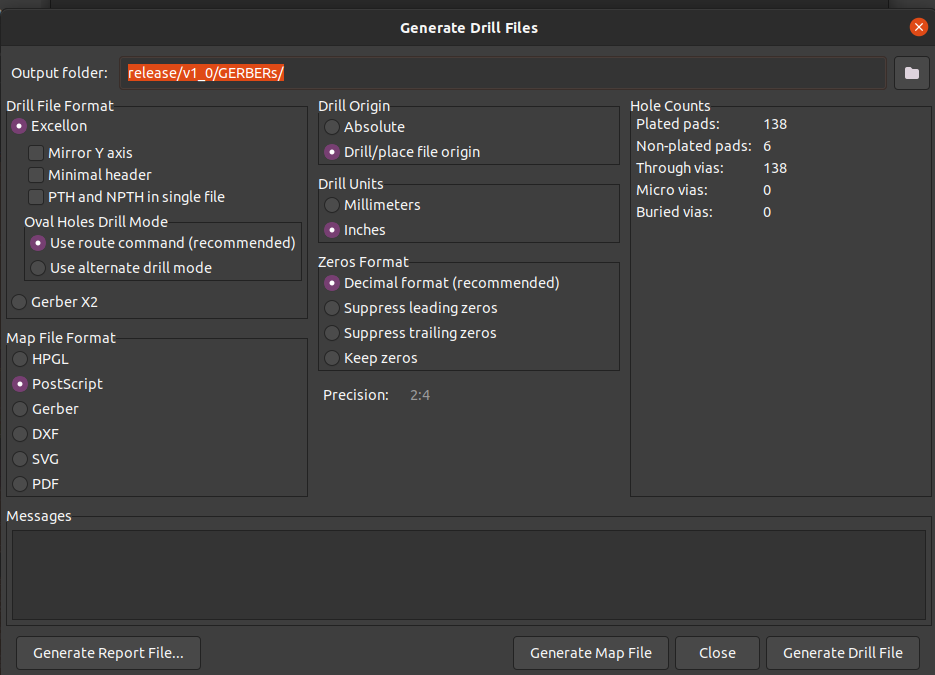
Make sure you set origin point for you .pos file. In the fish head PCB, set FID2 fiducial as origin. Click the icon bellow in tool set to place your origin.

Files -> Fabrication Outputs -> Component Placement (.pos)
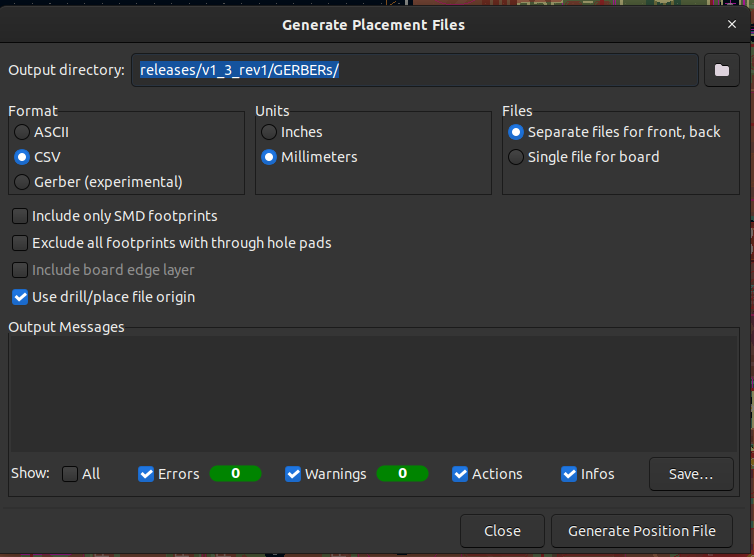
The following files will be generated.
Convert the generated file to smt machine format by a python file in tools/ folder.
python3 convert_form.py --file-name ../YOUR_FOLDER_PATH/PROJECT-top-pos.csvAn output.csv will be generated in tools/.
If the footprint name is too long, for example "JST_SH_BM03B-SRSS-TB_1x03-1MP_P1.00mm_Vertical ", please make it shorter or just delete this row.
Interactive Html Bom in the Plugin And Content Manager.PCB Editor -> Tools -> External Plugins -> Generate Interactive Html Bom{
"layout": {
"hspace": "3.2mm",
"vspace": "3.2mm",
"rotation": "45deg",
"rows": "6",
"cols": "5"
},
"tabs": {
"vwidth": "3.2mm",
"hwidth": "3.2mm"
},
"cuts": {
"type": "mousebites"
},
"framing": {
"type": "frame",
"hspace": "3.2mm",
"vspace": "3.2mm",
"width": "3.2mm"
}
}| Qty | Value | Footprint | References |
|---|---|---|---|
| 4 | 100nF | Capacitor_SMD:C_0603_1608Metric | C1, C2, C4, C9 |
| 4 | M3 | MountingHole:MountingHole_3.2mm_M3 | H1, H2, H3, H4 |
| 3 | 1uF | Capacitor_SMD:C_0603_1608Metric | C5, C6, C8 |
| 2 | CAN | Connector_JST:JST_PH_S2B-PH-SM4-TB_1x02-1MP_P2.00mm_Horizontal | J6, J7 |
| 2 | Fiducial | Fiducial:Fiducial_0.75mm_Mask1.5mm | FID1, FID2 |
| 1 | 1000uF | Capacitor_THT:CP_Radial_D8.0mm_P3.50mm | C10 |
| 1 | 100k | Resistor_SMD:R_0603_1608Metric | R1 |
| 1 | 10k | Resistor_SMD:R_0603_1608Metric | R3 |
| 1 | 10nF | Capacitor_SMD:C_0603_1608Metric | C7 |
| 1 | 1k | Resistor_SMD:R_0603_1608Metric | R2 |
| 1 | 3.3V | TestPoint:TestPoint_Pad_D1.0mm | TP2 |
| 1 | 4.7uF | Capacitor_SMD:C_0603_1608Metric | C3 |
| 1 | 470 | Resistor_SMD:R_0603_1608Metric | R4 |
| 1 | 5V | TestPoint:TestPoint_Pad_D1.0mm | TP1 |
| 1 | DC_IN | Connector_AMASS:AMASS_XT30PW-M_1x02_P2.50mm_Horizontal | J2 |
| 1 | DC_OUT | Connector_AMASS:AMASS_XT30PW-F_1x02_P2.50mm_Horizontal | J3 |
| 1 | GND | TestPoint:TestPoint_Pad_D1.0mm | TP3 |
| 1 | HC-SR04 | Connector_JST:JST_PH_S4B-PH-SM4-TB_1x04-1MP_P2.00mm_Horizontal | J5 |
| 1 | LD39050PU33R | CityScope_Component:SON95P300X300X100-7N-D | PS1 |
| 1 | LED | LED_SMD:LED_0603_1608Metric | D1 |
| 1 | NeoPixel | Connector_JST:JST_PH_S3B-PH-SM4-TB_1x03-1MP_P2.00mm_Horizontal | J4 |
| 1 | RST | Button_Switch_SMD:SW_SPST_TL3305A | SW1 |
| 1 | SN65HVD231 | Package_SO:SOIC-8_3.9x4.9mm_P1.27mm | U2 |
| 1 | STM32F303K8Tx | Package_QFP:LQFP-32_7x7mm_P0.8mm | U1 |
| 1 | ST_LINK | Connector_JST:JST_SH_BM06B-SRSS-TB_1x06-1MP_P1.00mm_Vertical | J1 |


ysoyjcgoxohxoh/Bird3
Drop-in replacement Bird Brain design for Bird 3 scooters.

bobbycar-graz/Telemetry-PCB
PCB with ESP32, CANbus, microSD, GPS and LoRa


vatsalbansal123/reaction-wheel-controller-pcb
Open-source FOC motor controller PCB for a reaction wheel — STM32G431 + DRV8311H driving a BLDC motor, with CAN bus interface. Designed in KiCad.
It measures 45 × 40 mm and has 4 copper layers, 2 mm thick.
35 parts, built around the SN65HVD231D, HC-SR04 and LD39050PU33R. The full list of its parts is on this page, with links to each part's symbol and footprint where PCBKit's library has them.
From the CityScience-TaipeiTech/cityscope-hardware repository on GitHub, at the commit this page was made from: the board is cityscope-can-module/cityscope-can-module.kicad_pcb and its schematic cityscope-can-module/cityscope-can-module.kicad_sch. PCBKit opens the board in the browser, with nothing to install.
Its repository states no licence, so its author keeps all rights: ask CityScience-TaipeiTech before reusing the design.