4 layers240 × 87 mm
Backplane
Ashet-Technologies/Home-Computer
A retro-inspired home-computer project.
637 parts20CERN-OHL-P-2.0
 Ashet-Technologies/Home-Computer20
A retro-inspired home-computer project.
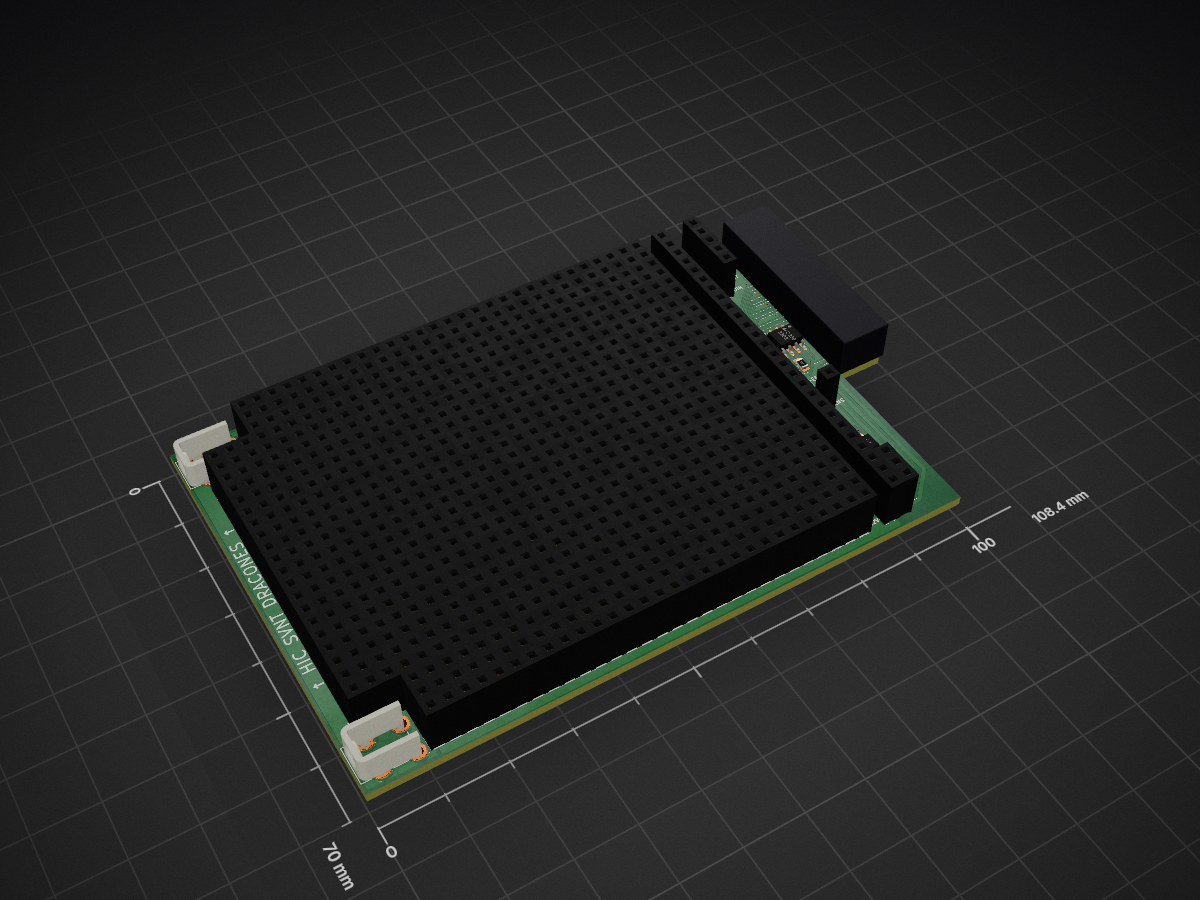
User Expansion is an open-source printed circuit board by Ashet-Technologies, from the Ashet-Technologies/Home-Computer repository on GitHub, published under the CERN-OHL-P-2.0 licence. It is a 2-layer board of 108.4 × 70 mm with 858 parts on 49 nets, routed with 302 tracks and 27 vias.
It is built around the 24LC256-I/P and TCA9517ADGKR. Its parts include 3 connectors, 2 resistors and 2 ICs.


| Project Status |
|---|
| ⚠️ WORK IN PROGRESS ⚠️ |
| This README reflects the state of where the project wants to go, not where the project is right now! |

The Ashet Home Computer bridges the gap between simple microcontroller development boards and modern single-board computers, offering the processing capability to run a full graphical desktop OS while maintaining the hardware accessibility of simpler systems.
Built around the RP2350 dual-core processor, it combines sufficient computational power for a modern user interface with a transparent, education-oriented architecture. The modular expansion system, inspired by classic computer designs, allows direct hardware access while providing proper driver abstractions for portability.
Key differentiators:
The system is designed for accessibility across different skill levels - from students learning computer architecture to makers building custom hardware interfaces, and from demosceners pushing hardware limits to educators teaching system design.
The computer follows a modular design similar to a PC where you have expansion cards that you can plug into the system.
These features are available no matter what expansion cards you have installed.
The following expansion cards are the designated expansion cards which make up the Ashet Home Computer as designed:
There are many more ideas that can be realized with expansion cards.
Take a peek at our List of Expansion Board Ideas or check out the Expansion Card Interface Specification how to create your own.
This chapter contains a list of things you can do with the computer, ordered loosely by user groups.
Make a demo, I guess?
With a good audio and video expansion card, and two strong multi-core CPUs the computer packs enough power to create awesome visuals and sound effects.
The computer is able to emulate a lot of existing machines with fitting I/O connectivity. The backplane is able to emulate a lot of different protocols with cheap passive expansion modules.
It also is able to create a multitude of video signals, analog and digital with 15 or 30 kHz line frequency. Another option is to have more complex expansion cards which can drive storage interfaces like Shugart bus, MFM disks, ATA and IDE…
The Ashet can be used as a cheap real-time sequencing controller which can handle a good amount of interfaces. With support for MIDI, DMX, analog audio channels and ethernet, it's possible to create complex audio setups. Another option is creating or using expansion cards that provide access to old-school synthesizers like the AY-3-8910 or the SID.
With the Propeller 2 on the backplane, one can basically emulate any digital interface like SPI or I²C. With a breakout I/O expansion card, it can be used for controlling your own hardware, accessing and changing SPI flashes, ...
It is also possible to use the Ashet as a basic logic analyzer and scope, as well as a signal and waveform generator. With a bigger I/O card, it can be expanded to 32 synchronously processed channels.
By utilizing a scripting language on Ashet OS, one should be able to easily access and bootstrap newly acquired hardware.
The project provides extensive documentation, from decision making over the schematic up to the software architecture, so it can be used as an example on how to design a complete computer system.
The machine also looks more like a "real computer" than a Raspberry Pi or other modern single-board computers, so it is more tangible for persons that do not have experience with electronics and might give an easier start.
The computer provides a good hands-on experience and allows both creating or understanding hardware and software designs and how they play together. The system is also easily expansible and thus allows creating custom hardware modules. The available documentation allows learning basically everything about the computer that is possible to know.
The following table shows a comparison to other "small" computers. It should help you get an idea where the Ashet Home Computer is in relation to other projects.
| Feature | Ashet | Raspberry Pi 4 | Arduino Uno REV3 | Neotron Pico | Cody Computer |
|---|---|---|---|---|---|
| CPU Architecture | Arm Cortex-M33 (32 bit) | Arm Cortex-A72 (64 bit) | ATmega328p (8 bit) | Arm Cortex-M0+ (32 bit) | 6502 |
| CPU Model | Rapsberry Pi RP2350 | Broadcom BCM2711 | ATmega328P | Rapsberry Pi RP2040 | W65C02S |
| CPU Cores | 2 | 4 | 1 | 2 | 1 |
| CPU Clock | 150 MHz | 1.8 GHz | 16 MHz | 133 MHz | 1 MHz |
| System Memory | 8 MB | 1, 2, 4 or 8 GB | 2 KB | 264 kB | 64 kB |
| Understandable | ✅ | ❌ | ✅ | ✅ | ✅ |
| Modern I/O | ✅ | ✅ | ❌ | ❌¹ | ❌ |
| Modular Design | ✅ | ❌ | ❌ | ✅ | ✅² |
| Full Documentation Available | ✅ | ❌ | ✅ | ✅ | ✅ |
| Ethernet | ✅ | ✅ | ❌ | ❌ | ❌ |
| Parallax Propeller I/O Chip | ✅ (Propeller 2) | ❌ | ❌ | ❌ | ✅ (Propeller 1) |
¹Neotron Pico uses PS/2 for mouse/keyboard and VGA for video.
²Cody Computer has a single cartridge that can be added.

| Qty | Value | Footprint | References |
|---|---|---|---|
| 58 | - | Home Computer:Perfboard_Pad_P2.54mm | TP1301, TP1302, TP1303, TP1304, TP1305, TP1306, TP1307, TP1308, TP1309, TP1310, TP1311, TP1312, TP1313, TP1314, TP1315, TP1316 +42 |
| 35 | ~ | Home Computer:Perfboard_Pad_P2.54mm | TP101, TP104, TP105, TP106, TP107, TP108, TP109, TP110, TP111, TP112, TP113, TP114, TP115, TP116, TP117, TP118 +19 |
| 2 | 10K | Resistor_SMD:R_0805_2012Metric_Pad1.20x1.40mm_HandSolder | R1, R2 |
| 2 | 7774 | Home Computer:KEYSTONE_7774 | J1, J2 |
| 2 | WP | Jumper:SolderJumper-3_P1.3mm_Open_RoundedPad1.0x1.5mm | JP101, JP102 |
| 1 | 24LC256 | Package_SO:SOIC-8_3.9x4.9mm_P1.27mm | U1 |
| 1 | TCA9517ADGKR | Package_SO:VSSOP-8_3x3mm_P0.65mm | U2 |
| 1 | ~ | Connector_PCBEdge:BUS_PCIexpress_x4 | J101 |
The 102 most common of 858 parts.
Ashet-Technologies/Home-Computer
A retro-inspired home-computer project.

Ashet-Technologies/Home-Computer
A retro-inspired home-computer project.

Ashet-Technologies/Home-Computer
A retro-inspired home-computer project.

Ashet-Technologies/Home-Computer
A retro-inspired home-computer project.

Ashet-Technologies/Home-Computer
A retro-inspired home-computer project.

Ashet-Technologies/Home-Computer
A retro-inspired home-computer project.

Ashet-Technologies/Home-Computer
A retro-inspired home-computer project.

Ashet-Technologies/Home-Computer
A retro-inspired home-computer project.

daleondev/ProtoMate_Control
Open ProtoMate.kicadpro in KiCad 10. The complete system schematic and linked perfboard layout share the same project name and component identities.

kjdykstra406/Pivot-Control-PCB
"# Pivot-Control-P(kicadsch (version 20250114) (generator "eeschema") (generatorversion "9.0") (uuid "5632ba6c-34ff-4a54-b5e1-022e30e0e773") (paper "A0") (libsymbols (symbol "Adafruit I2C to 8 Channel Solenoid…

techmannih/pd1180-epr
PD1180-EPR — NEMA 34 Smart Motor-Mounted Stepper Controller with USB-C PD 3.1 EPR

The-Hybrid-Atelier/RheoBoard
RheoBoard is open hardware for pneumatic retraction-extrusion measurements.


It measures 108.4 × 70 mm and has 2 copper layers, 1.6 mm thick.
858 parts, built around the 24LC256-I/P and TCA9517ADGKR. The full list of its parts is on this page, with links to each part's symbol and footprint where PCBKit's library has them.
From the Ashet-Technologies/Home-Computer repository on GitHub, at the commit this page was made from: the board is Hardware/Expansions/User Expansion/PCB/User Expansion.kicad_pcb and its schematic Hardware/Backplane.proto/Backplane.kicad_sch. PCBKit opens the board in the browser, with nothing to install.
Its repository publishes it under the CERN-OHL-P-2.0 licence: you may reuse it on that licence's terms (keep the author's notice, and for a copyleft licence share your changes alike).