4 layers13 × 9.4 mm
Qomu board
QuickLogic-Corp/qomu-dev-board
100% open source dev kit for EOS S3 MCU+eFPGA SoC supported by fully open source SDK and FPGA Toolchain
52 parts43CC-BY-SA-4.0

 AlexeyInwerp/BoardRipper48
Web-based PCB boardview viewer for board-level repair. 14 formats: BVR1/3, BRD, BDV, BDV ASC, FZ, GenCAD, Mentor Neutral, XZZ, TVW, Allegro v15-v18, Altium, KiCad, EAGLE. GPU-accelerated, dockable panels, self-hosted via Docker.
Tomu fpga is an open-source printed circuit board by AlexeyInwerp, from the AlexeyInwerp/BoardRipper repository on GitHub, published under the AGPL-3.0 licence. It is a 4-layer board of 13 × 9.4 mm with 55 parts on 31 nets, routed with 579 tracks and 249 vias.
It is built around the ICE40UP5K-UWG30ITR, D5V0L1B2LP3-7-HXY and VCUT05E1-SD0. Its parts include 18 capacitors, 8 ICs, 7 diodes, 6 resistors and 1 switch. It belongs with the fPGA and programmable logic boards and the FPGA and CPLD boards of this library.


Web-based PCB boardview viewer for board-level repair. Fifteen boardview formats and the matching PDF schematic, side by side, in a browser. GPU-accelerated rendering, dockable panels, self-hosted via Docker. Free, AGPL-3.0.
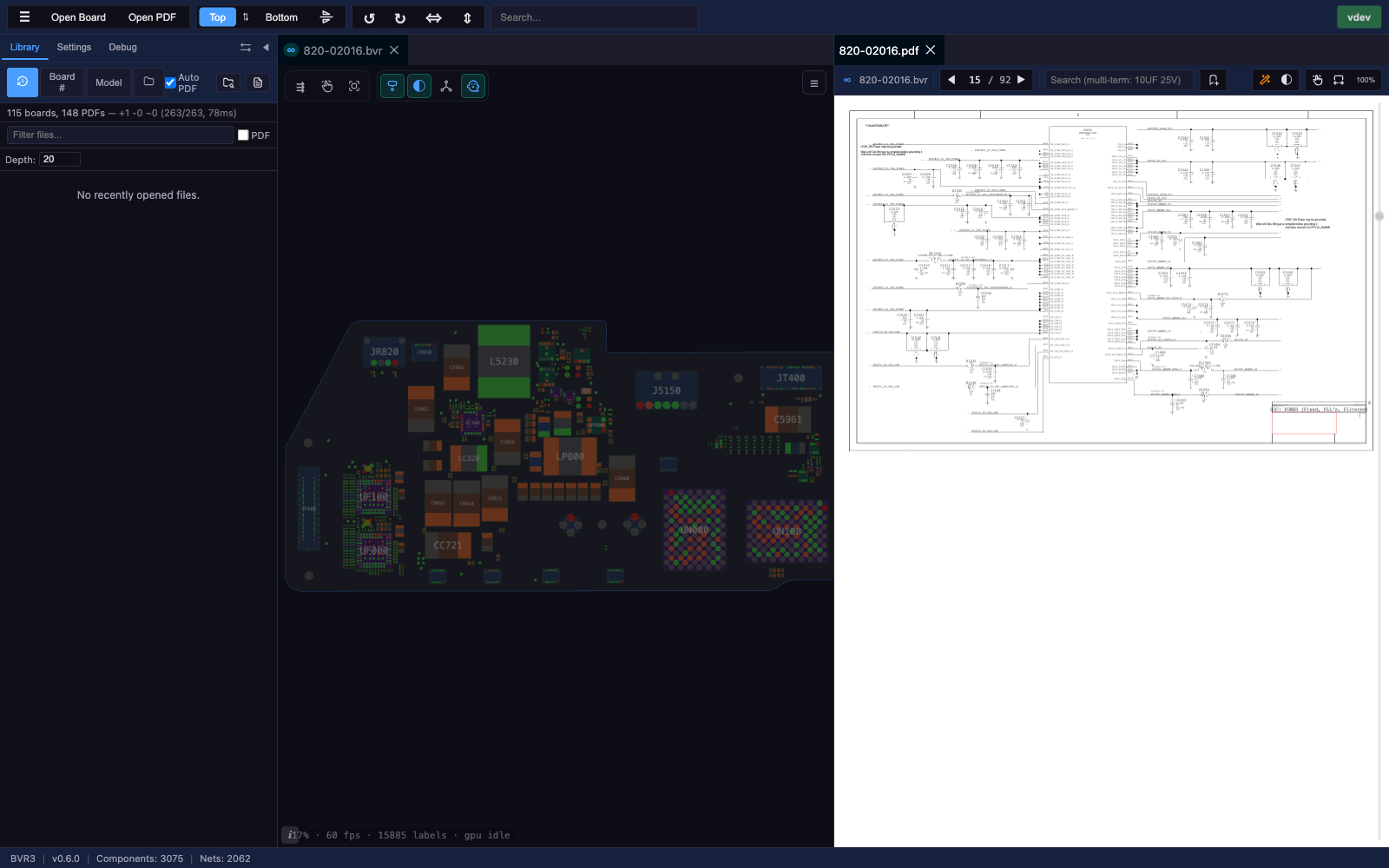
A polished overview with screenshots lives at https://www.ripperdoc.de/boardripper/. This README is the developer- and operator-facing companion: stack details, Docker setup, build instructions, license notes.
Bring your own files. BoardRipper is the viewer only — it does not ship with any boardview files, schematics, or PDFs. The bundled board database is reference metadata (board numbers and device models), no copyrighted content.
Discord: https://discord.gg/BYEkKTMNNY — the RipperDoc server.
You can request features and tools there, or on GitHub — whichever you prefer. There is also a small repair community on the server.
Besides the Docker build there's a lite build: the full viewer/inspector running entirely client-side, no backend. Open your own boardview files and PDFs locally — nothing is uploaded, nothing is stored server-side. There's no shared library, board database, or self-update (those need the backend), but all rendering, inspection, net-highlight, multi-layer, themes, and PDF viewing work.
Same codebase as the Docker build — npm run build:lite / npm run build:offline in src/frontend/. See src/frontend/LITE_BUILD.md.
.cad and .brd are shared extensions; BoardRipper sniffs file content to pick the right parser.GND, VCC, PP*), per-component-type fills (R / C / L / U / Q / D / J), per-layer colors, label / pin / outline tuning. Live preview before applying.20uF ⨯ 10V ⨯ C12*)./library/incoming (see Docker setup).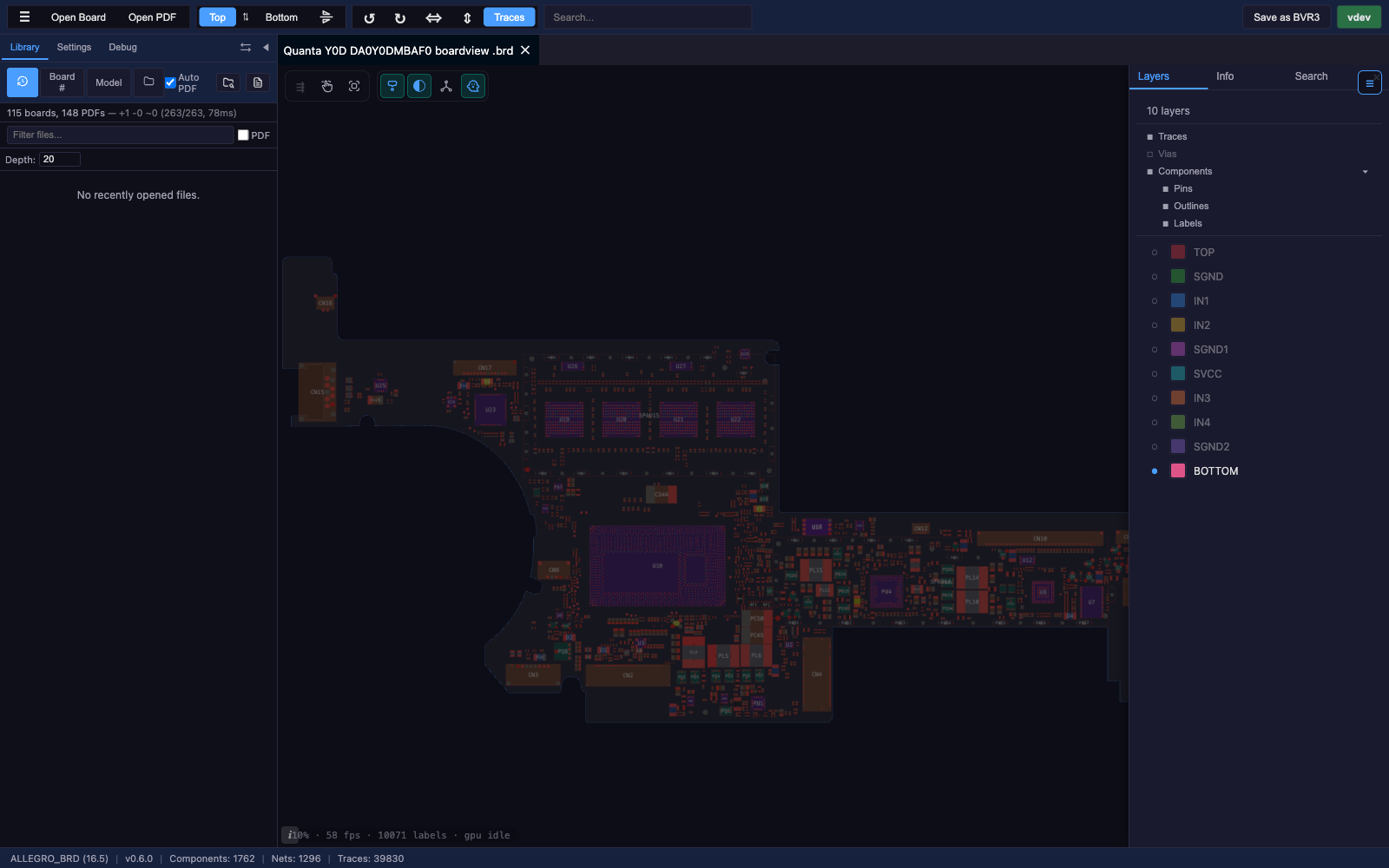
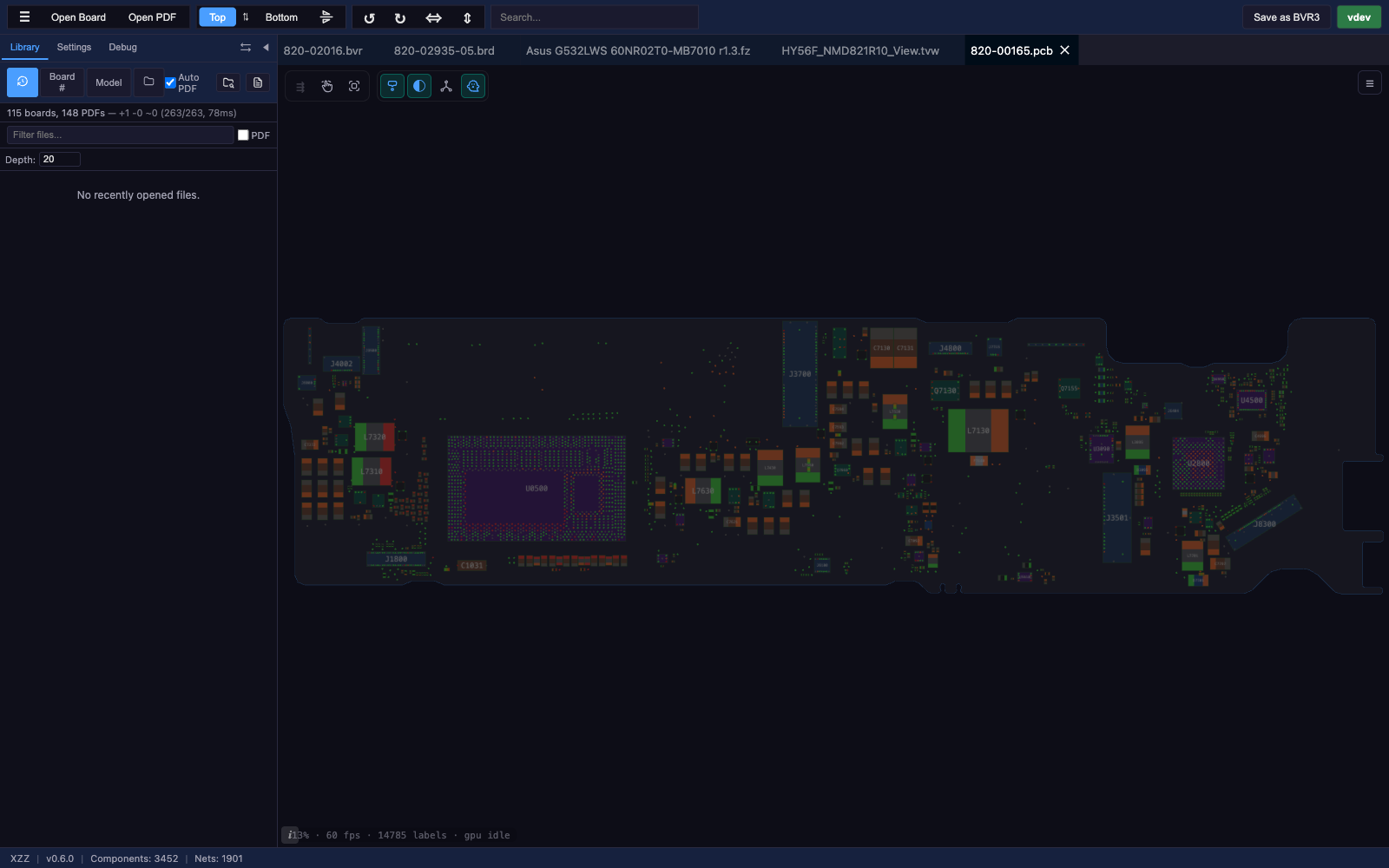
| Format | Extension(s) | Description | Spec |
|---|---|---|---|
| BVR1 | .bvr / .bv | Tab-delimited boardview, coordinates ×1000 → mils | BVR_FORMAT.md |
| BVR3 | .bvr / .bv | Keyword-value boardview, relative pin coordinates | BVR_FORMAT.md |
| BRD | .brd | Apple / Mac repair, bit-rotation obfuscated binary | BRD_FORMAT.md |
| BDV | .brd / .bdv | Plain-text boardview (BRDOUT / NETS / PARTS / PINS / NAILS) | BDV_FORMAT.md |
| BDV ASC | .bdv | Honhan / Tebo-ICT obfuscated multi-section ASC (line-key cipher) | BDV_ASC_FORMAT.md |
| FZ | .fz | ASUS, RC6-encrypted, zlib-compressed | FZ_FORMAT.md |
| CAE | .cae | ASRock PCBRepair Pro; same container and cipher as FZ, different key. Not yet verified against a real file | FZ_FORMAT.md |
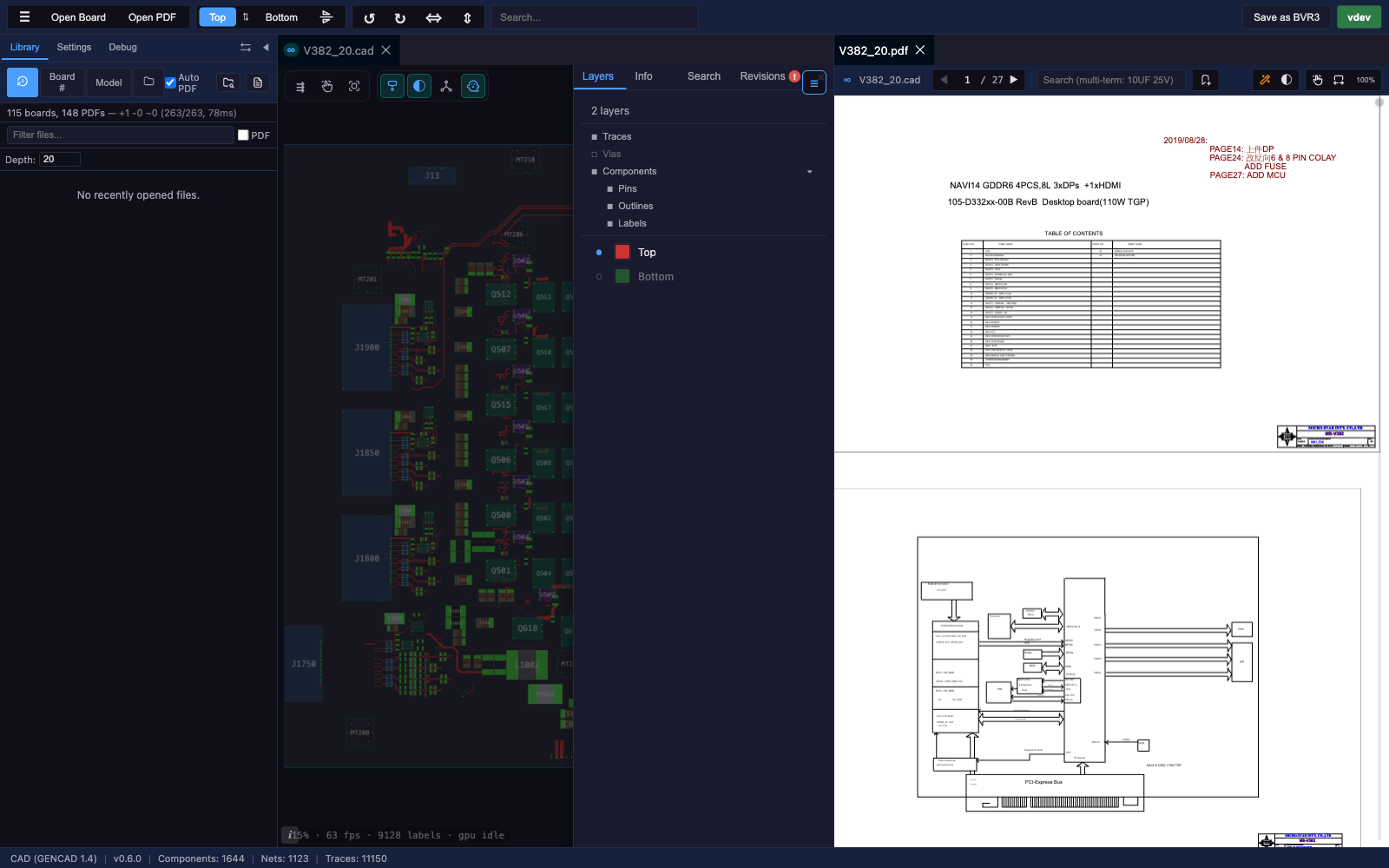
| GenCAD | .cad | GenCAD 1.4 PCB interchange (text) | CAD_FORMAT.md |
| Mentor Neutral | .cad | Mentor Boardstation neutral file (Samsung / Quanta / Compal exports) | MENTOR_NEUTRAL_FORMAT.md |
| XZZ | .pcb | XZZ PCB, DES-encrypted boardview | XZZ_FORMAT.md |
| TVW | .tvw | Teboview binary, multi-layer + traces + drill data | TVW_FORMAT.md |
| Cadence Allegro BRD | .brd | Cadence Allegro PCB binary, v16.x / v17.x / v18.x | ALLEGRO_BRD_FORMAT.md |
| ↳ Allegro v15.x | .brd | Same parser family, partial coverage, still in beta | ALLEGRO_V15_FORMAT.md |
| Altium PCB | .PcbDoc / .CMPcbDoc / .CSPcbDoc | Altium Designer 6.0+, Circuit Maker / Circuit Studio; binary CFB + ASCII v5.0 | ALTIUM_PCB_FORMAT.md |
| KiCad | .kicad_pcb | KiCad 4–9 board file: parts, pins, nets, outline with cutouts, tracks, vias, copper pours | KICAD_PCB_FORMAT.md |
| EAGLE | .brd | Autodesk / CadSoft EAGLE 6.0+ XML board; parts resolved through library packages | EAGLE_BRD_FORMAT.md |
The full, always-current list lives in Settings ▸ Input ▸ Keyboard Shortcuts (and on the home-screen Getting Started card). The headline shortcuts:
| Open board / PDF | ⌘O / ⌘P (Mac) · Ctrl+O / Ctrl+P (Win/Linux) |
| Find (selection-aware) | ⌘F / Ctrl+F — prefills PDF search with the selected component or net |
| Pan board / PDF | W A S D or Alt+arrows |
| Rotate board | Q / E (CCW / CW) or ⌘← / ⌘→ |
| Mirror board | ⌘↑ / Ctrl+↑ |
| Flip layer (top ↔ bottom) | Space |
| Zoom in / out | Shift+W / Shift+S (centred on canvas) |
| Toggle Library sidebar | ~ — the physical key left of 1 (Backquote / IntlBackslash); works on US, German, and most other layouts |
| Jump board ↔ PDF | Tab |
| PDF page nav | PgUp / PgDn, or ↑ / ↓ while a PDF panel is active and has no search matches (Home / End for first / last) |
The keyboard pan and zoom step sizes are configurable in Settings ▸ Input ▸ Navigation ▸ Keyboard pan / zoom. The right-click context menu adds a top-row icon strip with Copy net / Copy part / Search net / Search part (board) and Copy / Search Web (PDF text) — search opens Google in a new tab.
Layout note. WSAD/QE/Shift+WS bind to the printed letter on your keyboard, so on AZERTY layouts the keys are physically Z/Q/S/D rather than the W/A/S/D positions — a layout-aware remapping is on the roadmap. The
~library toggle is layout-independent.
| Layer | Technology |
|---|---|
| Rendering | PixiJS v8 + pixi-viewport v6 (WebGL) |
| Frontend | React 19 + TypeScript + Vite 7 |
| Panels | Dockview v5 |
| Backend | Go (net/http stdlib) |
| Container | Docker multi-stage, scratch-based, ~28 MB image / ~14 MB compressed |
| Desktop | Electron (macOS universal + Windows) |
| Tests | Playwright (Chromium headless) |
BoardRipper is primarily a server you run on a NAS or host machine and access from any browser on your network. Standalone binaries and desktop Electron wrappers are available as alternatives.
docker compose up -d      # the checked-in compose file BUILDS the image from source (build: .)
# → http://localhost:8081
It mounts ./library, which starts empty — put your board folders in there or edit the
volumes: block to mount them read-only (see Docker setup). On first visit the app asks to
index the library and offers automatic board↔PDF linking and the OpenBoardData download.
Or pull directly:
docker pull ghcr.io/alexeyinwerp/boardripper:latestMount your board-file folders under /library to expose them in the Library panel — see Docker Setup below.
git clone https://github.com/AlexeyInwerp/BoardRipper.git
cd BoardRipper

# Build the frontend bundle:
cd src/frontend && npm install && npm run build && cd ../..

# Run the Go server pointing at the built bundle (go.mod lives in src/backend):
cd src/backend
STATIC_DIR=../frontend/dist DATA_DIR=../../data LIBRARY_DIR=/path/to/boards go run .
# → http://localhost:8080
The released artifact is the Docker image (above) — no per-platform standalone binaries are published. If you need a portable binary, build the Go server with cd src/backend && CGO_ENABLED=0 go build -o boardripper . and ship it next to the dist/ directory and a STATIC_DIR= env var. Set LIBRARY_DIR to the folder to index — without it the server indexes DATA_DIR. Self-update only works in Docker (it needs the host's Docker socket).
# Frontend (hot reload)
cd src/frontend && npm install && npm run dev    # http://localhost:8082

# Backend (separate terminal) — the Vite dev proxy targets port 1336
cd src/backend && PORT=1336 go run . # http://localhost:1336services:
boardripper:
image: ghcr.io/alexeyinwerp/boardripper:latest # the repo's own docker-compose.yml says `build: .` instead
# The image ships USER 65532:65532 (distroless `nonroot`) so a hypothetical
# RCE doesn't own your bind-mounted /data. The default `docker compose up`
# flow creates ./data as root on Linux hosts (Docker daemon runs as root),
# which UID 65532 can't then write — the container exits at databank.Open
# with "unable to open database file". Override to root for the compose
# path, matching what NASdeploy.sh already does. Alternatively, remove this
# line and either (a) `chown -R 65532:65532 ./data` before `up -d`, or
# (b) switch ./data to a named volume — Docker initializes named volumes
# from /data inside the image (pre-chowned to 65532 in the Dockerfile).
user: "0:0"
ports:
- "8081:8080" # access at http://your-host:8081
volumes:
- ./data:/data # uploaded board files + cache persist here
# Your library: mount EVERYTHING read-only (:ro) by default.
- /path/to/MacBooks:/library/MacBooks:ro
- /path/to/iPhones:/library/iPhones:ro
- /path/to/Schematics:/library/Schematics:ro
# The ONLY writable mount the container should ever see:
- /path/to/incoming:/library/incoming:rw
# Docker socket (required for self-update — see Self-Update below):The Library panel browses the /library directory inside the container. Mount your board-file folders as subdirectories of /library:
-v /nas/boards/MacBooks:/library/MacBooks:ro
-v /nas/boards/iPhones:/library/iPhones:ro
-v /nas/schematics:/library/Schematics:ro
-v /nas/incoming:/library/incoming:rw
These appear as top-level folders in the Library panel. Use :ro for read-only by default. /library/incoming is the only path BoardRipper needs to be able to write to — that's where drag-dropped files land. The container does not need write access to your existing board folders, your schematics, or anything else.
boardripper-<version>.tar.gz (or latest.tar.gz) from https://www.ripperdoc.de/boardripper/releases/docker load < boardripper-<version>.tar.gz--user 0:0 is needed because DSM creates the data folder
root-owned and the image runs as UID 65532 otherwise (the container would exit with
"unable to open database file"); /library/incoming is where drag-dropped files land:
docker run -d \
  --name boardripper \
  --user 0:0 \
  -p 8090:8080 \
  --memory 2g \
  -v /volume1/docker/boardripper/data:/data \
  -v /volume1/your-boards/MacBooks:/library/MacBooks:ro \
  -v /volume1/your-boards/iPhones:/library/iPhones:ro \
  -v /volume1/docker/boardripper/incoming:/library/incoming:rw \
  -v /var/run/docker.sock:/var/run/docker.sock \
  -e PORT=8080 \
  --restart unless-stopped \
ghcr.io/alexeyinwerp/boardripper:latesthttp://your-nas-ip:8090BoardRipper can update itself when running in Docker:
Requires:
-v /var/run/docker.sock:/var/run/docker.sock).The signed release manifest is fetched from https://www.ripperdoc.de/boardripper/manifest.json and verified against an Ed25519 public key compiled into the running binary before any I/O on the body — a hijacked mirror cannot deliver a forged update. Once the manifest verifies, the image itself is pulled by content-addressed digest from ghcr.io/alexeyinwerp/boardripper@sha256:…; the signed tarball mirror is the fallback if GHCR is unreachable. The pipeline also enforces a monotonic counter (replay defence), a 30-day freshness window, a 90-day expiry, and a min_supported_version downgrade defence. See docs/RELEASE_RUNBOOK.md for the maintainer-side release procedure.
For installs that can't reach the registry or the mirror (firewalled networks, air-gapped shops, recovery from a broken self-update):
latest-update.tar from https://www.ripperdoc.de/boardripper/releases/latest-update.tar (signed bundle: manifest + signature + image, ~13 MB).Same trust envelope as the in-app updater — the manifest signature is what grants trust, the file itself is treated as untrusted bytes until verification passes.
docker pull ghcr.io/alexeyinwerp/boardripper:latest
docker compose down && docker compose up -d
Or with a downloaded tarball:
docker load < boardripper-docker-<new-version>.tar.gz
docker compose down && docker compose up -dHistorical releases live at https://www.ripperdoc.de/boardripper/archive.html — Docker tarballs and signed drop-bundles for v0.19.0 onward, with per-version source links for everything older. The GitHub Releases page intentionally lists only the current release; the archive is the canonical "give me an older version" landing page.
A handful of versions are also kept on GHCR (v0.19.0, v0.19.5, v0.20.5, v0.20.8) for direct docker pull — see the archive table for which ones are still pull-able vs. tarball/source-only.
Prebuilt Electron wrappers are published with every release (BoardRipper-macOS-universal-<version>.zip, BoardRipper-Windows-x64-<version>.zip). They run the same React frontend inside an Electron shell; the Go backend is bundled but runs only while Settings ▸ Integrations ▸ MCP is enabled, and then also brings the library database, board database, OBD and PDF search to the desktop. The Docker / server path is the primary way to deploy BoardRipper; the desktop wrapper is here for single-machine use.
The wrappers are unsigned, so macOS Gatekeeper and Windows SmartScreen will warn on first launch:
xattr -cr /Applications/BoardRipper.app (or wherever you extracted it), then double-click. On macOS < 15 you can also right-click → Open → Open once, or use System Settings → Privacy & Security → Open Anyway after the first failed launch.cd desktop
npm install
node build-all.mjs # builds macOS universal + legacy + Windows
node build-all.mjs --mac # macOS only
node build-all.mjs --win # Windows onlyOutput in desktop/out/ (macOS), desktop/out-legacy/ (macOS legacy), desktop/out-win/ (Windows).
BoardRipper is released under the GNU Affero General Public License v3.0 (AGPL-3.0). See LICENSE for the full text.
This project incorporates code derived from KiCad — the Cadence Allegro BRD reader in src/frontend/src/parsers/allegro/, transliterated from KiCad's pcbnew/pcb_io/allegro/ (GPL-3.0), and the Altium reader in src/frontend/src/parsers/altium/, transliterated from pcbnew/pcb_io/altium/ (GPL-2.0+, one file GPL-3.0+) — which is why AGPL-3.0 was chosen: it is compatible with GPL-3.0 and additionally closes the "SaaS loophole" by requiring source availability to users who interact with a hosted instance over a network.
For a complete list of third-party sources, libraries, and attributions, see THIRD_PARTY.md.
BoardRipper exists because of the reverse-engineering work already done by the boardview community. Each entry below was consulted during development; full attribution and license details are in THIRD_PARTY.md.
Community reverse engineering incorporated into BoardRipper
isOblongRoundPad / drawPinShape /
emitPartOutlineShape refactor that unified seven copies of one decision.
Attribution is repeated at each site in the source. He also maintains
XZZPCB-Layer-Viewer
and an ImHex pattern for the format.Parser references
Rendering & runtime
Backend
pdfium.wasm)pdfium.wasmDesktop
Corrections and missing attributions are welcome — open an issue, or email mail@ripperdoc.de.
BoardRipper is not hand-written. The codebase — parsers, renderer, panels, backend — was generated with Claude Code, working from format specs and reference implementations from the boardview community. I review, test, and direct it; the lines of code came out of an LLM.
Treat that as you would any AI-assisted software: it works on the boards I've tested, it has bugs I haven't found yet, and the right level of trust is "a useful viewer, not a forensic tool." Bug reports welcome.
If BoardRipper saves you time, buy me a coffee.
| Qty | Value | Footprint | References |
|---|---|---|---|
| 12 | Testpoint | tomu-fpga:testpoint | TP1, TP2, TP3, TP4, TP5, TP6, TP7, TP8, TP9, TP10, TP11, TP12 |
| 10 | 0201, 1uF, 10V, X5R, 20% | tomu-fpga:C_0201_0603Metric | C1, C2, C3, C5, C8, C9, C10, C17, C24, C25 |
| 7 | 0201, 100nF, 10V, X5R, 20% | tomu-fpga:C_0201_0603Metric | C4, C7, C11, C20, C21, C23, C28 |
| 6 | D5V0L1B2LP3-7 | tomu-fpga:X1-DFN1006-2 | D1, D2, D3, D4, D6, D7 |
| 2 | 0201, 10k, 1/16W | tomu-fpga:R_0201_0603Metric | R1, R5 |
| 2 | 0201, 22ohm, 1/16W, 1% | tomu-fpga:R_0201_0603Metric | R11, R12 |
| 1 | 0201, 1.5k, 1/16W, 1% | tomu-fpga:R_0201_0603Metric | R9 |
| 1 | 0201, 100ohm, 1/16W, 1% | tomu-fpga:R_0201_0603Metric | R10 |
| 1 | 0402, 10uF, 6.3V, X5R, 20% | tomu-fpga:C_0402_1005Metric | C22 |
| 1 | Captouch Pads | tomu-fpga:captouch-edge | SW2 |
| 1 | Case | tomu-fpga:nothing | XX2 |
| 1 | Crystal Oscillator | tomu-fpga:XTAL-2520 | U7 |
| 1 | ESD Bag | tomu-fpga:nothing | XX3 |
| 1 | ICE40UP5K-UWG30 | tomu-fpga:iCE40UP5K-UWG30 | U5 |
| 1 | LDO-X2SON-1.2V | tomu-fpga:Texas_X2SON-4_1x1mm_P0.65mm | U1 |
| 1 | LDO-X2SON-2.5V | tomu-fpga:Texas_X2SON-4_1x1mm_P0.65mm | U3 |
| 1 | LDO-X2SON-3.3V | tomu-fpga:Texas_X2SON-4_1x1mm_P0.65mm | U2 |
| 1 | RGB-LED | tomu-fpga:LED-RGB-5DS-UHD1110-FKA | U10 |
| 1 | SPI Flash | tomu-fpga:SON50P300X200X60-9N | U4 |
| 1 | Touchpad Mask Removal | tomu-fpga:soldermask-removal | XX1 |
| 1 | USB-B | tomu-fpga:USB-PCB | U9 |
| 1 | VCUT05E1-SD0 | tomu-fpga:TVS-11V | D5 |
QuickLogic-Corp/qomu-dev-board
100% open source dev kit for EOS S3 MCU+eFPGA SoC supported by fully open source SDK and FPGA Toolchain

antmicro/qomu-dev-board
This repository contains open hardware design files for the Qomu development board based on the QuickLogic EOS S3 Sensor Processing Platform . The design files were created by Antmicro in cooperation with QuickLogic .


Fr4nkFletcher/ESP32-Marauder-Cheap-Yellow-Display
ESP32Marauder Cheap Yellow Display


opentac/opentac
OpenTac: open tools to design, fabricate, read and simulate flex-PCB tactile skins that sense normal and shear force, for any robot surface.

Terrails/FW16-OCuLink
The schematic in itself is pretty simple. You only need to connect the TX and RX PCIe lanes to the correct pins of the OCuLink connector.

It measures 13 × 9.4 mm and has 4 copper layers, 0.6 mm thick.
55 parts, built around the ICE40UP5K-UWG30ITR, D5V0L1B2LP3-7-HXY and VCUT05E1-SD0. The full list of its parts is on this page, with links to each part's symbol and footprint where PCBKit's library has them.
From the AlexeyInwerp/BoardRipper repository on GitHub, at the commit this page was made from: the board is src/frontend/public/samples/tomu-fpga.kicad_pcb. PCBKit opens the board in the browser, with nothing to install.
Its repository publishes it under the AGPL-3.0 licence: you may reuse it on that licence's terms (keep the author's notice, and for a copyleft licence share your changes alike).