
2 layers76.2 × 50.8 mm

 AMuszkat/bpi_amp_platform
Banana pi cm4io class D amp board based on MAX98397
Speaker amp is an open-source printed circuit board by AMuszkat, from the AMuszkat/bpi_amp_platform repository on GitHub. It is a 4-layer board of 76.2 × 50.8 mm with 119 parts on 68 nets, routed with 813 tracks and 603 vias.
It is built around the MP9943GQ-Z, AC0402FR-0710KL and CL31B106KBHNNNE, with the EMZS350ARA471MHA0G, UMK105CG151JVHF and AC0402FR-134K7L among its other parts. Its parts include 65 capacitors, 34 resistors, 4 ICs, 2 diodes and 2 transistors. It belongs with the audio and music boards of this library.


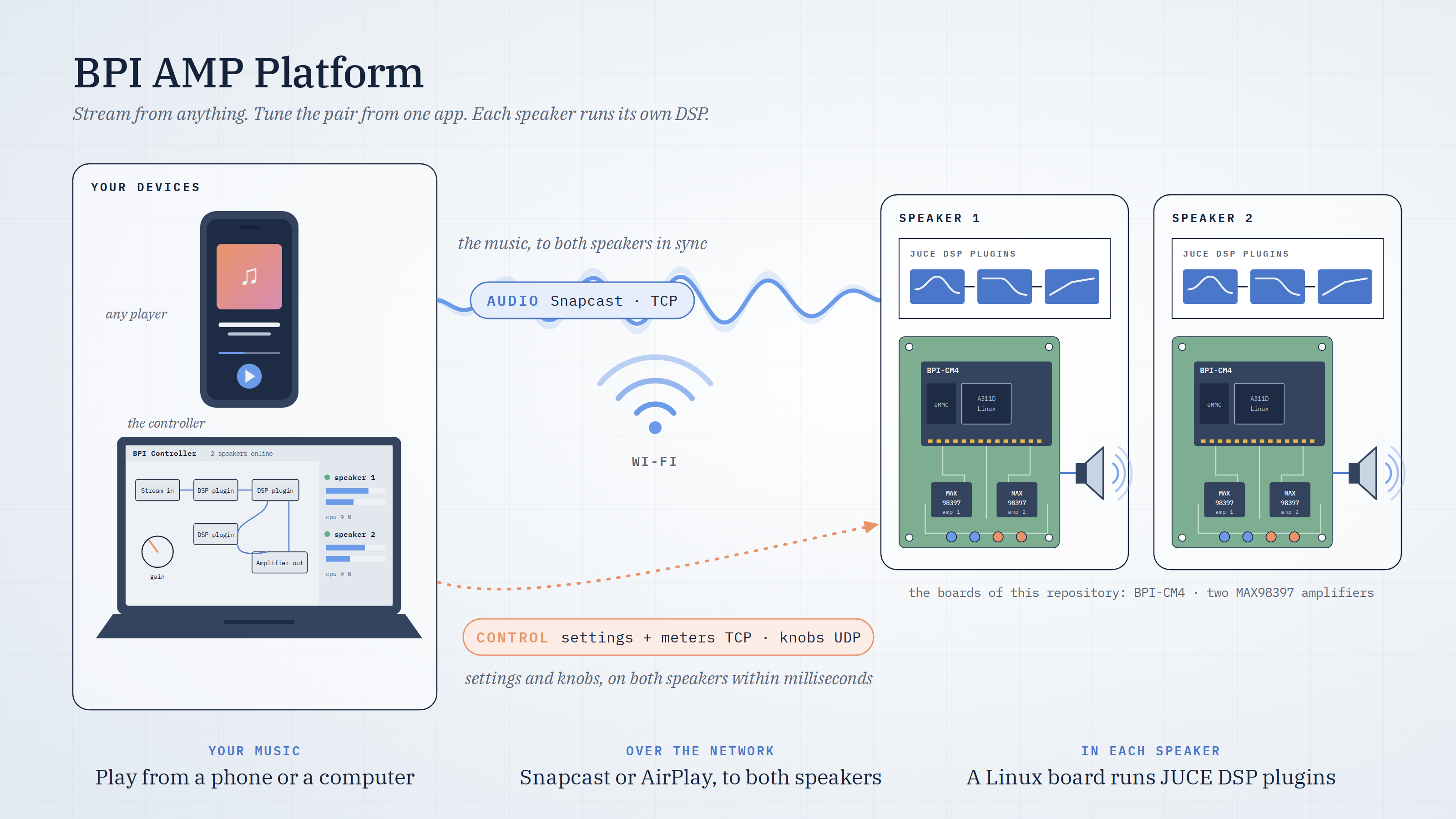
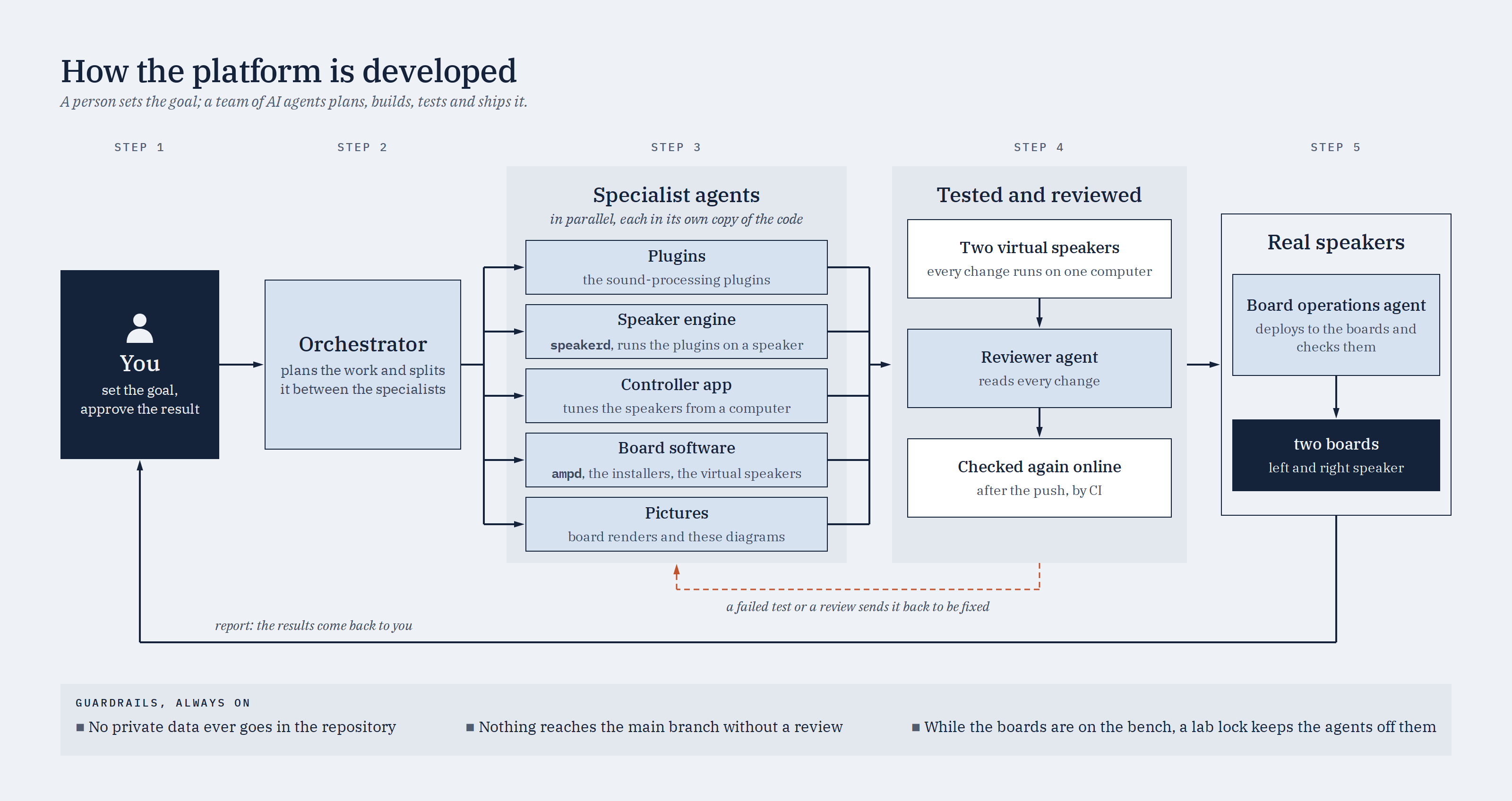
The BPI AMP Platform is an autonomous, agentic platform for audio streaming, loudspeaker tuning and digital signal processing (DSP). It is an open hardware and software stack for building and tuning custom active loudspeakers, and its software is developed, tested and deployed by a team of AI agents working under the direction of a person.
Each loudspeaker contains a BananaPi BPI-CM4 compute module on two purpose-built boards. The speaker receives music over the network, applies its own tuning in real time, and drives a woofer and a tweeter through two MAX98397 class-D amplifiers. Two speakers form a stereo pair, tuned together from a single desktop application.
The platform is built by specialised AI agents, each responsible for one part of the stack:
the audio plugins, the speaker's audio engine, the controller application, the board
software, and the pictures of the project. A person sets the goal and approves the result. An
orchestrator agent plans the work, runs the specialists in parallel, merges their changes and
has a reviewer agent read them; a failed test or a review comment goes back to the agent that made the change. Every change is tested on two virtual speakers running on one
computer before it is published, and again by continuous integration. A board operations agent
installs the result on the real speakers and checks them. Safeguards apply throughout: no
private data enters the repository, nothing reaches the main branch without review, and a lab
lock keeps the agents away from the boards while they are on the bench. The agents, their
rules and their tools are described in CLAUDE.md and
docs/autonomous-development.md.
Music is played as usual, from a computer or a phone; the speakers take care of the rest.
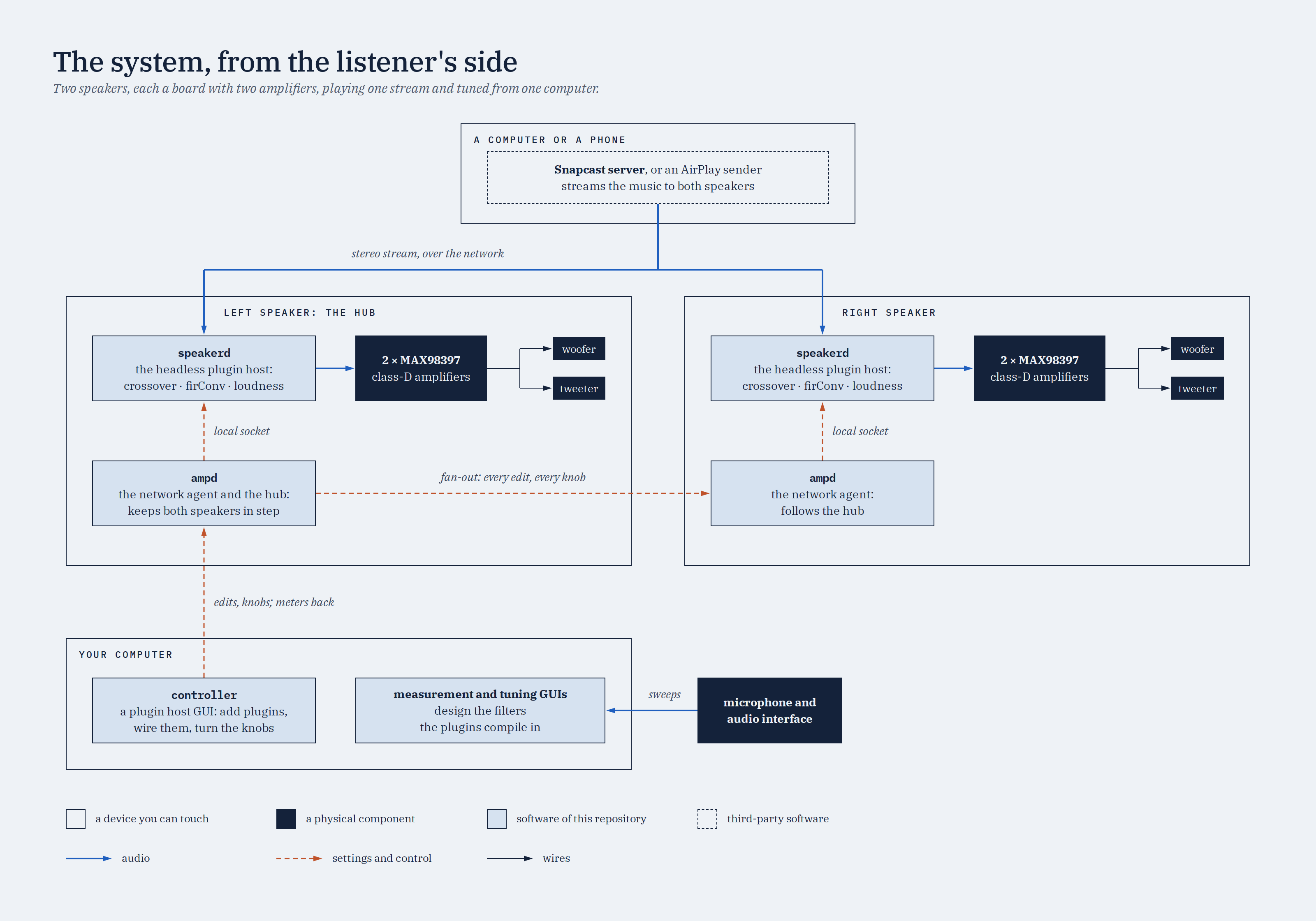
speakerd, runs a chain of plugins: a correction filter, a crossover that divides the signal
between the woofer and the tweeter, and a loudness contour. A speaker keeps playing from the
settings stored on it, with no network or controller connected.ampd service on the left speaker acts as the hub that keeps the pair in step; the right
speaker applies what the hub sends. Level meters are read directly from each speaker.Each speaker runs a layered stack: the platform's applications and PipeWire in user space, the Linux audio drivers in the kernel, and the hardware beneath them.
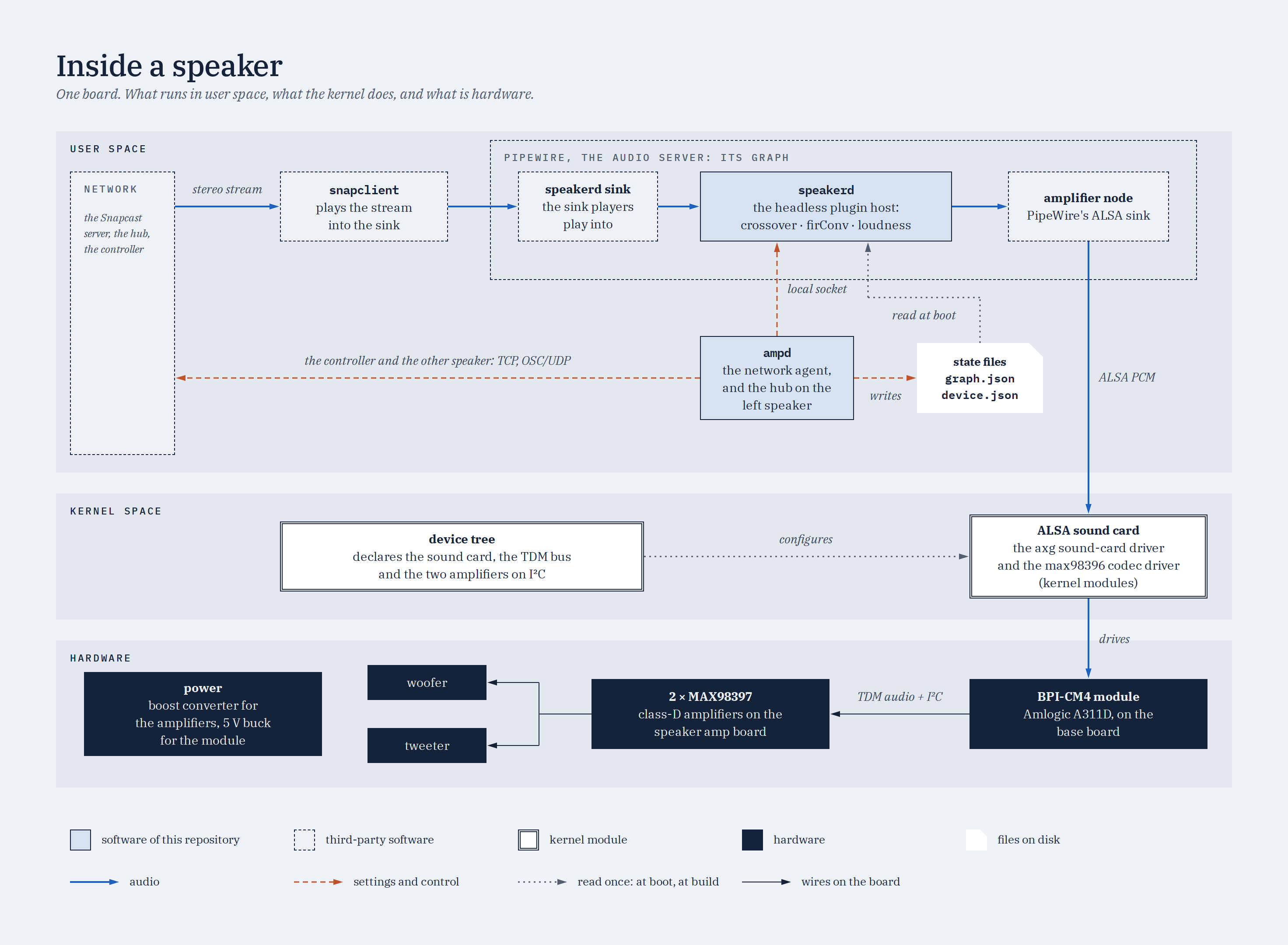
The diagrams on this page are generated from docs/diagrams/.
| Module | Purpose | Runs on | Location |
|---|---|---|---|
| Measurement and tuning tools | Measure a speaker's drivers, design its filters and export them for the plugins | the development computer (Python) | dsp/python_dsp_tools |
| Audio plugins | crossover, firConv (correction), loudness and ampScope. The first three are each built in three variants from one source: complete, control (the editor only) and headless (the signal processing only) | the speakers (headless), the controller (control) | dsp/juce_plugins |
speakerd | The speaker's audio engine: hosts the plugin chain inside PipeWire, from the settings stored on the speaker | each speaker | dsp/juce_apps/speakerd |
ampd | The speaker's network service: stores and applies its settings; on the left speaker, also the hub of the pair | each speaker | firmware/ampd |
| Controller | The desktop application for tuning the pair through the hub | the listener's computer | dsp/juce_apps/controller |
| PipeWire and Snapcast | The speaker's audio server, and the network stream that feeds it | each speaker | firmware/pipewire, firmware/snapcast-setup.sh |
| Kernel support | Device tree, kernel configuration, and the amplifier and sound-card drivers | each speaker | firmware |
| Installers | setup.sh installs the audio software of a speaker, one component at a time | the development computer, or the speaker | firmware/setup.sh |
The controller, ampd and speakerd communicate through the protocol described in
docs/protocol.md. The overall design is described in
docs/remote-plugin-host.md.
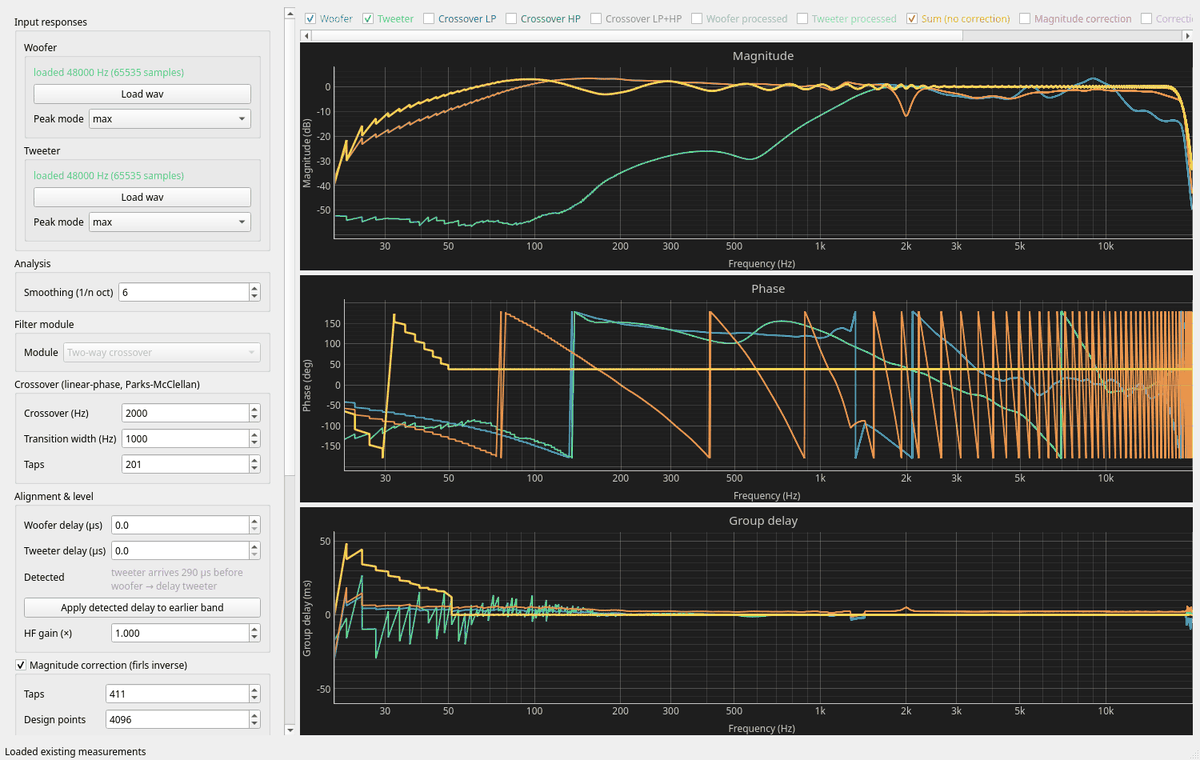 | 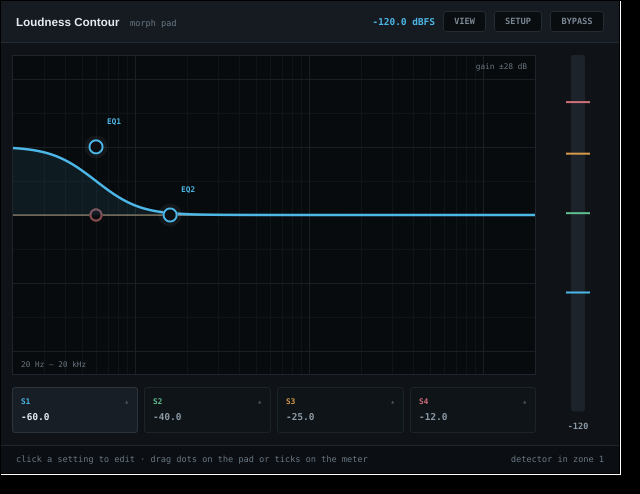 |
| Tuning tool: driver responses, the crossover sum and the corrected output, with every filter parameter adjustable live. | The loudness plugin in the controller: the plugin's own editor, acting as a remote control for both speakers. |
The first three steps of the roadmap are complete and tested: the plugins in their three
variants, the speakerd audio engine, and the controller with the hub. Every test run checks
them against a pair of virtual speakers. On 1 November 2026 the platform was first installed
on a real board, which now starts speakerd at boot and plays the music Snapcast streams to it.
Running ampd and the controller on real boards is the next stage of that installation. Step 4
of the roadmap (oscilloscope data, a catalogue of the plugins on each speaker, and several
controllers at once) is next. tools/roadmap.py reports the current state.
The platform uses two boards joined by a board-to-board connector: a base board that
carries the BPI-CM4 module, with a USB-C port and a debug serial port, and a speaker amp
board with the two MAX98397 amplifiers, a boost converter for their supply and a 5 V
regulator for the rest of the system. The KiCad projects and their details are in
hardware/.
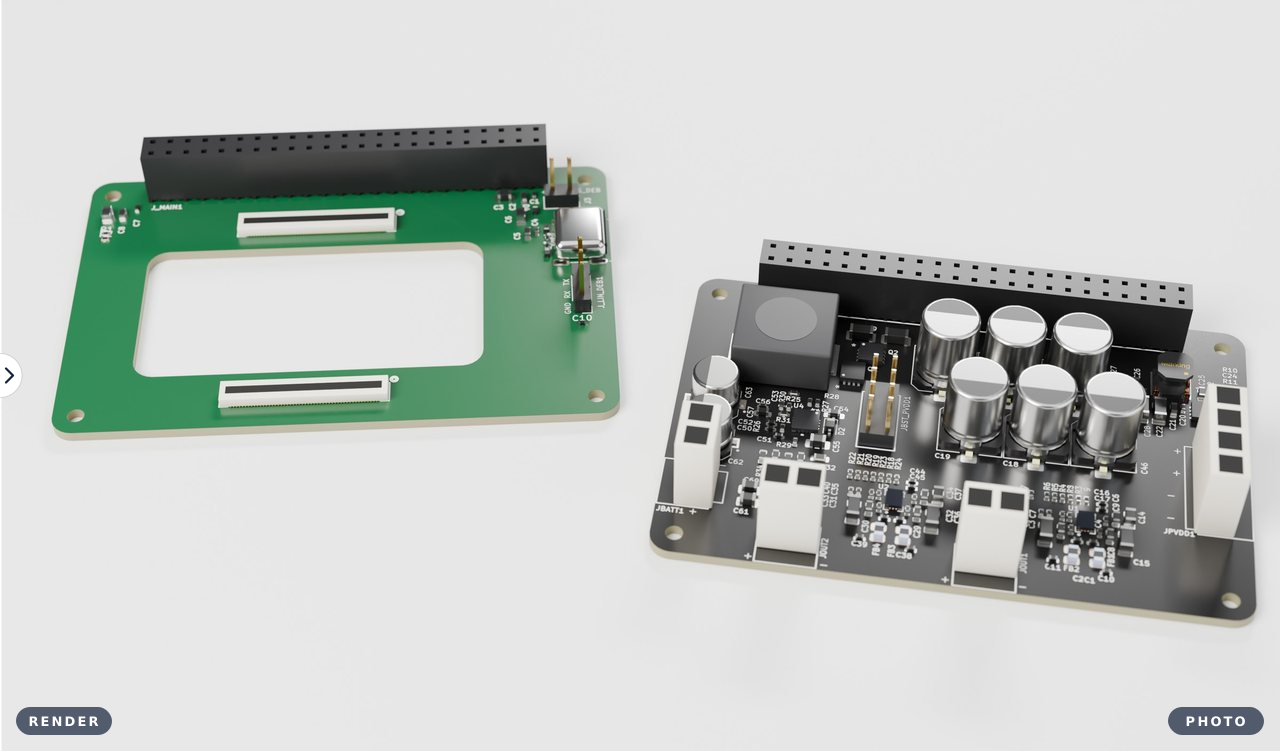
The picture alternates between a render of the KiCad projects
(hardware/render/) and a photograph of the boards as built
(all.jpeg).

The board runs Armbian Linux with this repository's device tree, kernel configuration and
amplifier drivers, and PipeWire as its audio server. firmware/setup.sh installs the audio
software of a speaker, either from the development computer or on the board itself. The
bring-up procedure and the installers are described in firmware/.
All development and testing, apart from work on the boards themselves, takes place on a Linux x86_64 computer with no board attached. Only Podman and git are required: the builds and the tests run in a development container with the same PipeWire version as the boards.
git clone --recurse-submodules https://github.com/AMuszkat/bpi_amp_platform
cd bpi_amp_platform
tools/test.sh all          # the complete test suite
tools/test.sh changed      # while working: the checks that cover the files changed
tools/build.sh loudness    # build one plugin or application into build/
tools/container.sh         # open a shell in the development container
The first run builds the container image and the JUCE framework, which takes a few minutes.
A focused check then takes between a few seconds and two minutes, and the complete suite about
two minutes. For a board, tools/build.sh speakerd aarch64 cross-compiles into
build/aarch64/, and firmware/setup.sh --mode target-remote installs the result. Run
tools/test.sh all before installing on a board: nothing enforces it.
The Python measurement and tuning tools have their own quick start in
dsp/README.md. The development process, including the test levels, the
development agents and continuous integration, is described in CLAUDE.md and
docs/autonomous-development.md.
| Directory | Contents |
|---|---|
hardware | KiCad projects: the base board and the amplifier board |
firmware | Device tree, kernel configuration, amplifier drivers, PipeWire configuration, the installers and ampd |
dsp | Measurement and tuning tools, the JUCE plugins, speakerd, the controller and the plugin test tool |
docs | The system design, its protocol, the block FIR filter, the development setup and the diagrams |
tests/vpair | Two virtual speakers on one computer, for development and testing without boards |
tools | Build, test, container and board scripts |
The software under dsp/ is free software, licensed under the GNU Affero General Public
License v3.0; see dsp/LICENSE.
| Qty | Value | Footprint | References |
|---|---|---|---|
| 21 | 100nF | speaker_global_library:C_0402_1005Metric | C1, C2, C3, C4, C16, C20, C24, C28, C29, C30, C31, C32, C34, C35, C44, C50 +5 |
| 12 | 33r | speaker_global_library:R_0402_1005Metric | R4, R5, R6, R7, R8, R9, R19, R20, R21, R22, R23, R24 |
| 11 | 10K | speaker_global_library:R_0402_1005Metric | R1, R3, R10, R11, R16, R18, R25, R26, R27, R28, R29 |
| 11 | 1uF | speaker_global_library:C_0603_1608Metric | C5, C8, C9, C21, C25, C33, C36, C37, C57, C64, C65 |
| 8 | 10uF | speaker_global_library:C_1206_3216Metric | C13, C15, C22, C23, C41, C43, C58, C59 |
| 6 | 470uF | speaker_amp_library:C_ELEC_8x10 | C18, C19, C46, C47, C48, C49 |
| 4 | 150pF | speaker_global_library:C_0402_1005Metric | C10, C11, C38, C39 |
| 4 | 1uF | speaker_global_library:C_0402_1005Metric | C12, C17, C40, C45 |
| 4 | 22uF | speaker_global_library:C_0805_2012Metric | C14, C26, C27, C42 |
| 3 | 4.7k | speaker_global_library:R_0402_1005Metric | R2, R12, R17 |
| 3 | Conn_01x02 | speaker_global_library:B2P-VH | JBATT1, JOUT1, JOUT2 |
| 3 | ~ | speaker_global_library:R_0603_1608Metric | R32, R33, R34 |
| 2 | 10uF | speaker_global_library:C_0805_2012Metric | C60, C61 |
| 2 | 1N4148WS | Diode_SMD:D_SOD-323 | D1, D2 |
| 2 | 47uF | speaker_global_library:CAP_EEEFK1C470P | C62, C63 |
| 2 | BSZ024N04LS6 | speaker_global_library:PQFN330x330 | Q1, Q2 |
| 2 | FERR_NFZ2MSD301SZ10L | speaker_global_library:NFZ2MSD301SZ10L | FB2, FB4 |
| 2 | FERR_NFZ2MSD301SZ10L | speaker_amp_library:NFZ2MSD301SZ10L | FB1, FB3 |
| 2 | ~ | speaker_global_library:WLP35 | U1, U2 |
| 1 | 0.047uF | Capacitor_SMD:C_0402_1005Metric | C53 |
| 1 | 10M | Resistor_SMD:R_0402_1005Metric | R30 |
| 1 | 13.3K | Resistor_SMD:R_0402_1005Metric | R31 |
| 1 | 1uF | Capacitor_SMD:C_0603_1608Metric_Pad1.08x0.95mm_HandSolder | C54 |
| 1 | 4.7uF | Capacitor_SMD:C_0805_2012Metric_Pad1.18x1.45mm_HandSolder | C55 |
| 1 | 4.7uH | speaker_global_library:HCM1A1307-4R7-R | L2 |
| 1 | 41.2K | speaker_global_library:R_0402_1005Metric | R15 |
| 1 | 51K | speaker_global_library:R_0402_1005Metric | R13 |
| 1 | 7.68K | speaker_global_library:R_0402_1005Metric | R14 |
| 1 | CONN_2x23PIN | speaker_global_library:SAMTEC_SSW-123-01-T-D | J1 |
| 1 | Conn_01x04 | speaker_global_library:B4P-VH | JPVDD1 |
| 1 | Conn_02x04_Odd_Even | speaker_global_library:TSW-104-07-F-D | JBST_PVDD1 |
| 1 | LTC3786 | speaker_global_library:QFN-16_UD_LIT | U4 |
| 1 | L_74404054xx | speaker_global_library:IND_5040-WE-LQS_WRE | L1 |
| 1 | MP9943 | speaker_global_library:QFN-8_MP9943_MNP | U3 |


inceptionev/PlasmaTransformer
This project mainly focuses on creating a driver and 3D-printed support structure that allows for safe continuous operation of a plasma toroid.


NaokiS28/Konami-System-573-Documentation
Schematics and pinout information for the Konami System 573

bluesatunsw/owr
This repo includes all software necessary to operate the Test Rover Platform that is being designed and developed in the 502 project.


It measures 76.2 × 50.8 mm and has 4 copper layers, 1.61 mm thick.
119 parts, built around the MP9943GQ-Z, AC0402FR-0710KL, CL31B106KBHNNNE and EMZS350ARA471MHA0G. The full list of its parts is on this page, with links to each part's symbol and footprint where PCBKit's library has them.
From the AMuszkat/bpi_amp_platform repository on GitHub, at the commit this page was made from: the board is hardware/speaker_amp/speaker_amp.kicad_pcb and its schematic hardware/base_board/base_board.kicad_sch. PCBKit opens the board in the browser, with nothing to install.
Its repository states no licence, so its author keeps all rights: ask AMuszkat before reusing the design.