4 layers48 × 30 mm

 ZuluSCSI/ZuluSCSI-Pico-OSHW38
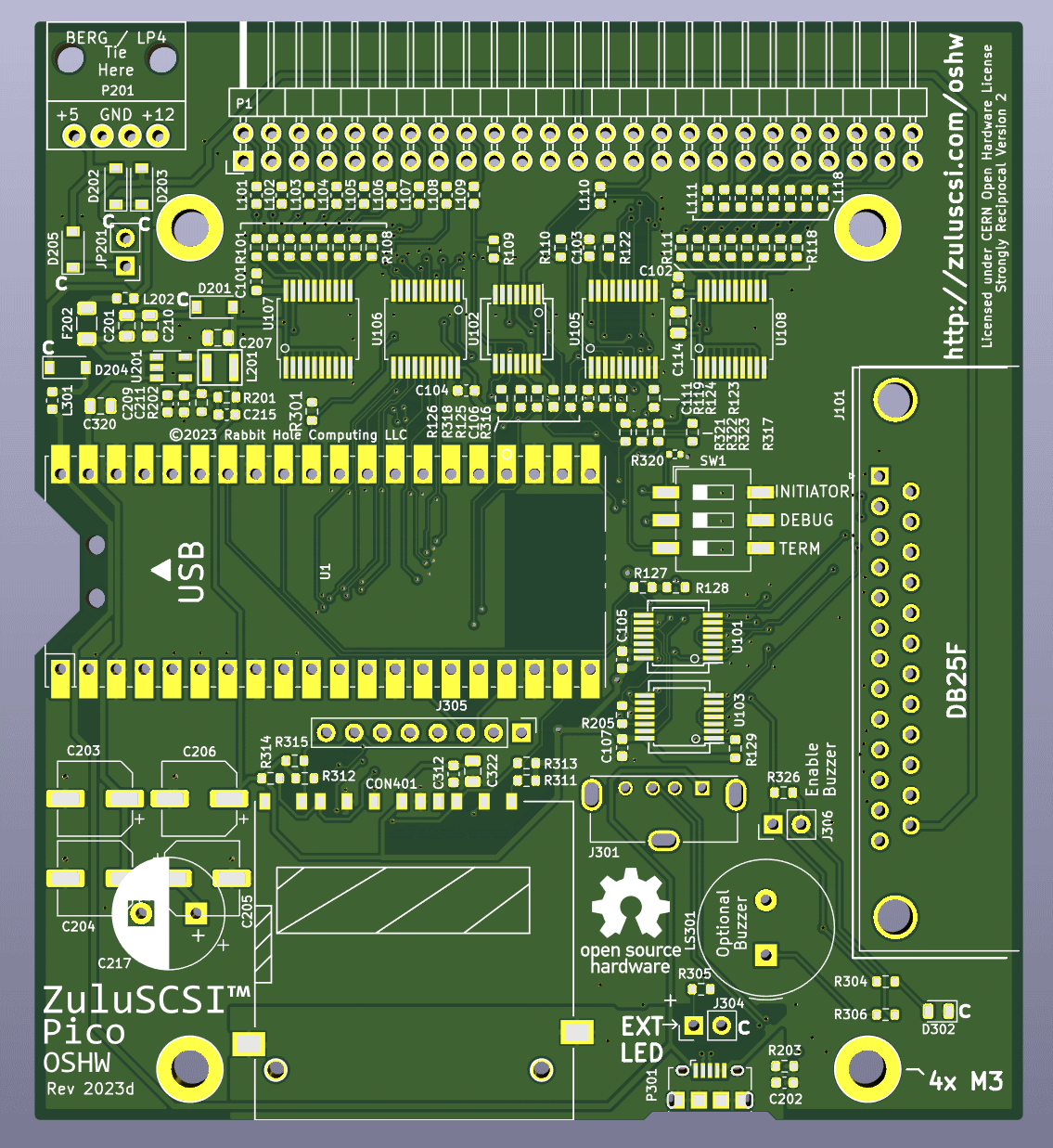
ZuluSCSI Pico - An Open Source Hardware SCSI emulator
ZuluSCSI Pico OSHW is an open-source printed circuit board by ZuluSCSI, from the ZuluSCSI/ZuluSCSI-Pico-OSHW repository on GitHub, published under the CERN-OHL-S-2.0 licence. It is a 2-layer board of 90 × 100 mm with 129 parts on 118 nets, routed with 2,393 tracks and 243 vias.
It is built around the 74LVT245D and 74LVT125D. Its parts include 48 resistors, 24 capacitors, 21 inductors, 9 ICs and 9 connectors. It belongs with the RP2040 boards of this library.


This repository contains the KiCAD 7 schematic and PCB design files for the Pico-based ZuluSCSI™ SCSI to SD storage emulator, which is derived from the ZuluSCSI RP2040 board design. Firmware for ZuluSCSI is available at http://github.com/ZuluSCSI/ZuluSCSI-firmware.
This hardware design is licensed under the terms of the strongly reciprocal CERN OHL-S V2 license, which can be viewed in full at https://ohwr.org/cern_ohl_s_v2.txt and https://ohwr.org/cern_ohl_s_v2.pdf.
ZuluSCSI™ is a registered trademark of Rabbit Hole Computing, and may not be used commercially without the express written consent of Rabbit Hole Computing. Individuals producing ZuluSCSI boards for personal use are hereby granted permission to use the ZuluSCSI trademark in a noncommercial capacity.
Any use of the ZuluSCSI trademark in a commercial context requires prior written consent from Rabbit Hole Computing.
Firmware for ZuluSCSI is licensed under the GNU GPL Version 3, and can be found at https://github.com/zuluscsi/ZuluSCSI-firmware
The component part numbers are stored in KiCAD schematic. Manufacturing files, including assembly BOM, can be generated using KiKit.
| Qty | Value | Footprint | References |
|---|---|---|---|
| 20 | Ferrite_Bead_Small | Inductor_SMD:L_0603_1608Metric | L101, L102, L103, L104, L105, L106, L107, L108, L109, L110, L111, L112, L113, L114, L115, L116 +4 |
| 19 | 110 | Resistor_SMD:R_0603_1608Metric | R101, R102, R103, R104, R105, R106, R107, R108, R109, R110, R111, R112, R113, R114, R115, R116 +3 |
| 13 | 4k7 | Resistor_SMD:R_0603_1608Metric | R126, R127, R128, R129, R205, R311, R312, R313, R314, R315, R316, R317, R318 |
| 9 | 100nF | Capacitor_SMD:C_0603_1608Metric | C101, C102, C103, C104, C105, C106, C107, C202, C312 |
| 8 | 1k | Resistor_SMD:R_0603_1608Metric | R122, R123, R124, R125, R301, R321, R322, R323 |
| 6 | 10uF | Capacitor_SMD:C_0805_2012Metric | C114, C201, C207, C210, C320, C322 |
| 5 | D_Schottky | Diode_SMD:D_SOD-123 | D201, D202, D203, D204, D205 |
| 4 | 12pF | Capacitor_SMD:C_0603_1608Metric | C111, C209, C211, C215 |
| 4 | 220uF | Capacitor_SMD:CP_Elec_6.3x7.7 | C203, C204, C205, C206 |
| 4 | 74LVT245 | ZuluSCSI:SSOP_TSSOP-20_5.3x7.2mm_P0.65mm | U105, U106, U107, U108 |
| 4 | Screw_Hole_M3 | ZuluSCSI:Screw_Hole_M3 | , , , |
| 3 | 62 | Resistor_SMD:R_0603_1608Metric | R304, R305, R306 |
| 3 | 74LVT125 | ZuluSCSI:SSOP_TSSOP-14_4.4x5mm_Pitch0.65mm_PCBWay-MaskClearance0.22mm | U101, U102, U103 |
| 2 | 100k | Resistor_SMD:R_0603_1608Metric | R202, R203 |
| 2 | MountingHole | MountingHole:MountingHole_2.7mm_M2.5 | H301, H302 |
| 1 | 0R | Resistor_SMD:R_0603_1608Metric | R326 |
| 1 | 2.2uH | ZuluSCSI:Inductor_1008 | L201 |
| 1 | 500mA Hold | Fuse:Fuse_1206_3216Metric | F202 |
| 1 | 510k | Resistor_SMD:R_0603_1608Metric | R201 |
| 1 | BUZZER | Connector_PinHeader_2.54mm:PinHeader_1x02_P2.54mm_Vertical | J306 |
| 1 | CONN_02X25 | Pin_Headers:Pin_Header_Angled_2x25 | P1 |
| 1 | DB25_Female_MountingHoles | Connector_Dsub:DSUB-25_Female_Horizontal_P2.77x2.84mm_EdgePinOffset9.90mm_Housed_MountingHolesOffset11.32mm | J101 |
| 1 | EXT_SDCARD | Connector_PinHeader_2.54mm:PinHeader_1x08_P2.54mm_Vertical | J305 |
| 1 | Floppy_BERG | ZuluSCSI:floppy-berg | P201 |
| 1 | JUMPER | Connector_PinHeader_2.54mm:PinHeader_1x02_P2.54mm_Vertical | JP201 |
| 1 | LED | LED_SMD:LED_0805_2012Metric | D302 |
| 1 | LED | Connector_PinHeader_2.54mm:PinHeader_1x02_P2.54mm_Vertical | J304 |
| 1 | LM3674-ADJ | Package_TO_SOT_SMD:TSOT-23-5 | U201 |
| 1 | N/A | Resistor_SMD:R_0402_1005Metric | R320 |
| 1 | N/A | Capacitor_THT:CP_Radial_D10.0mm_P5.00mm | C217 |
| 1 | Pico W | MCU_RaspberryPi_and_Boards:RPi_Pico_W_SMD_TH | U1 |
| 1 | SD_Card | ZuluSCSI:SD-FCI-10067847-001 | CON401 |
| 1 | SW_DIP_x03 | Button_Switch_SMD:SW_DIP_SPSTx03_Slide_6.7x9.18mm_W8.61mm_P2.54mm_LowProfile | SW1 |
| 1 | Speaker | Buzzer_Beeper:Buzzer_TDK_PS1240P02BT_D12.2mm_H6.5mm | LS301 |
| 1 | USB_A | ZuluSCSI:USB_A_Molex_105057_Vertical | J301 |
| 1 | USB_DN | TestPoint:TestPoint_Pad_2.0x2.0mm | TP202 |
| 1 | USB_DP | TestPoint:TestPoint_Pad_2.0x2.0mm | TP201 |
| 1 | USB_OTG | ZuluSCSI:USB_Micro-B_Amphenol_10118194_Horizontal | P301 |


jackw01/pi-tin
Open source raspberry pi handheld retro gaming console

BathroomEpiphanies/KiCAD-Keyboard-Tutorial
Tutorial on making keyboard PCB layouts in KiCAD

It measures 90 × 100 mm and has 2 copper layers, 1.6 mm thick.
129 parts, built around the 74LVT245D and 74LVT125D. The full list of its parts is on this page, with links to each part's symbol and footprint where PCBKit's library has them.
From the ZuluSCSI/ZuluSCSI-Pico-OSHW repository on GitHub, at the commit this page was made from: the board is ZuluSCSI-Pico-OSHW-kicad/ZuluSCSI-Pico-OSHW.kicad_pcb and its schematic ZuluSCSI-Pico-OSHW-kicad/ZuluSCSI-Pico-OSHW.kicad_sch. PCBKit opens the board in the browser, with nothing to install.
Its repository publishes it under the CERN-OHL-S-2.0 licence: you may reuse it on that licence's terms (keep the author's notice, and for a copyleft licence share your changes alike).