2 layers20.5 × 24.8 mm

 Zeal8bit/Zeal-CompactFlash9
Interfacing a CompactFlash with Zeal 8-bit Computer
Cfadapter is an open-source printed circuit board by Zeal8bit, from the Zeal8bit/Zeal-CompactFlash repository on GitHub, published under the CC0-1.0 licence. It is a 2-layer board of 66.9 × 60.4 mm with 8 parts on 84 nets, routed with 228 tracks and 35 vias.
Its parts include 2 connectors, 1 resistor, 1 IC and 1 diode. It belongs with the retro computing and games boards and the FPGA and CPLD boards of this library.
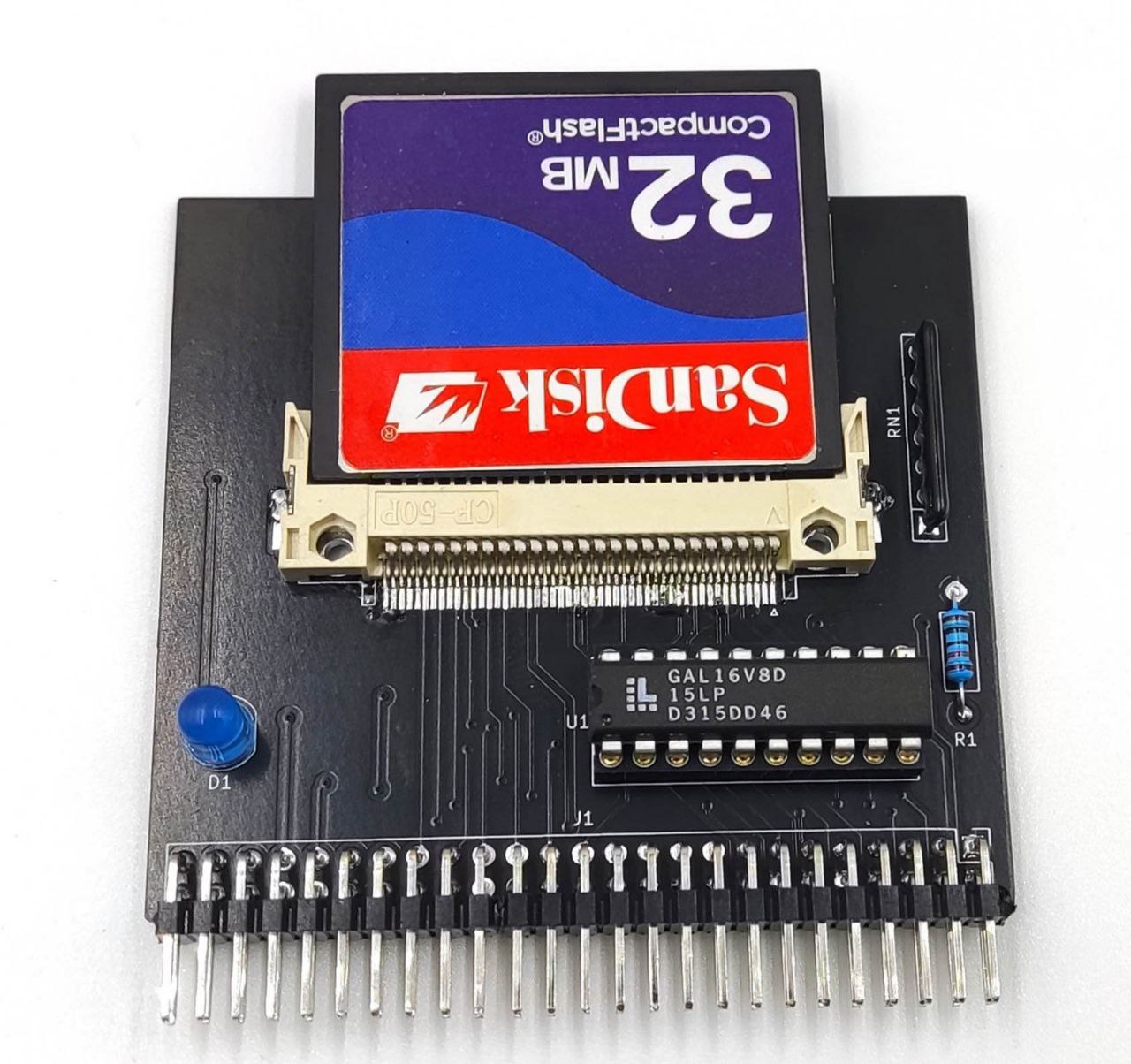
The goal of this project is to create an adapter for connecting CompactFlash cards to Zeal 8-bit Computer.
This repository includes:
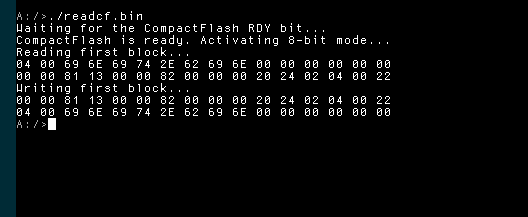
The output of the example on Zeal 8-bit OS should look like this:
As described in the Youtube video, the CompactFlash connector needs to accept cards inserted bottom up. This is because the footprint of the connector is mirrored on the PCB.
Update v1.0.0: the PCB and its connector have been fixed, the card can be connected upside up.
To compile this example you will need:
To install z88dk, please check out their Github project.
To build the program, define the path to Zeal 8-bit OS, this will let us find the header files used to assemble the example:
export ZOS_PATH=/your/path/to/Zeal8bitOSThen simply use the command:
makeAfter compiling, the folder bin/ should contain the binary readcf.bin. This file can be then loaded to Zeal 8-bit OS through UART thanks to the load command.
The binary can also be embedded within the romdisk that will contain both the OS and a read-only file system. For example:
cd $ZOS_PATH
export EXTRA_ROMDISK_FILES="/path/to/this/repo/bin/readcf.bin"
make
More info about compiling Zeal 8-bit OS here.
The resulted ROM image can then be provided to an emulator or directly flashed to the computer's ROM that will use it.
Distributed under the Creative Commons Zero v1.0 Universal License. See LICENSE file for more information.
You are free to use it for personal and commercial use, the boilerplate present in each file must not be removed.
For any suggestion or request, you can contact me at contact [at] zeal8bit [dot] com or on the Discord server https://discord.gg/UzEjwRvBBb
| Qty | Value | Footprint | References |
|---|---|---|---|
| 2 | RD_Choice | Jumper:SolderJumper-3_P2.0mm_Open_TrianglePad1.0x1.5mm_NumberLabels | JP1, JP2 |
| 1 | CF-CARD | Connector_Card:CF-Card_3M_N7E50-E516xx-30 | CON1 |
| 1 | Extension port | Connector_PinHeader_2.54mm:PinHeader_2x25_P2.54mm_Vertical | J1 |
| 1 | GAL16V8 | Package_DIP:DIP-20_W7.62mm_Socket | U1 |
| 1 | LED | LED_THT:LED_D5.0mm | D1 |
| 1 | Pull-Down | Resistor_THT:R_Axial_DIN0207_L6.3mm_D2.5mm_P10.16mm_Horizontal | R1 |
| 1 | Pull-Up Resistors | Resistor_THT:R_Array_SIP7 | RN1 |

joeycastillo/Sensor-Watch
A board replacement for the classic Casio F-91W wristwatch

rusefi/rusefi
rusefi - GPL internal combustion engine control unit

hoglet67/RGBtoHDMI
Bare-metal Raspberry Pi project that provides pixel-perfect sampling of Retro Computer RGB/YUV video and conversion to HDMI

shanteacontrols/OpenDeck
A platform for building interactive control and sensing devices using MIDI and OSC built with Zephyr RTOS.

hackclub/OnBoard
💡 Join 1,000 teenagers and make your first PCB with a $100 grant!

dangiu/PicoMemcard
Emulating PSX Memory Card (or controller) using a Raspberry Pi Pico

OLIMEX/DIY-LAPTOP
Do It Yourself Open Source Hardware and Software Modular Hacker's Friendly Laptop
It measures 66.9 × 60.4 mm and has 2 copper layers, 1.6 mm thick.
8 parts. The full list of its parts is on this page, with links to each part's symbol and footprint where PCBKit's library has them.
From the Zeal8bit/Zeal-CompactFlash repository on GitHub, at the commit this page was made from: the board is kicad/cfadapter.kicad_pcb and its schematic kicad/cfadapter.kicad_sch. PCBKit opens the board in the browser, with nothing to install.
Its repository publishes it under the CC0-1.0 licence: you may reuse it on that licence's terms (keep the author's notice, and for a copyleft licence share your changes alike).