Skip to the content
PCBKitNew board
2 layers93.5 × 58.7 mmRfid3, the printed circuit board in 3D

An IOT based self checkout system.

Size
93.5 × 58.7 mm
Copper layers
2
Thickness
1.6 mm
Parts
13
Nets
29
Pads
58
Tracks, vias
174, 8
Pours
2
Routed
Yes
KiCad
KiCad 8.0 (file 20240108)
Created
10 Jul 2024
Updated
29 Dec 2024

Overview

Rfid3 is an open-source printed circuit board by yadhu-dev, from the yadhu-dev/LibraryManagementSystem repository on GitHub. It is a 2-layer board of 93.5 × 58.7 mm with 13 parts on 29 nets, routed with 174 tracks and 8 vias.

It is built around the ATMEGA328-PU and MFRC522. Its parts include 4 connectors, 3 capacitors, 1 resistor, 1 IC and 1 crystal. It belongs with the home automation and IoT boards and the AVR (ATmega, ATtiny) boards of this library.

Main components

2

README

README.md

Library Management System

Overview

The Library Management System (LMS) is designed to streamline and modernize library operations by enabling self-service checkouts and returns of books and other materials. This innovative system leverages RFID technology for identifying library items and an Internet of Things (IoT) infrastructure to communicate with a central server. It enhances user experience, reduces manual workload for library staff, and ensures efficient management of library resources.

Key Features

  • Self-Service Checkouts and Returns:

    • Users can check out and return books independently, reducing wait times and improving convenience.
    • The system uses RFID tags attached to library items, which can be scanned quickly and easily.
  • RFID Technology:

    • Each library item is equipped with an RFID tag containing a unique identifier.
    • An RFID reader integrated with an Arduino board reads these tags to capture the item's details.
  • Standalone Application:

    • The system connects to the local library for fetching necessary details without the need for online dependancy.
    • This eliminates any connectivity issues like latency and downtime.
  • Central Server Communication:

    • The software sends HTTP requests to a central server to update the local database with checkout and return information.
    • The flask server handles these requests and manages the local library database which is implemented using mysql.
  • Database Integration:

    • The server stores information about library items, user transactions, and inventory status.
    • This centralized database ensures that the library can track all items and user activities accurately.

System Components

  • Arduino Board with RFID Reader:

    • The heart of the system, responsible for reading RFID tags and sending data to the server.
    • Prepares UID for data mapping and it's only function is to fetch UID from the tags.
    • The board is made to be completely replaceable to avoid much of hardware dependancy.
  • Flask Server:

    • A lightweight web server that reads the serial data from the micro controller and maps the data with the required UIDs.
    • Manages the database and provides APIs for updating item status.
    • Facilitates data mapping according to UID - Data.
  • RFID Tags:

    • Attached to each library item, these tags store unique identifiers that can be read by the RFID reader.
    • Enable quick and accurate identification of items during checkouts and returns.

Modules

Data Mapping Module

  1. User Interaction:

    • Users scan their library card (RFID tag) and the items they wish to check out or return.
    • The RFID reader captures the UID from the tag and prints it serially.
  2. Data Transmission:

    • The serial data is read by the flask backend and printed on the frontend for data mapping.
    • The user can give the roll number that should be mapped to the UID received.
    • On submission, if no duplicates exist, push to the database and show confirmation.
  3. Server Processing:

    • On receiving the mapped data, sends it to the flask server to store it in the local database.
    • The server sends a response back to the frontend to tell the user that the details has been updated.

CRUD Module

  1. User Interaction:

    • A table with all the registered users will be shown on the page loading.
    • The user can tap the RFID tag to search for the data associated with the UID scanned.
    • The user can perform the crud operation required and save changes to the local dataabse.
  2. Server Processing:

    • On reading the RFID card, the data is sent serially to the backend for filtering the user.
    • The user data associated with the UID can be updated or deleted.
    • The updated data gets sent back to the flask backend to be updated in the local database.

Keystroke Module

  1. User Interaction:

    • The user can change the data mapping mode to keystroke mode by clicking the start keystroke button.
    • When this mode is active, the roll no or any number associated with the UID read will be printed on any input field as keystrokes.
    • This is useful for easily fetching the indentifying data through the UID of the tag without manually entering it.
  2. Data Transmission:

    • The serial data is read by the flask backend and the associated data is fetched.
    • The data is typed on the focused input field as keystrokes for the use case.
    • No data is typed if the UID is not mapped.
  3. Server Processing:

    • On activating keystroke mode, the data mapping mode ceases temporarily to avoid read clashes.
    • The serial data is read and the associated data is fetched and stored for typing.
    • On finding an input field, the data is typed in string format in the form of keystrokes and presses enter if necessary.

Installation

  • Run Installer.bat as administrator as it installes all the software dependencies and packages required for the program to function.

  • If any super user prompt, click allow since it needs to install python and mysql which requires additional administrative privilages.

  • If installer fails, do the following:

    1. Install python

Benefits

  • Efficiency: Automates the checkout and return process, reducing manual workload and speeding up operations.
  • User Convenience: Allows users to manage their library transactions independently, enhancing their experience.
  • Accuracy: Ensures precise tracking of library items, reducing the chances of errors and lost items.
  • Real-Time Updates: Keeps the library inventory updated in real-time, ensuring accurate availability information.

This Library Management System represents a significant step forward in library automation, leveraging modern technology to improve service delivery and operational efficiency.

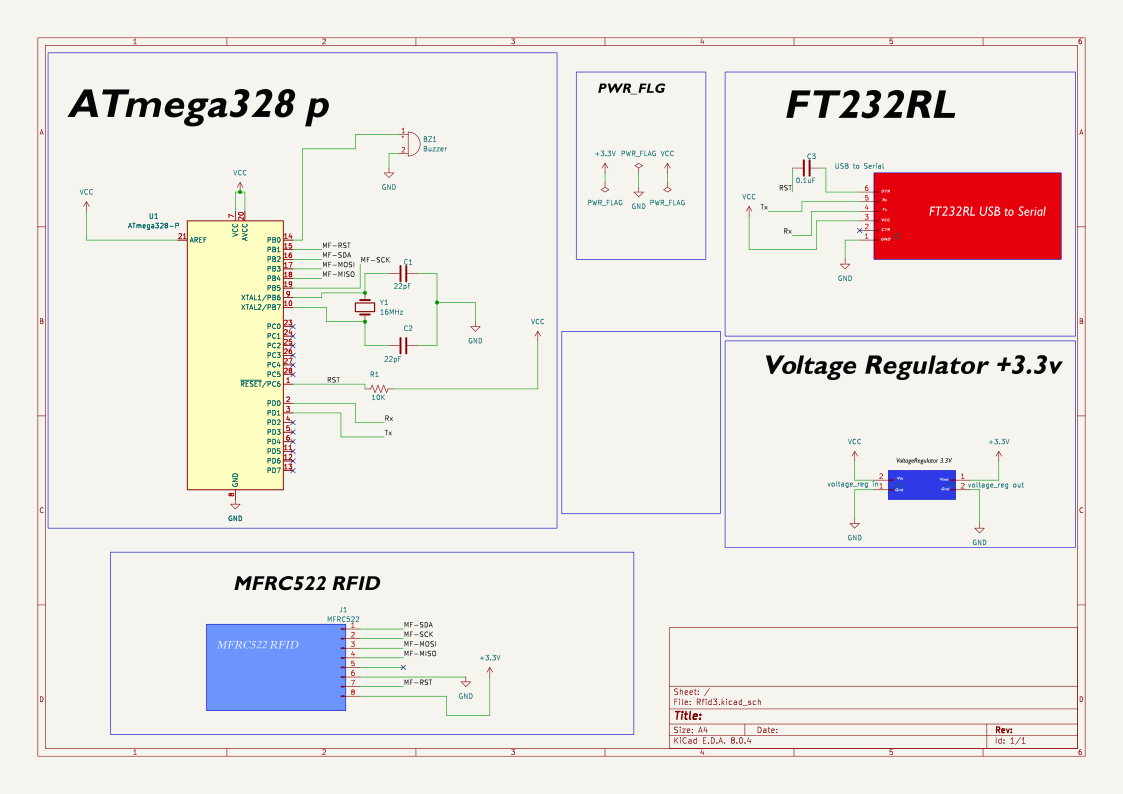
PCB Schematic Diagram

Schematic SVG

Parts

13
QtyValueFootprintReferences
222pFCapacitor_THT:C_Disc_D3.8mm_W2.6mm_P2.50mmC1, C2
10.1uFCapacitor_THT:C_Disc_D3.8mm_W2.6mm_P2.50mmC3
110KResistor_THT:R_Axial_DIN0204_L3.6mm_D1.6mm_P7.62mm_HorizontalR1
116MHzCrystal:Crystal_HC49-4H_VerticalY1
1ATmega328-PPackage_DIP:DIP-28_W7.62mmU1
1BuzzerBuzzer_Beeper:Buzzer_TDK_PS1240P02BT_D12.2mm_H6.5mmBZ1
1LOGOkjc logo_kicad:kjc ultra2G***
1LOGOkjc logo_kicad:KJC_LOGOG***
1MFRC522Connector_PinHeader_2.54mm:PinHeader_1x08_P2.54mm_VerticalJ1
1USB to SerialConnector_PinHeader_2.54mm:PinHeader_1x06_P2.54mm_VerticalJ2
1voltage_reg inConnector_PinHeader_2.54mm:PinHeader_1x02_P2.54mm_VerticalJ5
1voltage_reg outConnector_PinHeader_2.54mm:PinHeader_1x02_P2.54mm_VerticalJ4

Questions

How big is the Rfid3 PCB?

It measures 93.5 × 58.7 mm and has 2 copper layers, 1.6 mm thick.

What parts does the Rfid3 use?

13 parts, built around the ATMEGA328-PU and MFRC522. The full list of its parts is on this page, with links to each part's symbol and footprint where PCBKit's library has them.

Where can I download the Rfid3 KiCad files?

From the yadhu-dev/LibraryManagementSystem repository on GitHub, at the commit this page was made from: the board is KICAD PCB files/Rfid3.kicad_pcb and its schematic KICAD PCB files/Rfid3.kicad_sch. PCBKit opens the board in the browser, with nothing to install.

Can I use the Rfid3 design in my own project?

Its repository states no licence, so its author keeps all rights: ask yadhu-dev before reusing the design.

Similar boards

  • 2 layers168.6 × 70 mmBailabox main board v2, the printed circuit board in 3D

    Bailabox main board v2

    dr-harvey/BailaBox

    BailaBox - RFID enabled, ESP32-based music toy for kids that works with Home Assistant and network speakers.

    87 parts29
  • 2 layers39.3 × 59.9 mmRFID furtka, the printed circuit board in 3D

    RFID furtka

    ghostwritter91/Gate_RFID_PCB

    PCB for gate opening via RFID

    20 parts1
  • 4 layers71.2 × 66.1 mmMaxbox, the printed circuit board in 3D

    Maxbox

    ios-cv/maxbox

    An in car telemetry and access management box consisting of PCB design, firmware and case.

    110 parts1AGPL-3.0
  • 2 layers99.6 × 72 mmTime terminal, the printed circuit board in 3D

    Time terminal

    ontarioskaut/in_time

    Hardware z InTime 2025 etapy

    60 parts1
  • 2 layers120 × 50 mmPCB Nodev3 v1.3, the printed circuit board in 3D

    PCB Nodev3 v1.3

    innexgo/PCB

    PCB(s) we use, typically in KiCad format.

    56 parts
  • 2 layers74 × 74 mmLabpass RFID Reader, the printed circuit board in 3D

    Labpass RFID Reader

    psu-epl/epl-badge-access

    OLD Repo for v2 of the EPL Badge Access System

    64 partsGPL-3.0
  • 2 layersGates v1-speaker, the printed circuit board in 3D

    Gates v1-speaker

    aosodoev/esp8266-doorphone

    ESP8266 door phone w/ RFID lock.

    13 parts1